




About STRYKIO
Most one-on-one football games give you a goal at each end, a big-headed player and a ball, and leave the pitch alone for the whole match. STRYKIO keeps changing the pitch under your feet. Our first match started with a countdown that read Up Next: Ice Pitch, and before the minute was out the ball had grown heavier, the goals had grown bigger, and the ball had started floating.
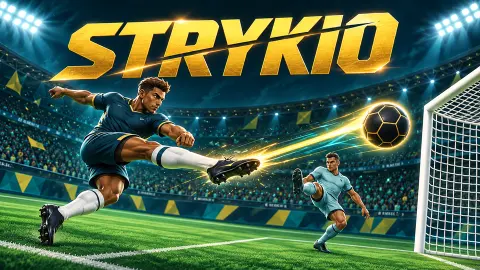
Underneath the rule changes, the game is a 1v1 duel. You play one footballer, the computer plays another, and a quick match lasts sixty seconds in a stadium packed with fans waving the two players' flags. There are no teammates and no goalkeepers. Whoever is nearer the ball is attacking, and whoever is not is the last line of defence.
STRYKIO is published by SZB_Official. It went up on 27 October 2026.
We played one ten-minute session on a computer, all of it quick matches against the CPU on Easy, against five different rivals. We won two, lost one to a golden goal, lost another by a single goal, and were three goals up in a fifth when the clock ran down. The career, cups, arena modes and two-player mode are on the menu, but we did not play them, and this page says so wherever they come up.
The pitch rules change every few seconds
This is what sets STRYKIO apart from other head-to-head football games. A match is not one minute of the same football: it is a string of short spells, each with its own rule, announced a few seconds in advance so you can adjust.
The rules we played under were Ice Pitch, Air Ball, Big Goals, Power Shots, Heavy Ball and Spring Ball. Between them the game drops back to Classic Football for a moment, and in extra time it brings in one called Clutch. The names tell you most of what each one changes, and that is the point: you do not need a manual, you need to notice the banner.
The effect on a match is bigger than it sounds. In our game against Hossam we scored twice under Air Ball and once under Power Shots, and went 3-0 up with four seconds left. Against Ahmed, the one goal of the match came during Big Goals. A lead in STRYKIO is never safe, because the next rule might suit your rival better than it suits you.
Extra time and the golden goal
A draw at the end of the sixty seconds does not end the match. The clock resets to thirty seconds of extra time, and if the scores are still level after that, the clock turns into an infinity sign and the words Golden Goal appear under the score. The next goal wins.
This is borrowed from real football. For about a decade, international competitions decided some knockout matches with a golden goal in extra time, and two European Championship finals in a row, in 1996 and 2000, ended that way. The rule was dropped after 2004, partly because teams grew so afraid of conceding that extra time became cautious. STRYKIO keeps the rule because in a one-minute game the opposite happens: there is no time to be cautious.
Our first match showed both sides of it. Hugo led 2-1, we equalised in extra time, and the screen called it All Square. Then, in the golden goal, Hugo scored first, and it was over at 3-2.
Losing is not the end of the match
When you lose, STRYKIO does not jump straight to the results. A panel called One More Chance appears with the score and two buttons. One is Play Next, which accepts the result. The other plays an optional video and then rewinds the last thirty seconds, scores and positions included, so you can play them again. It is allowed once per match, and the panel says plainly that you can accept the result without watching anything.
We saw it after both of our defeats and declined it each time. The results screen also offers a video that doubles your coins and XP, which we skipped too.
Defeat still pays. Our win against Regina earned a win bonus of 95 coins. The golden-goal defeat to Hugo paid 57 as a participation bonus, and the defeat to Ahmed, in which we never scored, only 22. On our results, scoring in a losing match still earned you more.
The XP bar moves after every match, wins or not, and our player went up a level within the session.
What else is on the menu
The main menu shows a lot more than quick matches. Arcade Levels promises 100 challenges, Cups three tournaments, and Arcade Arena four special modes. Skill Lab is for timing and technique, and the Style Shop sells outfits.
A Club Career panel invites you to create your own club, starting in a league called League 6, Asphalt Circuit. Your player, Noah from Germany, starts with the same rating of 27 in jumping, shooting and speed, and you can rename him and customise his look.
We did not open any of these, so we cannot tell you how long the career runs or how hard the cups are. The game's instructions say the shop uses virtual coins, which is where those match rewards go.
Who STRYKIO is for
It suits anyone who likes short, scrappy football games where a match is over before you can get bored, and it is a good fit for two people sharing a keyboard. Easy was beatable but not a walkover: we won some and lost some, and every match we lost was decided by one goal. If you want eleven-a-side tactics or a long season with transfers, this is not that game. If you want one minute of chaos where the pitch keeps changing, it is.
More football games
For another one-minute 1v1, Ragdoll Football floats a floppy player through zero gravity, and Soccer Jump plays the duel with a single button. Pocket League 3D swaps the players for cars and also works for two on one keyboard, and Football.io keeps only the goalkeepers. There are more in our soccer games.
Screenshots
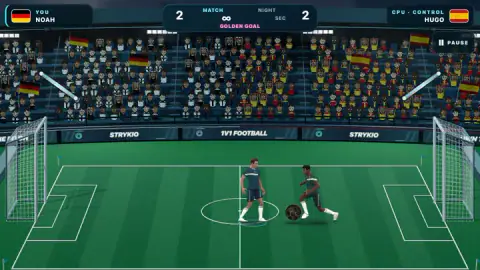
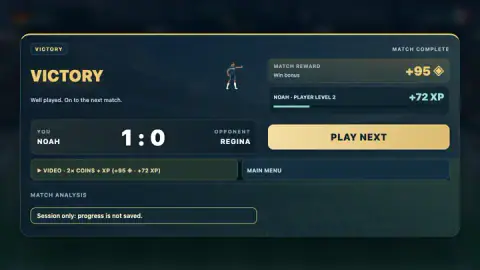
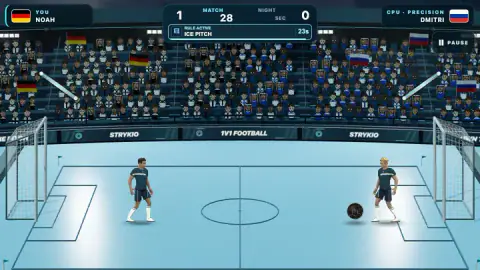
Taken by opening the game ourselves and letting it run — not supplied by the publisher, and not the same picture every other site shows.
How to play STRYKIO
- Press Kick Off. The first button on the main menu starts a quick 1v1 against the computer. Above it you can set the difficulty to Easy, Medium or Hard.
- Read the top bar. Your name and flag sit on the left, the rival's on the right, and the clock and score in the middle. Under the score, a small panel announces the next pitch rule with a countdown, then shows how long the current one has left.
- Get to the ball and pick a shot. Run with the arrow keys and jump with Up. Space or J shoots, F lifts a lob, K keeps it low, and E charges an Ultimate.
- Score more than your rival before the minute is up. A draw goes to extra time, and a draw after that to a golden goal.
- Collect your reward. The results screen shows your coins and XP, then offers Play Next after a win or Play Rematch after a defeat.
Tips from our matches:
- Watch the Up Next panel, not just the ball. Our only goal conceded against Ahmed came during Big Goals, when the targets are wider and a long shot is suddenly worth trying.
- Do not sit on a lead. We were 1-0 up against Dmitri with seconds left, eased off, and he equalised to force extra time. We won it 2-1 in the end, but it was close.
- The rival's style is printed under their name. Hugo was listed as Control, Dmitri as Precision, and Hossam, Regina and Ahmed as Speed, so you know before kick-off what kind of player you face.
- The pause menu has two settings worth knowing: Motion and Flash & Shake. If the goal celebrations and screen effects bother you, that is where to calm them down.
Controls
| Left / Right arrows | Run (A and D also work, according to the game's instructions) |
|---|---|
| Up arrow | Jump |
| Space or J | Shoot; the instructions say a double tap gives a hard shot |
| F | Lob the ball over your opponent |
| K | Low shot along the ground |
| E | Prepare the charged Ultimate shot |
| P or Escape | Pause the match (there is also a Pause button in the top-right corner) |
Features
- Quick matches are one minute, one player against one, in a stadium full of flag-waving fans
- Every few seconds a new pitch rule takes over, announced with a countdown: Ice Pitch, Air Ball, Big Goals, Heavy Ball and more
- A tie after 60 seconds goes to 30 seconds of extra time, and a tie after that goes to a golden goal
- CPU rivals come in styles shown under their name, such as Control, Speed and Precision, with Easy, Medium and Hard to choose from
- The main menu offers Arcade Levels with 100 challenges, three Cups, four Arcade Arena modes, a club career and a Skill Lab
- Two people can play on one keyboard
- After a defeat, an optional video lets you replay the final 30 seconds once per match; declining it costs nothing
Game details
- Developer
- SZB_Official
- Release date
- October 2026
- Last updated
- October 28, 2026
- Added here
- October 2026
- Technology
- HTML5
- Platforms
- Browser (desktop, keyboard), Browser (mobile & tablet, touch, landscape)
- Classification
- Multiplayer , Soccer , Sports
- Saved progress
- Saving, when available, is managed by this game. Mava cannot confirm your level.
FAQ
How do you play STRYKIO?
Press Kick Off on the main menu for a one-minute match against a CPU player. Run with the arrow keys, jump with Up, shoot with Space or J, lob with F, hit a low shot with K and charge an Ultimate with E. Whoever has scored more when the clock runs out wins.
What happens if a STRYKIO match ends in a draw?
A tied match goes to 30 seconds of extra time. If it is still level after that, the clock turns into an infinity sign and the game plays a golden goal: the next goal wins. We lost one match exactly that way, 3-2, after equalising in extra time.
What are the special rules in STRYKIO matches?
During a match the game swaps in a new pitch rule every so often, with an Up Next countdown at the top of the screen. In our matches we saw Ice Pitch, Air Ball, Big Goals, Power Shots, Heavy Ball and Spring Ball, with short spells of Classic Football in between, and a rule called Clutch in extra time.
Can two players play STRYKIO on the same computer?
Yes. The main menu has a Two Players mode for two people on one keyboard. The game's instructions give player one the WASD side with Q, X and E, and player two the arrow keys with Right Shift, Right Ctrl and Enter. We only played against the CPU.
Does STRYKIO save your progress?
The game's instructions say you can choose to allow saving and restore your progress later, or play for the current session only. Our session ran in session-only mode, and a banner on the menu, pause screen and results screen kept saying progress was not saved.
Does STRYKIO have ads?
It offers optional videos: one doubles your coins and XP after a match, and after a defeat one lets you rewind the last 30 seconds and replay them. Both can be skipped, and the screen says you can accept the result without watching. The game's instructions add that ads may appear when you start and between matches.
Can I play STRYKIO on a phone?
It is listed for Android and iOS as well as PC, and the game's instructions describe on-screen buttons for moving, jumping and each shot, with the phone turned to landscape. We played it on a computer with a keyboard and did not try it on a phone.
Who made STRYKIO?
It is published under the name SZB_Official. It went up on 27 October 2026.