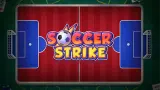



About Soccer Strike
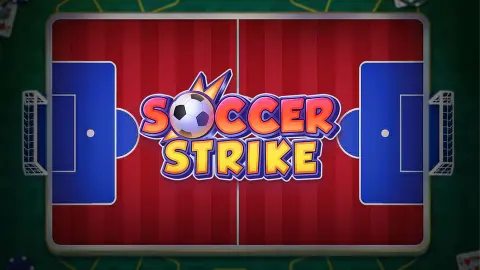
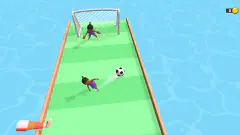
Most football games on a phone want you to be the player. Soccer Strike asks you to be the finger. There is no striker running at goal, no keeper diving. There is a green pitch printed on a board, the board lying on a wooden desk next to a book and a toy brick, one ball, and one orange disc with a star on it. You pull the disc back and let it go.
That makes it a game about two numbers you never see: the angle and the strength of a flick. The disc hits the ball, the ball goes where the hit sends it, and the disc stays wherever it stops. You judge every shot with your eyes, the way you would on a real table.
Soccer Strike is by Hammerplay Studios, whose logo is printed faintly on the desk in every scene, and the same studio made the 3D penalty game Penalty Shooter. It was published in May 2026. We played it three times with a mouse. We scored in the first lesson each time, and each time we got stuck in the second one, for a reason that matters to anyone playing on a computer.
The second lesson is made for two fingers
The first lesson teaches the pull. The second one adds something no mouse can do. The banner reads When dragging, you can adjust aim with the other finger, and two cartoon hands appear on the pitch: one holding the disc, the other touching the grass to steer the shot.
That is a clever answer to a real problem. On a small screen your own finger covers the disc and the line you are aiming along. A second finger lets you make the final small turn without letting go of the power you have already set.
On a computer it is a wall. In all three of our sessions the disc kept firing when we dragged it with the mouse, and it ended up in new places around the pitch, but the lesson never ended and no match started. We are not saying the game is broken: it may want both touches at the same moment, which a single mouse pointer cannot give. If you are on a laptop with a touchscreen, use it. Otherwise this is a game to open on a phone or a tablet.
The real game behind it: button football
Flicking a flat disc into a ball is not a video game idea. In Brazil it has been played on tables for about a century as futebol de botão, button football. The usual story starts with Geraldo Décourt, an artist from São Paulo who played with buttons taken from clothes in the 1920s and wrote down the first known rules around 1930. Sources do not agree on the exact year.
It grew into a proper sport. Brazil's National Sports Council recognised it officially in 1988, and a national confederation for table football followed in 1992. The game also has a long history in Hungary, and its rules vary by region, from three touches per possession in one Rio de Janeiro version to a single touch in Bahia.
The connection with Soccer Strike is the physics of the flick. In button football the ball goes where the disc hits it, never where you meant it to, and the skill is choosing the point of contact. Soccer Strike keeps exactly that. What it changes is the hand: a real player presses down on the button with a second, separate disc, while here you pull back on glass. Subbuteo, the English table game from 1947, works on the same flick but with little figures on round bases instead of plain discs.
What a full match adds, by Hammerplay's account
We did not get past the tutorial, so everything in this section is the studio's own description, not our report. Hammerplay says that in matches you have to aim past defenders and obstacles, which would turn the single empty pitch of the lessons into a game of angles and rebounds. It also mentions building and customising a lineup of strikers to play better, which suggests you collect several discs rather than always flicking the orange star.
What the tutorial does confirm is the order: lessons first, then your first match. We never saw an opponent, a scoreboard, a timer, a shop or a second pitch.
Who Soccer Strike is for
It suits anyone who likes short, physical puzzles more than fast reactions. Nothing moves until you let go, so younger players can take their time over every shot, and there is almost no reading beyond the tutorial banners. Players who want to run with the ball will find it slow. Play it on a phone or tablet, where the two-finger aiming works as intended.
Hammerplay's other football game is Penalty Shooter, a 3D shoot-out where you swipe to shoot and to dive as the keeper. Freekick Hero is also about one precise strike: you choose the spot on the ball your boot hits. Pongoal turns football into a duel of two blocks and a bouncing ball, and Pill Soccer is a 90-second match between two pill-shaped players, alone or with a friend on one keyboard. More are in soccer games.
Screenshots
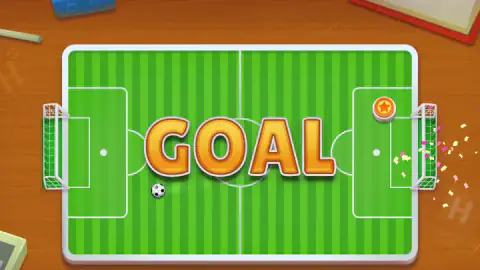
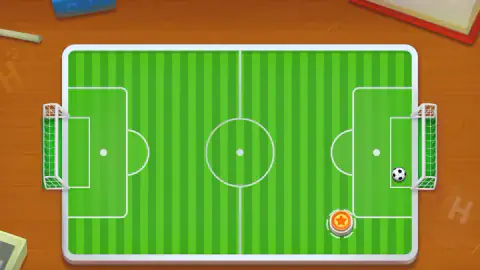
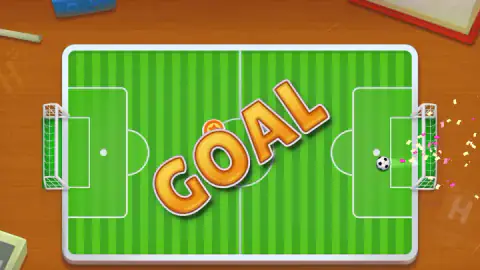
Taken by opening the game ourselves and letting it run — not supplied by the publisher, and not the same picture every other site shows.
How to play Soccer Strike
- Start the tutorial. A blue card says Welcome! Before your first match, we will teach you the controls. Press the green Start button. The lessons come first, then your first match.
- Grab the disc. The orange disc with the star is your piece. A yellow arrow points at it and a hand shows where to press.
- Pull away from your target. Hold the disc and drag it the opposite way to where you want it to go, like a slingshot. The further you pull, the harder it flies.
- Let go. The disc shoots forward, hits the ball, and the ball travels on from the contact. Put it in the goal and the word GOAL fills the pitch in big orange letters, with confetti at the net.
Tips from our sessions:
- Aim at the ball, not the goal. The disc only moves the ball by hitting it, so the question is which side of the ball you strike. In the first lesson the ball sat in front of the right-hand goal and a straight pull to the left was enough.
- A long pull is not always better. In the second lesson our shots carried the disc from the bottom of the pitch to the top, well past the ball.
- Watch where the disc stops. It stays where it ends up, and that becomes your next starting point.
- The arrow keys and the space bar made no sound when we tried them, and the tutorial only ever asks for a drag.
Controls
| Drag the disc with the mouse or a finger | Pull the orange star disc away from where you want it to go. The further you pull, the more power |
|---|---|
| Release | The disc shoots forward and knocks the ball |
| Second finger while dragging (touch) | Fine-tunes the aim during the pull, as the second lesson of the tutorial shows. There is no mouse equivalent that we found |
Features
- A top-down pitch laid on a wooden desk, with one orange disc marked with a star that you flick into the ball
- Pull back to aim and set power, let go to shoot: the disc travels the opposite way to your drag
- A step-by-step tutorial with hand icons that runs before your first match
- The second lesson adds a second finger to adjust the aim while you hold the first
- By Hammerplay Studios, who also made Penalty Shooter
Game details
- Developer
- Hammerplay Studios
- Release date
- May 2026
- Last updated
- August 10, 2026
- Added here
- April 2026
- Technology
- HTML5 (2D)
- Platforms
- Browser (desktop, mouse), Browser (mobile & tablet, touch)
- Saved progress
- Saving, when available, is managed by this game. Mava cannot confirm your level.
FAQ
How do you play Soccer Strike?
Soccer Strike is a table football game played with a disc. Press on the orange disc with the star, drag it away from the direction you want to shoot, and let go. The disc flies forward, hits the ball, and the aim is to send the ball into the goal.
Do you drag towards the goal or away from it in Soccer Strike?
Away from it. It works like a slingshot: in our first lesson we pulled the disc to the left, away from the ball, and on release it shot right, struck the ball and scored. The length of the pull sets the power.
Why does the Soccer Strike tutorial not finish on a computer?
The second lesson says When dragging, you can adjust aim with the other finger, which needs two touches at once. In three sessions with a mouse our shots still moved the disc, but the lesson never moved on to a match. On a phone or tablet you can do it as shown; on a computer, try a touchscreen if you have one.
Who made Soccer Strike?
Soccer Strike is by Hammerplay Studios. Their logo is printed on the wooden table under the pitch, and the game's listing gives them as the developer. The same studio made the 3D game Penalty Shooter.
Can you play Soccer Strike on a phone?
Yes. The tutorial is written for touch, with hand icons and a two-finger aiming lesson, and it is listed for Android and iOS browsers as well as computers. It is free and runs in the browser without a download.
Is Soccer Strike like Subbuteo or button football?
It is closest to button football, the Brazilian table game where flat discs are flicked into a ball. Subbuteo uses small figures on weighted bases instead of discs. Soccer Strike keeps the flick and the bounce off the disc, and does it with a drag on the screen.
Is there more than one game called Soccer Strike?
Yes, the name is shared by other small games, including an unrelated one on an indie-games site. This page is about the Hammerplay Studios game with the orange star disc on a pitch drawn on a wooden desk.
What does a full match of Soccer Strike include?
We did not get past the tutorial, so we cannot describe a match first hand. Hammerplay's description says you aim past defenders and obstacles and build a lineup of strikers that improves your play. The tutorial itself confirms that matches come after the lessons.