


About Finger Soccer Tournament
The name makes you think of flicking: a coin skidding across a school desk, a plastic footballer sent spinning towards a goal. Finger Soccer Tournament is not that. You never let go. Your player is a single round disc, and it follows your finger for as long as you keep it pressed.
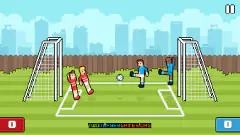
What you get instead is a very fast duel. One disc against one disc on a vertical pitch, a ball between them, and a clock that gives each half about a minute. In the match we played, the score went from 0-0 to 3-3 before the second half was half over.
It is credited to Renato Duchini of Onduck Games, whose duck logo greets you on the title screen. It has been available since December 2024. We played one tournament match on a computer, and we say below exactly where it ended for us.
Goals come every few seconds
Most football games make a goal feel rare. Here they arrive in bunches. The clock showed 59 seconds at kick-off, with nothing on the board.
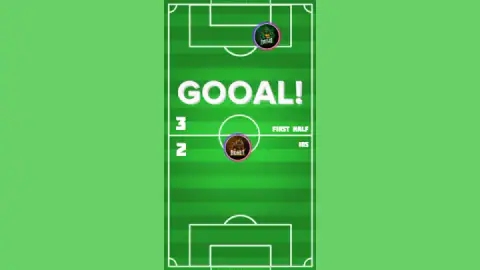
With 33 seconds left in the first half it was 1-1. With ten left it was 3-2 to the computer, and GOOAL! was flashing across the pitch.
That is five goals in under a minute. Early in the second half we made it 3-3, six goals in well under a minute and a half of football.
So a one-goal lead is not a lead. It lasts about as long as it takes the ball to come back down the pitch. The flip side helps too: if you fall a goal behind, there is no need to panic or throw your disc forward. There will be more chances, and soon.
Two minutes a match, and no time to settle
The clock in the corner counts seconds, not minutes, and it counts them in real time. A half starts on 59 seconds. We watched it count down to 10 while the same 49 seconds passed outside the game.
There is barely a pause at half-time. The first half ended and the second was already under way a couple of seconds later, with the score still 3-2 and the clock on 56. Rain started falling across the pitch at that point; we never saw it in the first half, and we could not tell whether it changes how the ball rolls.
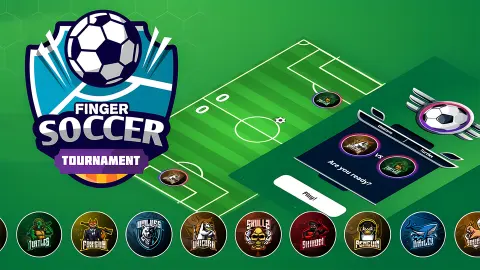
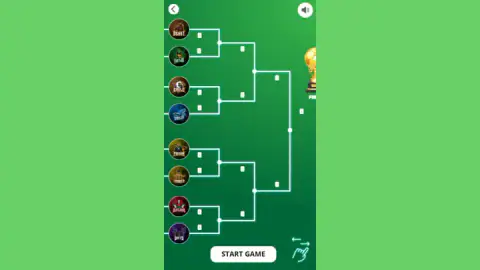
Put together, a match lasts about two minutes. The bracket screen shows eight crests with lines running towards a gold trophy, and a swipe sign in the corner suggests it carries on to the side, so the cup takes at least three wins. That is a good game for a short break and a hard one to come back in. You do not have time to settle in.
The computer keeps goal, until it chases the ball
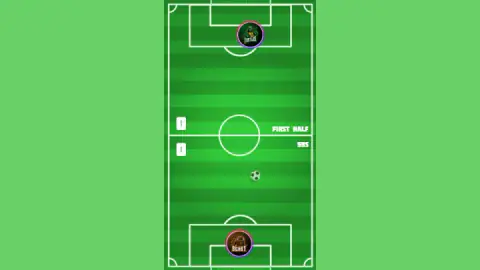
Watch the other disc for a while. In every shot we took of the pitch, it was in the top quarter, near its own goal. It plays like a goalkeeper that is allowed to run, and in none of those shots was it near the middle.
That gives you the middle of the pitch. You can bring the ball up, line it up and choose your moment, without the computer pressing you.
The moment to choose is when the ball goes wide. In the second half the computer's disc followed it into the top-left corner, well outside its goal mouth, and the goal sat open. A push straight upfield from there has nothing in its way. A push straight upfield when the computer is standing in its goal just hands the ball back.
It is air hockey in a football kit
"Finger soccer" usually means a table game. In penny football you flick coins between a friend's fingers for goalposts; in Subbuteo, the "flick to kick" game, you flick small players with a fingertip. In both, the skill is in the release.
This game works the other way. One flat disc each, a ball that slides, goals at both ends, and a player who steers the disc without ever letting go. That is the setup of air hockey, the table game that engineers at Brunswick Billiards worked on between 1969 and 1972, with a pitch drawn over it.
It explains the most common first mistake. On our first try we only clicked, as you would to aim a flick. The disc never moved, and by the second half we were 3-1 down. Once we held the button and dragged, the disc went where we pointed: to the centre circle and out to the touchline.
So think of your disc as an air hockey mallet. Keep it under your hand and put it in the ball's path.
What we did not see
The last time we looked at the scoreboard it was 3-3, with 38 seconds left. Less than a minute later we were back on the bracket, with an ad break on top. We do not know how the match ended, what happens after a draw, or whether winning moves you up the bracket on screen. We did not play the second round, the final or a trophy screen.
The game's listing says you can play alone or with friends. The title screen we saw had one button, Tournament, and our match was against the computer; we did not find a two-player mode. We played with a mouse. The game's listing gives phones and tablets and the game is drawn tall, for a phone held upright, but we did not try it on a touch screen. Ad breaks also came up after we chose our team and on the bracket screen.
Who is it for? Anyone who wants a full football match in two minutes. The rule fits in one sentence, so young players can start at once. Staying calm when the score changes every ten seconds is the part that takes practice.
More one-on-one football
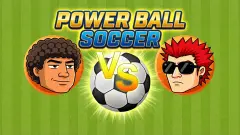
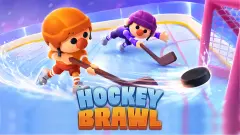
For the table game the name suggests, Soccer Strike has you pull back a disc and let go on a pitch drawn on a desk. Power Ball Soccer is another one-on-one match against a short clock and a computer that punishes standing still. Hockey Brawl plays the same duel on ice in rounds of twenty seconds, and Soccer Random turns it into a one-button match for two players. More in our soccer games section.
Screenshots
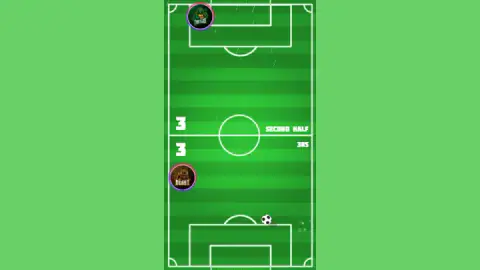
Taken by opening the game ourselves and letting it run — not supplied by the publisher, and not the same picture every other site shows.
How to play Finger Soccer Tournament
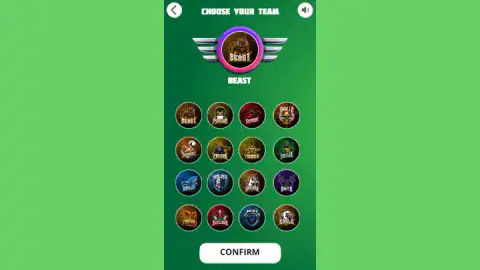
- Press Tournament and pick a crest. There are 16 mascots, Beast, Turtles, Eagle, Bats and the rest. The one you pick appears large at the top; press CONFIRM.
- Check the bracket. Eight crests on screen, with lines leading towards a gold trophy. The team drawn next to yours is your first opponent. Press START GAME, then PLAY.
- Hold and drag your disc. It is the one at the bottom with your crest. Keep the finger or mouse button down and it follows you; push it into the ball to send the ball away.
- Score in the top goal, guard the bottom one. The computer's disc defends the top of the pitch.
- Watch the left and the right. The score is on the left, beside the halfway line: the lower number is yours. The seconds left in the half count down on the right.
Tips from our match
- Never tap. A click does nothing to your disc, so keep contact all the time.
- After you score, get back in front of your goal before anything else. The next goal can come within seconds.
- Shoot when the computer's disc has gone to a corner after the ball. A push into the middle while it stands in its goal runs straight into it.
Controls
| Press and hold on your disc, then drag | Your disc follows the pointer while you hold; a single click or tap does not move it |
|---|---|
| Click or tap the buttons | Tournament, CONFIRM, START GAME and PLAY take you from the title screen to kick-off |
| Arrow at the top left | Goes back a screen in the menus |
| Speaker at the top right | Sound on or off |
Features
- One-on-one football on a vertical pitch: your disc defends the bottom goal, the computer's the top one
- Pick one of 16 mascot crests and play a knockout bracket towards a gold trophy
- Two halves of about a minute each, with the seconds counting down on the right of the pitch
- Goals come quickly: we saw six in well under a minute and a half of play
- The computer's disc stays deep near its own goal and follows the ball into the corners
- You move by holding and dragging, not by flicking
Game details
- Developer
- Renato Duchini (Onduck Games)
- Release date
- December 2024
- Last updated
- November 6, 2026
- Added here
- April 2025
- Technology
- HTML5 (2D)
- Platforms
- Browser (desktop, mouse), Browser (mobile & tablet, touch)
- Classification
- Multiplayer , Soccer , Sports , 2 Player
- Saved progress
- Saving, when available, is managed by this game. Mava cannot confirm your level.
FAQ
How do you play Finger Soccer Tournament?
Press and hold on your disc at the bottom of the pitch and drag it. It follows your finger or mouse while you hold, and pushing it into the ball sends the ball off. Score in the computer's goal at the top and keep the ball out of yours at the bottom.
Why doesn't my player move in Finger Soccer Tournament?
Because you are tapping. A single click or tap does nothing to your disc; you have to keep the finger or mouse button down and drag. On our first try we only clicked, our disc stood still all match and we were 3-1 down by the second half.
How long is a match in Finger Soccer Tournament?
About two minutes. Each half starts with the clock on 59 seconds and counts down in real time, and the second half begins a couple of seconds after the first ends. There is no long break in between.
How many teams are in Finger Soccer Tournament?
You choose your crest from 16, all animal or fantasy mascots such as Beast, Turtles, Eagle and Bats. The bracket screen then shows eight crests with three rounds of lines leading towards a gold trophy at the edge of the screen. A swipe sign in the corner suggests the draw continues to the side, so expect at least three wins before the cup; we only played the first match.
Which score is mine in Finger Soccer Tournament?
The bottom one. The two numbers sit on the left, beside the halfway line, each on the side of the pitch that team defends. Your disc is at the bottom, so your goals are the lower number.
How do you beat the computer in Finger Soccer Tournament?
Let it commit first. The computer's disc stays near its own goal, and when it chases the ball into a corner it leaves the goal mouth open. Use the middle of the pitch, where we never saw it, to line up your shot, and go back in front of your own goal as soon as you score.
Is Finger Soccer Tournament two player?
It is listed for playing alone or with friends, but the title screen we saw had a single Tournament button and the match we played was against the computer. We did not find a two-player mode.
Who made Finger Soccer Tournament?
The game is credited to Renato Duchini of Onduck Games, whose duck logo is on the title screen. It has been available since December 2024, with an update in November 2026.