







About Cricket Mania
Most browser cricket games keep the bat and throw the scorebook away: a ball comes, you hit it, a number goes up. Cricket Mania keeps the scorebook. The corner of its screen counts runs, wickets and overs the way a real ground does, and the game ends for the same reason a real innings does.
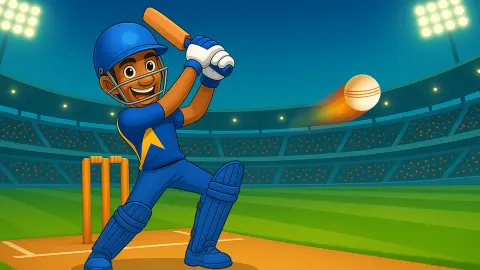
You only bat. A bowler in green runs in from the far end, you stand in blue with your back to the camera, and one swing per ball decides whether the board gains runs or loses a wicket. What makes it more than a reflex test is that the game tells you what is coming. Before each over it stops and shows a card with the type of ball, and that changes when you should swing.
The game is credited to Zop Technologies WLL. It was published in May 2026.
We played it twice on a desktop with a mouse. The first sitting ended in front of the tutorial card. The second gave us about four minutes at the crease, and we batted badly: one four, then seven wickets in a row. This page covers that innings and says where it stops.
A scoreboard that counts like the real thing
The red and white panel in the top right corner is worth a minute before you swing at anything, because every part of it comes from the sport.
Runs are the score. In cricket a ball hit along the ground to the edge of the field is worth four and one that clears the edge without bouncing is worth six. Those two hits are called boundaries, which is the word the tutorial uses. The crowd in the stands holds up small signs with 4 and 6 on them.
Overs are how the bowling is counted. An over is six balls, and the board writes it as 7.5 for seven overs and five balls. That is not a decimal. The next ball takes it to 8.0. Under the runs there is a row with six places, one per ball of the current over. A dot means nothing was scored. It is the mark real scorers use, and the reason a scoreless ball is called a dot ball. A number means runs. A W means a wicket.
Wickets are your lives, written with the limit in brackets: WICKETS 3 (10). Ten is not a number the game picked. A cricket side has eleven players and they bat two at a time, so once ten are out the eleventh has nobody to bat with and the innings is over. Here the same count ends the game, under a red ribbon that reads "You're out of wickets".
Real matches also bring on a different bowler for each over, since nobody may bowl two in a row. The card appears at that same moment, at the start of the over.
What the card tells you about the next six balls
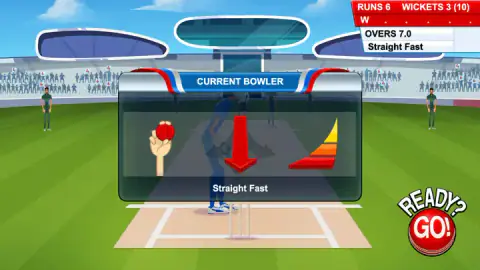
We saw three deliveries named: Straight Fast, Straight Slow and Off Spin.
The first two say what they are. Going by the names, the ball keeps its line and the only question is how soon it gets to you. Off spin is the odd one. In cricket it is a slower ball that the bowler twists with the fingers, so it turns sideways after it hits the ground. A swing timed for a fast straight ball is early for it.
The card draws this as well as naming it. On the Straight Fast card the arrow pointed straight down and the gauge beside it showed three steps, in yellow, orange and red.
We cannot give you a timing rule for each type. Our one scoring shot came against Straight Fast, and one hit does not make a rule.
Our innings: one four and seven wickets
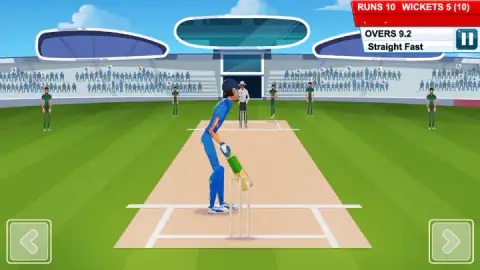
Our notes start with the board at 6 runs and 3 wickets after seven overs. In the next over, on the fourth ball, a swing connected and the board jumped to 10. The row under the score showed three dots and a 4.
That was the last run. By the end of the eleventh over the wickets column had gone from 3 to 8 and the row filled with dots and the letter W. One of those we saw clearly: on the last ball of the tenth over the ball went through, the stumps behind the batter were knocked apart, and two fielders had their arms in the air. In cricket that way of getting out is called bowled.
The last two wickets fell in the twelfth over and the ribbon came up. The screen then offers two round red buttons. The one on the left, with two curved arrows, put us back at 0 runs and 0 wickets. We did not press the one on the right, with a play triangle.
The lesson is the plain one. A miss here is not just a wasted ball. It can be a wicket, and ten of those end everything.
What we did not find out
We never hit a six, and we never scored one, two or three, so we cannot say whether the game has them. We did not see an over limit either: our innings ran past eleven overs and only the wickets stopped it. The listing's own page mentions levels. We did not reach anything that looked like one, nor a menu, a shop or a target score.
On controls, we used the left mouse button only. The two arrow buttons in the corners, the right click and the arrow keys are still untested by us.
Who it is for
Anyone who wants cricket's scoring without a full match around it. An innings can be over in a few minutes, and the scoreboard teaches the notation as you go. If you have never followed the sport, it is a gentle way to learn what 7.5 and a row of dots mean.
It is not a full cricket game. In what we played you do not bowl, set a field or pick a team.
More sports games built on one timed swing
Tennis Hero works on the same idea with a racket: the player runs alone and you only time the hit. Golf Orbit asks for a single click on a power fan and then pays you for where the ball lands. Mini Golf Battle trades timing for aim, with a drag to set each putt. The rest are in the sports games category.
Screenshots
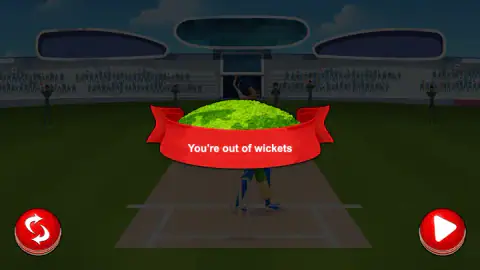
Taken by opening the game ourselves and letting it run — not supplied by the publisher, and not the same picture every other site shows.
How to play Cricket Mania
- Get past the card headed "TUTORIAL". It asks you to hit one boundary, and it moves on with the round red button at the bottom right of the screen, not with anything on the card itself.
- Read the CURRENT BOWLER card. It shows a hand holding the ball, an arrow, a small three-step gauge and the name of the delivery underneath.
- Press "READY? GO!", the button drawn on a cricket ball at the bottom right. The card goes away and two arrow buttons appear in the bottom corners.
- Watch the bowler run in and swing as the ball reaches the bat. We did it with a left click on the field.
- Check the top right corner after each ball. When the over is done, the card comes back for the next one.
Tips from our innings:
- Nothing happens until you press the ball-shaped button. The game waits on the card between overs. Use the pause to read it.
- One swing per ball. We swung by guesswork far more often than by watching the ball, and nearly all of our wickets went that way.
- The name under the scoreboard is your reminder. If you forget what the card said, it stays there for the whole over.
- Do not judge the pace from your first over. A fresh innings opened for us with a card that read Straight Slow. Further in, most overs were Straight Fast.
Controls
| Left click on the field | Swings the bat; this is how we batted, and one of those swings went for four |
|---|---|
| Right click | Listed as the swing to the other side; we did not try it |
| Left and Right arrow keys | Listed as the same two swings; we did not confirm them |
| Arrow buttons in the bottom corners | On screen while the ball is live, one per side; we did not press them |
| READY? GO! (bottom right) | Starts the over once you have read the CURRENT BOWLER card |
| Pause button (top right, under the scoreboard) | On screen during play; we did not open it |
| Round button with two curved arrows | On the "You're out of wickets" screen, starts a new innings from zero |
Features
- Batting only in everything we saw, against a computer bowler, with the camera behind the batter
- A card before every over that names the delivery to come, such as Straight Fast, Straight Slow or Off Spin
- A scoreboard that follows real cricket, with runs, wickets out of ten, and overs counted ball by ball
- A row of six marks for the current over, where a dot is no run, a number is runs and a W is a wicket
- An innings that ends when the tenth wicket falls, with a restart button on the same screen
Game details
- Developer
- Zop Technologies WLL
- Release date
- May 2026
- Last updated
- June 19, 2026
- Added here
- March 2026
- Technology
- HTML5 (2D)
- Platforms
- Browser (desktop, mouse), Browser (mobile & tablet)
- Saved progress
- Saving, when available, is managed by this game. Mava cannot confirm your level.
FAQ
How do you play Cricket Mania?
You are the batter. Before each over a card shows what kind of ball is coming, and the over starts when you press the READY? GO! button. The bowler runs in and you swing as the ball arrives. Runs go on the board when you connect, a wicket goes on it when you do not, and the innings ends at ten wickets.
What are the controls in Cricket Mania?
We batted with left clicks of the mouse on the field. The game's listing gives the left arrow key or left click for a swing to the left and the right arrow key or right click for a swing to the right. Two arrow buttons also sit in the bottom corners of the screen during play. We did not confirm the keys, the right click or those buttons ourselves.
What does OVERS 7.5 mean on the Cricket Mania scoreboard?
It means seven full overs and five balls of the next one, not seven and a half. An over in cricket is six balls, so the number after the point only goes up to five and the next ball turns the board to 8.0. The game counts the same way.
Why does the game end at ten wickets?
Because that is how an innings ends in cricket. A side has eleven players and two of them bat at a time, so when ten are out the last one has no partner left. The scoreboard shows the limit in brackets, as WICKETS 3 (10), and the message at the end reads "You're out of wickets".
What do Straight Fast and Off Spin mean in Cricket Mania?
They are the kind of ball the bowler is about to send. A fast straight ball keeps its line and arrives early. Off spin is a slower ball that the bowler turns with the fingers so that it changes direction after it bounces. We also saw Straight Slow. The name stays under the scoreboard for the whole over.
How do I get past the tutorial in Cricket Mania?
The first screen is a card headed TUTORIAL that asks you to hit one boundary. Move on with the round red button with a white triangle at the bottom right of the screen, outside the card. We lost a whole first sitting by clicking elsewhere on that card.
Can you play Cricket Mania on a phone?
It is listed for PC, Android and iOS, in landscape. We played in a landscape window on a desktop with a mouse and did not try it on a phone ourselves.
Who made Cricket Mania?
The game is credited to Zop Technologies WLL. It was published in May 2026 and last updated in June 2026.