




About Mini Golf Battle
Most mini golf games count your strokes and let you keep going. Take nine shots at a hole and the worst that happens is a bad score. Mini Golf Battle does not work that way. It hands you a small number of balls, and when they are gone the hole is over.
That changes what a putt is. In Level 1 the counter under the level number read 2 at the start of each try. Two hits, then a panel asking whether you want to watch an ad for one more, then "Level Failed". There is no room for a practice shot.
First, the limits of what follows. Our session lasted a little over four minutes and never left Level 1. We failed it twice and did not hole the ball. Everything below comes from that one hole, and where we lean on the game's own description we say so.
Mini Golf Battle is credited to Drivix Games, and it was published in September 2025 and updated in August 2026.
Two balls and a plank: what Level 1 asks of you
The first hole is a single rectangle of green with a raised cream border, set down on the sand. The ball starts at one short end. The hole and its flag are at the other. Between them lies one pale plank, set at an angle across the middle, so the straight line from ball to hole is blocked.
That is the whole puzzle, and it is a fair one. You either go around the plank or use the border to come in from the side. The game's description talks about bouncing off walls to get around corners, which fits what the hole looks like. We cannot tell you which line works, because neither of our tries found it.
What we can tell you is how a failed try goes. The counter drops with each hit. At zero, a panel asks "Revive?" and shows a button with an ad icon, a golf ball and "+1". Under it is "No, Thanks". Decline, and "Level Failed" appears with a single Retry button. Retry puts the ball back and the counter back at 2.
Where the battle is, and what costs an ad
The title promises a battle. In our session there was no opponent: one ball, one hole, no second score, no turns. The fight we saw is against the ball counter. A versus mode may exist beyond Level 1, but nothing on the Level 1 screen points to one, and the game's description does not mention another player either.
The description does name the three round buttons. It calls them Fire Power, for speed on long straight shots, a wing that makes the ball glide further, and a spring that bounces it over barriers. Their icons match: a flame, a white wing, and a pink disc on a coil. We did not get to use any of them.
Ads are tied to four things here: the revive, the three bonuses and the skip button in the top right corner. When we pressed skip, the game told us no ads were available and left us on Level 1. An ad break also came up between attempts.
What we did not reach
We never holed the ball, so we cannot describe what finishing a level looks like, whether leftover balls earn anything, or what Level 2 adds. The number of levels is also unknown to us.
The game's description says levels get harder and bring slopes, ramps and barriers. The plank is the only obstacle we met.
Who it is for
Mini Golf Battle suits someone who likes the aiming part of mini golf and does not mind being sent back to the start. The beach is bright, the hole is small enough to read at a glance, and a try takes seconds.
It is less suited to anyone who wants a relaxed round. Two balls is a strict allowance for a first level, and the way to soften it is to watch ads. If you came for a match against another player, we did not find one.
More golf and cue games
Golf King 3D is even stricter: every shot there has to be a hole in one. Golf Orbit goes the other way, with one button and a ball that just has to fly as far as it can. If you want a second player, Pro Billiards lets two people share one mouse, and the angles off the cushion are the same kind of thinking. Neon Mini Golf is another mini golf to try. There is more in the sports games category.
Screenshots
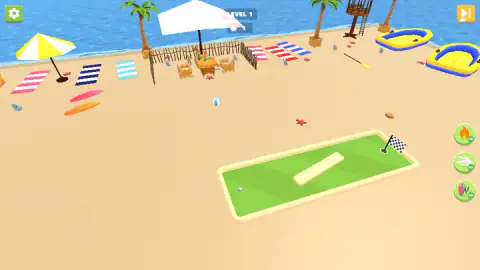
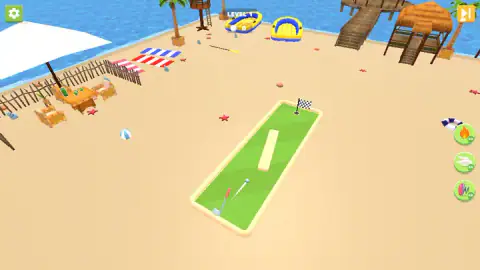
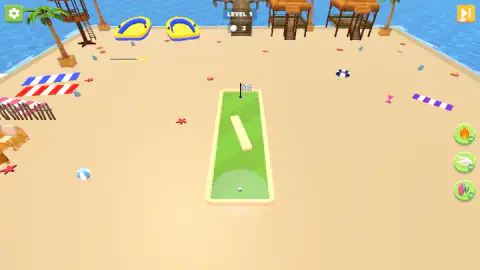
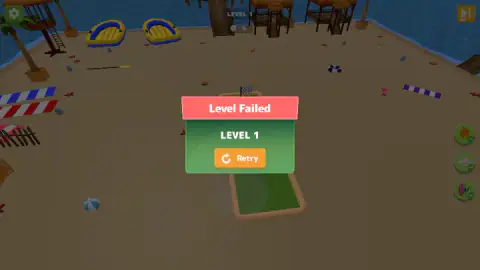
Taken by opening the game ourselves and letting it run — not supplied by the publisher, and not the same picture every other site shows.
How to play Mini Golf Battle
- Start the game. After a few clicks ours was on Level 1, with the ball already on the green and no menu in between.
- Drag on the green with the mouse or a finger. A red-shafted putter and a white aim line appear at the ball.
- Release to hit. The game's description says the longer the drag, the harder the shot.
- Get the ball into the hole with the chequered flag before the ball counter reaches zero.
- If it does reach zero, choose "No, Thanks" on the revive panel and then Retry, or watch the ad for one more ball.
Tips from our session:
- Read the counter, not the scenery. The number next to the small ball icon, just under "LEVEL 1", is the only score on screen. It is easy to miss against the sea behind it.
- A plain click does nothing useful. We started by clicking on the ball, and it took us a while to switch to dragging. The arrow keys did nothing we could hear either.
- Look before you drag. We saw the same hole from the side, from a corner and from straight behind the ball. From behind, the hole is directly ahead and the plank in the middle is plainly in the way.
- The round buttons are not free. Each of the three on the right edge has an AD badge. We pressed the flame expecting a stronger shot and got an ad screen.
- Leave the gear alone mid-shot. It opens a Settings panel over the middle of the green. Close it with the red X.
Controls
| Drag on the green and release (mouse or finger) | Aims the putter and hits the ball |
|---|---|
| Gear button (top left) | Opens Settings, with a Sound switch and a Music switch |
| Flame, wing and spring buttons (right edge) | Bonus shots; each one carries an AD badge |
| Skip button (top right) | Offers to skip the level in exchange for an ad |
Features
- Mini golf in 3D on a beach, with parasols, towels, palm trees and rubber dinghies around the green
- A ball counter under the level number that shows how many balls you have left
- A "Revive?" offer of one more ball for watching an ad when the counter reaches zero
- Three bonus buttons, a flame, a wing and a spring, each marked with an AD badge
- A camera that showed us the same hole from three different sides
- Sound and music switched off separately from the Settings panel
Game details
- Developer
- Drivix Games
- Release date
- September 2025
- Last updated
- August 10, 2026
- Added here
- July 2025
- Technology
- HTML5 (3D)
- Platforms
- Browser (desktop, mouse), Browser (mobile & tablet, touch)
- Saved progress
- Saving, when available, is managed by this game. Mava cannot confirm your level.
FAQ
How do you play Mini Golf Battle?
You drag on the green with the mouse or a finger and let go to hit the ball. A putter and a white line appear next to the ball while you aim. The game's description says a longer drag means a harder hit. The goal is to get the ball into the hole with the chequered flag before you run out of balls.
Is Mini Golf Battle a multiplayer game?
Not in what we played. Despite the name, Level 1 had one ball, one hole and no opponent, and there was no second score or turn indicator on screen. The contest we saw is between you and the ball counter. We did not get past Level 1, so we cannot rule out a versus mode further in.
How many shots do you get in Mini Golf Battle?
Under the level number there is a ball icon with a number. Each time we restarted Level 1 it read 2, and we saw it at 0 just before the game stopped the attempt. So Level 1 gave us two balls per try. We do not know whether later levels give more.
What happens when you run out of balls in Mini Golf Battle?
A panel asks "Revive?" and offers one extra ball in exchange for watching an ad. If you choose "No, Thanks", a "Level Failed" panel follows with a Retry button, and the same level starts again with the counter back at its starting number.
What do the fire, wing and spring buttons do in Mini Golf Battle?
The game's description calls them bonuses. Fire gives the ball more speed for long straight shots, the wing lets it glide further with less friction, and the spring adds bounce to clear barriers. All three buttons carry a small AD badge. When we pressed the flame, an ad screen came up instead of a shot, so we cannot confirm how any of them plays.
Can you skip a level in Mini Golf Battle?
There is an orange skip button in the top right corner, and it has an AD mark on it. When we pressed it, the game answered that no ads were available and we stayed on Level 1. Skipping depends on an ad being served.
Who made Mini Golf Battle?
The game is credited to Mini Golf Battle to Drivix Games. It was published in September 2025 and last updated in August 2026.