

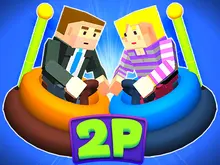



About 12 MiniBattles
Most two-player games on one keyboard give each player a set of keys. One gets the arrows and the other gets WASD. Then somebody says the other side is easier. 12 MiniBattles ends that fight. Each player gets one key. A is red, on the left. L is blue, on the right. There is nothing else to learn.
The battle changes every round. One time it is tennis. The next time it is a boat rescue or a Wild West duel. A roulette picks the battle, so you never know what is next until the cards stop. Then you have a few seconds to work out what your key is for.
The 12 in the name is old. The game came out in 2018 with twelve battles. Now there are far more. When we spun the menu roulette, we counted 26 different card names, and each card is a battle.
It was made by Shared Dreams Studios, the studio of Argentine developer Mariano Maffia. The browser version arrived in November 2018. That year it was second runner-up in a contest for game makers run by a big games site. One thing to know first: there is no computer opponent. You play with someone, or with one hand on each key.
The roulette picks the battle
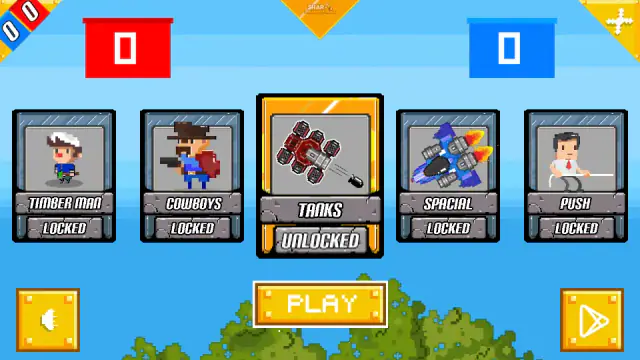
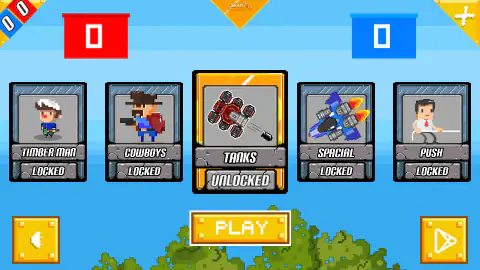
The menu shows five cards in a row. The middle one says UNLOCKED and the others say LOCKED. Above them sit a big red counter and a big blue counter. Press PLAY and the row spins. The UNLOCKED label stays on whichever card passes the middle.
When it stops, read the name. That is your next battle. In our tries, COWBOYS gave us two cowboys seen from above, among rocks and cacti. FIRE gave us two helicopters and two houses on fire. DUEL gave us a Wild West shootout seen from the side. SOCCER PHYSICS gave us football, two players per team.
So use those few seconds. Say the name out loud and put your hand on your key.
What a session looks like: tennis, a loading ring, then a boat rescue
We played both sides, one hand per key, for about four minutes.
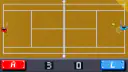
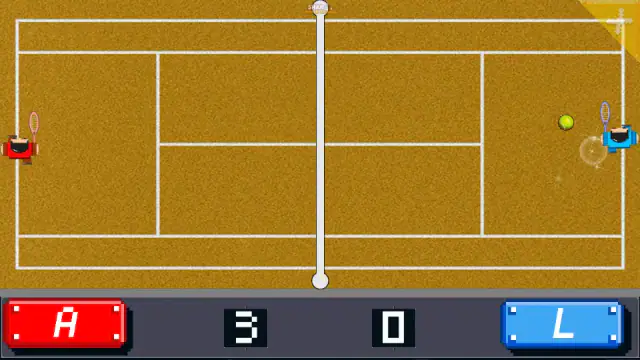
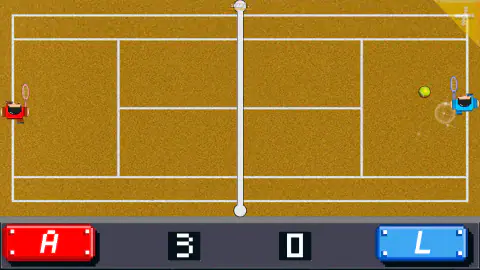
The first battle was tennis, seen from above. Red stood on the left of a clay court. Blue stood on the right. The bar at the bottom showed a red A, a blue L and two big counters. Red went 3-0 up. By our next picture, blue had pulled it back to 4-3. The match took about a minute.
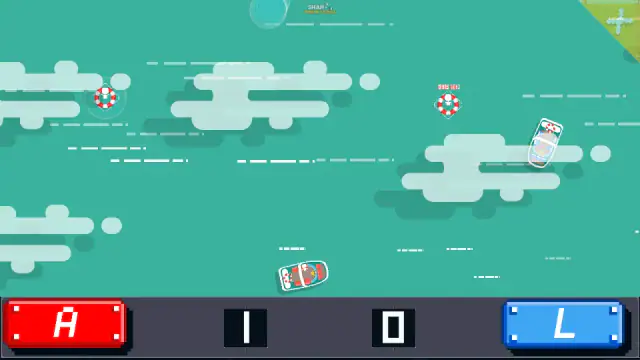
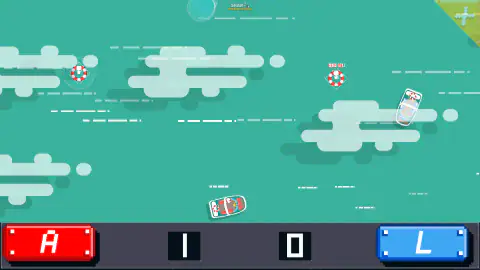
Then the screen went black and a grey loading ring spun. The next battle was a boat rescue on a sea seen from above. There was a red boat, a blue boat and life rings with a small person in each. The counters were back at 0-0.
The point came with a ring. The ring in the middle was gone, a new one had appeared on the right with "HELP ME!" over it, and the score read 1-0 to red. Then the rings sat near the edges. The boats stayed near the middle, and it was still 1-0 more than a minute later.
The tip that comes from this: remember your colour. In tennis, red was on the left. In the rescue, the red boat ended up to the right of the blue one. In the FIRE battle, the red helicopter starts next to the blue house. The bar at the bottom is the only thing that stays put. Red is A and blue is L.
The battles we saw
There is no official list. These are the six battles we saw ourselves.
| Card or battle | What we saw |
|---|---|
| Tennis | A clay court seen from above. Red on the left, blue on the right. Ours reached 4-3 |
| Boat rescue | Two boats and life rings. A ring that vanished gave one point. Ours stayed at 1-0 for over a minute |
| COWBOYS | Two cowboys seen from above, with rocks and cacti between them. A red dot and a blue dot mark who is who |
| FIRE | Two helicopters, two burning houses and a pond in the middle. The colours are crossed |
| DUEL | Two gunfighters seen from the side. A sign shows HEAD SHOT, BODY SHOT and AIR SHOT, with a coloured bar at the top |
| SOCCER PHYSICS | Football, two players per team, a goal on each side |
The roulette showed 22 more names. Timber Man, Tanks, Spacial, Push, Gangsters, Gollll!, Vikings, Bumpers, Zombies and Copters. Paintball, Thumbs, Ninjas, Wrestling, Golf, Battle-Pong, Cars, Pocket Basket, Agent and Box. Red Hands and Arrows too. We did not play those, so we will not guess their rules.
Why one key each is the whole idea
One key is not a shortcut. It is the point. In 2014, Finnish developer Otto Ojala made Soccer Physics, a football game for two with one key each. It won an award for best multiplayer game, and many games copied the idea. One of the cards in 12 MiniBattles even uses that name.
One key works on a shared keyboard because there is nothing to explain. With four keys each, there are eight keys to learn before anyone can play. With one key each, the only gap between two people is speed and nerve. And A and L sit in the same row, one at each end. Two people can share a laptop without their hands bumping.
Playing 12 MiniBattles unblocked
The game is one HTML5 page. There is nothing to install, no plugin and no login. So on a school laptop, only the page has to get through. Some copies on unblocked sites list other keys, such as the up arrow for player 2. This one uses A and L.
MiniBattles, 12 Mini Battles 2 and the rest
Three games share the name. 12 MiniBattles is this one, for two players. MiniBattles came out in July 2020. Up to six people play it on one keyboard, with the keys C, N, Q, P and the two arrows. 12 Mini Battles 2 came out in January 2024 with twelve battles. It is not on Mava Games. This page is about the original. It has far more battles than the sequel's twelve, and two players are easier to gather than six.
More two-player games on one keyboard
If you like one key each, Drunken Duel 2 is the simplest version: two stick figures, one shot each. For wobbly fights with a few more keys, try Drunken Boxing. The Random series works the same way: Basket Random, Soccer Random and Boxing Random. There are more in our two-player games on one keyboard, in our mini games and in the multiplayer category.
Screenshots
How to play 12 MiniBattles
- Find a second player. Red sits on the left and takes A. Blue sits on the right and takes L.
- Press PLAY on the title screen. You will see two Vikings, a red 1 and a blue 2.
- Press PLAY in the card menu. The cards spin like a roulette.
- Read the card that stops in the middle. It says UNLOCKED. That card is the battle that loads next.
- Look at the arena, then press your key. Find the goal, the ball, the target or the ring. That is your best clue to what your key does.
Tips we picked up while playing:
- The roulette tells you what is coming. We pressed PLAY four times. The roulette stopped on COWBOYS, FIRE, DUEL and SOCCER PHYSICS. Each time, that battle loaded.
- Follow your colour, not your side. The bar at the bottom never changes. Red A is on the left and blue L is on the right. The arena can mix them up. Agree on who is red before the first battle.
- Every battle starts at 0-0. A lead in one battle does not help in the next. When the black loading screen comes up, get ready to read a new arena.
- Look before you press. We did not test what the key does in every battle. The goal, the ball or the rings in the arena are your best clue.
Controls
| A (Player 1, red) | The only key the red player has. What it does changes with each battle |
|---|---|
| L (Player 2, blue) | The only key the blue player has. It does the same job as A, for the other side |
| PLAY (mouse) | Starts the game on the title screen, then spins the card roulette in the menu |
| A and L together | With no second person, put one hand on each key and play both sides |
Features
- One key per player in all six battles we saw, so nobody has to learn new controls between rounds
- A card roulette picks the next battle, and the card it stops on is the battle you get
- Far more than 12 battles: the roulette showed us 26 card names, from cowboys and a duel to football and fire
- Every battle starts again at 0-0, with the score in the bar at the bottom
- Two players on one keyboard, with no split screen, no lobby and no account
- No computer opponent, so you play with a friend, or with one hand on each key
Game details
- Developer
- Shared Dreams Studios
- Release date
- November 2018
- Last updated
- April 1, 2019
- Added here
- April 2023
- Technology
- HTML5 (GameMaker Studio export, 1280×720 landscape)
- Platforms
- Browser (desktop, keyboard)
- Classification
- Arcade , Driving , Multiplayer
- Download size
- 5.9 MB
- Ad requests
- 0 (few)
- Has a save
- No
- Saved progress
- Saving, when available, is managed by this game. Mava cannot confirm your level.
Measured by opening the game ourselves on 2026-09-10, not taken from the feed. Twelve seconds on a phone-sized screen, with ad requests counted and blocked rather than loaded.
FAQ
How many minigames does 12 MiniBattles have?
Far more than twelve. The name comes from the first version in 2018. When we spun the menu roulette, we saw 26 different card names, and each card is a battle.
What are the controls in 12 MiniBattles?
Player 1 is red and presses A. Player 2 is blue and presses L. In all six battles we saw, the bar at the bottom showed only those two keys. What the key does depends on the battle, so look at the arena before you press.
How do you choose a minigame in 12 MiniBattles?
You do not choose it. Press PLAY in the menu and the cards spin like a roulette. The card that stops in the middle, marked UNLOCKED, is the battle that loads. It worked that way all four times we tried.
Can you play 12 MiniBattles alone or against the computer?
There is no computer opponent. The game is for two people. On your own, put your left hand on A and your right hand on L and play both sides. That is how we played it.
Does the score carry over from one battle to the next?
No. The two counters at the bottom belong to the battle you are in. Our tennis match stood at 4-3. Then a loading ring came up on a black screen, and the boat rescue after it started at 0-0.
Who made 12 MiniBattles?
Shared Dreams Studios, the studio of Argentine developer Mariano Maffia. The browser version came out in November 2018. That year it was second runner-up in a developer contest run by a big games site.
Can I play 12 MiniBattles unblocked at school?
The game is one HTML5 page. There is no download, plugin or login. So a school laptop only needs to reach the page. Some copies on unblocked sites list other keys, such as the up arrow. This version uses A and L.
Is 12 MiniBattles the same as 12 Mini Battles 2 or MiniBattles?
No. 12 Mini Battles 2 came out in 2024 with twelve battles, and it is not on Mava Games. MiniBattles is for up to six players, with the keys C, N, Q, P and the two arrows. This page is the two-player original.
Can you play 12 MiniBattles on a phone?
This version is made for a keyboard. We played it on a desktop computer and did not try a phone or a touch screen. The studio has a separate Android app.