







About 2 Player Games Mini Games
Most pool games punish a potted white ball with a slap on the wrist. Your opponent gets the table, places the white where they like, and the game goes on. The billiards table inside 2 Player Games Mini Games does not do that. Pot the white once and the frame is over, and you have lost it.
That single rule changes how the whole table plays. There are only ten coloured balls, five red and five blue, so a frame could be short anyway. With the white-ball rule on top, it can end on the second shot.
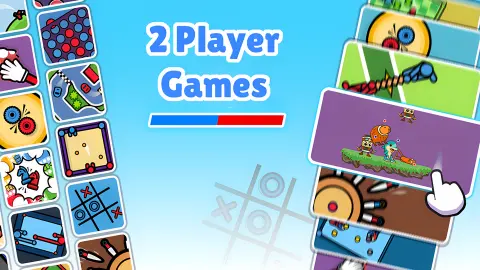
The game is a collection of quick duels for two people sharing one screen, with a computer opponent for when you are alone. It is credited to VeturGames. It was published in December 2025.
Now the honest part. We played for about four minutes and spent all of them at the billiards table. We did not open any other mini-game, and we never took a frame to its last ball. So this page explains billiards in detail and says plainly where our knowledge stops.
What is on the table
The table is drawn from straight above: green cloth, brown rails, six pockets. The ten coloured balls start in a triangle on the right, mixed, and the white sits on the left. There are no numbers, no stripes and no black ball.
The rules card gives the whole game in three lines:
- "Goal: pocket all balls of your color with the white ball."
- "Controls: pull back the white ball and aim to hit with the white ball."
- "If you pocket the white ball, it counts as a loss."
Above the table is a scoreboard split in two, red on the left and blue on the right. It does not count frames won. It counts balls. A few shots into our frame against the game's Easy bot it read 1:1, and the table held four reds and four blues. One of each had gone down.
Two things the card does not say, and we cannot answer: whether you shoot again after potting one of your own, and what happens when you sink a ball of the other colour.
Why our frames ended early
Two of our frames stopped after a handful of shots with the scoreboard still at 0:0. The last time we had looked, all ten coloured balls were still on the cloth. Yet the game declared a winner, red the first time and blue the second, and offered to play again. Moments later a full rack was back on the table.
The only rule on the card that ends a frame that fast is the white-ball rule. In the first of those frames the white had come to rest right beside the bottom-right pocket one shot earlier. We did not catch the ball dropping, so take this as our reading of it and not as something we watched frame by frame. It matches the card, and it matches how nervous the table made us afterwards.
It also tells you something about playing a friend. A careless break can hand over the frame before either of you has scored. If you want longer games, agree to break gently.
Two players on one screen, or the game's bot
The mode card comes up as soon as you choose a mini-game. With two people you take turns at the same table, and the lights at its sides say whose shot it is.
Alone, you choose the game's bot and then its strength. The three levels come with faces: a green smile for Easy, a flat orange stare for Normal and a red face with horns for Hard. We played Easy only, and only for a few shots, so we will not rate how well it pots.
One practical note. A pause screen from the platform appeared when we chose a mode and again when we started a new frame. This is where an advert can play. You click Continue Playing and the table is back.
Five a side and no black ball: how this differs from real pool
Plain red balls against plain balls of another colour is not an invention of this game. It is how pool looks in British pubs. The game known as blackball uses seven reds, seven yellows and a black, and the World Pool-Billiard Association wrote a rule set for it in 2004.
In the pub game, and in American eight-ball with its solids and stripes, potting the white is a foul. Under the association's eight-ball rules the incoming player gets the white in hand anywhere on the table. You only lose outright if it happens on the shot that sinks the black.
This table has removed the black ball, and with it the usual ending. The white has taken over the job. In eight-ball there is one ball you must not sink at the wrong moment. Here it is the ball you hit on every single shot. That is why a frame with five balls a side still asks for care, and why soft, short shots are worth more here than a hard break.
Who it is for
It suits two people at one computer who want a game that needs no explaining: the rules fit on one card. It also works as a few minutes alone against the game's bot on Easy.
It is not a pool simulator. We saw no spin, no numbered balls and no called shots. If you want the full game, look at the pool tables linked below.
More games for two on one screen
12 MiniBattles is the closest relative: a run of short duels on one keyboard. Pro Billiards is the fuller pool table, with all fifteen balls and solids against stripes for two players. Carrom Pro is the flick-and-pocket board game that pool players tend to enjoy, and Pool Shoot Tournament is a bubble shooter played with pool balls. The rest are under multiplayer games.
Screenshots
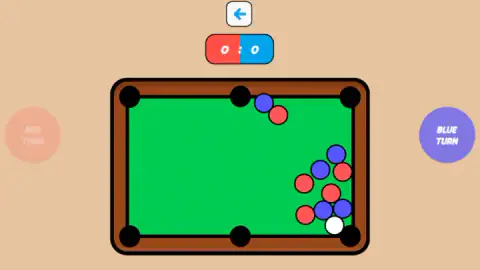
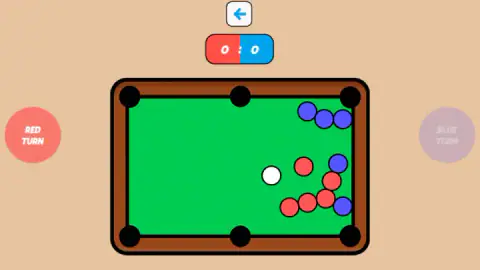
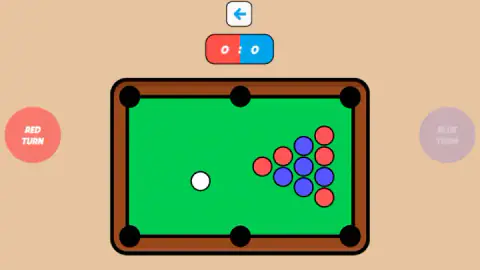
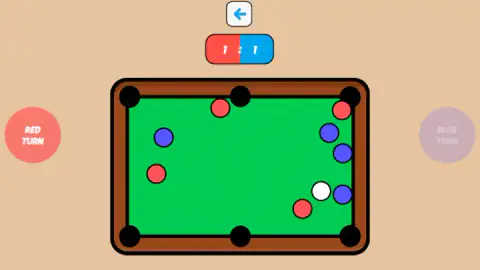
Taken by opening the game ourselves and letting it run — not supplied by the publisher, and not the same picture every other site shows.
How to play 2 Player Games Mini Games
- Pick the mini-game. We chose Billiards from the menu.
- Pick the mode. One button shows two people, for two players on the same screen. The other shows a person against a robot, for playing the game's own bot.
- Pick the bot's level if you are alone: Easy, Normal or Hard. The question only came up for us on the route against the bot.
- Read the rules card and press Got It. It is three lines long, and it came up each time we reached the table from the menu.
- Take your shot when your light is on. Red Turn glows on the left of the table, Blue Turn on the right. Pull back from the white ball, aim and release.
What our session taught us:
- The white ball is the only thing that can beat you in one shot. Before you pull, look at where the white will travel after it hits. If a pocket sits on that line, shoot softer or pick another ball.
- Start the pull on the white ball itself. The card's wording is "pull back the white ball": the drag begins on the ball, not on the spot you want to hit.
- Check whose light is on before the break. Red did not always start. We saw fresh racks waiting with Blue Turn lit.
- The rack is not the same every frame. The front ball of the triangle was blue in one frame and red in another, so do not plan a break from memory.
Controls
| Pull back from the white ball and release (billiards) | Takes the shot; the rules card puts it as "pull back the white ball and aim to hit with the white ball" |
|---|---|
| Click a mode on the Mode Selection card | Two players on one screen, or one player against the game's own bot |
| Click Easy, Normal or Hard | Sets the strength of the game's bot; the question came up when we chose to play against it |
| Got It | Closes the rules card and starts the frame |
| Arrow above the scoreboard | Back out of the table; we did not use it mid-frame |
Features
- A collection of short duels for two people on one screen; we played the billiards table only
- Billiards with ten balls, five red and five blue, on a six-pocket table seen from above
- One rule that ends a frame at once, potting the white ball counts as a loss
- A red and blue scoreboard that counts the balls each side has potted
- Solo play against the game's own bot at three levels, Easy, Normal and Hard
- Turn lights on both sides of the table, Red Turn on the left and Blue Turn on the right
- Made by VeturGames
Game details
- Developer
- VeturGames
- Release date
- December 2025
- Last updated
- August 10, 2026
- Added here
- October 2025
- Technology
- HTML5 (2D)
- Platforms
- Browser (desktop, mouse), Browser (mobile & tablet)
- Classification
- Multiplayer , Sports , 2 Player
- Saved progress
- Saving, when available, is managed by this game. Mava cannot confirm your level.
FAQ
How do you play billiards in 2 Player Games Mini Games?
Each player owns a colour, red or blue, and there are five balls of each on the table. You pull back from the white ball, aim and let go, and the two sides take turns. The goal on the rules card is to pocket all the balls of your colour with the white ball.
What happens if you pocket the white ball in 2 Player Games Mini Games?
You lose the frame. The rules card says it in one line: if you pocket the white ball, it counts as a loss. In real pool the same mistake only hands the table to your opponent, so this is much stricter.
Can you play 2 Player Games Mini Games alone?
Yes. The mode card offers two players on one screen or one player against the game's own bot. If you choose the bot, the game asks for its difficulty: Easy, Normal or Hard. We only played against Easy.
What does the score mean in the billiards mini-game?
It counts potted balls, red on the left and blue on the right. When our scoreboard read 1:1 there were four reds and four blues left on the table, out of five each at the start.
Which mini-games are in 2 Player Games Mini Games?
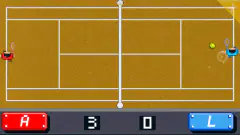
We played billiards, and the menu we saw also offered Tic Tac Toe. The developer's description lists tennis, air hockey and curling as well. We did not open those, so we cannot describe how they play.
Who made 2 Player Games Mini Games?
It is credited to VeturGames. It was published in December 2025 and was last updated in August 2026.
Does 2 Player Games Mini Games work on a phone?
It is listed for PC, Android and iOS, in landscape. We played it on a desktop with a mouse, so we cannot tell you how the pull-back shot feels under a finger.