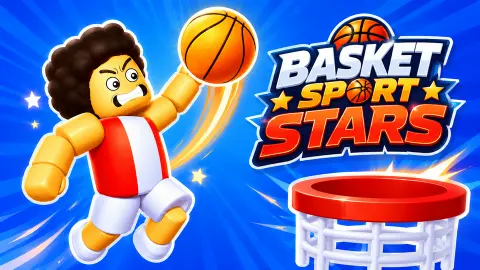



About Basket Sport Stars
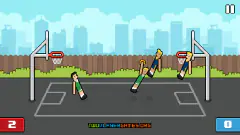
Most basketball games built for a keyboard hand you a team. Basket Sport Stars hands you one player, puts one rival in front of them, and sets a clock running. The court is seen from the side, with a hoop at each end and a rack of balls behind each one. There is no pass, because there is nobody to pass to.
That makes every second of a match a small duel. Either you have the ball and the other player is on top of you, or they have it and you are the one in the way. A match lasts about a minute and a half, and the score when the clock hits zero is the result.
The menu credits the game to Rocket Games, with a 2026 copyright under the logo. It is listed under another name, Cursora Labs. We go by what the game shows and leave the mismatch on the record.
We should say how we did, because it shapes this page. We played two Quick Match games against the computer rival, which the game calls Cpu, and lost both without scoring. Tournament, Practice and Two Player were not played. What follows is what the Cpu taught us on the way.
The Cpu does not ease you in
In the first match we were mostly standing still, and the Cpu punished it. With two seconds left the scoreboard read 0 to 20. That is twenty points conceded in a match of about a minute and a half.
The second match went the same way with our hands on the keys. The Cpu already had 10 points before the clock was halfway down, and 19 near the end. Then the card: Cpu Wins.
So the honest advice is this. Quick Match is the first button on the menu, but it is not a tutorial. The key card is on screen for the opening seconds only, and the Cpu is already moving while you read it. The menu has a Practice button, and the game's description presents it as the place to learn the jump and the shot. We did not open it. After two matches like ours, we would start there.
One more thing you notice only on a second match: the setting changes. Our first game was in a blue arena on a green court. The second was outdoors, on an orange court with a wire fence and pine trees behind it. Both rivals were different characters too.
The +3 over the hoop is a real rule, and a young one
When the Cpu scored in our second match, a green +3 rose over the hoop and its total went from 10 to 13. That is a three-pointer, and basketball lived without it for most of its history.
A three-point shot is a basket made from behind an arc painted on the floor. Anything from inside the arc is worth two. The idea was tried in a college game in the 1940s and then dropped. A professional league in the United States made it a rule in 1961, the NBA took it up in 1979, and FIBA, the international federation, in 1984.
The rule is strict about feet. Both of the shooter's feet must be completely behind the line when they shoot or jump. A toe on the paint makes it a two. In international play that line now sits 6.75 metres from the centre of the basket.
Basket Sport Stars keeps the idea and, as far as we could see, mixes it with smaller baskets. The Cpu totals we read during play included 10, 17 and 20. None of those can be built out of threes alone, so some baskets must be worth less. What we could not work out is where the three starts. The court has arcs painted at both ends, but we never saw a shot leave the Cpu's hands and land as a three in the same picture.
The question-mark bubble and the G key
During both matches a round bubble with a question mark floated above the court, near one of the hoops. In the second match a number hung over it, first a 3 and later a 1, like a countdown.
The key card ties this to a key: G, labelled "Bonus". The game's description says a gift appears during a match, that you jump to collect it, and that using it fires a rocket along the court that stuns the other player unless they jump over it. We never collected the bubble and never saw a rocket, so we can only pass that on as the game's own claim.
A trophy counter sits in each top corner as well. Ours read zero throughout. The one on the Cpu's side read 10 in the first match and 115 in the second. We do not know what it counts.
Two Player, Tournament and Practice: what we can and cannot say
We played none of these three. Here is what is on the screen and in the game's instructions.
Two Player is the orange button. The instructions give Player 1 the W, A, S, D keys with G for the gift, and Player 2 the arrow keys with L. That is two people on one keyboard, not an online match. In Quick Match the arrows also move your own player, so the split only applies here.
Tournament is described by the game as a bracket: win a round and you meet the next opponent. The Next button on the result card may belong to this idea, but we pressed Menu and cannot confirm it.
We did not test a phone either. The game is listed for Android and iOS, and all we can vouch for is the keyboard.
Who it suits
Two friends at one keyboard, on the evidence of the menu, and anyone who likes a short match with a clear result. It is less kind to a solo player who wants to be walked through the basics. If you would rather learn by shooting alone, this is not the gentlest place to start.
More basketball games
Basket Random is the closest relative: also side-on and also for one or two players, but played with a single key and first to five. School Of Basketball takes the rival away and leaves you, a limited supply of balls and the hoop. Basketball.io is a 3D game where points come from dunks. Do not confuse this one with Basketball Stars, a different game by a different studio with a similar name. The rest are under sports games.
Screenshots
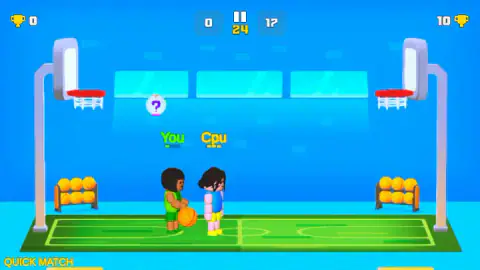
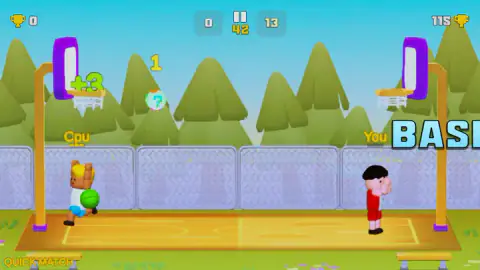
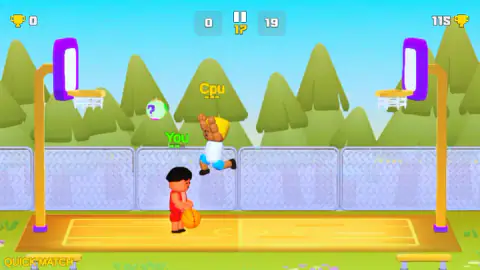
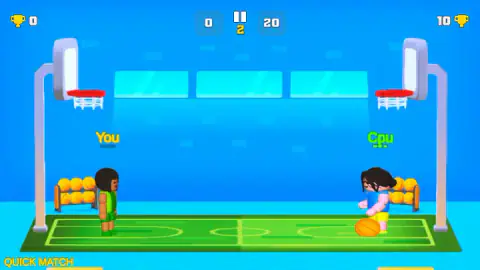
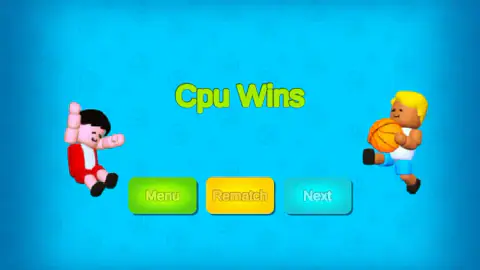
Taken by opening the game ourselves and letting it run — not supplied by the publisher, and not the same picture every other site shows.
How to play Basket Sport Stars
- Pick Quick Match on the menu. The other three buttons are Two Player, Tournament and Practice.
- Accept or change your player. The Select Player screen shows one character at a time, with a yellow button marked "Change/W" and a green Next. We pressed Next both times and got a different character each time: green kit first, red kit second.
- Move with A and D, jump with W. A key card at the start of the match shows W, A, S, D, the word "OR" and the arrow keys, so either hand position works when you play alone.
- Shoot at the far hoop. The game's own instructions say you hold the jump key to aim and let go to shoot, and that S is an attack that can make the rival drop the ball.
- Be ahead when the clock runs out. The number between the two score boxes counts down. At zero a card names the winner and offers Menu, Rematch and Next.
What two lost matches taught us:
- You attack to the right. Your player starts on the left and the Cpu on the right. The one basket we saw clearly was the Cpu's, on the left hoop, so the left hoop is the one you guard. This is our reading from that basket, not something the game spells out.
- Your score is the left box. Ours stayed at zero in both matches while the right box climbed, which is how we know which is which.
- A drifting ball is a lost ball. When we stood still, the Cpu took the ball, crossed the court and scored. It does not wait for you to learn the keys.
- Having the ball is not enough. We had it in our hands at least twice, once with the Cpu jumping straight at us, and never got a shot to drop.
- Watch the dots. On one shot a short line of green dots trailed the ball's path to the rim. The game's description says an aiming line shows where the ball will go, and that it turns green when the shot is a good one.
Controls
| A / D or Left / Right arrow | Move along the court (the key card in Quick Match shows both sets joined by "OR") |
|---|---|
| W or Up arrow | Jump; the game's instructions say you hold it to aim and release to shoot |
| S or Down arrow | Attack the rival to shake the ball loose, according to the game's instructions |
| G | Labelled "Bonus" on screen; uses a collected gift, per the game's instructions. Not used by us |
| W on the Select Player screen | The yellow button reads "Change/W"; we went ahead with the player offered |
| Two Player mode | Not played. The instructions give Player 1 W A S D and G, and Player 2 the arrow keys and L |
Features
- One-on-one basketball seen from the side, with a hoop at each end of a short court
- Four modes on the menu, Quick Match, Two Player, Tournament and Practice
- Timed matches of about a minute and a half; the highest score when the clock runs out wins
- A Cpu rival that scored 20 points on us in a single match while we scored none
- A floating bubble with a question mark and a G key labelled Bonus
- Different courts and different characters from one match to the next
- A menu credit that reads Made by Rocket Games
Game details
- Developer
- Rocket Games
- Release date
- August 2026
- Last updated
- August 12, 2026
- Added here
- June 2026
- Technology
- HTML5 (3D)
- Platforms
- Browser (desktop, keyboard), Browser (mobile & tablet)
- Classification
- Multiplayer , Sports
- Saved progress
- Saving, when available, is managed by this game. Mava cannot confirm your level.
FAQ
How do you play Basket Sport Stars?
You move one player along a side-on court with A and D or the arrow keys and jump with W or the up arrow. The game's own instructions say you hold the jump key to aim and release it to shoot, and that S attacks the rival to knock the ball loose. Whoever has more points when the clock reaches zero wins.
What are the controls in Basket Sport Stars?
In a Quick Match the game shows a key card with W, A, S and D, the word OR, and the four arrow keys, plus G labelled Bonus. In Two Player mode, according to the game's instructions, Player 1 keeps W, A, S, D and G while Player 2 uses the arrow keys and L. We did not play the two-player mode ourselves.
How long is a match in Basket Sport Stars?
About a minute and a half. The clock sits between the two scores and counts down; the earliest reading we caught was 86 seconds, and the game's description gives 90. We saw no target score: both our matches ran until the clock ended them.
Can two people play Basket Sport Stars on one keyboard?
The menu has a Two Player button, and the game's instructions describe two players sharing one keyboard, one on W, A, S, D and the other on the arrow keys. We only played Quick Match against the Cpu, so we cannot say how the shared keyboard feels.
Who made Basket Sport Stars?
The game's menu carries the credit "Made by Rocket Games" with a 2026 copyright. It is listed under a different name, Cursora Labs. We go by what the game itself shows and note that the two do not match.
Are there three-pointers in Basket Sport Stars?
Yes. We watched a +3 pop up over the hoop when the Cpu scored, and its total went from 10 to 13. Other totals we read, such as 17 and 20, cannot be reached with threes alone, so some baskets are worth less. We could not establish where on the court the three starts.
Is Basket Sport Stars free, and does it work on a phone?
It is free in the browser, with no download and no account. An ad break came up before each of our matches. It is listed for PC, Android and iOS in landscape, but we played it on a computer keyboard and did not test a touch screen.