




About Swipe Swoosh
Most swipe basketball games give you one ball, one hoop and one question: how hard. Swipe Swoosh adds a second question that is easy to miss on the first level. The ball does not start in the same place twice. After every shot it sits somewhere new along the free-throw area, a little left of the hoop, then right, then back to the middle, and the swipe that scored a moment ago now sends the ball wide.
The other thing that decides a level is the clock. Level 1 hands you ten balls and asks for 10 points in 60 seconds. A basket is worth 2, so you need five of them. That sounds generous with ten balls to throw, and in our hands it was not: we played the first level three times and the timer ran out on all three, once with eight balls still waiting in the rack.
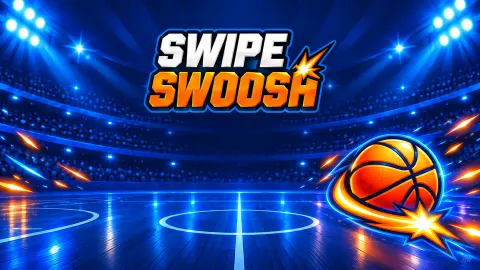
Swipe Swoosh is made by Rival Motion Games, whose logo sits at the top of the title screen, and it was published on 22 September 2026. It is a small, tidy game set on a blue rooftop court above a city skyline, with a menu that promises much more than the first level shows.
The clock beats you before the balls run out
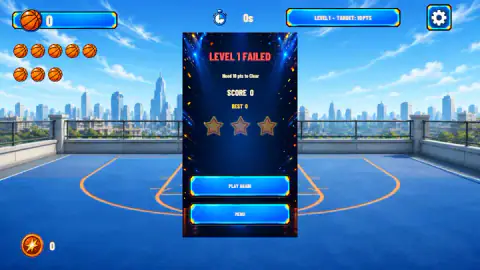
On paper, level 1 is a ball problem: ten balls, five baskets needed, so you can afford to miss half. In practice it is a time problem. Our first attempt ended at zero seconds with eight balls still sitting in the rack, which means we had thrown only two in a whole minute. Our third attempt was better, and it still had four balls left with eight seconds to go.
The reason is that every shot takes longer than it feels. You wait for the ball to settle on its new spot, you work out the angle from there, you drag, and then you watch the ball fly and come back down before the next one is ready. Spend a few seconds lining up each throw and the minute is gone.
So the real skill in Swipe Swoosh is rhythm. Find a drag length that reaches the rim, then keep shooting at an even pace and correct a little each time. A missed shot that teaches you something is worth more than a perfect shot you never had time to take.
Two points a basket, just like the real thing
Each basket we made added exactly 2 points to the score, from 0 to 2 and then to 4. That is the value of an ordinary field goal in real basketball: any basket scored from inside the three-point line counts two, and only shots from beyond the arc count three. The court in Swipe Swoosh is drawn with both lines, and every ball we were given started inside the arc, on or near the free-throw area.
That makes the level targets easy to read. A target of 10 points is five baskets, and every point you still need is half a basket. On the Level Failed card the line "Need 10 pts to Clear" tells you the same thing in reverse.
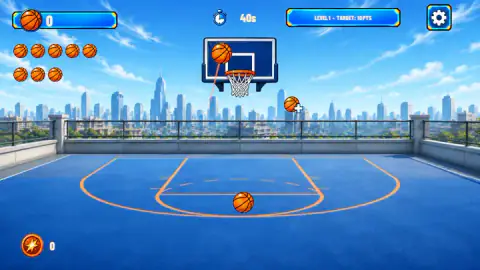
The name comes from the court too. A swish is a basketball shot that drops through the net without touching the rim or the backboard, and the sound it makes is where the word comes from. In the moments we captured, most of our shots were up against the backboard rather than dropping cleanly through.
What we played, and how far we got
We played Swipe Swoosh for about four minutes and made three attempts at level 1. The first two ended on zero points. The third reached 4 points, two baskets, with eight seconds left on the clock and four balls still in the rack, and the clock ran out before a third. We did not clear the first level, so everything we say about later levels comes from the menu, not from playing them.
A few things showed up along the way. A second counter in the bottom left corner, next to a round orange icon, jumped from 0 to 100 with our first basket and still read 100 after the second. We do not know what it counts or what it buys. The fail card also shows three stars, all empty in our case, which suggests each level is graded by how well you clear it.
Thirty levels and a locker full of balls
The main menu is bigger than the first level lets on. There is a Levels 1-30 button, so there are thirty levels to work through. A Ball Locker holds the basketballs you can collect, and there are buttons for Achievements, a Leaderboard and Settings. A small calendar with a basketball on it sits in the top left corner, and a sound switch in the top right.
The sign-in box that greets you on opening belongs to the distributor. It says signing in saves your progress and lets you use the leaderboard. Playing as a guest worked fine for us and took us straight to the menu.
Who it is for
Swipe Swoosh suits anyone who likes short, one-move skill games. The rule fits in one sentence, a level lasts a minute, and the drag is the same on a mouse as it is on a phone, so children can pick it up from the first shot.
It is not a basketball match. There are no players, no defence and no opponent, only you, the ball and the hoop. If the first level feels hard, that is normal: we found it harder than it looks, and the fix is to shoot faster, not to aim longer.
More basketball games to try
If you like the swipe, Basketball Mania is built on the same move, with a hoop that starts moving after a few levels. For a match with players on court, Basketball Stars has big-head one-on-one games against the computer or a friend, and Basket Random changes the court and the ball after every point. The rest are in our sports games.
Screenshots
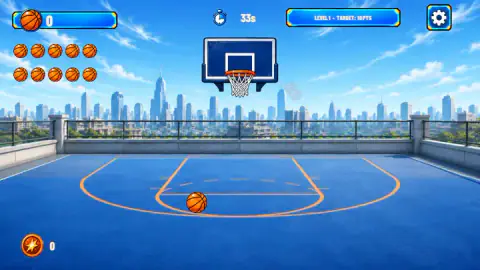
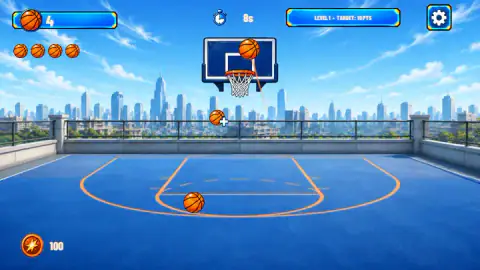
Taken by opening the game ourselves and letting it run — not supplied by the publisher, and not the same picture every other site shows.
How to play Swipe Swoosh
- When the game opens, a sign-in box covers the menu. Press Continue as Guest to skip it, or sign in if you want your progress saved.
- Press Play. The level card at the top right tells you the target, and the timer at the top counts down from 60.
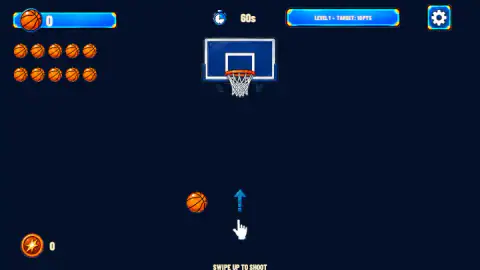
- Press on the ball, drag upwards towards the hoop and let go. On the first shot a hand and an arrow show the move, with the words "Swipe up to shoot".
- Every basket adds to the score in the top left corner. Reach the target before the clock hits zero to clear the level.
- If time runs out first, the Level Failed card offers Play Again or Menu.
Tips from our games
- Watch where the ball lands before each shot. It moves sideways after every throw, so aim at the hoop from where the ball is now, not where it was.
- Most of our misses hit the top of the backboard. When that happens, drag a shorter distance on the next shot.
- The ten balls in the top left corner go down by one with every shot. Six seconds per ball is the pace that uses them all inside the minute.
- A spare ball with a plus sign sometimes floats in the air near the hoop. We never found out what it does, so do not waste time chasing it.
Controls
| Click and drag up from the ball (swipe on touch screens) | Aims the shot and sets its strength |
|---|---|
| Release the mouse button or your finger | Shoots the ball at the hoop |
| Click or tap | Presses menu buttons and the settings gear |
Features
- Level 1 asks for 10 points inside a 60-second clock, with ten balls in the rack
- Each basket we scored added 2 points, so the first target means five baskets
- The ball starts from a different spot on the court after every shot
- A spare ball marked with a plus sign sometimes floats in the air near the hoop
- Thirty levels, a Ball Locker, achievements and a leaderboard on the main menu
- Every level card shows three stars to earn, a score and your best score
- Playing as a guest works; signing in to the distributor only saves progress and scores
Game details
- Developer
- Rival Motion Games
- Release date
- September 2026
- Last updated
- September 23, 2026
- Added here
- September 2026
- Technology
- HTML5 (2D physics)
- Platforms
- Browser (desktop, mouse), Browser (mobile & tablet, touch)
- Saved progress
- Saving, when available, is managed by this game. Mava cannot confirm your level.
FAQ
How do you shoot in Swipe Swoosh?
Press on the ball, drag upwards towards the hoop and let go. The direction of the drag aims the shot and its length sets the strength. On a phone or tablet the same move is a swipe with your finger.
How do you pass a level in Swipe Swoosh?
Each level shows a points target at the top of the screen. Level 1 asks for 10 points before a 60-second clock runs out, and each basket is worth 2, so you need five baskets. If time runs out first, you get a Level Failed card with Play Again and Menu buttons.
Why do I keep failing level 1 in Swipe Swoosh?
In our three attempts the clock beat us every time, not the ball count. We had balls left in the rack when time ran out, so shoot at a steady rhythm instead of lining up each throw for long. Shots that hit the top of the backboard most likely had too much strength.
How many levels does Swipe Swoosh have?
The main menu has a Levels 1-30 button, so there are 30 levels. We only played the first one and did not clear it, so we cannot tell you how the later levels change.
Do you need to sign in to play Swipe Swoosh?
No. A sign-in box appears over the menu when the game opens, with a Continue as Guest button next to Sign In. Signing in is only for saving progress and using the leaderboard.
Who made Swipe Swoosh?
Swipe Swoosh is by Rival Motion Games, whose logo appears on the title screen. It was published on 22 September 2026.
What is the ball with a plus sign in Swipe Swoosh?
During a level a ball marked with a plus sign sometimes floats in the air near the hoop, in a different place each time. We saw it twice but did not find out what it gives you before our time ran out.
Can you play Swipe Swoosh on a phone?
The game is listed as playable on phones and tablets, in both landscape and portrait, and the shot is a swipe by design. We played it on a computer with a mouse and did not test touch ourselves.