




About Basketball Stars
Most basketball games give you a dunk button. Basketball Stars does not have one. You get 2 points from a jump shot or from a dunk, and the same up arrow does both. What changes the result is where you stand and when you let go.
You play one minute of one against one on a side-on court. The players are cartoon figures with huge heads. Each one also has a special move. You get it when you pick your player before the match. The game is made by MadPuffers, the studio behind Moto X3M.
We played the tutorial, the tournament, training, quick matches and the two-player mode. We lost all four of our games against the computer on Normal. The tips below come from those losses as much as from our baskets.
How to dunk in Basketball Stars
There is no dunk key. The up arrow is your jump, and what it does depends on where you stand.
Far from the basket, it is a jump shot. On the free-throw half circle in front of the basket you attack, it turns into a dunk. The tutorial shows this place with a green ring. In a real match there is no ring, so use the half circle painted on the floor.
A dunk is worth 2 points, the same as a jump shot. What it gives you is safety. In training, every dunk went in, and a jump shot only goes in if you let go at the right time. So if the defender is behind you, keep running to the half circle. If he is waiting there, shoot from further out and watch the bar.
After a miss, the ball does not come back to you. It bounces loose, and in a match the computer is often first to it.
The shot bar: when to let go
When you hold the up arrow, a bar appears next to your player. A marker climbs from red, through yellow, to green. The tutorial points at the green part with the words Release here, then flashes Release now.
We tested it on the training court, from the centre circle, with no defender:
| What we did | What happened |
|---|---|
| Let go in the green | 4 shots, 4 baskets |
| A very quick tap | More misses than baskets, often short |
| Held for more than a second | The ball often flew over the rim |
Training is the best place to learn this. There is no opponent, the clock does not move, and you can go and fetch your own misses.
Specials: four we saw, and when to use them
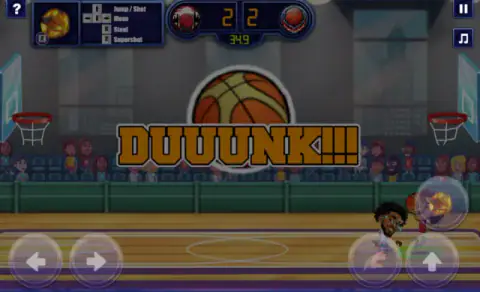
Before a match, each team shows two players with a special written under each one. Click a player to make him yours. The icon in the top left corner shows your special. It lights up when it is ready.
| Special | What we saw |
|---|---|
| Mega Dunk | Your player flies with a flaming ball from his own half and dunks at the far end. 2 points. |
| Alley-Oop | He throws the ball up, vanishes in a flash and dunks it. 2 points. |
| Defence | A metal lid drops over your own basket for a few seconds. |
| Fast Break | A fast dash with a blue trail. The defender ends up dizzy. |
Two things decide if a special helps you. The first is the ball. You have to hold it, or nothing happens. The second is timing. We once fired Defence after the computer had already scored, and the lid was wasted. Another time we fired it with the ball in our own half. The lid covered our basket while we ran up the court and scored.
Watch the other side too. Twice, right after we scored, the computer fired its own Mega Dunk from far away. When you score, run straight back to defend.
Defending against the computer
The computer is quick, and we did not beat it. These moves helped most:
- Stay between him and your basket. Under our own rim, the computer shot from far away and missed twice in a row. It scored on the third try.
- Steal only from close up. If you stand still next to it, the computer may hit you first. Stars spin round your head and the ball is gone.
- Blocking did not work for us. The card says the down arrow blocks. In our tests the defender just crouched, and the dunk went over him. We never blocked a shot.
Two players on one keyboard
Pick 2 PLAYERS from the main menu. The player on the left, marked Player 1, moves with W, A, S and D and uses B and V. The player on the right moves with the arrow keys and uses L and K. Some websites list these the other way round. We pressed A, and the left player moved.
There are three modes: one against one, two against two, and the two of you on the same team against the computer. Our one-against-one game ended YOU WON!!! 4:2 for the left player.
The tournament: one loss and you are out
The tournament has 16 teams and runs to a final, with a match for third place too. You choose Normal or Hard. We lost our first game 4:6. The REMATCH button carried a small AD sign, and NEXT took us to the podium with a total score of 0.
So warm up first. Quick Match lets you restart at once, and Training lets you practise the shot bar for as long as you like.
More basketball games
Basketball Legends is another two-player basketball game with a tournament. Basket Random is the one-key, sillier side of two-player basketball. You can find more in our basketball games, in two players, one keyboard and in the sports category.
Screenshots
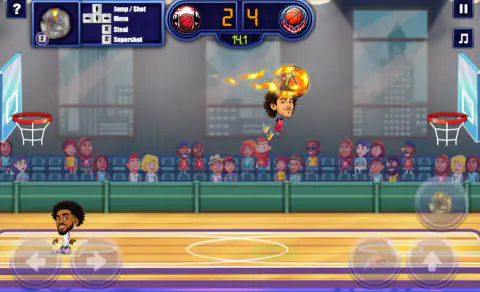
How to play Basketball Stars
- Choose TUTORIAL first. Run with the arrows to the green ring called the shot spot.
- Hold the up arrow. A small bar fills next to your player. When the game writes Release now, let go. The score goes from 0-0 to 2-0.
- Run to the next green ring, the dunk spot, and hold the up arrow again. This time you dunk, and the score reads 4-0.
- Press Z for the Supershot, your special move. The score reads 6-0, and the tutorial ends with the HOW TO PLAY card.
- Play a QUICK MATCH. It starts at once, and if you lose you can press RESTART.
Tips from our games:
- Let go in the green. From the middle of the court, all four shots we let go in the green went in. Very quick taps missed more often than not, and the ball often fell short. Holding too long sent it over the rim.
- Dunk from the half circle. The dunk spot is on the free-throw half circle, not under the rim. All seven dunks we tried from there went in.
- Fire your special only with the ball. Without the ball, Z did nothing for us.
- Stay close to steal. One step away, the steal did nothing. Pressed right up against the player with the ball, it knocked him dizzy and the ball came loose.
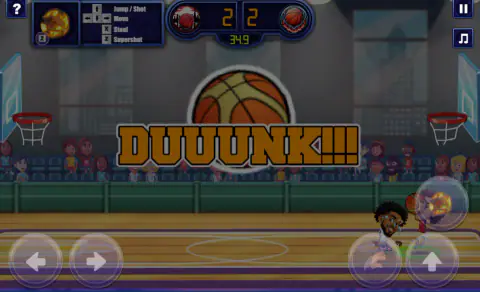
- Do not leave your basket empty. When we ran forward on defence, the computer walked in and dunked. The screen said JAM.
Controls
| Left and right arrows | Run left or right |
|---|---|
| Right, right (tap twice) | Dash, a short burst of speed |
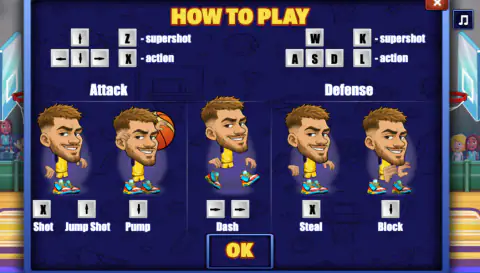
| Up arrow (hold, then let go) | Jump shot. Let go when the marker on the bar is in the green. Near the basket it becomes a dunk. |
| X | Shot from the floor with the ball, or steal without it |
| Down arrow | Pump fake with the ball, block without it |
| Z | Your player's special. It only works when you have the ball. |
| Two players: left player | W, A, S, D to move and jump, B to shoot or steal, V for the special |
| Two players: right player | Arrow keys to move and jump, L to shoot or steal, K for the special |
Features
- One-minute matches, one against one, with a basket at each end of a side-on court
- Every basket we scored or let in was worth 2 points, dunks and specials included
- Each player has a special, such as Mega Dunk, Defence, Alley-Oop or Fast Break, shown under his picture before the match
- A 16-team tournament on Normal or Hard, where one loss ends your run
- Quick Match, Random Match and a Training court with no opponent and a clock that stands still
- Two players on one keyboard, one against one, two against two, or both of you against the computer
Game details
- Developer
- MadPuffers
- Release date
- November 2025
- Last updated
- September 4, 2026
- Added here
- September 2025
- Technology
- HTML5 (2D)
- Platforms
- Browser (desktop, keyboard), Browser (mobile & tablet, touch)
- Classification
- Multiplayer , Sports
- Saved progress
- Saving, when available, is managed by this game. Mava cannot confirm your level.
FAQ
What are the controls for Basketball Stars?
In one-player mode you run with the left and right arrows and tap one twice to dash. Hold the up arrow to jump and shoot, and let go in the green. X shoots from the floor or steals, the down arrow fakes or blocks, and Z fires your special.
How do you dunk in Basketball Stars?
Take the ball to the free-throw half circle in front of the basket you attack, then hold the up arrow. The tutorial marks that place with a green ring called the dunk spot. Every dunk we tried from there went in, and each one counted 2 points.
How does the Supershot work in Basketball Stars?
The round icon in the top left corner is your special. When it is lit and you have the ball, press Z and it fires at once. With no ball, Z did nothing for us. After you use it, the icon goes dark and slowly fills again.
How do you block in Basketball Stars?
The game's card says the down arrow blocks. In our tests the defender only crouched, and the dunk went in over him. We never blocked a shot. What did work was the steal. Stand right against the player with the ball and press X, and he drops it.
How do you play Basketball Stars with two players?
Pick 2 PLAYERS. The player on the left, marked Player 1, uses W, A, S and D, B and V. The player on the right uses the arrow keys, L and K. You can play one against one, two against two, or together against the computer.
Is there a Basketball Stars 3?
We did not find one. Among MadPuffers' games we only found this Basketball Stars. The closest thing is Basketball Legends, another two-player basketball game by the same studio.
Can you play Basketball Stars unblocked at school?
It runs in the browser with no download and no sign-in, so it works wherever this page is allowed to open. If the school network blocks the page, ask the teacher or play at home instead of looking for a way around it.
Is this the same game as Basketball Stars Multiplayer on phones?
No. That one is a separate phone game with online matches. This Basketball Stars is played in the browser against the computer, or with a friend on the same keyboard.