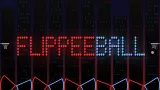






About Flippee Ball
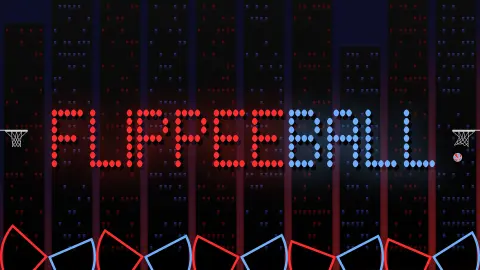
Pinball gives you two flippers and a button for each. Flippee Ball gives you five flippers and one button for the lot. Press it and all five swing up together, whether the ball is near them or not. Your opponent has five more, slotted between yours along the same floor, and a net hangs on each side wall. It is basketball played from the bottom of a pinball table.
That single button is the whole game. You cannot choose which flipper moves. You can only choose when, and for how long you keep them raised. A flip that sends the ball towards the far net also lifts four flippers that had nothing to do with it.
The game is credited to The Bounce Forge Ltd. It was published in February 2026.
One caution before the rules: we barely scratched this game. We spent about four minutes in the game on a desktop computer, with the mouse. Much of that went on the quick start screens and the help pages, which are long and worth reading. We then started one match against the CPU and left it unfinished, losing 4-0. The rules below come from the game's own help text. The match report comes from what we saw.
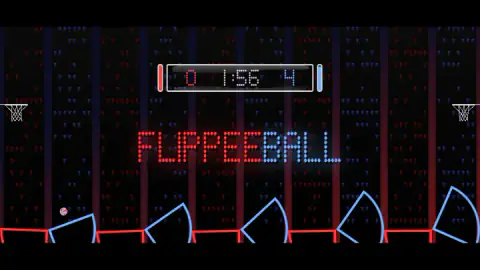
Four points down with 1:56 on the clock
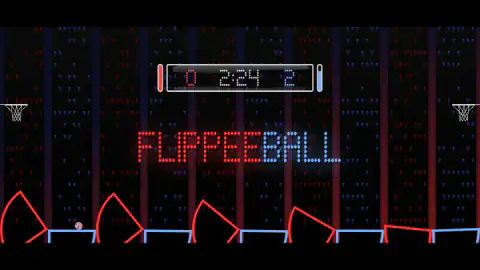
The picture of our match is simple. At 2:51 the score was 0-0, the ball sat on the tip of a red flipper and every flipper on the floor was in the air at once, ours and the CPU's.
At 2:24 it was 0-2. At 1:56 it was 0-4. The score moved in twos both times, so a basket looked to be worth two points.
By our notes the menu read «EASY MODE - CURRENT STREAK: 0 GAMES» before the start. So that was the gentle setting, and the CPU still scored twice in about a minute while we scored nothing.
In both later pictures the ball is in the same place: on the blue flipper nearest the left wall. That is the detail to learn from. The flippers alternate, so the CPU's last flipper stands directly beside your first one, right under your own net. A ball that settles there is one flick from going in. We left it there twice.
We stopped with 1:44 left. We did not see the end of the match, a win, or a basket of our own.
Eleven shots have names, and the help pages list them
Most arcade games explain themselves in one line. This one has a shot dictionary. Three basic shots, the Lob, the Flick and the Smash, are shown inside the Academy. Eight more are described in words.
Some are attacks. The Roller lets a ball roll along the flipper before a timed flip. The Wall Pass bounces the ball off the wall under the net when the nearest flipper cannot reach, and shoots from the rebound.
Others are ways of calming the ball down. For the Spike you start with the flippers up and release just before a fast, low ball arrives, so that it pops straight up and gives you time for a proper second flip. The Clip only nicks the ball to steer it away from the opponent.
One of them is doing nothing at all. The Bounce is for a high ball coming from behind: leave the button alone and it may drop off your flipper into the net.
We did not pull off any of these. We list them because they show what kind of game this is. The button is simple. The timing is not.
The Academy sets up 100 assists and counts your hits
The help pages describe a practice mode called the Flippee Academy. It has 100 levels, half at amateur speed and half at professional. Each one is an assist: an arrow shows where the ball will be launched, and you have to score from it.
Each level also sets a maximum number of hits, and the scoreboard counts yours against it. The pages give four ways to fail: too many hits, the ball touching an opponent's flipper after yours, a possession timer running out, or an own goal.
The advice printed there is sound. Work out what the level wants before trying to do it, watch for spin on the ball, and skip a level that beats you, since any level can be played at any time. We read all this and did not play a level.
Pinball had no flippers until 1947
For years pinball was closer to a lottery. You launched the ball, nudged the cabinet and watched. The flipper arrived in 1947 and changed what the game was, because for the first time the player could hit the ball back.
Flippee Ball keeps that one idea and removes the rest of the table. There are no bumpers and no ramps. The skill of real pinball is still here, though: the same flipper sends the ball to different places depending on where along its length the ball is when you press. That is why the help pages talk about the heel and the toe.
Best for players who will read the help pages first
This suits someone who likes a one-button game with real depth under it, and who does not mind losing while learning. The developer's notes say matches start at amateur speed with an aim assist switched on, and that both can be changed in the settings. We did not open them.
It suits less a player who wants to win on the first try. We did not, on the easy setting. We also cannot tell you how the two-player match feels, how the harder CPU levels play or what the career mode adds, because we did not reach any of them.
More one-button basketball
Basket Random is the nearest relative: one key, two baskets, and a match against the CPU or a friend. Basket Sport Stars gives you more buttons and short matches, with a shared keyboard for two. For shooting practice without an opponent, Swipe Swoosh is level after level of aimed throws. The rest are under sports games.
Screenshots
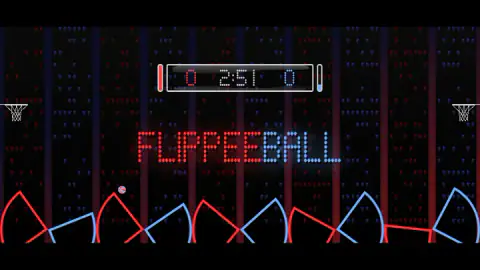
Taken by opening the game ourselves and letting it run — not supplied by the publisher, and not the same picture every other site shows.
How to play Flippee Ball
- Pick who plays. On the menu, each side of the scoreboard has a smiley face and a CPU face. They set the left and right players to human or CPU.
- Press the triangle to the right of the scoreboard. The clock starts at 3:00.
- Find your colour. In our match we were red, with the CPU in blue. The floor alternates red, blue, red, blue from the left wall.
- Click to flip. All five of your flippers swing up at once. Let go and they drop.
- Send the ball to the far net. Your own net is the one above your first flipper. You score in the other one.
What the help pages and our match taught us:
- Do not click on rhythm. We flipped several times with the ball nowhere near a red flipper. It achieved nothing and left our flippers up when the ball came back.
- Where the ball lands on the flipper matters. The help pages say a ball near the heel, the hinge end, may not have the power for a shot. They suggest passing it on instead.
- Holding is a move. Keeping the button down keeps the flippers raised. The help pages use that to trap the ball against the wall or to slow one that rolls too fast.
- Pause from the scoreboard. Click it during a match, or press P.
Controls
| Click anywhere on the court (left mouse button) | Flips all five of your flippers at once; this is how we played |
|---|---|
| Hold the button down | Keeps the flippers raised, according to the help pages, which use it to trap or deaden the ball |
| Left Ctrl | Flip key on a keyboard according to the developer's instructions; we did not test it |
| Click the scoreboard, or press P | Pauses a match, as the quick start screens explain |
| Click the triangle to the right of the scoreboard | Starts the match |
Features
- Ten flippers along the floor, five red and five blue in alternating order, and one button that swings all five of yours together
- A net on each side wall and a scoreboard with a clock that starts at 3:00
- Matches against the CPU or against a second player on the same device, set with a human or CPU button for each side
- Help pages inside the game that name eleven shots, from the Roller to the Wall Trap
- An Academy of 100 set-piece levels, 50 at each of two speeds, each with a limit on how many times you may hit the ball
- Mouse, keyboard and controller prompts on the game's own quick start screens
- Made by The Bounce Forge Ltd.
Game details
- Developer
- The Bounce Forge Ltd.
- Release date
- February 2026
- Last updated
- August 10, 2026
- Added here
- December 2025
- Technology
- HTML5
- Platforms
- Browser (desktop, mouse), Browser (mobile & tablet, touch)
- Classification
- Multiplayer , Sports
- Saved progress
- Saving, when available, is managed by this game. Mava cannot confirm your level.
FAQ
How do you play Flippee Ball?
Ten flippers lie along the floor, five red and five blue, and a net hangs on each side wall. One button flips all five of your flippers at the same time. You time the flip so the ball is thrown towards the net on your opponent's side, and whoever has more points when the clock runs out wins.
What are the controls in Flippee Ball on a computer?
We played with the mouse: a click anywhere on the court flips your five flippers. The developer's instructions give Left Ctrl as the keyboard key, which we did not test. To pause, click the scoreboard or press P.
Can two players play Flippee Ball on the same device?
The game says so. Its menu has a button for each side that switches that player between human and CPU, and the developer lists a Player v Player mode for one shared device. We only played the single-player match against the CPU.
How long is a match in Flippee Ball?
The clock read 3:00 when our match started and counted down from there. The menu shows a plus and a minus button around the clock, which we did not touch. We stopped with 1:44 left, so we did not see what happens at zero.
What is the Flippee Academy?
It is a practice mode of 100 levels, 50 at amateur speed and 50 at professional speed, according to the game's help pages. Each level launches the ball in a set way and asks you to score within a maximum number of hits. We read the rules but did not play a level.
Is Flippee Ball hard?
Against the CPU on the easy setting we were 4-0 down after 64 seconds and had not scored. Flipping without watching the ball does not work, because every flip moves all five flippers and leaves them out of position. The help pages treat it as a game of learned shots, and that matches what we saw.
Who made Flippee Ball?
It is credited to The Bounce Forge Ltd. It was published in February 2026. It is listed for PC, Android and iOS in landscape; we played it on a desktop computer.