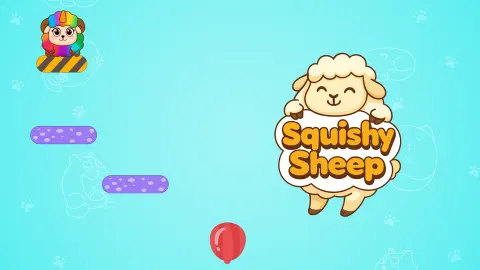









About Squishy Sheep
Most browser physics puzzles hand you something to add. A rope to swing from, a cannon to aim, a crate to drop into a gap. Squishy Sheep hands you one click, and the only thing that click can do is take something away. You never place a piece, never steer the sheep and never touch it directly. You delete the floor underneath it and watch where the fall goes.
The target is red balloons. Each level puts one, two or three of them somewhere below a sheep standing on a short plank, and the level is over when the sheep has touched all of them. Since the only verb available is remove, every level asks the same question in a new shape: which piece of this structure, taken away, sends the sheep through every balloon on the way down.
What caught us out is how little hurry there is in it. The sheep stands on its plank indefinitely. Nothing drifts, nothing counts down, no bar drains while you think, and in the levels we reached there was nothing on screen moving on its own. You can study a level for a minute before you commit. It looks like a reaction test and plays like a diagram.
The game is credited to Drivix Games. This one went up in October 2025 and was last updated the following August.
Here is what this page is built on. We came in on a Level Complete card, played levels two, three and four through to their own Level Complete cards, and left in the middle of level five — about four minutes in one sitting, on a desktop with a mouse. We never saw the first level, never reached the end, never opened the settings and never found out what the coins buy. Where this page states something, we watched it happen; where we are reading between the lines, it says so.
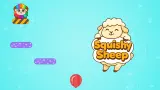
Yellow and black means the floor is about to go
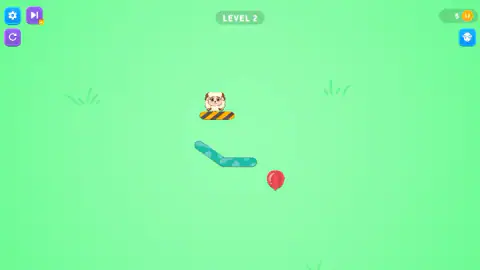
The clearest piece of design here is a paint job. In every level we reached, the object holding the sheep up was striped diagonally in yellow and black, and nothing else on screen was. Not the teal ledges, not the purple ones, not the balloons. By the fifth level the striped thing was not even a plank any more. The shape changed; the warning paint did not.
That colour is borrowed straight from the real world, and from a rule that is written down. American workplace safety law lays out which colours mean what on a factory floor, and it is explicit about this one: yellow is the basic colour for marking caution and physical hazards. The hazards it names are striking against, stumbling, falling, tripping and getting caught in between. Yellow-and-black diagonals are what a loading-bay lip, a low beam or the nose of a step gets painted, and the message is always a version of the ground stops being reliable here.
Which is exactly the information a one-click puzzle needs you to have. Without it, every level would start with the player poking at things to find out which of them can be deleted, and the puzzle would be a search instead of a decision. Painting the loose object in the universal colour of you are about to fall removes that guessing completely. A nine-year-old who has never seen a hazard stripe in a game has almost certainly seen one on a kerb or a car park ramp, and reads it right the first time.
Five coins a balloon
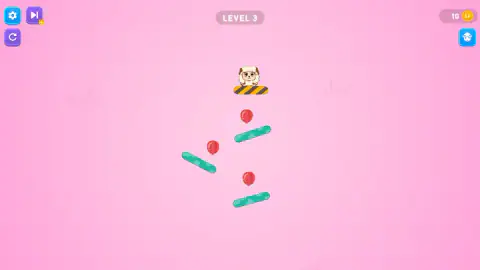
A coin counter sits in the top-right corner, the coin stamped with a little two-lobed hoof print. We read it at the start of four consecutive levels: 5, then 10, then 25, then 40.
Line those readings up against the balloons on each level. The level that paid five had one balloon in it. The two that paid fifteen each had three. Across every reading we have, the arithmetic comes out at five coins a balloon — which also means the payout is for finishing and nothing else. Nothing counted our clicks, nothing timed us, and restarting a level did not appear to cost anything. That is a fit across three increments rather than a rule the game told us, but it is the only pattern the numbers support.
What we cannot tell you is where the coins go. Under the counter there is a blue button with a sheep's head on it, which in a game like this is usually where the hats and the recolours live, and we never opened it. That is a hole in this page, and we would rather name it than guess at what is behind the door.
A phone game stretched across a desktop window
It is listed as a portrait game, and playing it on a wide desktop window makes that obvious. It does not letterbox: the field stretches to fill whatever you give it, the four buttons go to the far corners, and the puzzle itself stays in a narrow strip down the middle. The result on a big screen is a small, tidy diagram surrounded by a great deal of flat colour — green on the second level, pink on the third, turquoise on the fourth and fifth. Held upright on a phone, that strip is the whole screen and the layout makes sense.
The ads behave like a phone game's too. They come between levels rather than during them, which is the right place for them in a game made of thirty-second puzzles. In our session the break dimmed the level behind it and the platform put up a note of its own, saying it had skipped the ad that round, with a button to carry on. Beside the settings gear there is a skip-forward button carrying a small gold video badge, which in this kind of game normally means watch something and jump this level. We left it alone, so what it actually costs is one more thing we did not check.
More games by Drivix Games
Maths Puzzle is the same studio in its other register: the pieces stay still and the work is arithmetic rather than gravity. Sticker Art Book Puzzle is Drivix again, and closer in spirit than it looks — one tap, one piece, and no way to lose. If what you liked here was setting something off and watching it play out, Wonder Vending Machine runs on the same pleasure, with the drop happening inside the glass. The rest are in kids games.
Screenshots

How to play Squishy Sheep
- Look before you touch. Nothing moves until you make it move, so there is no penalty for reading the level first. Find the balloons, then work out what stands between them and the sheep.
- Find the striped object. One thing on screen is painted in yellow-and-black diagonal stripes, and the sheep is sitting on it. In the first four levels it was a stubby plank; by the fifth it was a pair of striped balls.
- Click it. It vanishes, the sheep drops, and from that moment the level runs on its own. In every level we played there was exactly one striped object, so the first click was also the last decision.
- Watch the whole fall before you judge it. The sheep bounces off the fixed ledges rather than landing on them, and a route that looks like a miss halfway down often sweeps the last balloon on the rebound.
- Use RESTART rather than waiting out a bad drop. It is the purple circular arrow under the gear, top left, and it puts the level back exactly as it was.
What the session taught us:
- The keyboard never started anything. We pressed all four arrow keys over and over, held them down and tried Enter. The sheep did not twitch. Every level that ended began with a click.
- You are not aiming, you are choosing. The sheep has no steering and no jump. Where it ends up is decided entirely by which object you took away.
- The balloons do not have to be collected in order. In the levels with three of them, scattered down a zigzag of tilted ledges, one good fall swept the lot on its way past.
- The fourth level looks worse than it is. Two long ledges lean together into a V, wide at the top and narrow at the bottom, with the three balloons bunched directly under the gap. It reads as a trap and it is actually a funnel.
- The sheep is soft, and you can see it. On the fifth level it starts perched on two striped balls, and moments later it has sagged down into the gap between them without anything being clicked. The name is a physics note, not just a cute word.
Controls
| Left mouse button | Removes the object you click on |
|---|---|
| Tap (touchscreen) | The same thing, on a phone or a tablet |
| Restart button (top left) | Puts the level back the way it started |
| Gear button (top left) | Settings; we left it closed |
| Arrow keys | Nothing we could see. We pressed all four, held them down and tried Enter, and the sheep never moved |
Features
- One control and one verb: a click that deletes what you click, after which gravity does everything else
- A level ends when the sheep has touched every red balloon on screen, and there is no other goal
- No timer, no lives and no drifting pieces: the sheep stands still until you take its floor away
- The object holding the sheep up is painted in yellow-and-black hazard stripes, and nothing else on screen is
- Coins paid out level by level: the counter read 5, then 10, then 25, then 40 across the four starts we saw
- A crowned sheep, a green NEXT and a purple RESTART between every level
- Made by Drivix Games
Game details
- Developer
- Drivix Games
- Release date
- October 2025
- Last updated
- August 10, 2026
- Added here
- August 2025
- Technology
- HTML5 (2D physics)
- Platforms
- Browser (desktop, mouse), Browser (mobile & tablet, touch)
- Saved progress
- Saving, when available, is managed by this game. Mava cannot confirm your level.
FAQ
How do you play Squishy Sheep?
You click or tap an object and it disappears. That is the whole control scheme. The sheep is resting on something, and taking that something away is the only way to make it fall, bounce and roll towards the red balloons it has to collect. A level ends when the sheep has touched every balloon on the screen.
Which platform should you remove in Squishy Sheep?
In every level we reached, the object directly under the sheep was painted in yellow-and-black diagonal stripes, and nothing else on screen carried those stripes. In the fifth level it was not even a plank any more but a pair of striped balls. The paint is the game telling you which object is the loose one.
Does Squishy Sheep need fast reactions?
Far less than its cute, bouncy presentation suggests. The sheep sits still until you take its floor away, so you can study the shape of a level for as long as you like before the first click. In the five levels we saw there was nothing on screen moving on its own, so there was nothing to react to.
What are the coins in Squishy Sheep for?
We cannot tell you. A coin counter sits in the top-right corner and climbs after every level, and there is a blue button below it with a sheep's head on it that looks like the place you would spend them. We played four levels without opening it, so what the coins buy is a gap in this page rather than something we are withholding.
How many levels does Squishy Sheep have?
Nobody publishes the number and we did not reach the end. We came in on a Level Complete card, played levels two, three and four, and left in the middle of level five. Each one was solvable in a handful of clicks, so the total is likely to be high rather than low.
Does Squishy Sheep work on a phone?
It is built for one. It is listed for Android and iOS as well as PC, and lists its orientation as portrait. A tap does exactly what a click does, and the buttons sit in the four corners where thumbs reach. Played in a wide desktop window it stretches rather than letterboxing, which leaves a lot of empty field around a small puzzle.
Are there ads in Squishy Sheep?
Yes, between levels rather than during them, which is the right place for them in a game made of thirty-second puzzles. In our session the break dimmed the level and the platform put up a note saying it had skipped the ad that round, with a button to carry on. There is also a skip-forward button beside the gear carrying a small video badge, which we did not press.
Who made Squishy Sheep?
Drivix Games, according to the game's listing. The game was published in October 2025 and last updated in August 2026. Note that a different game with the same name exists on FRVR, credited to another studio; it is not this one.