







About Rough Ball
Rough Ball is a platformer that takes away walking. The purple ball at the bottom of the first cave cannot roll left or right on command. It can only hop, up and to the left or up and to the right, and everything else is the physics deciding where it lands.
That one rule makes the game. A short hop to the right lifts you onto the first step; a hop the wrong way bounces you back off a wall. Then the game tells you the trick that turns it into a climber: you can jump again whenever you touch anything. Press the key fast against a wall and the ball works its way up it. The aim, painted in a sign at the top of the screen, is make your way to the top.
The pixel caves are brown earth and grey stone, with a sword stuck in the ground near the start, a few coins hanging in the air and WELCOME written on the rock. A red flag marks where you begin, and red arrows painted on the floor hint at the next move.
Rough Ball is by SecGame, the studio credited as its developer, and it was published on 18 March 2026. Our session covered only the start of the climb: the first room and the foot of its first tall wall.
Two keys and a wall
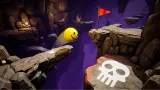
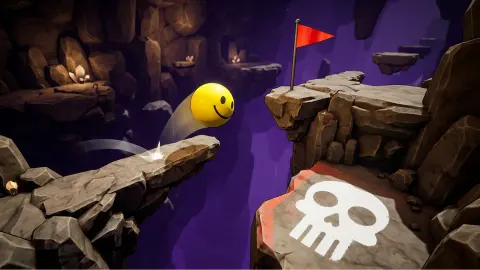
The jump rule is the heart of the game, and it is not obvious from the cover art. The cover shows a glossy yellow ball over a skull; in the game you get a small purple pixel ball with a face that changes as it flies, from a grin to a worried look, and it leaves a purple trail in the air.
Because each key throws the ball in a fixed diagonal, you cannot stop halfway along a ledge. You line up a jump by where you start it. In our run the ball bounced around the first steps before settling at the foot of the first tall wall, where a red arrow points straight up. The hint card at the top left had changed by then: Spam jump to climb walls, maybe more? That question mark is the game inviting you to test what else counts as "anywhere". We did not get far enough to find out.
Checkpoints you plant yourself
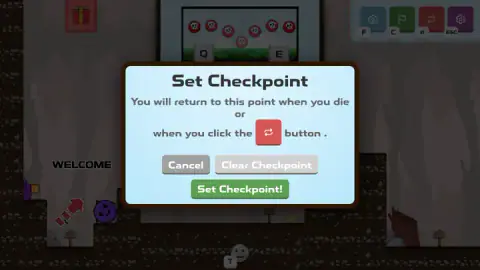
Most climbing games either save for you or refuse to save at all. Rough Ball hands you the flag. Click the green button and a window explains the deal: you will return to that point when you die or when you click the red button. You can Cancel, Clear Checkpoint or “Set Checkpoint!”
When we confirmed one, confetti fell across the cave, a card at the top said Keep going..., and the red flag stood next to our ball on the ledge where we had saved. From then on, the red button is your safety rope. It also works as a manual reset: if the ball wedges itself somewhere awkward, one click puts you back on your flag.
The game's description talks about deadly pits and a red flag at the end of each level. In our session we did not fall, did not die and did not reach a finish flag, so we cannot tell you how far a fall costs you or how a level ends.
Climbing games where the fall is the enemy
Rough Ball belongs to a family of games about going up and dreading going down. Getting Over It with Bennett Foddy, released in December 2017, has you haul a man in a cauldron up a mountain with a hammer, and it famously has no checkpoints. Jump King, by the studio Nexile, came out on Steam in May 2019. It is one long vertical stage where you choose the direction of each jump, and again there are no checkpoints to catch you when you slip.
What those two games share is that one bad jump can undo an hour of climbing. Rough Ball keeps the jumping that is hard to control, but lets you decide how much a fall can cost. Plant your flag often and it plays like a puzzle you solve a ledge at a time. Never plant it and you get closer to the old, unforgiving kind of climb. That choice is yours from the first room.
What we did not see
Our run stayed in the opening cave. We never made it up the first tall wall, so we did not see what lies above it, any pits, or the end of a level. A red gift box sits in the top left corner of the screen, and a white smiley button marked T sits at the bottom; we did not open either. The Settings panel has a Show Other Players switch, turned on, and a Return to Hub button, which suggest other players' balls and a shared hub, but we saw no one else in the cave. We saw no score or coin counter either. All our playing was on a computer with a keyboard, so the touch controls are untested here.
Who it is for
Rough Ball suits players who like precise, patient platforming and do not mind being bounced back a few times. The checkpoint button makes it gentler than the climbing games it resembles, which helps younger or newer players. There is very little to read: two keys and a hint card.
It is not a game for people who want to run and jump freely. If that is you, Mega Jump sends a monster up a jungle on small platforms. From the same studio, SecGame, Ball Jump Switch The Colors has you tap a ball upwards through coloured obstacles. For more climbing, “Climb Up!” is a 3D mountain ascent with a hand on each stick, and Jumper Jam climbs tall towers on just two keys, like this one. More quick-to-learn games are in arcade games.
Screenshots
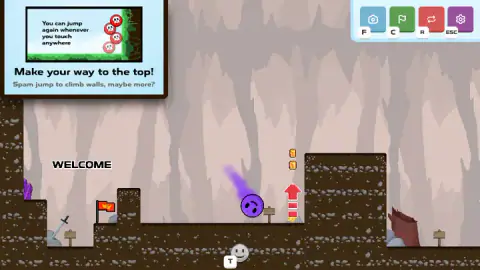
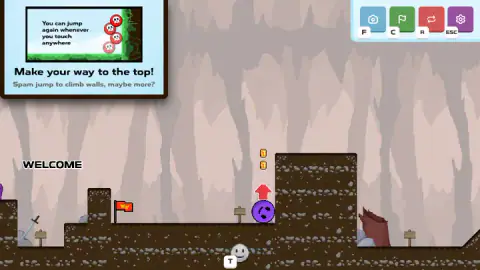
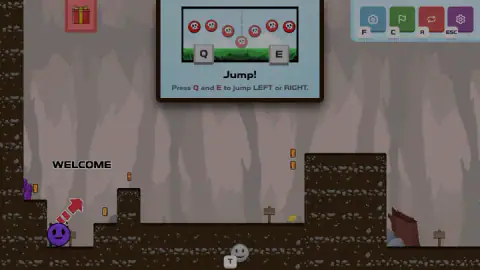
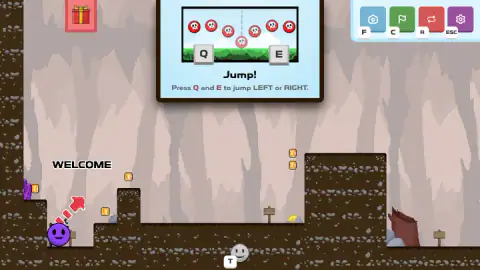
Taken by opening the game ourselves and letting it run — not supplied by the publisher, and not the same picture every other site shows.
How to play Rough Ball
- Press E to hop up and to the right, or Q to hop up and to the left. The blue card at the top that says “Jump!” only shows these keys; it does not need closing.
- Follow the red arrows on the floor. The first ones point you right, onto a raised step and towards a tall wall of rock.
- At a wall, hop into it and keep pressing. Every touch gives you a fresh jump, so mashing the key walks the ball upwards.
- When you reach a spot you do not want to lose, press C or the green flag button and confirm “Set Checkpoint!”
- If you fall or get stuck, the red button (or R) sends you back to your checkpoint.
Tips
- Use the keyboard, not the mouse. Clicking on the ball or the floor does nothing. All the movement is on Q and E.
- Small taps, not long presses. Each hop is a fixed arc. You steer by choosing when to hop and which way, so a calm rhythm beats holding a key down.
- Set checkpoints often. We saw no limit or cost on them. The window also has Clear Checkpoint, if you would rather go back to the start.
- Stay away from ESC. It opens Settings and stops the game. If you land there by mistake, press Continue Playing.
Controls
| Q | Hop up and to the left (the game's own sign) |
|---|---|
| E | Hop up and to the right (the game's own sign) |
| C (green flag button) | Opens Set Checkpoint to save your current spot |
| R (red button) | Sends you back to your checkpoint |
| ESC (purple gear button) | Settings, with Continue Playing to get back in |
| F (blue camera button) | Camera; we did not try it |
Features
- A purple ball that never rolls on command: every move is a hop, left on Q or right on E
- You can hop again the moment you touch anything, so mashing the key against a wall walks you up it
- One goal, written on the wall at the start: make your way to the top
- Checkpoints you place yourself with the green flag button, and a red button that takes you back to them
- Red painted arrows on the cave floor that hint at the next jump
- A Settings panel with a Show Other Players switch and a Return to Hub button
- Pixel-art caves of brown earth and grey stone, with coins hanging in the air
Game details
- Developer
- SecGame
- Release date
- March 2026
- Last updated
- August 10, 2026
- Added here
- January 2026
- Technology
- HTML5 (2D, pixel art)
- Platforms
- Browser (desktop, keyboard), Browser (mobile & tablet, touch)
- Classification
- Arcade
- Saved progress
- Saving, when available, is managed by this game. Mava cannot confirm your level.
FAQ
How do you play Rough Ball?
Press Q to hop up and to the left and E to hop up and to the right. You can hop again as soon as the ball touches anything, so pressing the key over and over against a wall climbs it. The goal, shown at the start, is to make your way to the top of the cave.
What are the controls for Rough Ball?
On a computer the game's own sign says Q and E: Q jumps left and E jumps right. The buttons in the top right corner also have keys: F for the camera, C to set a checkpoint, R to go back to it and ESC for settings. The listing's page lists the arrow keys and Space instead; we played with Q and E.
How do checkpoints work in Rough Ball?
Click the green flag button (or press C) and a Set Checkpoint window opens. It explains that you will return to that point when you die or when you click the red button. You can confirm, cancel or clear the checkpoint. When we set one, confetti fell and the game said Keep going.
Why is Rough Ball not moving?
The ball does not respond to clicks on the level. Use Q and E on the keyboard. The blue card at the top that says Jump! is not a menu you need to close: it shows the controls, and the game carries on underneath it. If the Settings panel is open, press Continue Playing.
How do you climb walls in Rough Ball?
Spam the jump key while pressed against the wall. The game's own hint says you can jump again whenever you touch anywhere, and a wall counts. A red arrow pointing up marks the first wall you have to climb.
Is Rough Ball a multiplayer game?
Its Settings panel has a Show Other Players switch and a Return to Hub button, which suggests other people's balls can appear in the cave. In our session we never saw another player, so we cannot confirm how that works.
Who made Rough Ball?
Rough Ball is by SecGame, the studio credited as its developer. It was published in March 2026 and is free to play in the browser.