


About Roll Rush
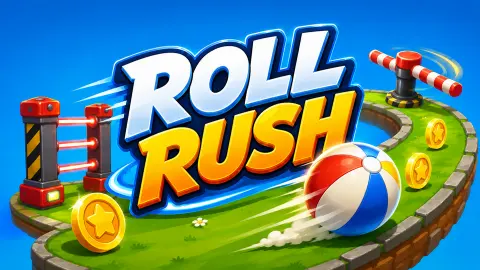
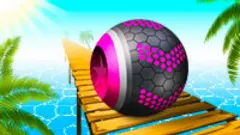
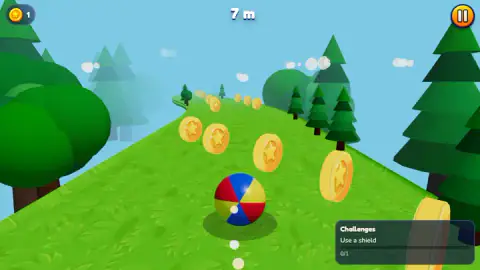
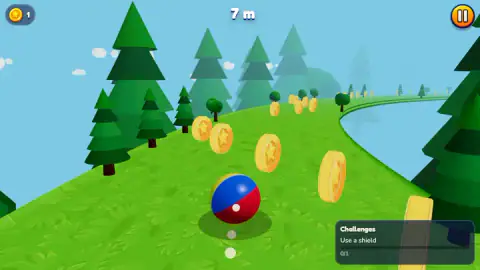
A beach ball is the worst thing you could possibly race down a hill. It is hollow, it is light, and against anything solid it loses, every time. Roll Rush hands you one anyway: four bright panels of red, blue, yellow and white, dropped onto a green slope lined with toy conifers, already moving before you have worked out what the buttons do.
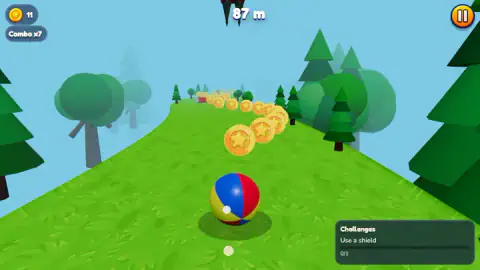
There are no buttons. That is the design. The ball goes forward because the hill goes down, and the only thing you get to decide is where across the slope it goes. Gold coins stamped with a star float in long curving lines, inviting you off the safe middle. Red-and-yellow road barriers sit in the way like something borrowed from roadworks. A number at the top counts the metres, and it is the only score there is.
The game is credited to Yenemy Studios. This one went up in August 2026 and was updated a month later.
Here is what this page is built on, and some of it is unflattering. We played it on a desktop for about four minutes. Our best run reached 149 m, most ended near 100 m, and a good part of the session was spent not rolling at all but staring at a pause card we had summoned ourselves. We never opened the shop, never unlocked a second ball, and never found the shield the game spent the whole session asking us for. Why that happened is in the next section, and it will save you the same four minutes.
The hill is the engine, and there is no brake
Games about going fast usually give you a throttle to hold and a brake to be brave about. This one gives you a gradient. Everything the ball does on the straight is settled by the shape of the ground, which is why the control scheme is so thin: there is nothing to accelerate with, because the slope is already doing it, and nothing to slow down with, because slowing down is not a move you would ever want.
That is the reason the genre works at all. A ball on a hill turns height into speed, continuously, without asking you. The steeper the ground, the faster it adds up.
The choice of ball is the joke underneath all this. There is a classic school experiment, the rolling race, where you let a solid ball and a hollow one go from the top of the same ramp at the same moment. The solid one always wins. Not usually: always, no matter how heavy either one is or how big. Mass and size cancel out entirely, and what is left is where the mass sits. A hollow ball keeps all of it out at the skin, far from the centre, so more of the push from the hill goes into spinning the shell and less into getting down the slope. The gap is small but it never flips: around a tenth faster for the solid one, all the way down.
Which makes a beach ball the slowest serious candidate you could have picked. Roll Rush ignores that and sends it down the hill like a cannonball, because a four-colour sphere is the easiest thing in the world to track against green grass. That is the kind of trade a game makes and a physics teacher does not.
Two runs can end on the same metre and pay different coins
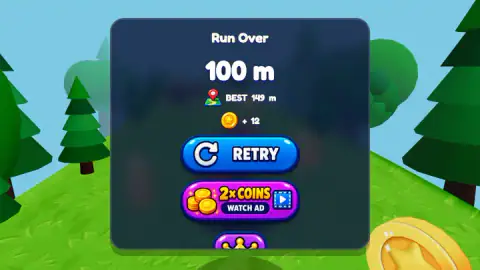
The results panel shows four things: the distance you reached, your record, the coins you earned, and the buttons. We read it carefully, because the coin line is the one place the game's maths shows.
Two of our runs ended at exactly the same distance, 100 m. One paid twelve coins. The other paid ten. A longer run, ending at 144 m, paid twenty-eight.
So the payout is not a function of distance alone. What changes between two identical endings is what you picked up on the way, and that is where the coin lines stop being decoration. Hooking a long curve of them is worth real money; playing the safe middle of the track and surviving the same number of metres is not worth as much.
The counter in the top-left corner tracks the run's haul as you go, and under it a Combo badge appears once you start stringing pickups together. It is not simply counting coins. We had three coins with a combo of three early on, but later the purse read eleven while the badge still said seven, so something resets it that we could not pin down — most likely a coin missed rather than a coin taken. Either way, the behaviour you want is the same: get the whole line, not most of it.
The Run Over screen, and the button we left alone
Stopping is abrupt. There is no tumble and no slow-motion, just a barrier and then a dark panel in the middle of the screen with Run Over across the top, your metres in large type, a little map pin holding your record, and a coin icon with your earnings beside it.
Under that sit the buttons, and one of them deserves describing plainly because it is the game's, not ours. The blue RETRY restarts. Below it is a purple panel reading 2x COINS, marked WATCH AD, with a small video icon on the end: the game offering to double the coins from the run you just finished if you sit through a video. We did not press it, so we cannot tell you how long it runs, whether it always has something to show, or what happens if you close it halfway.
There is a third button under those two, also purple. In every capture we have of that screen it is clipped by the bottom edge of the panel, so we only ever saw its top half. We do not know what it offers. We would rather say that than guess, and if it turns out to be something the game needs you to reach, it is worth knowing that in a wide desktop view it may not be fully there.
More balls, and more hills to lose them on
The same studio's Strike Bullet is the opposite kind of aiming problem: one shot, metal walls, and a ricochet you have to picture before you take it. Yenemy, the game the studio is named after, goes much bigger, with gathering, building and clan-sized fights. For more rolling, Roll Sky Ball 3D puts the same single-axis steering on narrow tracks in mid-air, where the edges matter more than the obstacles. Giant Snowball Rush is the closest relative on the shelf, a downhill ball that grows as it goes. And Slope City 2 takes the descent into a city and has an actual shop full of balls, which is what the BALLS button here looks like it is hiding. The rest is in action games.
Screenshots
How to play Roll Rush
- Press the green PLAY button. It sits in the middle of the menu, under a slowly turning beach ball. The other buttons around it — BALLS, SHOP, RANKS, a trophy, a gear — are not needed to start.
- Steer sideways, because sideways is all there is. On a computer the ball tracks the mouse left and right. On a phone you drag. There is no key for forward and nothing that stops you.
- Treat each coin line as a route, not a reward. The coins are laid out in curves that pull you across the track. Following one is how you build a combo, and also how you end up on the wrong side of a barrier.
- Read the gap, not the obstacle. The barriers are wide and brightly striped, so the useful question is which side of one you will pass, decided early rather than at the last metre.
- When Run Over appears, take RETRY. The blue button with the looping arrow drops you back onto a fresh hill immediately, with no loading screen.
What our run actually taught us:
- The round button in the top-right corner pauses, it does not resume. We hit it over and over expecting the opposite, and turned a four-minute session into a slideshow of pause cards. The card itself is plain: Paused, an orange RESUME, a blue MAIN MENU with a house on it, and a small sound toggle underneath.
- MAIN MENU on that card throws the run away. RESUME is the one you want, and clicking anywhere outside the card does nothing.
- Your distance resets and your record does not. Every run restarts the metre counter at zero, while BEST sits on the results panel as the number to beat.
- The Challenges panel runs in the background. Ours asked us to use a shield for the entire session, stayed at 0/1, and never explained where a shield comes from. If you find one, you are ahead of us.
Controls
| Mouse left and right (desktop) | Steers the ball across the slope. This is what the game's listing gives for desktop, and it matches a line the game shows under the menu ball |
|---|---|
| Drag left or right (touch) | The same steering on a phone or tablet, according to the game's listing. We played on a desktop, so we have not tried it |
| A and D | Offered on the menu's own one-line control hint alongside dragging. We could not get either key to move the ball, so treat it as unconfirmed |
| PLAY (green, centre of the menu) | Starts a run. The menu also holds BALLS, SHOP, RANKS, a trophy and a gear, none of which we opened |
| Pause button (orange, top right) | Pauses. It does not resume, which is the single most expensive thing we learned |
| RESUME / MAIN MENU | The two buttons on the pause card, orange and blue. MAIN MENU throws the run away |
| RETRY (blue, results panel) | Starts a fresh run at once, with no loading screen in between |
Features
- One input and nothing else: the slope sets your speed, you only choose the line across it
- Distance is the score, counted in metres at the top of the screen and reset the moment a barrier stops you
- Gold star coins float in long curving lines, and a Combo badge climbs as you keep hooking them without a break
- A persistent Challenges panel in the corner, which spent our whole session asking for a shield we never found
- Runs end on red-and-yellow road barriers, hard stops rather than a tumble, and the results panel appears instantly
- Our best was 149 m and most runs ended near 100 m, which is roughly a minute of rolling
- Made by Yenemy Studios, a six-game studio
Game details
- Developer
- Yenemy Studios
- Release date
- August 2026
- Last updated
- September 22, 2026
- Added here
- August 2026
- Technology
- HTML5 (WebGL)
- Platforms
- Browser (desktop, mouse), Browser (mobile & tablet, touch)
- Saved progress
- Saving, when available, is managed by this game. Mava cannot confirm your level.
FAQ
How do you play Roll Rush?
You steer a beach ball down an endless green hill and try to survive. The ball moves forward on its own and you only control it sideways, with the mouse on a computer or by dragging on a phone. Collect the gold star coins on the way and avoid the striped barriers, because touching one ends the run.
What are the controls in Roll Rush?
The game's listing gives two: move the mouse left and right on desktop, drag left or right on a touchscreen. The game's menu also shows a one-line hint offering the A and D keys, which never moved the ball for us. There is no jump, no brake and no boost, so sideways is the whole control scheme.
What is a good distance in Roll Rush?
We cannot tell you what the top of the leaderboard looks like, only what we managed. Our best run reached 149 m and a typical run ended somewhere near 100 m, which takes about a minute. The results panel keeps your record on screen as BEST, so you always know what you are chasing.
How do you earn coins in Roll Rush?
Coins float in lines along the track and a counter in the top-left corner adds them up during the run. They are paid out on the results screen when you stop. Distance alone does not decide the payout: two of our runs ended at the same 100 m and paid different amounts, so what you picked up on the way counts too.
What is the 2x COINS button on the Run Over screen?
It is the game's own offer, not an advert placed by this site. When a run ends, the panel shows your distance, your record and the coins you earned, and under the blue RETRY button sits a purple one offering to double those coins in exchange for watching a video. We did not press it, so we cannot tell you what plays.
What do the coins buy in Roll Rush?
The menu has a BALLS button and a SHOP button sitting either side of PLAY, which is where a currency like this normally goes. We never opened either one, so we cannot tell you what is in them or what anything costs. Until someone checks, assume the coins buy new balls and nothing that changes how a run plays.
Does Roll Rush work on a phone?
It is listed for Android and iOS as well as PC, and lists both landscape and portrait, with dragging as the touch control. We played it only on a desktop in a wide view, so how it handles on a small screen, and whether the results panel fits there better than it did for us, is something we have not checked.
Who made Roll Rush?
Yenemy Studios, according to the game's listing. It was published in August 2026 and updated in September 2026. We found no studio website to confirm the name against a second source, so it rests.