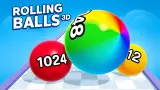






About Rolling Balls 3D
Most runners count how far you got. Rolling Balls 3D counts how many of you are left. A small counter floats over the ball, it starts at x1, and every gate, wall and spike on the lane is there to change that number.
The lane is white, edged with purple rails, and hangs over dark hills under a pink sky. The ball rolls forward without being asked. Your part is to move it sideways, and nearly every sideways move is a choice between two sums.
The game is credited to Foxi Games. It was published at the end of August 2025.
We should say how far we got, because it is not far. We played about four minutes on a desktop with a mouse, all of it on the first level, which the game calls Level 0. We lost it five times and did not finish it once. This page covers what those attempts showed and stops where they stopped.
The number over the ball is your life
The counter is easy to miss. It sits just above the ball, a pair of small white figures and a number. On the start screen a card called Starting balls shows the same x1, which is how we know what it counts.
There are no hearts and no timer. When the counter reads x0 a blue panel with the words "You Lose" covers the screen. On two of our losses the lane behind the panel was scattered with loose bricks. On another, two red cones stood next to where the ball had been.
Every time we looked, the counter read x1 or x0, never more. That is the honest measure of our session: we did not once build a group large enough to afford a mistake. The game is plainly designed around doing so, and we cannot describe how a large group behaves.
Green and red gates, and the sums on them
Gates come in two colours and each carries a sum. Among the green ones we read x1.6 and +19.
Among the red ones we read ÷1.5 and -2.
So the game uses all four operations, and they are not equal. A +19 is worth far more than a x1.6 when you hold one ball. It would be worth less once you held thirty. That shift, from wanting additions early to wanting multiplications late, is the part of the game that takes thought, and it is not obvious on a first try.
The colour does the first half of the reading for you. The number does the second, and it matters when the lane offers two green gates or none.
Level 0 was not the same track twice
We expected to learn the level by losing it. That did not work.
One attempt opened with a red strip across the lane, a raised white block and a brick wall behind it. The next opened with a brick wall on the left and the +19 gate on the right. Each time we came back to the start screen, the gates in the distance carried other numbers.
Further along, the track has more than gates. On one attempt we met a clean pair, x1.6 against ÷1.5, and behind it the lane narrowed to thin grey rails leading up to a raised block.
The ball changed too. It was green on one attempt and purple on another. We saw nothing that tied the colour to how it plays.
What this means in practice: a restart is a new reading test, not a second go at the same question.
What losing costs, and the two cards on the start screen
The "You Lose" panel has two buttons, Restart in blue and Menu in orange. Restart puts you back on the start screen of the same level. Our coins were untouched by losing: the counter at the top right stayed where it was through every defeat.
Coins did rise once without our doing anything. A card headed Offline earnings appeared between attempts, and the total went from 100 to 105.
The start screen keeps two upgrade cards in its bottom corners. Starting balls stood at x1 and Offline earnings at +0%, both at their lowest level.
Each was priced at 56 coins, so the 100 we began with would have paid for one. We did not buy either. Given how our attempts ended, more starting balls is where we would spend first.
Who it is for
Players who like quick sums under pressure, and who do not mind short attempts. A loss costs nothing but the restart, and a restart takes one click.
It is not a ball-balancing game. The lane has a rail on each side, and what we met on it was the choice of gate and the obstacles between. We also cannot tell you what the finish looks like or how many levels follow, because we did not get there.
More games built on a number that grows
The Biggest Number is the nearest relative here: you steer a number down a track, take anything your size or smaller and avoid the red ones. Master of Numbers works the same way and makes you pay for walls out of your own total. If you want a ball and a track without the arithmetic, Roll Sky Ball 3D has you drag a steel ball along floating paths, and Rolling Balls Sea Race is a race along wooden piers that two can play on one keyboard. The rest are in the 3D games category.
Screenshots
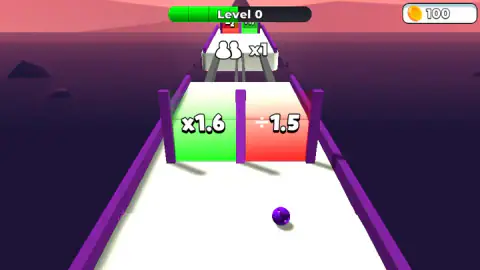
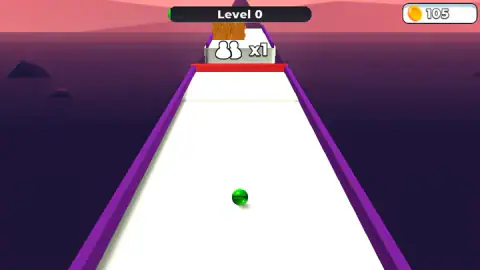
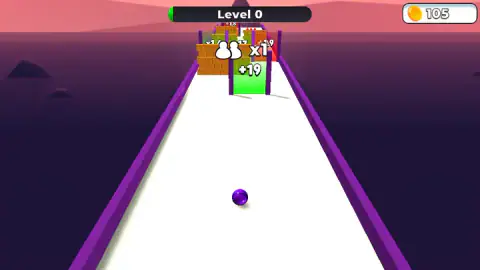
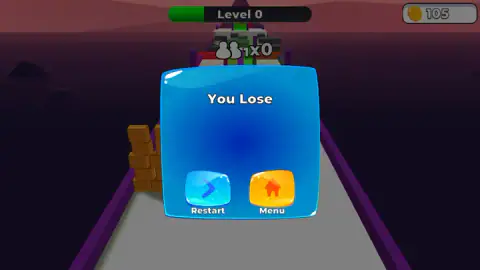
Taken by opening the game ourselves and letting it run — not supplied by the publisher, and not the same picture every other site shows.
How to play Rolling Balls 3D
- On the start screen, click once. The words on the lane are "Click to play", with a yellow hand under them.
- The ball sets off by itself. Drag left or right to move it across the lane.
- Where two gates stand side by side, steer through the green one. It adds to your ball count; the red one takes away.
- Keep clear of brick walls and red spikes while your count is low.
- Watch the bar behind the words "Level 0" at the top. It fills in green as you get further along.
Tips from our session:
- The first seconds decide the attempt. With one ball, the first thing you touch that is not a green gate ends it. One of our attempts lasted about twenty seconds from the click to the panel.
- Read the far gates while the lane is still empty. The numbers are legible well before the ball arrives. By the time a gate fills the screen you have very little room left to cross over.
- Do not memorise the opening. It changed every time we restarted.
- A wall can stand in front of a gate. On one attempt a brick wall covered the left half of the lane and a green +19 gate stood on the right. The gate was the way through, not a bonus.
Controls
| Click (start screen) | Starts the attempt; the screen says "Click to play" |
|---|---|
| Drag left or right | Moves the ball across the lane while it rolls forward on its own |
| Restart (blue button) | On the "You Lose" panel, starts Level 0 again |
| Menu (orange button) | Offered next to Restart on the "You Lose" panel; we cannot say for sure where it leads |
| Arrow keys | Pressed once each; we could not tell that they did anything |
Features
- A ball that rolls forward by itself along a white lane with purple rails, steered only from side to side
- Gates in two colours, green for a gain and red for a loss, each with its sum on it, such as x1.6 next to ÷1.5
- A counter over the ball that shows how many balls you have, and ends the attempt when it reads x0
- Brick walls and red spikes between the gates
- A different track on every attempt at the same level, in what we played
- Two upgrade cards on the start screen, Starting balls and Offline earnings, at 56 coins each
Game details
- Developer
- Foxi Games
- Release date
- August 2025
- Last updated
- August 10, 2026
- Added here
- July 2025
- Technology
- HTML5 (3D)
- Platforms
- Browser (desktop, mouse), Browser (mobile & tablet)
- Download size
- 19.8 MB
- Ad requests
- 4 (some)
- Has a save
- Yes
- Saved progress
- Saving, when available, is managed by this game. Mava cannot confirm your level.
Measured by opening the game ourselves on 2026-09-11, not taken from the feed. Twelve seconds on a phone-sized screen, with ad requests counted and blocked rather than loaded.
FAQ
How do you play Rolling Balls 3D?
Click once on the start screen and the ball begins to roll forward by itself. You drag left and right to choose which gate it goes through and to keep it away from brick walls and red spikes. Green gates add to your ball count and red ones take from it. The attempt ends when the count reaches zero.
What do the green and red gates mean in Rolling Balls 3D?
Each gate carries a sum that is applied to your number of balls. Green gates show gains, such as x1.6 or +19, and red gates show losses, such as ÷1.5 or -2. They usually stand side by side, so the choice is made by steering to one half of the lane.
Why do I keep losing in Rolling Balls 3D?
You start with a single ball, and the counter above it reads x1. One brick wall or one row of spikes is enough to take it to x0, and the "You Lose" panel comes up at once. We lost Level 0 five times in about four minutes that way. Going through a green gate before the first obstacle is the obvious remedy.
Is the level the same every time in Rolling Balls 3D?
Not in what we played. We restarted Level 0 several times and the opening was different on each one, with other gates, other numbers and the walls in other places. Learning the track by heart did not help us.
What are the upgrades in Rolling Balls 3D?
The start screen shows two cards. Starting balls was at level 0 and x1, and Offline earnings was at level 0 and +0%. Each cost 56 coins. We had 100 coins and then 105, and we did not buy either, so we cannot say how the prices move.
How many levels does Rolling Balls 3D have?
We cannot say. The first level is labelled Level 0, and we did not finish it. No screen we saw gave a total.
Can you play Rolling Balls 3D on a phone?
It is listed for PC, Android and iOS, in landscape. We played in a landscape window on a desktop with a mouse and did not try it on a phone ourselves.
Who made Rolling Balls 3D?
The game is credited to Foxi Games. It was published at the end of August 2025 and last updated in August 2026.