




About Climb Up!
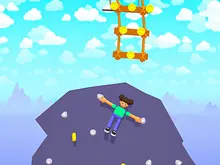
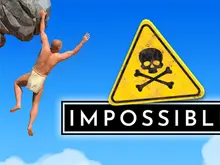
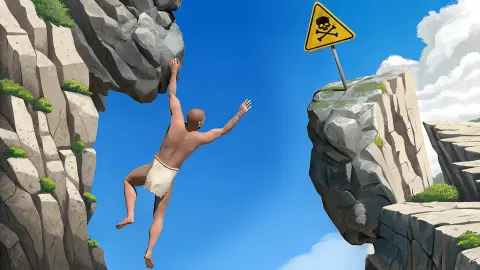
Most climbing games hand you a jump button. The Climb Up game hands you two arms and stops there. No legs push, no key leaps. A bare-chested climber in a white cloth hangs off a rock, and at the bottom of the screen sit two round buttons with a hand on each: one for his left arm, one for his right. Whatever height you gain, you gain by getting one hand onto something and then the other.
So the game is the grip. A yellow bush is a hold. So is a bare branch. So is the chequered disc where a run begins. Up in the corner a gold star counts metres and a stopwatch counts up, and between them they tell you how it is going.
The game is credited to Nishad Games and was published on 13 March 2025.
How it went for us shapes this whole page, so here it is early. We played for about ten minutes on the game's clock, and a minute and a half more after a restart. The star read 0m from the first second to the last. We got the climber out of the sea and one body length up a golden rock, and no higher. This page can tell you how the game handles and what the first rock is like. It cannot tell you what is above it.
Ten minutes of the Climb Up game, and the meter still said 0m
Our first clear view had the stopwatch at 03:46 and the climber chest-deep in the sea, at the foot of a rock covered in golden pebbles. We cannot tell you how he got there. The first minutes went on the opening screens, and by the time we could see properly he was already wet.
He stood in the water for over a minute with his right arm in the air. Then, at 05:15, the right hand was on a yellow bush at the edge of the rock. Ten seconds later the left hand had a bare branch above it and his feet were clear of the water. That was our high point: one body length. The star still said 0m.
It did not last. By 05:58 the left hand was off the branch, and for the next two and a half minutes he hung from the bush by his right hand alone. The left arm went up, out to the side, across. It never found anything.
At 08:53 he was back in the sea, to the right of the rock. We worked the right-hand button, the right hand found the bush again within half a minute, and that is where we stopped.
Two things are worth taking from this. The first is where the difficulty sits. Holding on was never the problem: a hand that reached the bush stayed on it for minutes. The problem is the next hold. We found one sequence that gained height, bush and then branch, and never found the third.
The second is that the water forgives. Nothing ended when the climber was in the sea. No card came up, the stopwatch kept running, and he could climb out again. We never fell from high up, so how much a long fall costs is something we cannot tell you.
What else is on the screen
Four round buttons run down the right edge: pause, sound, a circular arrow and a bin.
We pressed the circular arrow. The next thing we saw was the clock at 00:00 and the climber somewhere else entirely: both hands on a chequered disc ringed in green, with a location pin and a tick in the middle, on a moss-green rock with no sea in view. A yellow road sign points right, and a red-and-white barrel stands on a ledge nearby. A fresh load of the game opened in the same spot, so this is where runs start. The arrow button carries a small screen badge, the kind that often marks a video advert. We cannot say whether one normally plays.
We left the bin alone.
On the golden rock, two small round hand markers sit near the waterline, and a cartoon finger taps them in turn. It looks like a tutorial pointing at something. We did not work out what it wants.
Climbing with hands only has a name
Real climbers do this on purpose, and they call it campusing: going up with the arms alone, feet hanging free.
The word comes from a gym. In 1988 the German climber Wolfgang Güllich hung a board fitted with thin wooden rungs in the Campus Center, a gym in Nuremberg, and trained by moving from rung to rung without his feet. Three years later he climbed Action Directe, widely regarded as the hardest route in the world at the time. The campus board is now in climbing gyms everywhere.
What a campus board teaches is what this game asks for. With no feet, you cannot stand and think. Every move starts from a hang, and the free hand has to arrive on the next hold before the fixed arm gives up. Our climber's two and a half minutes on one arm were a campus move that never finished.
Who it suits
It suits a patient player who likes a game where the controls are the challenge. Nothing chases you and no timer runs out. The whole question is whether you can make two arms do what you mean, and the answer improves slowly.
It suits less anyone who wants quick progress. Ten minutes bought us one body length and a meter that never moved. If that sounds like a bad evening, it will be.
More ways up
Ladder to Brainhot: Climb Obby is a climb with a simpler deal: a lattice wall and a stamina bar that decides how far you get. Get Tall And Fall reaches height by stretching a blocky character and pays out for the drop. Puppetman: Ragdoll Puzzle goes the other way, lowering a limp puppet to the ground in one piece. The rest are under adventure games.
Screenshots
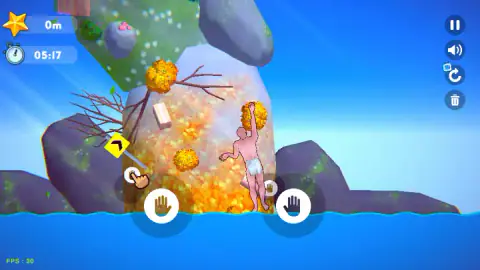
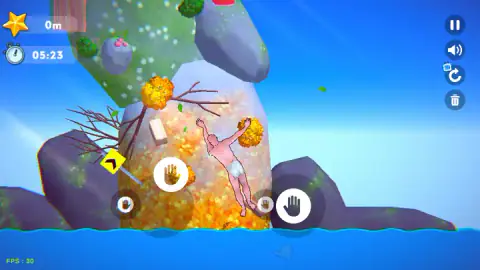
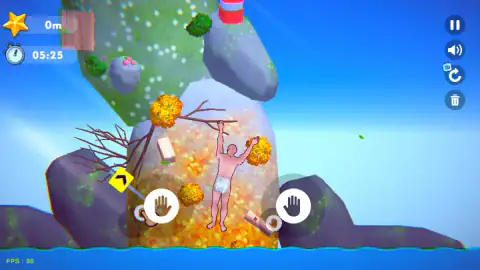
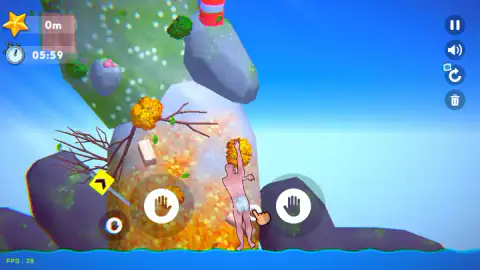
Taken by opening the game ourselves and letting it run — not supplied by the publisher, and not the same picture every other site shows.
How to play Climb Up!
- Find the two hand buttons. They sit side by side at the bottom of the screen. Left button, left arm. Right button, right arm.
- Press on a button and drag. It works like a stick: the arm follows the drag.
- Bring the hand to a hold. Bushes, branches and the chequered disc all took our climber's weight.
- Reach with the other hand. With one hand fixed, the free arm is the one that finds the next hold.
- Watch the star. It counts height in metres.
What we picked up while playing:
- Start the drag on the button. After the restart we dragged across the screen just beside the buttons for a minute and a half. The climber kept both hands on the disc and did not move at all.
- The hand icons are see-through. They look white over the sky, brown over rock and green over moss. As far as we could tell that is the scenery behind them, not a signal.
- Escape pauses, and the clock stops with it. The screen reads "Click anywhere to resume!". It took us more than one click.
- The sea is not the end. More on that below.
Controls
| Left hand button (press and drag) | Moves the climber's left arm; the drag has to start on the button |
|---|---|
| Right hand button (press and drag) | Moves the climber's right arm |
| Escape | Pauses the game and stops the clock; a click resumes |
| Circular arrow (right edge) | Sent us back to the chequered disc with the clock at 00:00 |
| Pause and speaker buttons (right edge) | On screen above the arrow; we paused with Escape and left the sound alone |
| Bin button (right edge) | Not pressed, so we cannot say what it clears |
Features
- A climber with two working arms and no jump: every bit of height comes from one hand, then the other
- Two round hand buttons at the bottom of the screen, one per arm, dragged like sticks
- Bushes, bare branches and a chequered disc as holds on a mountain of rock, moss and stray objects
- A gold star that counts height in metres and a stopwatch that counts up, with no limit in the ten minutes we watched it
- The sea at the foot of the first rock: landing in it did not end our run
- A chequered disc with a green ring and a location pin, where a fresh run starts
Game details
- Developer
- Nishad Games
- Release date
- March 2025
- Last updated
- August 7, 2026
- Added here
- May 2025
- Technology
- HTML5 (Unity WebGL)
- Platforms
- Browser (desktop, mouse), Browser (mobile & tablet, touch)
- Download size
- 16.3 MB
- Ad requests
- 5 (some)
- Has a save
- Yes
- Saved progress
- Saving, when available, is managed by this game. Mava cannot confirm your level.
Measured by opening the game ourselves on 2026-09-11, not taken from the feed. Twelve seconds on a phone-sized screen, with ad requests counted and blocked rather than loaded.
FAQ
How do you play the Climb Up game?
You control a climber's two arms and nothing else. Two round buttons at the bottom of the screen each carry a hand: drag the left one to move his left arm and the right one to move his right arm. Get a hand onto a bush, a branch or another hold, then reach higher with the other hand. A gold star in the corner counts the metres.
What are the controls in Climb Up!?
Everything is done with the two on-screen hand buttons, which work like sticks: press on one and drag. In our session a drag only counted when it started on the button itself. Escape pauses the game. We played with a mouse on a desktop.
Is Climb Up! hard?
It was for us. In about ten minutes on the game's own clock we got the climber out of the sea and one body length up the first rock, and the height meter read 0m the whole time. Holding on is easy; finding the next hold with the free hand is the difficult part.
What happens when you fall in Climb Up!?
We twice ended up in the sea at the foot of the first rock, and neither time did the game stop. There was no game-over screen and the stopwatch kept running, so from the water you simply start climbing again. We did not see a fall from high up, so we cannot say how far one sends you.
Is there a time limit in Climb Up!?
We did not find one. The stopwatch counts up, not down, and ours passed 09:50 with the game still running. It stops while the game is paused.
How do you restart in Climb Up!?
A round button with a circular arrow sits on the right edge of the screen, under the pause and sound buttons. After we pressed it, the clock was at 00:00 and the climber was hanging with both hands from a chequered disc. A fresh load of the game opened in the same place.
Who made Climb Up!?
It is credited to Nishad Games, and the game's loading screen shows a Nishad logo. It was published on 13 March 2025 for PC, Android and iOS. We played it in a desktop browser.