






About Mega Jump
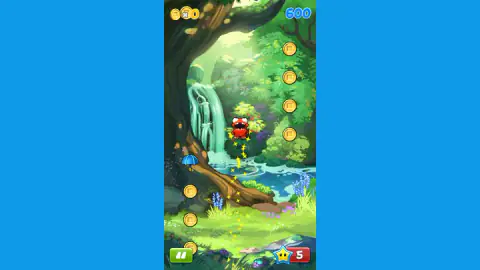
The first thing the Mega Jump game takes away is the floor. You start on a patch of grass at the bottom of a cartoon jungle, with a waterfall on your left and bluebells at your feet, and for about a second that grass is the only solid thing in the game. After that there is nothing underneath you but small purple platforms, each one a dome with a white zigzag under it and two knobbly wooden beams below that, scattered in loose staircases with gaps wider than they are. In one of our pictures there are six of them spread across the lower half of the screen and not one touches another.
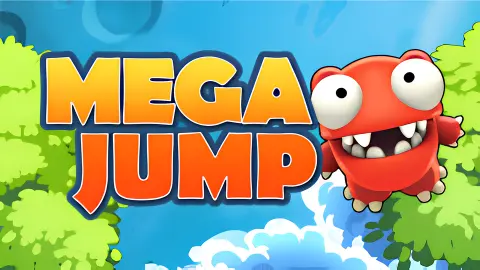
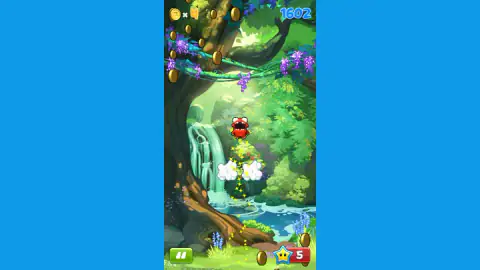
You are a red monster with two big white eyes and a mouth full of teeth, and the camera only ever goes up. What you are climbing towards is gold: coins hung in vertical columns down the side of the tree, in long curves that sweep over the top of the frame, in arcs through the leaves. They are not scattered. The shape the gold makes is the route, and reading that shape is most of what skill means here.
Two numbers sit in the top corners and they are not the same number, which took us a while to work out. Top left is a coin, a small cross and a count. Top right, in fat blue digits, is the score. In one of our captures the coin counter reads zero and the score reads 600 at the same moment, which is the clearest way we can put it: the coins are a pile you collect, and the score is how high you got.
The instruction card the game shows you once, before the first run, says DRAG OR USE THE ARROW KEYS TO MOVE and underneath it COLLECT COINS TO JUMP HIGHER. Notice what is missing from that: any mention of jumping as something you do. We did not notice. We spent a chunk of our first runs pressing up and wondering why the coin two body-widths to our right stayed exactly two body-widths to our right.
Our session ran about ten minutes and a good dozen runs, almost all of them cut short. Our best score was 3197 and the board at the end held five rows, every one of them ours.
The vertical jumper was invented for a phone you tilt, and this one is not one
The climb-upwards-forever game has a short and very datable history, and knowing it explains the one thing that makes this version awkward at first.
It starts on the iPhone. Sunflat released PapiJump in August 2008 — a small free thing with a bouncing character and an endless ladder of platforms. Doodle Jump, from Lima Sky, followed on 6 April 2009 and is the one everybody remembers. Both were steered the same way: you tilted the phone, and the character leaned the way you leaned it. There was no jump button in either, because the bounce was automatic. The whole of the game was the lean.
That is the genre this one belongs to, and it is why the instruction card offers a drag before it offers a keyboard. A drag is the nearest a browser gets to a tilt: you can be a little to the left or a lot to the left. An arrow key is on or it is off. On a desktop you are playing an analogue game with a switch, and the way to make it work is short taps rather than held keys — the opposite of what feels right in your first thirty seconds.
It also explains the missing floor. In a tilt jumper the ground is not a place, it is the losing condition. This one keeps that rule intact: the grass you start on never comes back, and the moment you are below the lowest platform, you are falling and the card is coming.
What the Mega Jump game does with your coins, and what it does with your score
Most browser climbers have one number. This one has two and keeps them apart, and once you see why, the game reads differently.
The score is altitude. It climbs while you climb and it stops when you stop, and it is the number the game ranks you by: the card at the end of a run prints HIGH SCORE! or SCORE above a list of five rows, and every row on ours was labelled YOU. By the end of our session that board read 3197 at the top and 1073 at the bottom, five attempts of our own stacked against each other. There is no other player on it and nothing to beat but yesterday.
The coins are the other thing. They count up in the top left while you climb, and at the end of a run the card shows them turning into something else at a rate it prints as twenty for two, with a 2X button sitting next to it. We never pressed that button and we never opened the STORE that sits beside PLAY on the same card, so we will not pretend to know what either of them buys.
What the coins are for during the run is clearer, and the game says it out loud on the instruction card: COLLECT COINS TO JUMP HIGHER. Whatever the economy does afterwards, in the moment the gold is also the lift. That is the reason to swerve for a coin you do not need.
The things in the air that are not coins
Two kinds of object turned up in our runs that are plainly not currency, and we can describe both honestly without pretending we mastered either.
The first is the umbrella. In one of our pictures there is an open blue umbrella with a yellow handle hanging in mid-air, well away from any platform, drawn at the same size as a pick-up rather than as scenery. It is lying there to be taken. We never took one, so what it does is a question this page is not going to answer.
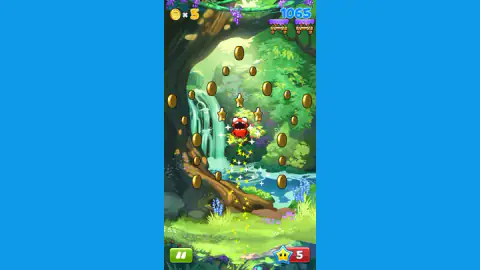
The second is the star, and it is worth being careful here, because three different yellow things share the screen. Big gold five-pointed stars float in the levels — three at once in one of our pictures, arranged around the monster the way the coins are. When the monster is rising fast, a tail of much smaller sparks streams out behind it. And neither of those is the star on the red badge in the corner, which is the one the SAVE ME! card wants. The big ones are objects, the small ones are what speed looks like, and the game labels none of them. You work that out in your fourth run, which is part of why the first three go badly.
More climbs on the shelf
If what you want is the same upward pressure with a different body attached to it, Stickman Jump runs the same loop with a stick figure and much plainer scenery, and Get Tall and Fall turns the climb itself into the thing that can go wrong. Stickman in Space swaps the jungle for low gravity, which changes how long a mistake takes to arrive. Grass Land is the gentler one of the four if a run that ends in fifteen seconds is not what you came for. We have not played those four down to a lost run the way we played this one, so take them as signposts rather than verdicts. The rest of the shelf is in adventure games.
Screenshots


How to play Mega Jump
- Press the green PLAY button. The screen reads GET SET! and then GO!, and your monster is already moving.
- Steer left and right — drag with the mouse or your finger, or use the left and right arrow keys. That is the whole of the input.
- Follow the gold. Coins come in lines and curves, and the line is telling you where the next platform is.
- Land on the purple platforms to keep climbing. Everything between them is air, and the screen keeps rising whether you do or not.
- When you fall, a SAVE ME! card appears with two buttons: a red one with a star and a 1, and a green one marked FREE with a video icon. One of them costs a star. We used the red one.
What we only learned by being there:
- Up is not a move. The thing we got wrong for our whole first run was treating this like a game with a jump key. Everything we actually wanted was off to one side, and the only way to it was sideways.
- Watch the two numbers separately. A run where you feel rich can be a run that scored badly, and the board between runs only cares about the score.
- The star badge is your lifeline count. It sits bottom right, a yellow star with eyes on a red square. Ours read five the whole session and we never saw it move, so treat the number you have as all you are getting.
- A straight column of coins is a ladder; a wide arc is a journey sideways. Work out which one you are on before you commit to it.
- Runs are short. A dozen of ours fit into ten minutes. This is a game you lose quickly and restart quickly, not one you settle into.
Controls
| Drag with the mouse or your finger | Steers the character left and right. The game's own instruction card offers this first, before the keyboard |
|---|---|
| Left and right arrow keys | Steers the character the same way. This is what we played with, and it is the whole of the steering |
| Up arrow | Unconfirmed. We pressed it a great deal in our first runs and it never once brought us closer to anything that was off to one side. If it does something, we did not find it |
| Click or tap on a menu | Works everywhere on the menus: PLAY to start a run, STORE to open the shop, and the two buttons on the SAVE ME! card |
| The green button with two white bars, bottom left | Pause. It sits in the same corner in every frame of a run |
| The red button with a star and a 1 on the SAVE ME! card | Spends one of your stars to carry on falling runs. We pressed it, and the game carried on |
| The green FREE button with a video icon on the SAVE ME! card | The other way out of the same card. We did not take it, so we are not going to tell you what it costs you |
Features
- A vertical climb with no floor in it: above the patch of grass you start on, everything you can land on is a small purple platform with a white zigzag under it and nothing either side
- Two separate counters, and they do not track each other — one of our captures reads zero coins and a score of 600 in the same frame
- Steering only, by drag or by the left and right arrow keys, exactly as the game's own card puts it: DRAG OR USE THE ARROW KEYS TO MOVE
- Coins are laid out as columns, curves and long arcs rather than scattered, so the shape of the gold tells you where the game wants you to go
- Five Save Stars sit on a red badge in the bottom right corner, and the SAVE ME! card that appears when you fall asks for one of them
- A personal high-score board of five rows, every one of them labelled YOU, that rewrites itself between runs
- A single jungle backdrop of waterfall, wisteria and bluebells runs through every one of our runs, drawn in flat cartoon colour
Game details
- Developer
- Partner studio
- Release date
- August 2025
- Last updated
- October 24, 2026
- Added here
- June 2025
- Technology
- HTML5
- Platforms
- Browser (desktop), Browser (mobile & tablet, touch)
- Classification
- Arcade
- Saved progress
- Saving, when available, is managed by this game. Mava cannot confirm your level.
FAQ
What is the Mega Jump game?
It is a free browser game in which a small red monster climbs a cartoon jungle by landing on small purple platforms. The screen scrolls upward with you and there is no ground to return to once you leave the grass at the bottom. You steer left and right, gather gold coins on the way up, and the run ends when you fall. A score in the top right corner counts how far you got.
How do you control Mega Jump in a browser?
The game's own instruction card offers two ways and names dragging first: drag with the mouse or your finger, or use the arrow keys to move. Both of them steer left and right. On a phone or a tablet a drag is the natural one, and on a desktop the left and right arrow keys do the same job.
Is there a jump button in Mega Jump?
We never found one and we do not think you need one. The character is airborne in every picture we took, and the instruction card talks only about moving, not about jumping. We spent a lot of our first runs pressing the up arrow and it never brought us any closer to a coin that was off to one side; what worked was steering sideways while already in the air.
Do the coins and the score mean the same thing in Mega Jump?
No, and one of our own captures settles it: the coin counter in the top left reads zero while the score in the top right reads 600, in the same frame. The score is what the game ranks you by on the board between runs. The coins are a separate pile, and the end-of-run card shows them being converted into something at a rate the card prints as twenty for two.
What is the SAVE ME! screen in Mega Jump?
It is the card that interrupts a fall before the run is counted as over. It offers two buttons: a red one carrying a star and the number one, and a green one with a video icon marked FREE. We pressed the red one and the game carried on. We did not press the green one, so we will not tell you what happens if you do.
What are the stars in the bottom right corner?
They are the currency the SAVE ME! card asks for, shown as a yellow star with eyes on a red badge. Ours read five in every single picture we published, start to finish. Because that number never moved on camera, we cannot tell you how quickly it runs down or what refills it.
Who made the Mega Jump browser game and when did it come out?
We could not settle it, so the developer field on this page is deliberately empty. The platform listing we play it from credits a studio called Iron Fox Games and lists four games under that name, and gives August 2025 for the release and August 2026 for the most recent update. The description that came with the game names a different company altogether. Rather than pick whichever was most convenient, we have left it open.
How far did you get in Mega Jump?
About ten minutes and a good dozen runs, almost all of them short. Our best score was 3197 and the five-row board at the end was entirely our own attempts, from 3197 down to 1073. We never opened the store, never changed character and never reached anything the first menu calls a world, so nothing on this page describes any of that.