




About Hoppy Bird
Most one-button flying games put you in the air the moment the page loads. Hoppy Bird makes you find the way in first. The big green button at the bottom of the menu looks like the start button, and it is not: it opens the mode picker. The flight starts when you tap the sky.
Once you are up, the rules fit in a sentence. Gravity pulls the yellow bird down all the time, and every tap or press of Space gives it a short push upwards. You never steer left or right. The world scrolls towards you, and your only decision is when to flap. The game's own description says what comes at you is an endless row of pipes with gaps in them, and that touching a pipe or the ground ends the run.
Hoppy Bird is made by Dream World, the studio behind Stack Ball 3D and Merge Mushroom. It was published in December 2025 and updated in August 2026. Around the flying, it builds a small economy: coins, a shop, a quest that changes every day and an event that doubles your earnings.
We should be clear about how far we got. Our flights were short, every one ended with a score of zero, and we never reached the first pipe. What follows describes the menus, the modes and the first seconds of flight, which we saw in full, and says plainly where the rest comes from the game's own description.
Three modes on one card
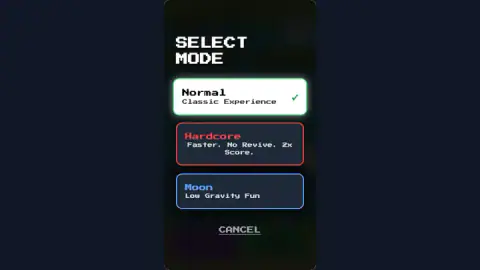
The mode picker is one card with three options, each with a single line of explanation.
Normal is labelled Classic Experience. It is where the game starts you, and the mode named on our Game Over card.
Hardcore says Faster. No Revive. 2x Score. Those three words tell you how the game is built. A faster world means less time between flaps. No revive means a crash is final, and since that rule is singled out for Hardcore, the other two modes give you some way back after a crash. Double score is the reward for accepting both. It is the mode for players who already fly well and want their best number to climb faster.
Moon says Low Gravity Fun. The sky changes with it, to a deeper blue with lilac clouds, and the mode tag in the corner turns blue. Low gravity means each flap carries the bird further and the fall between taps is slower, so mistakes take longer to happen. For a first-time player it is the gentlest of the three.
Why Moon mode is easier to learn on
Moon mode borrows a real fact. On the Moon, gravity is about one sixth as strong as on Earth, so anything that falls takes far longer to land. Apollo astronauts filmed it: dropped objects drift down instead of dropping, and a jump lasts long enough to watch.
That matters in a game where gravity is the whole opponent. Everything in Hoppy Bird is about the gap between one flap and the next. In Normal that gap is short, and a late tap means the ground. With gravity turned down, the bird hangs in the air longer, and you get more time to judge each tap. It is a good way to learn the rhythm before you go back to Normal, where the same rhythm has to be quicker.
Coins, the shop and the daily quest
The coin counter lives in the top left corner, with a green plus sign beside it, on the menu and in flight. In our session it started at 100 and later read 50. We did not spend time finding out what used the other half.
Three things on the menu feed that counter. The Daily Quest box gave us one goal, Collect 50 Coins, with a progress bar at zero and a note that it refreshes daily. The Gold Rush banner across the top read Double Coins. And the purple SHOP button, also reached through the cart icon on the Game Over card, is where coins go.
The game's description lists what the shop and the flights hold: boosters such as a Shield, a Magnet that pulls coins in and a Double Score pick-up, plus skins, including a Ninja and a Red Rocket, and global leaderboards. We did not see any of these. None turned up in our short flights, and we did not open the shop, so take that list as the game's promise rather than our report.
Between rounds the game can stop for an ad. In our session the slot came up empty, with a short message and a Continue playing button that took us back to the menu.
Who it is for
Hoppy Bird suits anyone who likes a game they can start and lose in ten seconds and start again in two. It needs one hand, or one key, and the layout is a tall phone-shaped screen, so it plays the same on a phone as on a computer, where it sits in a column in the middle of the frame.
If you know the flapping-bird genre that Flappy Bird made famous in 2014, the core will be familiar at once. What Hoppy Bird adds is around the flying, not inside it: three modes, a coin economy, a quest and events that give each session a small goal. It is not a game with levels or an ending. The only finish line is your own best score.
More games by Dream World
Stack Ball 3D is the same studio's other one-tap game, smashing a ball down through a tower of spinning platforms. Merge Mushroom and Melon Maker are its drop-and-merge games, growing bigger pieces from small ones. For a twist on the same bird-and-pipes idea, Slappy Bird puts you in charge of the pipes instead of the bird. More quick reflex games are in the arcade category.
Screenshots
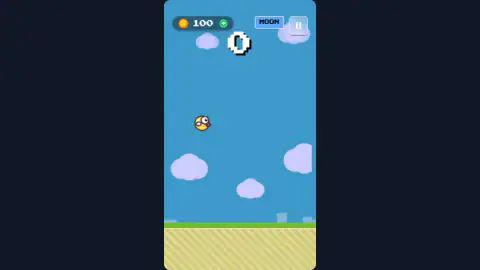
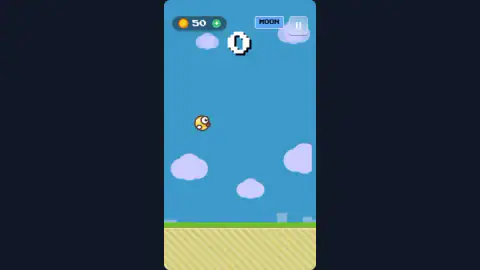
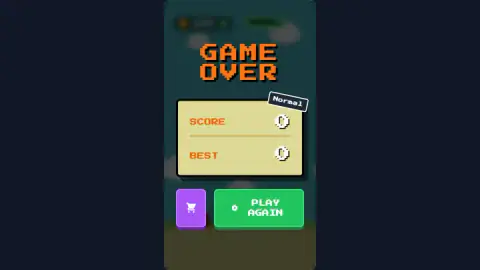
Taken by opening the game ourselves and letting it run — not supplied by the publisher, and not the same picture every other site shows.
How to play Hoppy Bird
- On the main menu, tap the sky or press Space. The screen says TAP / SPACE TO FLY, and that is literally how the run begins.
- Keep tapping. One tap is one flap, and the bird starts dropping again straight after it.
- Watch the big number at the top centre. That is your score, and it only goes up as you get past obstacles.
- When you crash, the Game Over card shows your score, your best and the mode you were playing. Press Play Again for another go.
- To change mode, press the green button at the bottom right of the menu and pick Normal, Hardcore or Moon.
Tips from our run:
- The green button is not a play button. It carries the name of your current mode and a gamepad icon, so it looks like Start. We pressed it, chose Normal, landed back on the menu, and went round that loop several times before we tapped the sky instead.
- Flap little and often. In our runs, a few taps followed by a pause put the bird on the ground almost at once. Gravity never lets up, so there is no safe moment to stop.
- Pause sits in the top right corner during a flight. On the menu the same corner holds the sound button.
- Check the banner before you play. When the yellow Gold Rush strip is up, coins count double, so that is the time to fly for the shop.
- Look at the tag beside the coin counter. It always shows which mode you are in, NORMAL in green or MOON in blue, which saves you a trip to the picker.
Controls
| Space or a click on the sky | Flap once; every flap lifts the bird a little and gravity pulls it back down |
|---|---|
| Tap (phone or tablet) | Flap, the same as Space on a computer |
| Green mode button (main menu) | Opens the mode picker with Normal, Hardcore and Moon; it does not start a flight |
| Pause button (top right, in flight) | Pauses the run |
| Purple SHOP button or cart icon | Opens the shop where coins are spent |
Features
- Three modes on one card, Normal for the classic game, Hardcore for faster flights with no revive and double score, and Moon for low gravity
- One input does everything, a tap or Space press that pushes the bird up against a constant fall
- A coin counter with a green plus sign sits in the top left corner of every screen, menu and flight alike
- A daily quest on the main menu, Collect 50 Coins in our session, which refreshes every day
- Gold Rush events double the coins you earn, announced by a yellow banner over the title
- The Game Over card shows your score, your best and the mode you played, with Play Again one tap away
- Made by Dream World, the studio behind Stack Ball 3D and Merge Mushroom
Game details
- Developer
- Dream World
- Release date
- December 2025
- Last updated
- August 10, 2026
- Added here
- October 2025
- Technology
- HTML5 (2D)
- Platforms
- Browser (desktop, keyboard & mouse), Browser (mobile & tablet, touch)
- Classification
- Arcade
- Saved progress
- Saving, when available, is managed by this game. Mava cannot confirm your level.
FAQ
How do you play Hoppy Bird?
Tap the screen or press Space to flap. Each flap lifts the yellow bird a little and gravity drags it straight back down, so you keep it in the air with a rhythm of taps. The game's description says you fly through gaps between pipes, and touching a pipe or the ground ends the run.
How do you start a game in Hoppy Bird?
Tap the sky or press Space on the main menu, where the game says TAP / SPACE TO FLY. The big green button at the bottom right is not a play button. It shows your current mode and opens the mode picker, and choosing a mode there sends you back to the menu.
What are the modes in Hoppy Bird?
There are three. Normal is labelled Classic Experience. Hardcore is faster, has no revive and doubles your score. Moon is labelled Low Gravity Fun, so the bird falls more slowly between flaps.
What is Gold Rush in Hoppy Bird?
Gold Rush is an event announced by a yellow banner at the top of the main menu that reads Double Coins. While it runs, the coins you collect count twice, which makes it the quickest time to save up for the shop.
What is the daily quest in Hoppy Bird?
The main menu shows a Daily Quest box with a goal and a progress bar. In our session it asked us to collect 50 coins, and the box says the quest refreshes daily.
Who made Hoppy Bird?
Hoppy Bird is made by Dream World. It was published in December 2025 and last updated in August 2026.
Is Hoppy Bird the same as Flappy Bird?
No. Hoppy Bird is a separate game by Dream World that uses the same idea of a bird kept in the air by taps. It adds its own modes, a coin shop, daily quests and Gold Rush events.
Can you play Hoppy Bird on a phone?
Yes. You tap anywhere to flap, and the game is laid out as a tall phone-shaped screen even on a computer, where it plays in a column in the middle of the frame. It needs no download or sign-in.