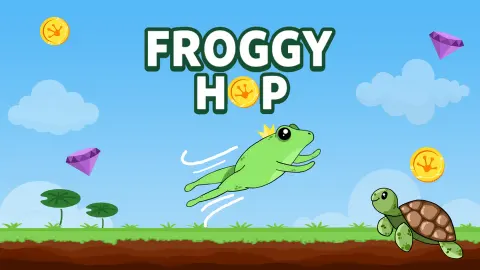



About Froggy Hop
Most jumping games ask for a button press every second. Froggy Hop asks for one per run. The frog sits on a grass bank, a pointer slides along a meter, you click once, and the rest of the run is watching how far that click carries.
What turns it into a game is the loop around the click. Every run pays coins by the metre, the coins are meant for three upgrades, and a bar at the top of the screen measures each attempt against a trophy marked 500. The first runs come nowhere near it. Ours stopped at about a fifth of the way.
The game is credited to Dissorto. It was published in November 2025.
We played about four minutes on a desktop with a mouse: seven launches, seven payouts, no upgrade that we saw take effect. The frog never reached a lily pad. This page covers that much and says where it stops.
One click, a meter and a hundred metres
A first-level frog does not go far. Four of our seven runs ended at 99 metres and the other three at 105. Nothing we did with the click moved it outside that range.
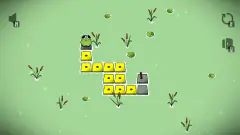
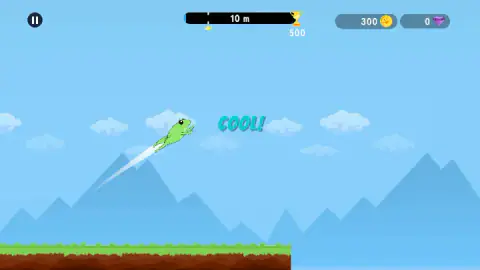
The grass bank is short. Ten metres into a flight the ground had already ended under the frog, and from there on it is open water. At the end of a 99-metre run the screen showed sky, mountains and water, and no frog.
The longer runs showed one thing more. At 105 metres a lily pad stood at the right edge of the screen, a dark leaf on a stalk rising out of the water. The frog came down just short of it, three times.
That leaf is the point of the early game as we read it. The upgrade called Rebound promises to "Bounce harder", which only means something once there is a thing to bounce on. The first target is not 500 metres. It is the few metres more that put the frog on that pad.
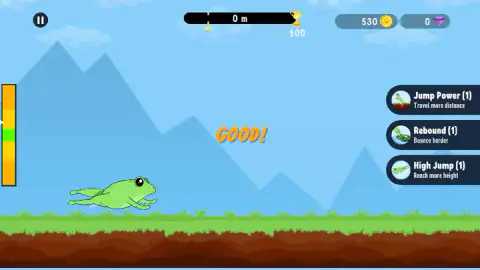
We also noted where the pointer was on two launches. On one it sat in the lower orange band and the word was "COOL!". On another it was in the upper yellow band and the word was "GOOD!". Two launches are not a rule, and we would rather give you the two cases than invent one.
What a run pays: 74 coins for 99 metres
The payout follows the distance closely. We were paid 74 coins for 99 metres, which is about three coins for every four metres.
The longer runs kept to the same rate: 105 metres paid 78.
The "HOP REWARDS!" card shows that amount twice. The blue button gives it as it is. Above it, a red button with a film icon and an "x4" tag offers four times as much, 296 instead of 74, in exchange for watching an advert. We took the blue one every time.
Seven runs left us with 530 coins.
There is a second counter next to the coins, with a purple gem on it. It read 0 from start to finish. We did not find out where gems come from or what they buy.
The chest at the end of the reward bar
The reward card has one more part, and it is easy to miss. Under the pile of coins runs a green bar with a red treasure chest at its far end.
The bar was fuller each time we saw it: about three tenths on our third payout and six tenths on the sixth. That is a tenth per run, whatever the distance was. At that pace the chest comes on the tenth run.
We stopped at seven, so we did not see it open. If you are deciding whether to play one more round, that bar is a fair reason: it moves even when the frog does not go any further than last time.
Three upgrades, and what we did not find out
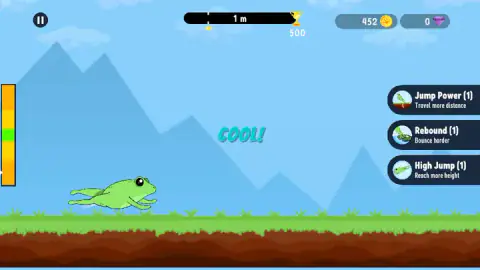
The buttons on the right say what they are for. Jump Power reads "Travel more distance". Rebound reads "Bounce harder". High Jump reads "Reach more height". Each had a (1) after its name, the level.
No price is printed on them. With 530 coins in hand all three were still at level 1. We pressed Jump Power once, as a jump was starting, and our session ended before we could see whether it took, what it cost or what it changed.
So the cost of a level is something we cannot give you. The same goes for the pause menu, for anything beyond the first lily pad, and for whatever waits at the trophy.
A small crown sits under the distance bar from the second run on, where the earlier run ended. We read it as the mark of your best distance.
Who it is for
Players who like a short loop with a number that goes up. A run is short, the payout never fails to come, and the question is always the same: whether this click went further than the last one.
It is not a platformer in the usual sense. In what we played there was no steering, no second jump and no enemy. If you want to guide the frog from pad to pad with your own hands, the first minutes here will feel like watching.
More games about one well-timed jump
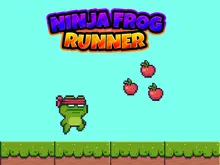
Chubby Duck Jump is the closest thing we have: hold to charge, release, and a duckling hops from plank to plank. Golden Fish sets the strength with a drag instead of a click and sends a goldfish from one aquarium to the next. For a frog you steer yourself, Ninja Frog Runner is a five-level platformer with arrow keys and double jumps. The rest are in the arcade games category.
Screenshots
Taken by opening the game ourselves and letting it run — not supplied by the publisher, and not the same picture every other site shows.
How to play Froggy Hop
- Look at the left edge of the screen when the frog is on the grass. A tall meter stands there, orange at both ends, yellow further in and green in the middle, with a white pointer moving along it.
- Click once. The frog leaves the bank with a white trail behind it, and a word comes up in the middle of the screen. We saw "COOL!" and "GOOD!".
- Watch the bar at the top. It counts the metres and fills towards the trophy.
- When the run ends, a card headed "HOP REWARDS!" appears. Press the blue button to take the coins.
- Back on the bank, the three upgrade buttons are on the right. Then launch again.
Tips from our session:
- The green band is narrow. It is the thinnest strip on the meter, and the pointer does not wait for you. We take it to be the best launch, though we never got a word better than "COOL!" to prove it.
- The blue button is enough to keep going. We never pressed the video button and the game never held us back for it.
- Do the upgrades before you click. The three buttons are on screen while the frog is on the bank. By ten metres into a flight they were gone.
- Do not expect the keyboard to help. We tried the arrow keys and Space and saw nothing change.
Controls
| Left click | Launches the frog from the grass bank; the meter on the left edge is moving while you decide |
|---|---|
| Blue button on the HOP REWARDS! card | Collects the coins for the run and puts the frog back at the start |
| Red button with the film icon | Offers four times the coins in exchange for an advert; we did not press it |
| Jump Power, Rebound, High Jump (right edge) | The three upgrades, shown at the start of a run; we pressed Jump Power once and did not see the result |
| Pause button (top left) | On screen while the frog is in play |
| Arrow keys and Space | Pressed once each; we could not tell that they did anything |
Features
- One click per run, timed against a vertical meter with a narrow green band in the middle
- A distance bar at the top that counts metres towards a trophy marked 500
- Coins paid at the end of every run, at about three for every four metres
- A choice on every payout between the plain amount and four times as much for watching an advert
- Three upgrades, Jump Power, Rebound and High Jump, each starting at level 1
- A reward bar that fills towards a chest, by about a tenth per run in our session
Game details
- Developer
- Dissorto
- Release date
- November 2025
- Last updated
- August 10, 2026
- Added here
- September 2025
- Technology
- HTML5 (2D)
- Platforms
- Browser (desktop, mouse), Browser (mobile & tablet)
- Classification
- Arcade
- Download size
- 13 MB
- Ad requests
- 5 (some)
- Has a save
- Yes
- Saved progress
- Saving, when available, is managed by this game. Mava cannot confirm your level.
Measured by opening the game ourselves on 2026-09-11, not taken from the feed. Twelve seconds on a phone-sized screen, with ad requests counted and blocked rather than loaded.
FAQ
How do you play Froggy Hop?
The frog waits on a grass bank at the edge of the water, and a pointer moves up and down a coloured meter at the left of the screen. Click once to launch. The frog flies out over the water, the bar at the top counts the metres, and when the run ends a card pays you coins for the distance. Then you are back on the bank for the next launch.
What are the controls in Froggy Hop?
One click of the left mouse button launches the frog. The arrow keys and Space did nothing we could notice. The other things to click are the three upgrade buttons on the right at the start of a run, the pause button at the top left and the two buttons on the reward card.
How many coins do you get per run in Froggy Hop?
In our session the payout followed the distance at about three coins for every four metres. A run of 99 metres paid 74 coins and a run of 105 metres paid 78. Seven runs added up to 530 coins.
Do you have to watch adverts in Froggy Hop?
No. The HOP REWARDS! card after each run has two buttons. The red one, with a film icon and an x4 tag, offers four times the coins for watching an advert, and the blue one under it gives the plain amount with no advert. We took the blue one every time and the game carried on.
What do the upgrades do in Froggy Hop?
There are three, and each button carries its own description. Jump Power says "Travel more distance", Rebound says "Bounce harder" and High Jump says "Reach more height". All three were at level 1 when we played. We did not see a price on them and did not see one bought, so we cannot say what a level costs.
What is the 500 next to the trophy in Froggy Hop?
It is the distance target. The bar at the top fills as the frog travels and the trophy sits at its end with 500 under it. Our runs ended between 99 and 105 metres, about a fifth of the way, so we cannot tell you what happens when the frog gets there.
Can you play Froggy Hop on a phone?
It is listed for PC and Android, in landscape. We played in a landscape window on a desktop with a mouse. The game asks for a single click, but we did not try it on a phone ourselves.
Who made Froggy Hop?
The game is credited to Dissorto. It was published in November 2025 and last updated in August 2026.