





About About a Frog
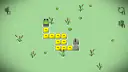
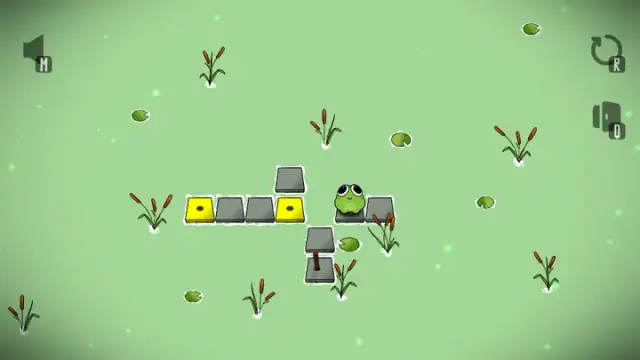
In About a Frog, every hop counts. You press an arrow and the frog jumps one square across a pond. The yellow square it just left sinks into the water. You can never stand on it again.
That one rule turns a short walk into a puzzle. About a Frog is a puzzle game by Brokellusion, from 2025, seen from above. Your goal is a gray slab with a brown pole on it. The pole is a mast: it holds up a sail. Solve the level and a gray sail rises. Then the slab floats away with the frog on it and leaves a white trail behind. That is how you know you won.
You may know puzzles where you draw one line through every box. This one feels close, but the squares are not all the same. Yellow tiles have one dot and take one visit. Gray tiles have no dot and never sink. Later, red tiles with two dots show up.
There is no timer, no score, no lives and no enemies. The level map shows 25 levels. We played twice on a computer with a keyboard, in October and November 2026. We cleared three levels and got stuck on one with red tiles. When we are guessing, this page says so.
Yellow tiles sink when you leave them, so save the bridge for last
A yellow tile does not sink when you land on it. It sinks when you hop off. While the frog stands on a yellow tile, that tile is still there under it. Look back after two hops in level 2. The first yellow tile is gone, but the gray start slab is still in place.
This matters most when one yellow tile is the only link between two parts of the pond. We call it a bridge. If you leave a bridge too early, it sinks. Then the tiles on the far side are cut off. The game gives no warning. So before each hop, ask one question: is this tile the only way across? If it is, finish everything on this side first.
Turn around on gray tiles, because they stay put
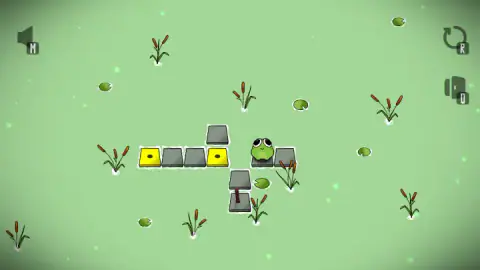
Gray tiles without a dot stay put. The start slab is still there in every screenshot we took, long after the frog left it. In the stuck level below, the gray tiles in the row are fine. The yellow and red tiles near them are gone.
So when your path has to double back, make the turn on a gray tile. A yellow tile lets you pass only once. We did not test going back over the same gray tile on purpose. Treat this as advice, not a rule we proved.
If the sail stays down, a yellow tile is probably left
Reaching the mast is not always enough. In level 1, the sail rose the moment the frog landed. In level 2, on our fourth try in October, the frog reached the mast with two yellow tiles still floating. The sail did not rise, and no message appeared.
From those two cases, we think every yellow tile has to sink before the sail will rise. The game never says this, so it is our guess. If you land on the mast and nothing happens, count the yellow tiles left. If you cannot reach them anymore, restart. This time, make the mast your very last hop.
Red tiles with two dots seem to take two visits
A few levels in, red tiles with two black dots appear. Our reading is that the dots show how many visits a tile has left. A yellow tile has one dot. A red tile has two.
Our screenshots back this up. At the start of one level, two red tiles sat in a row. Later in the same level, the left red tile had turned yellow with one dot. The right red tile was gone. That right tile was the only link from the row down to the mast. Once it sank, the frog could no longer reach the mast.
So save a red tile's second visit for the step where you have no other choice. We have not confirmed that red tiles take exactly two visits. We also do not know if they must all sink for you to win. We tried this level four times and did not solve it.
Stuck? Press R right away, because there is no game over
The frog can get stuck in two ways. It can be left with no tile next to it. Or it can stand on the mast with yellow tiles to spare. Either way, the screen stays the same. There is no sign that you are stuck.
Do not keep pressing arrows. Press R, or click the round arrow at the top right. The whole level comes back, with every tile in place. The frog returns to the start slab. A curtain of dark green reeds sweeps across the screen in between. Nothing counts your restarts, so they cost you nothing. In November, we restarted the red-tile level four times this way.
A route for level 2, read from the board
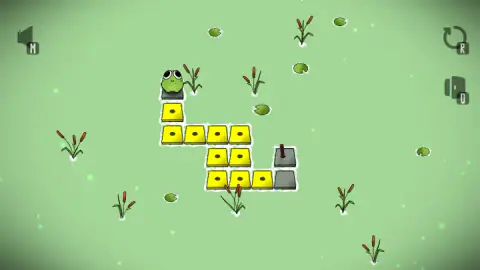
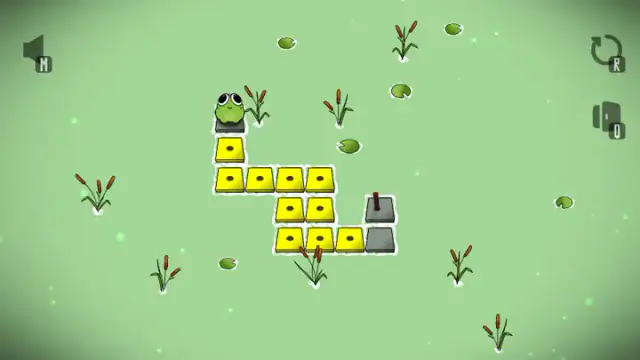
At the start of level 2, the frog sits on the start slab at the top left. There are ten yellow tiles. A plain gray tile sits at the bottom right, and the mast slab is just above it.
Reading the board, this route steps on each yellow tile once and ends on the mast:
down, down, right, right, right, down, left, down, right, right, right, up
Our October game began with the first five moves of this route. We did not finish the level that way. The rest of the route is worked out from the board, not played. If the sail stays down, check that no yellow tile is left.
Keyboard, controller or phone: what we tested
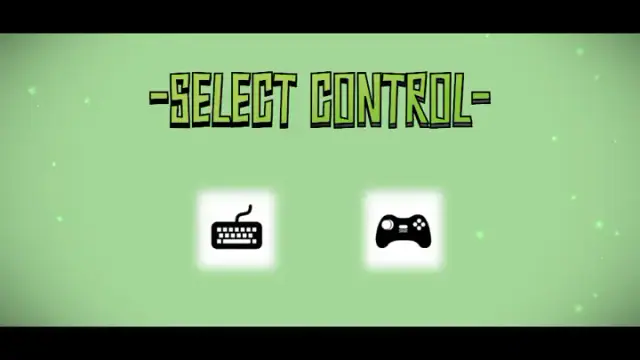
The first screen asks you to pick a keyboard or a controller. We picked the keyboard. We tested these:
- the arrow keys, in levels and on the map;
- the select key on the map;
- R, to restart;
- a mouse click on the round arrow, to restart.
The game also shows M (a speaker, top left) and Q (a door, under R). According to the game's description, M mutes the sound. Q goes back to the menu. W A S D also move the frog. We did not try them.
The same description says phones get buttons on the screen. We did not play with a controller or on a phone, so we cannot tell you how well either works.
More games to try
If you want to try something else after the pond, have a look at The Fill, Push The Box or Pistonio. You can find more in our kids' games.
Screenshots
How to play About a Frog
- On the "-SELECT CONTROL-" screen, pick the keyboard card or the controller card. The title "ABOUT A FROG" appears.
- Press a key. The "LEVELS" map opens, with the frog on a green stone where level 1 is.
- Press the key shown next to "— SELECT" at the bottom of the map. The pond opens, seen from above.
- Press an arrow key. The frog hops one square, and the yellow tile it left sinks.
- Try to step on every yellow tile once, then hop onto the slab with the mast. If you got it right, the sail rises and the slab sails off.
Tips from our games
- Before each hop, look at the tile under the frog, not the one ahead. That is the tile you are about to lose.
- Count the yellow tiles before your first move. Level 2 has ten. Our best guess is that your route has to pass over all of them.
- Look at where the mast slab sits. In level 2 the mast is above a plain gray tile, so you must come in from below. Plan your route backward from there.
- Pressing toward the water does nothing. The frog will not fall in, so a wrong press costs you nothing.
Controls
| Arrow keys | Hop the frog one square, in a level and on the level map (tested) |
|---|---|
| R | Restart the level with every tile back in place (tested) |
| Click the round arrow, top right | Also restarts the level (tested) |
| Key shown next to "— SELECT" on the map | Enter the level the frog is standing on (tested) |
| W A S D | Move, according to the game's description (not tested) |
| Q | Back to the menu, according to the game's description (not tested) |
| M | Mute, according to the game's description (not tested) |
| Controller / touch buttons | Offered by the game, but we only played with a keyboard (not tested) |
Features
- 25 levels on a zigzag map, with no timer, no score, no lives and no enemies.
- Yellow tiles have one dot and sink as soon as the frog hops off them.
- Gray tiles never sink, and the start slab is always still there after you leave it.
- Red tiles with two dots show up in a later level. In our screenshots of one level, a red tile had turned yellow after a single visit.
- Solve a level and a gray sail rises on the mast, then the slab floats the frog away.
- Level 1 teaches you to move without words, using only a sign with arrows and "MOVE".
- Press R and the level comes back whole, with no penalty and no counter.
Game details
- Developer
- Brokellusion
- Release date
- June 2025
- Added here
- June 2025
- Technology
- HTML5 (Unity WebGL)
- Platforms
- Browser (desktop)
- Saved progress
- Saving, when available, is managed by this game. Mava cannot confirm your level.
FAQ
What is the About a Frog game?
About a Frog is a puzzle game by Brokellusion, from 2025, seen from above. You hop a frog across a pond one square at a time. Yellow tiles sink when you leave them, so each one can only be used once. You win a level by ending on the gray slab with a brown mast.
How do you play About a Frog?
Pick the keyboard or controller on the first screen, then choose a level on the map. Use the arrow keys to hop one square at a time. Try to step on every yellow tile once and finish on the slab with the mast. Press R to start the level over.
Why won't the sail go up in About a Frog?
Most likely, some yellow tiles are still floating. In level 1, the sail rose at once. In level 2, we reached the mast with two yellow tiles left and nothing happened. The game never says this rule, so it is our best guess from what we saw.
How many levels does About a Frog have?
The level map shows 25 levels in a zigzag path. We cleared three of them over two games and got stuck on a level with red tiles. We have not seen the later levels or the ending.
What do the red tiles do in About a Frog?
Red tiles have two dots, while yellow tiles have one. In our screenshots of one level, a red tile had turned into a yellow tile with one dot after the frog crossed it once. That suggests a red tile takes two visits before it sinks. We have not confirmed it.
Can you lose in About a Frog?
There is no game over, no lives and no timer. The frog can still get stuck with no tile next to it, and no message tells you. When that happens, press R or click the round arrow at the top right. The level comes back whole.
Can you play About a Frog on a phone or with a controller?
The game asks you to choose a keyboard or a controller when it starts. According to the game's description, phones get buttons on the screen. We only played on a computer with a keyboard, so we cannot say how well the controller or touch buttons work.
What games are similar to About a Frog?
If you like About a Frog, try [The Fill](/game/the-fill), [Push The Box](/game/push-the-box) and [Pistonio](/game/pistonio) on mavagames.com: they are the closest games to it in our catalogue.