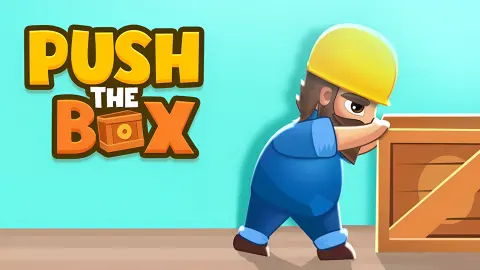







About Push The Box
Most block puzzles in a browser give you an undo button. Push The Box gives you a restart arrow instead, parked in the corner of the top bar from the first second of the first level, and that one decision tells you what kind of game this is. Where you can undo, a mistake costs you a move. Here it can cost you the level, so the way out stays permanently in view.
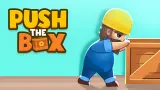
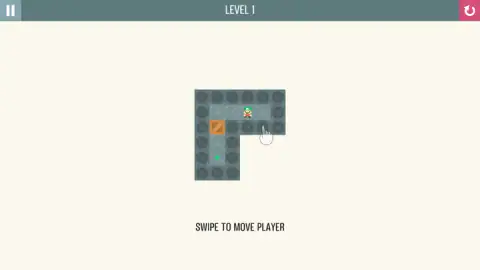
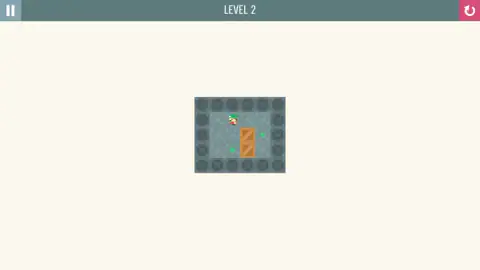
The screen is close to empty. A room of slate stone tiles floats on a cream background. A small worker in a green cap stands on one tile, an orange crate on another, and somewhere on the floor sits a green diamond. The bar across the top holds the level number, a pause button at one end and that pink restart arrow at the other. Under the board, in grey capitals, the game prints its only instruction: SWIPE TO MOVE PLAYER. That is the entire interface.
What you are playing is a sokoban, a genre with a name and a country of origin, and the rule that defines it is worth knowing before you start. You can push a crate. You can never pull one. Everything difficult here falls out of that.
Push The Box is by Drivix Games and was published in September 2025. It starts quickly: a loading screen, the Unity logo the game prints while it boots, and three seconds later a title card with a blue PLAY button. Our latest run lasted ten minutes. We cleared level one, and then, inside the first few minutes of level two, we ruined it with a single push and spent the rest of the session discovering that the game was never going to mention it.
You can push, you can never pull, and that is the entire design
The word sokoban is Japanese, and it means the person who runs a warehouse. The original game came out of Japan in the early eighties and was influential enough that its name stopped belonging to it: sokoban now describes the whole family of games built the same way, Push The Box among them.
The design is one restriction, and it comes from the fiction: the keeper is on foot, so the only thing he can do to a crate is lean on it.
The obvious consequence first. To send a crate north you have to be standing south of it, so that square must be empty and reachable on foot. Half of every level is that journey: the crate's route is short, and yours around it is long.
Then the consequence that bites. Because nothing can be pulled, some mistakes are not setbacks, they are endings. A crate shoved into a corner is finished: the two directions it could still travel are walls, and the two squares you would have to stand on do not exist. A crate flat against a wall is nearly as bad, because from then on it can only run along that wall, so a target out in the middle of the room is now unreachable. In both cases the level is already lost, and nothing flashes to say so.
That is why the restart arrow is pinned in the top bar instead of buried in a menu. The question after a push is never whether it helped, but whether that crate can still reach its target. When the answer is no, the move you want is the pink one in the corner.
Level two is twelve swipes, and only two of them are pushes
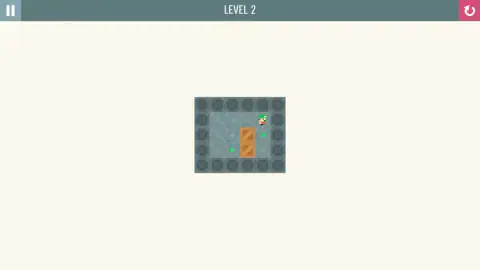
The second room is a plain rectangle with no obstacles: four tiles across, three deep, walls all the way round. Two crates sit stacked in the third column. One target is beside the upper crate on the right-hand side; the other is on the bottom row, on the opposite side of the lower one. The worker starts on the top row, one column to the left of the crates, which means his first move cannot be a push at all.
So the level is not asking you to push yet. It is asking you to walk, and to walk in the right order. Take the lower crate first: go right, right, down, down to reach the square on its right, then push it left onto its target. Now walk the whole way back round — right, up, up, left, left, down — to arrive on the left of the upper crate, and push it right. Twelve swipes in all, of which exactly two move a crate.
The order is not a preference. Do the right-hand crate first and you seal yourself out: the only route to the far side of the other one runs through the square you have just filled, and the only way to clear that square again is to shove that crate off its target and into the corner, where it dies. An empty room has already taught you that a sokoban level can be lost on move two.
The level we broke in the first few minutes, and played for another seven
That is not a hypothetical, because it is what happened to us. Early in level two we pushed the lower crate sideways instead of walking around it, and it came to rest in the bottom-right corner of the room. Two walls in front of it, and both squares we would have needed to stand on are outside the floor. The puzzle was over at that moment.
Nothing said so. The level number stayed where it was, the worker kept walking, every legal move stayed legal, and we carried on swiping in a dead room for the better part of seven minutes. There is a case for the silence, since a game that flagged every lost position would be solving the puzzle for you. Knowing it in advance still changes how you play: after each push, look at the crate you have just moved and ask whether anything can still reach it.
One last thing, since the description that travels with this game will tell you otherwise. It promises boxes in several colours, an arrow on each one dictating its direction, tiles that repaint them, stars to match by colour, and it changes the game's name halfway through. None of that is in the two rooms we have played, and we will not repeat a description we could not confirm. We also do not know how many levels there are, because nothing on screen has said. What is on screen is the oldest puzzle idea in the warehouse: one keeper, some crates, some marks on the floor, no way to take anything back.
More puzzles where the answer is a position, not a reflex
Pistonio is the nearest relative we have: the same business of getting a block onto a marked square, except the pushing is done by pistons you fire. Slide the Blocks keeps the grid and the blocked paths but takes the keeper away: you move the pieces directly. ExitBlocks: Color Match Puzzle puts a clock on a sliding board, which is the opposite of the deal offered here. And Marble Maze is the other way to use a swipe on a grid: one flick and you roll until something stops you. The rest are in puzzle games.
Screenshots
How to play Push The Box
- Swipe to walk. One swipe moves the worker one square, in one of four directions. The game spells it out under the board of the first level.
- Make the swipe a long one. Flicks that stayed inside a single square did nothing for us. The gestures that registered were the ones that clearly travelled from one tile to the next.
- Walk into a crate to push it. There is no push button. You step into the crate's square and it moves one square further away from you, which means you are always on the opposite side from where it is going.
- Get behind the crate first. Most moves in a level are not pushes but the walk around to the right side, which is where the thinking lives.
- Land every crate on a green diamond, and use the restart arrow early rather than late. A level that has gone wrong does not tell you so. More on that below, because it is the whole game.
What we picked up in our session:
- Level one is four swipes: left, left, down, down. The floor is an L. You start three tiles along the top corridor; the crate is the top square of the short arm that drops out of the left end, with its target two squares below it. Walk left twice to stand over the crate, then push down twice.
- The pointing hand is the game waiting for you. A white hand hovers over the board until you move. It is a prompt, not a clue.
- Plan the last push before you make the first. Work out which side the crate has to reach its target from, then work backwards. Pushing a crate in the generally right direction is how levels get lost here.
- Treat corners as holes in the floor. A crate shoved into a corner never comes out. A crate pressed flat against a wall can only slide along that wall from then on.
- You can leave and come back. We reloaded the page twice, and both times PLAY dropped us back into the level we had reached rather than at the beginning.
Controls
| Swipe in one of four directions | Moves the worker one square. On a desktop that is a short drag with the mouse; on a phone or tablet it is a flick of the thumb. The game prints the instruction in grey capitals under the first level: SWIPE TO MOVE PLAYER |
|---|---|
| A swipe that crosses a tile | Is the one that registers. Small flicks that stayed inside a single square were ignored for us; the gestures that worked travelled clearly from one tile to the next |
| Walk into a crate | Pushes it one square ahead of you. There is no separate push button, and nothing pulls |
| Restart arrow, top right | Starts the level again from the beginning. It is the pink button in the corner of the bar, and it is on screen from the first second of the first level |
| Pause button, top left | Pauses. It sits at the opposite end of the same bar |
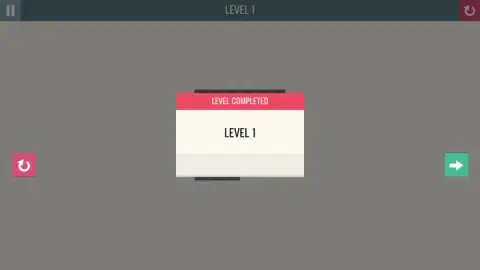
| Green forward arrow | Appears when the LEVEL COMPLETED card does, at the right-hand edge of the screen, and takes you into the next level. The pink button at the left edge replays the one you have just finished |
Features
- Rooms carved out of slate stone tiles, floating on a cream background, with the level number in a bar across the top
- One control for everything: a swipe in one of four directions, spelled out on screen so nobody has to guess
- Crates that move only away from you, one square at a time, which is the rule the whole puzzle hangs on
- A restart arrow parked permanently in the top bar, because a level here can be ruined several moves before it looks ruined
- Level one is four swipes and a single crate; level two is twelve, two crates, and an order you have to get right
- Progress kept between visits: after a reload, PLAY put us back on the level we had reached
- Made by Drivix Games, published in September 2025
Game details
- Developer
- Drivix Games
- Release date
- September 2025
- Last updated
- August 10, 2026
- Added here
- July 2025
- Technology
- HTML5 (Unity WebGL)
- Platforms
- Browser (desktop), Browser (mobile & tablet, touch)
- Classification
- Puzzle
- Saved progress
- Saving, when available, is managed by this game. Mava cannot confirm your level.
FAQ
What is Push The Box?
It is a browser puzzle game in the sokoban tradition. You control a small worker on a grid of stone tiles, and the aim of each level is to get every crate onto a marked target square. You move with a swipe, and you move a crate by walking into it, which shoves it one square away from you. The targets in the levels we played are small green diamonds set into the floor.
How do you move in Push The Box?
You swipe, and the game says so: the line SWIPE TO MOVE PLAYER sits under the board of the first level. On a desktop that is a short drag with the mouse, and on a touchscreen it is a flick in the direction you want to go. Make it a long one. Gestures that stayed inside a single square did nothing for us, while the ones that clearly crossed from one tile to the next registered every time.
How do you solve level 2 of Push The Box?
The room is four tiles across and three deep, with two crates stacked in the third column and the two targets on opposite sides of them. Deal with the lower crate first: walk round the right-hand side to get underneath, then push it left onto its target. Then walk the long way back round to the left of the upper crate and push it right. Twelve swipes, and only two of them are pushes.
Why has my level in Push The Box become impossible?
Almost certainly because a crate is in a corner or flat against a wall. Since you can only push, a crate in a corner has two walls in front of it and no square left for you to stand on, so it can never move again, and a crate against a wall can only slide along that wall. The game does not announce this. It lets you keep making legal moves in a level that has no solution, which is why the restart arrow is pinned to the top bar.
Does Push The Box save your progress?
It did for us. We reloaded the page twice during one session, and both times pressing PLAY put us straight back into the level we had reached rather than at level one. So you can leave a level unsolved, close the tab and pick it up later, at least in the same browser.
What is sokoban, and why can you only push?
Sokoban is the name of a genre, and it comes from the Japanese word for the person who runs a warehouse. The original game appeared in Japan in the early eighties and was popular enough that its name stuck to every game built the same way: a grid, some crates, some marked squares, and a keeper on foot. Being on foot is the whole point. You can lean on a crate, which pushes it, but you have nothing to pull it back with.
Does Push The Box have coloured boxes and stars?
Its description on the provider's page says so, and also mentions arrows printed on each box and tiles that repaint them. The two levels we have played have none of that: plain orange crates, small green targets, and a worker you steer with a swipe. That description even switches to a different game's name partway through, so we treat it as unreliable rather than as a preview of later levels. Nothing on screen announces a total number of levels either, so we are not going to print one.
Who made Push The Box and when?
Drivix Games. It was published on 14 September 2025 and the listing there was last updated in August 2026. The platform files it under puzzle, which is the right shelf: nothing in it rewards quick fingers, only whether you worked out the order of the pushes before you made the first one.