

About Railway Traffic Jam! Untangle the Trains!
One train on level 2 of Railway Traffic Jam! Untangle the Trains! can leave whenever you like. It sits on the east arm, its arrow points away from the junction, and the track in front of it is empty to the edge of the map. We have now sat on that level on two different days, and on both of them we clicked every train except that one.
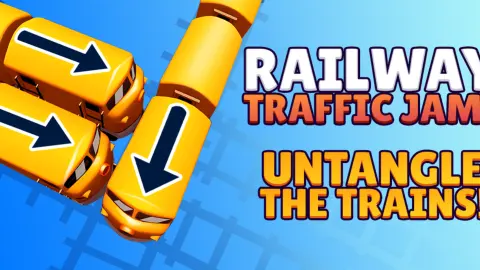
That is the game in one mistake. You look straight down on a railway crossing laid on bright green grass. A few blue trains are parked on its arms, and each carries an arrow painted on its roof. That arrow tells you the entire trip. Click the train and it runs the route by itself, off the map, in a trail of smoke. Your only decision is which train goes first.
The game is credited to Eccentric Studio Games and was published on 17 March 2026.
The game goes further than we did, so here is exactly how far that was. Our longer visit lasted ten minutes with a mouse. Level 1 was cleared and paid out. Level 2 was not. We never saw a third level, so everything below describes one small crossing with three trains, and then the same crossing with four.
Clearing a level pays thirty coins
The win screen dims the board and lays a blue banner across it reading "SUCCESS!". Under the banner sits a gold coin with the figure 30 beside it, and under that a green Next button that loads the following level. A white pill appears in the top right corner, in the place SKIP LEVEL occupies during play, and it carries your coin total. After our first level it read 30, which was all we had.
That is the whole of the economy we could see. The counter is on the win card and nowhere else: while you are playing, that corner belongs to SKIP LEVEL again. We found no shop, no engine to buy and no board to unlock, so we cannot tell you what the coins are for. We also left the gear button in the other corner alone.
Progress is kept, at least within a sitting. We reloaded the page halfway through and the game came back on level 2, with the four trains on the same marks and the coins still counted, rather than sending us back to the start.
A wrong click costs nothing here
On level 2 we sent the south train first. Its arrow goes up into the crossing and then right, and the east train was parked on that arm. The south train rolled up, met it with a puff of smoke and shoved it a little way along its track. Then both went back to their marks. The same thing happened when we sent the top train down onto the south one.
Nothing else followed: no move counter to drop, no clock, no fail screen. The only text at the top of the screen was the level label. We kept guessing for seven minutes on that level, and the board at the end was identical to the board at the start, down to the position of every train.
So the game lets you find the order by trial and error, and that is how level 1 fell for us: an early click knocked a train askew, and a few clicks later the crossing was empty and the card was up.
The catch is that free guesses have now failed to solve level 2 twice. We kept sending the same blocked trains and got the same harmless bump. A puzzle with no penalty still needs you to stop and read it.
We cannot say whether later levels add a limit. We did not reach them.
The four-train crossing has one free engine, and it faces east
This board does not change. We met it on two separate days and again after reloading the page, and the four roof arrows were the same every time, so the levels are set rather than shuffled. What follows is our reading of those arrows, not a solution we watched work.
Start with the east train. Its arrow is straight, it points at the edge of the screen, and the track in front of it is empty.
The south train runs up into the crossing and turns right, onto the arm the east train has just emptied. It goes second.
The top train runs straight down, along the arm the south train has just emptied. The west train runs right into the crossing and turns down that same arm. Either can go third, and the other follows it out.
That is four clicks for four trains.
Real railways solve the same puzzle with a locked lever
A real crossing has the same problem as this one: two trains must never be sent onto the same piece of track. Railways do not leave that to anyone's attention. Since the nineteenth century, signal boxes have used interlocking, a mechanism that ties the signals and the points together so that a signal cannot show clear while a route that crosses it is already set. The signaller can pull the wrong lever as hard as he likes. It will not move.
The game hands you the signaller's job and takes the lock away. You can send a train into an occupied crossing, and it answers with a harmless bump where a real railway would have refused the lever. Before each click, ask the signaller's question: is this train's whole route clear to the end?
How it compares with Car Escape
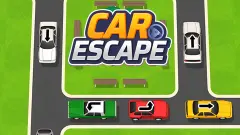
Car Escape is the same idea with yellow cars on a road, from a different studio: the game is credited to that one to Drivix Games. The boards look alike, with one vehicle on each arm and straight and bent arrows.
The difference is the cost of a mistake. Car Escape showed us a counter that read 9 moves on its second level, and every click on a car took one off. A blocked car there also stayed in the middle of the junction, in the way of the others. In Railway Traffic Jam the blocked train rolls back and nothing is counted. If you want the puzzle without the pressure, this is the gentler of the two. If you want a wrong guess to matter, Car Escape is stricter.
Who it suits
It suits someone who wants a short logic puzzle with no clock, and it suits a young player well: nothing moves until you click, a mistake is a small bump, the board resets itself, and finishing a level ends in a card and a handful of coins.
It suits less anyone looking for a train game with driving in it. You never control speed or direction. We also cannot tell you how hard it gets, because two levels at one crossing say little about the rest.
One thing we still cannot settle. A SKIP LEVEL button with a film icon sits in the top right corner. We have pressed it four times across two visits and stayed on the same level each time, so we do not know what it asks for or what it hands over.
Other junctions worth a look
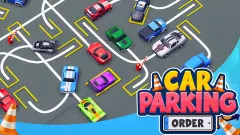
Traffic Jam Escape 3D is another arrows-on-the-roof puzzle with cars, a move counter and a third developer. In Car Parking Order the routes are drawn on the tarmac instead of the roofs, and when you send each car matters as much as which one. For a train you do drive, Train Master gives you one button to run a blue carriage through city road crossings. Everything else of this kind sits with the puzzle games.
Screenshots
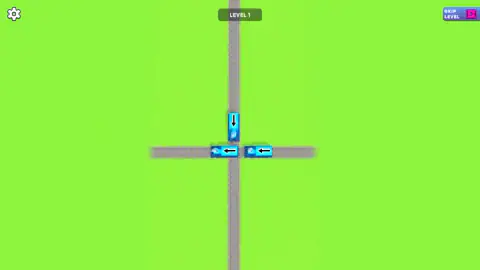
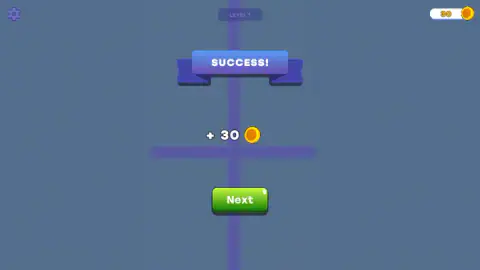
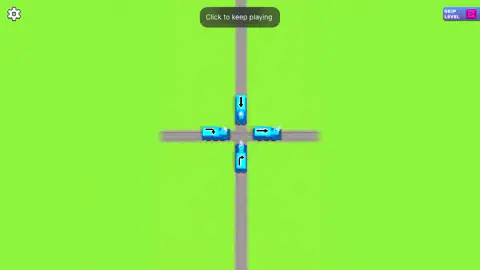
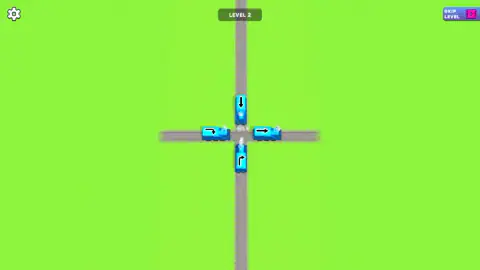
Taken by opening the game ourselves and letting it run — not supplied by the publisher, and not the same picture every other site shows.
How to play Railway Traffic Jam! Untangle the Trains!
- Read every arrow before you touch anything. A straight arrow runs straight on. A bent arrow turns at the crossing.
- Find the train whose whole route is empty, from where it stands to the edge of the board.
- Click it. It runs to the end of its track and is gone, leaving smoke on the rails behind it.
- Look again. The train that just left was probably standing in somebody's way.
- Empty the board. A card comes up, pays you, and the next level loads.
A few things the two levels taught us:
- Look for the arrow that points outward. On level 2 three arrows lead into the crossing and one leads away from it. The one that leads away is the free train, and it is the easiest to overlook because it looks like it has nothing to do with the jam.
- Sitting next to the junction is not the same as being free. Level 1 puts two trains side by side on the horizontal track, both with arrows pointing left. The western one has clear rails to the edge and can go at once. The eastern one has to cross the junction and run the full width of the board, which is why it was the last train out for us.
- The keyboard does nothing. We pressed Enter and Escape on the board, and the arrow keys and the space bar before that. No train moved.
- A click on empty track is ignored. Only a click on a train starts anything; the middle of the crossing does nothing.
- If the label at the top changes to "Click to keep playing", the game is waiting for you, not frozen. A click anywhere on the grass starts it again.
Controls
| Click or tap a train | Sends it along the route its arrow shows; if another train is in the way it bumps it and rolls back |
|---|---|
| Click anywhere on the board | Starts the game again when the label at the top reads "Click to keep playing" |
| Gear button (top left) | Settings; we did not open it |
| SKIP LEVEL (top right) | Carries a film icon; we pressed it four times across two visits and stayed on the same level |
| Next | Green button on the win card; loads the following level |
Features
- A track crossing seen from above on plain green grass, with blue trains parked on its arms
- An arrow on every roof: straight for a train that runs on, bent for one that turns at the crossing
- Three trains on level 1 and four on level 2, one on each arm
- A win card that reads SUCCESS, pays 30 coins and offers a green Next button
- A coin counter that only appears on that card, and nothing we could find to spend coins on
- No move counter and no timer on the two levels we saw
- A blocked train bumps its neighbour in a puff of smoke and rolls back to its mark
- Fixed levels: the four-train board was identical on two different days and after a reload
Game details
- Developer
- Eccentric Studio Games
- Release date
- March 2026
- Last updated
- August 10, 2026
- Added here
- January 2026
- Technology
- HTML5
- Platforms
- Browser (desktop, mouse), Browser (mobile & tablet, touch)
- Saved progress
- Saving, when available, is managed by this game. Mava cannot confirm your level.
FAQ
How do you play Railway Traffic Jam! Untangle the Trains!?
You look down on a railway crossing where blue trains are parked, each with an arrow on its roof. Click a train and it runs the way its arrow points. The level is cleared when every train has left, so the puzzle is the order: a train only gets out if the track its arrow draws is empty.
What do the arrows on the trains mean?
The arrow is that train's route. A straight arrow means it runs straight along its track and off the map. A bent arrow means it enters the crossing and turns onto another arm, so both the crossing and that second arm have to be clear.
What happens if you send a train that is blocked?
It rolls forward, bumps the train in its way with a puff of smoke, and both settle back where they were. Nothing else follows: no counter drops and no fail screen appears. We did it dozens of times on level 2 across two visits, and the board at the end was identical to the board at the start.
Is there a move limit in Railway Traffic Jam! Untangle the Trains!?
Not on the first two levels. The only text at the top of the screen was the level label, with no counter and no clock beside it. We did not get past level 2, so we cannot say whether a limit arrives later.
What do you get for clearing a level?
The board dims and a banner reads SUCCESS, with a gold coin and the figure 30 under it and a green Next button below that. A coin counter appears in the top right corner for as long as the card is up. After our first level it read 30, and we found nowhere in the game to spend it.
Does Railway Traffic Jam! Untangle the Trains! save your progress?
It remembered our level. We reloaded the page in the middle of a session and the game came back on level 2, with the four trains on the same marks, instead of starting again at level 1. The coin total is kept with it.
What is the solution to level 2?
Reading the arrows on the board, which is the same board every time: send the east train first, then the south train, then the top and west trains in either order. The east train is the only one whose arrow points away from the crossing. We worked this out from the arrows rather than watching it work.
Who made Railway Traffic Jam! Untangle the Trains!?
The game is credited to Eccentric Studio Games and was published on 17 March 2026. It is offered for PC, Android and iOS, in portrait, in English and Russian. We played it on a desktop with a mouse.