


About Traffic Jam Escape 3D
The title says escape, and there is a car in it, so you might expect to be the driver stuck in the queue. You are not in any of the cars. Traffic Jam Escape 3D puts you above a crossroads, looking straight down, and hands you the job a set of traffic lights would do: deciding who goes first.
Every car on the map is yellow, stopped, and carries a black arrow on its roof. The arrow is that car's route. Tap the car and it drives the route by itself, off the edge of the screen if nothing is in the way. Empty the roads and the level is done. What makes it a puzzle is the counter at the top of the screen, MOVES, which started at 10 on every level we saw and loses one each time you tap.
The game is credited to a developer listed as Good Games. It was published in October 2025.
A word on how much of it we saw. We played for about four minutes on a desktop computer, with the mouse. That was enough to clear levels 1 and 2 and to spend two moves on level 3. We never ran out of moves, so we cannot tell you what failing a level looks like, and everything past the third junction is outside this page.
Three levels, and what changed between them
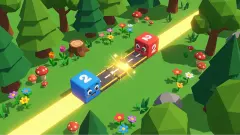
Level 1 is a lesson. One crossroads, three cars, and the hand telling you which to tap. We used three moves, one per car. A heart-eyed emoji popped up on the road as the first car drove away, which seems to be the game's way of saying well done.
Level 2 keeps the same crossroads and puts one car on each of its four arms. Two have straight arrows and two have bent ones. This is where we learned the cost of a careless tap. We sent the right-hand car into the junction while the top car was still parked in its path; it stopped with its nose against the other, and a round yellow flash lit the spot where they met. We finished the level, but with four moves showing while one car was still on the road. Four cars had cost us at least seven taps.
Level 3 changes the map. One road runs top to bottom and two roads cross it, so there are two junctions, and five cars are spread between them. A car leaving the lower road may have to pass through the upper junction too, which means its route can be blocked in two places.
Between levels a panel announces the level completed and pays out gems and coins. It has two buttons: a plain one to collect, and one that doubles the reward in exchange for an advert. Level 1 paid us nothing. Level 2 paid four gems and some coins. The developer's instructions say gems are for decorating a room; we did not see that room.
The helicopter and the two padlocks
Three round buttons sit along the bottom of the screen. On levels 1 and 2 all three are padlocks, labelled Lv.3, Lv.5 and Lv.10. They are not level selectors. They are boosters, and the label is the level that unlocks each one.
On level 3 the first padlock turned into a red helicopter with a small red 2 on its corner. The game introduces it as a way to remove one vehicle. We pressed it, and a purple band covered the bottom of the screen with the helicopter and the words TAP ON CAR. In other words, you choose which car it is for.
That is as far as we can take you. We did not watch the helicopter lift a car, so we cannot say what it does to the counter. The developer's instructions also mention rockets; neither of the remaining padlocks opened in the time we played.
The red car from 1996, and why this is a different puzzle
The best-known traffic puzzle is not a video game. Rush Hour is a sliding block puzzle invented by the Japanese designer Nob Yoshigahara in the 1970s and first sold in the United States in 1996, according to Wikipedia. It is played on a six-by-six grid. Cars and trucks move only in a straight line, and the goal is to get one red car out through the exit.
Traffic Jam Escape 3D has no link to that product, but it belongs to the same family, and the difference between them is worth knowing before you start. In Rush Hour nothing leaves except the red car. You push the others back and forth, and a move can always be undone. Here every vehicle leaves, each on a route it cannot change, and a car that has gone is gone. The puzzle is not where to put things. It is the order.
That is closer to the real thing the title borrows. Wikipedia defines gridlock as congestion in which queues of vehicles block a whole network of intersecting streets, so that traffic stops in every direction. The cause is cars sitting in a junction they cannot get out of. Level 2 showed us the small version: one car sent into the crossroads too soon, stuck behind another.
One more fact about Rush Hour explains why such simple rules can produce hard levels. Computer scientists have shown that, on a board of any size, deciding whether a Rush Hour position can be solved at all belongs to one of the hardest classes of problems they study. A few cars and one rule are enough.
Who it is for
It suits players who like short logic puzzles with a clear right answer: read the board, find the order, tap. A level is a handful of taps, and the first two are gentle.
It is not a driving game, whatever the category label says. You never steer and nothing is timed that we could see. And if adverts between levels bother you, know that the doubled reward is offered after each level, with the plain one beside it.
More games to try next
Escaping Arrows is the same idea with the cars taken away: arrows on a grid, sent off in the right order, with three lives for mistakes. Arrows Make It Cozy does it with winding worm-shaped arrows. Bus Parking Out is a traffic puzzle where the order is set by a queue of passengers. Arrow Parking turns the idea round: you lay the arrows and the car follows them. If you came here wanting to hold the wheel, Car Parking 3D is the one where you drive. The rest are under puzzle games.
Screenshots
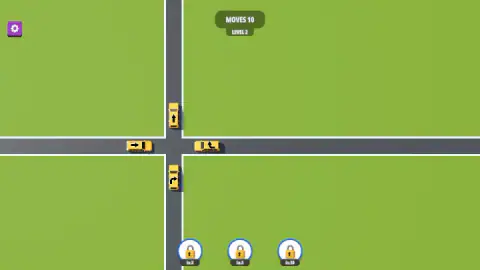
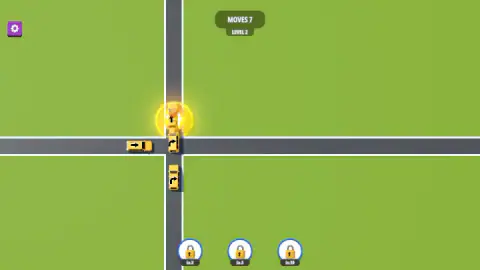
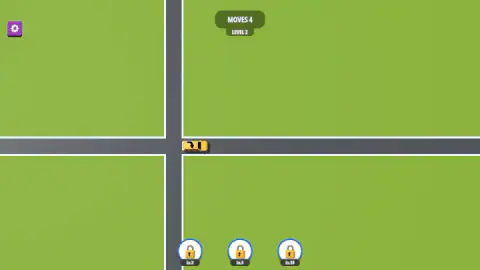
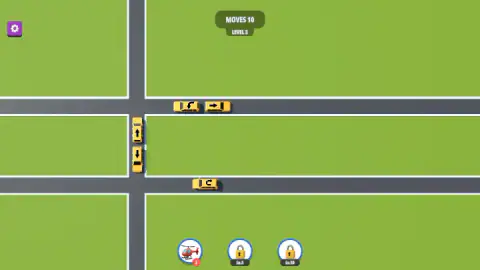
Taken by opening the game ourselves and letting it run — not supplied by the publisher, and not the same picture every other site shows.
How to play Traffic Jam Escape 3D
- Read the arrows before you touch anything. Each one shows where its car will go: straight on, or round the corner.
- Find a car with a clear road. If the route its arrow draws is empty all the way to the edge, that car can leave now.
- Tap it. It drives off and MOVES drops by one.
- Look again. The car that just left may have been the thing blocking another.
- Clear the map before the counter reaches zero.
What our session taught us:
- A tap costs a move whether or not it works. On level 2 the counter read 7 while all four cars were still on the map. Three taps gone, nobody out. Guessing is the expensive way to play.
- Count your spare taps at the start. Level 2 had four cars and ten moves, so six to waste. Level 3 had five cars and the same ten moves. The margin shrinks while the number on the counter stays the same.
- Bent arrows are the ones to check twice. A car that goes straight needs one road clear. A car that turns needs the junction and the road it turns into.
- The tutorial hand stops after level 1. On the first level a white hand and the word TAP point at the right car each time. From level 2 you choose alone.
- Cars facing each other on one road cannot both go first. Level 3 opens with two cars nose to tail on the same stretch, one arrow up and one arrow down. We sent the upper one away first and it left cleanly.
Controls
| Click or tap a car | Sends that car off along the route its arrow shows; each tap takes one off the MOVES counter |
|---|---|
| Round buttons at the bottom | Boosters. All three start locked, marked Lv.3, Lv.5 and Lv.10; the first becomes a helicopter on level 3 |
| Helicopter button, then a car | Arms the booster; a band reading TAP ON CAR asks you to pick the vehicle it is for |
| Gear (top left) | Opens the settings window |
Features
- One input for the whole game: tap a car and it drives off the way its arrow points
- A MOVES counter that started at 10 on each of the three levels we saw, whatever the number of cars
- Straight arrows and bent arrows, so some cars cross the junction and others turn in it
- Layouts that grow: one crossroads on levels 1 and 2, two junctions on level 3
- Three boosters that unlock at levels 3, 5 and 10; the first is a helicopter
- A tutorial hand that points at the right car on level 1 and then leaves you alone
- Made by Good Games
Game details
- Developer
- Good Games
- Release date
- October 2025
- Last updated
- August 10, 2026
- Added here
- August 2025
- Technology
- HTML5 (3D)
- Platforms
- Browser (desktop, mouse), Browser (mobile & tablet, touch)
- Saved progress
- Saving, when available, is managed by this game. Mava cannot confirm your level.
FAQ
How do you play Traffic Jam Escape 3D?
You look down on a road junction with a few yellow cars stopped around it. Each car has an arrow on its roof showing where it will go. Tap a car and it drives that route; the level ends when the roads are empty. The puzzle is the order, because a car that leaves too early finds another one in its way.
What does the MOVES counter mean?
It is the number of taps you have left on the level. It read 10 at the start of levels 2 and 3 in our session, and it dropped by one with every tap, including taps that did not get a car off the map. On level 2 we had used three moves before a single car had left.
What do the arrows on the cars mean?
The arrow is the car's route. A straight arrow means the car drives straight ahead and off the screen. A bent arrow means it turns when it reaches the junction. You cannot change the route; you only decide when the car sets off.
What are the three locked buttons at the bottom of the screen?
They are boosters, and each shows the level that unlocks it: 3, 5 and 10. When we reached level 3 the first padlock turned into a red helicopter with a small 2 on it. Pressing it brought up a band that said TAP ON CAR. We did not get as far as the other two.
Is Traffic Jam Escape 3D the same as the Rush Hour puzzle?
No, and it has no connection with it. In Rush Hour, the sliding block puzzle sold since 1996, you shuffle cars back and forth on a small grid to free one red car. Here nothing slides back: every car leaves for good along a fixed route, and the whole question is which one goes first.
Is Traffic Jam Escape 3D really in 3D?
The cars and roads are 3D models, but the camera looks straight down, so in play it reads like a flat map with shadows. There is no driving and no steering. It is a logic puzzle with cars in it, not a driving game.
Who made Traffic Jam Escape 3D?
It is credited to a developer listed as Good Games. It was published on 13 October 2025. It is listed for PC, Android and iOS; we played it on a desktop computer with the mouse.