


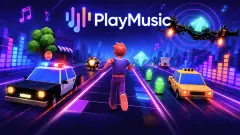


About Jump to the Rhythm of Songs! Musical Ball!
Most rhythm games test your timing. A marker reaches a line, you press, and the game tells you how late you were. Jump to the Rhythm of Songs! Musical Ball! takes the button away. The one thing it asks of your hand is sideways position: where the ball comes down, not when.
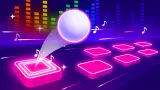
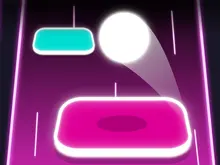
That changes what kind of skill it rewards. A white ball travels up a lane of floating tiles, and the tiles are not in a straight row. One sits in the centre, the next off to the right, then a long strip, then three short ones close together. You slide the ball across so that each landing finds a tile, and the game prints a verdict above it: GOOD, GREAT or SUPER.
The game is credited to Eccentric Studio Games. It was added in March 2026.
Now the honest part. We played for about four minutes on a desktop computer with a mouse, and a fair share of that went on the game's offer of an extra life. One song reached its results screen. We did not open the song list or the shop, and we did not get a reliable read on the audio, so this page says nothing about how the music sounds.
What GOOD, GREAT and SUPER tell you
The grade is the only feedback the game gives on a landing, so it is worth reading closely.
In our session GOOD always appeared alone. We saw it at 73 points and again at 536, and neither time was there a multiplier beside it.
GREAT came with x2. SUPER came with x6 on one run and x7 on another.
Our reading is that the multiplier is a streak. It grows while the landings stay good, and a merely adequate one takes it away. The game does not explain this anywhere we looked, so treat it as what the screen suggested and not as a rule we can prove. If it holds, the practical advice is simple: an accurate landing matters more late in a streak than early, because a bigger number is at stake.
The line across the top of the screen measures the song. Stars sit along it and light up as you pass them. At 559 points two were lit. The song we finished ended on a results screen with three stars and a score of 1,138.
Hearts, and the advert that offers one more
On the right of the screen there is a small counter with a heart. It is your margin for error.
When we missed with the counter at 0, the game stopped. A large pink heart marked +1 appeared over the lane, with a pink button reading "Get life?" and a video icon on it. Under the button, in smaller letters: "No, thanks...". The offer is a spare heart for an advert, and it came up both early, at 73 points, and deep into a run, at 559.
We saw the heart counter read 0, 1 and 2 at different moments. We cannot tell you how many hearts a run begins with or what refills them between runs; four minutes was not enough to pin it down.
Coins are the other currency. Our counter stood at 0 on the start screen and at 50 once the first song was done.
A pink +200 button with a video icon sits under the coin counter, and the results screen shows a strip of multipliers running from x1.5 up to x3 and back. We used neither.
The start screen also has a Songs button and a Shop button, and the developer's instructions say that progress unlocks new tracks. What 50 coins buy, we do not know.
Rhythm games used to need a dance mat
A rhythm game, in Wikipedia's definition, is a music-themed action game that challenges the player's sense of rhythm. For most of the genre's history that meant special hardware or strict button timing.
Wikipedia traces the line from Dance Aerobics in 1987, played by stepping on a floor mat, to PaRappa the Rapper in 1996, which it calls the first influential rhythm game and which had players press buttons in the order shown. Dance Dance Revolution followed in arcades in 1998 with pressure pads underfoot, and Guitar Hero in 2005 with a plastic guitar.
Then the phone arrived. Wikipedia notes that Tap Tap Revenge was the most downloaded iPhone game of 2008. A touch screen has no pads and no buttons, and games made for it trimmed the input down to what one thumb can do.
Musical Ball sits at the far end of that trimming. There is no press to time at all, only a ball to steer. This is a lineage of the genre and nothing more; the game has no connection with any of the titles above.
About the song titles
The start screen shows "Song name:" and a title. Ours read See You Again. That is all the screen says: a title, with no artist and no credit beside it, and we will not guess beyond what is shown. Whether the track list suits you is something the Songs button will answer faster than we can.
Who it is for
It suits players who like one-handed games with a clear verdict after every move, and anyone who finds strict beat-matching games stressful. A run lasts as long as a song.
If you want to tap out a rhythm yourself, this is not that. And if adverts in exchange for lives bother you, know that the offer appears every time the hearts run out, with the refusal in small print below it.
More games to try next
Jump in Rhythm to the Hit! Cat Disco! is the same studio's other take on the idea. Hop Ball is tile-hopping without the songs, where one missed tile ends the run. Roll Sky Ball 3D keeps the drag-to-steer control and swaps tiles for sky tracks. Geometry Rash is for players who do want the timed press: one button, eight levels. The rest are under arcade games.
Screenshots

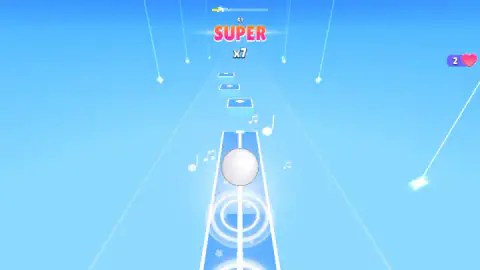
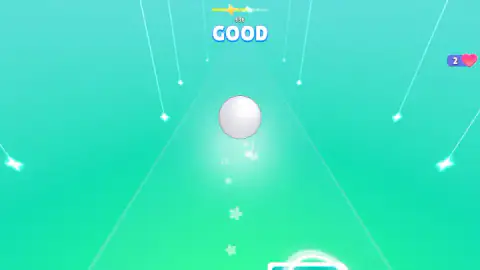
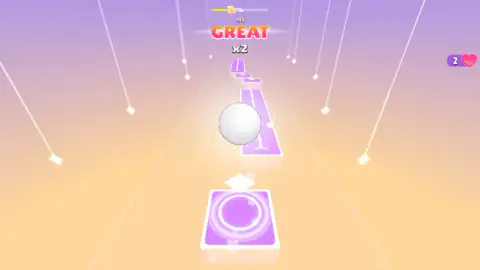
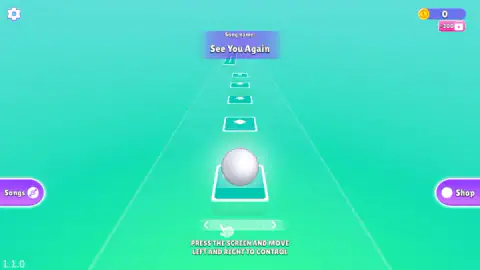
Taken by opening the game ourselves and letting it run — not supplied by the publisher, and not the same picture every other site shows.
How to play Jump to the Rhythm of Songs! Musical Ball!
- Read the start screen. It names the song, shows your coins in the top corner and puts the ball on the first tile.
- Press and hold. On a computer that is the left mouse button; the game's own words are "PRESS THE SCREEN AND MOVE LEFT AND RIGHT TO CONTROL".
- Slide to the next tile. Look two tiles ahead and move while the ball is in the air.
- Watch the grade. The word above the ball tells you how the last landing was judged.
- Reach the end of the line. The bar across the top is the song. When it fills, the run is scored.
What our session taught us:
- Each tile has a white mark in its centre. On the start screen it is a small diamond. The game does not say so, but the grades make most sense if that mark is the target and the edges are the pass mark.
- Look past the ball. In one of our runs the next tile sat clearly to the right of the lane's centre while the ball was still over the previous one. The time to move is before the ball starts coming down.
- The long tiles are a rest. Some tiles are strips several times the length of the others, with a line down the middle. Use them to settle back to the centre.
- A low score can carry a high multiplier. We had x7 on screen with only 41 points on the board. The multiplier is about your recent landings, not about how far into the song you are.
Controls
| Hold the left mouse button and move the mouse | Slides the ball left and right across the lane; the start screen puts it as press the screen and move left and right |
|---|---|
| Finger drag (phones and tablets) | The same sideways slide, according to the developer's instructions; we did not play on a touch screen |
| Get life? (pink button with a video icon) | Appears after a miss with no hearts left and offers one more heart for an advert; No, thanks... sits under it |
| Songs and Shop (edges of the start screen) | Two menus we did not open |
Features
- One input only, sideways position; the game never asks for a timed button press
- Every landing is graded on screen; we saw GOOD, GREAT and SUPER
- A multiplier that showed beside GREAT and SUPER and was absent beside GOOD
- A progress line across the top with stars that light up as the song advances
- Hearts as spare lives, with an advert offer for one more when they run out
- Lane colours that change from run to run; ours were blue, teal and purple
- Made by Eccentric Studio Games
Game details
- Developer
- Eccentric Studio Games
- Release date
- March 2026
- Last updated
- August 10, 2026
- Added here
- January 2026
- Technology
- HTML5 (3D)
- Platforms
- Browser (desktop, mouse), Browser (mobile & tablet, touch)
- Classification
- Arcade
- Saved progress
- Saving, when available, is managed by this game. Mava cannot confirm your level.
FAQ
How do you play Jump to the Rhythm of Songs! Musical Ball!?
You slide a white ball left and right so that it lands on the next tile of a floating lane. On a computer you hold the left mouse button and move the mouse; the start screen describes it as pressing the screen and moving left and right. Each landing is graded and added to your score, and the song's progress shows on a line at the top.
Do you have to tap in time with the music?
No. The only control the game names is sideways movement, so your job is where the ball lands, not when. That makes it closer to a steering game laid over a song than to a rhythm game where you hit buttons on the beat.
What do GOOD, GREAT and SUPER mean?
They are the grades the game prints above the ball after a landing. In our session GOOD appeared alone, GREAT appeared with x2 and SUPER with x6 and x7. We read the number as a streak that grows while you keep landing well, though the game does not explain it on screen.
What happens when you miss a tile?
A counter with a heart on the right of the screen holds your spare lives. When we missed with that counter at 0, the game stopped and offered one more heart for an advert, with a pink Get life? button and a smaller No, thanks... under it. We saw the counter at 0, 1 and 2 at different moments and cannot give the exact rule behind it.
Which songs are in the game?
The start screen names the song you are about to play. The only title we saw was See You Again, and the screen gives a title and nothing else. A Songs button opens the track list, which we did not open, so we cannot say how many tracks there are.
Can you play it on a phone?
It is listed for PC, Android and iOS and marked as a portrait game, which means it is laid out for a phone held upright. The developer's instructions say you drag a finger left and right. We played it on a desktop computer with a mouse.
Who made Jump to the Rhythm of Songs! Musical Ball!?
It is credited to Eccentric Studio Games. It was published on 26 March 2026. The same studio is behind Jump in Rhythm to the Hit! Cat Disco!, which works on the same idea.