












About Rocket Bloom
Most rocket games are about aiming. Rocket Bloom takes the aiming away and leaves one question: how long can you keep your finger down? Hold, and the engine burns. Let go, and the little white rocket with the red nose slows, stops and drops back towards the pad.
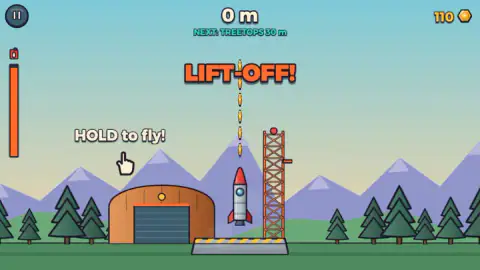
The pad scene tells you everything before you press a key. A hangar on the left, a red lattice tower on the right, and between them a straight column of gold coins stacked into the sky. HOLD to fly! says a hand on the screen. At the top, the target: NEXT: TREETOPS 30 m. And down the left edge, an orange bar with a fuel can on top of it, which is the real clock of the game.
We played close to twenty launches in one sitting. The first, with nothing bought, reached 12 metres. Then we went shopping, and every full flight after that stopped at 17 metres. We never saw the treetops. That gap between 17 and 30 is what the rest of this page is about.
What a launch pays, and why the shop is cheap
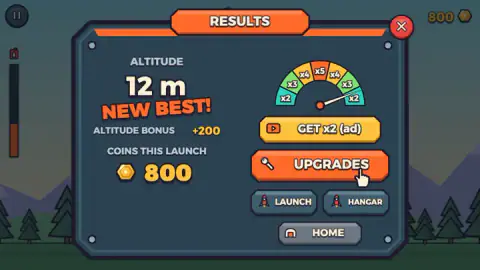
The results panel is the game's report card, and the arithmetic on it is simple. You get the coins you caught in the air, plus an altitude bonus for the height you reached.
| Launch | Height | Coins caught | Altitude bonus | Total |
|---|---|---|---|---|
| First, nothing bought | 12 m | 600 | +200 | 800 |
| Full flight after two upgrades | 17 m | 720 | +250 | 970 |
| Short flight | 9 m | 600 | +150 | 750 |
Now set that against the shop.
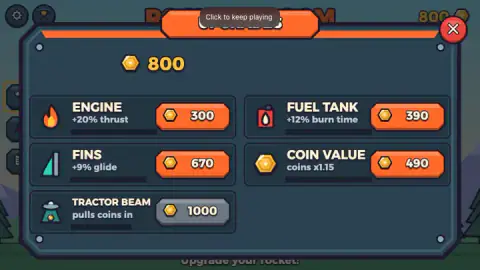
| Upgrade | What the card says | First price | Next level |
|---|---|---|---|
| Engine | +20% thrust | 300 | 780 |
| Fuel Tank | +12% burn time | 390 | 910 |
| Coin Value | coins x1.15 | 490 | not seen |
| Fins | +9% glide | 670 | not seen |
| Tractor Beam | pulls coins in | 1,000 | not seen |
In other words, at the start each upgrade costs about one full flight. Two or three launches always buy something. Only the Tractor Beam, which pulls coins towards the rocket, is out of reach after the first launch.
Next to those figures sits a semicircular gauge marked x2 to x5, with a needle that swings back and forth. The yellow button under it reads GET x2 (ad), GET x4 (ad) or GET x5 (ad) depending on where the needle is. That is an advert offer to multiply the launch's coins. It is optional, and Launch Again sits right under it. The home screen has one more of the same kind: EXTRA STAGE (ad), promising one extra stage on the next launch.
Thrust, fuel and Tsiolkovsky: why two upgrades bought five metres
The upgrade cards borrow their words from real rocketry, and the real physics explains why they are priced the way they are.
A rocket leaves the ground only while its thrust — the push of the engine — is bigger than its weight. NASA's Glenn Research Center teaches this as the thrust-to-weight ratio: above one, you climb; below one, you fall. That is the whole of Rocket Bloom's control scheme. Holding is thrust. Letting go is weight winning.
How much speed a rocket can gain is the subject of the equation that Konstantin Tsiolkovsky, a Russian schoolteacher, published in 1903; NASA's Glenn pages still teach it under his name as the ideal rocket equation. In plain words: the speed you can add depends on how fast the engine throws its exhaust out, and on how much heavier the rocket is full than empty. The catch is that the second part grows slowly. Doubling the fuel does not come close to doubling the speed, because the extra fuel is also extra weight to lift.
So the two upgrades do different jobs. Engine is about thrust: the same burn pushes harder, so you climb faster while the fuel lasts. Fuel Tank is about burn time: the bar empties later. We bought one level of each together, so we cannot say how many of the five extra metres came from which card. The Fuel Tank card mentions burn time and nothing about weight, so the game appears to have spared you the catch that real engineers fight.
Tsiolkovsky also drew the way out of that trap: rockets built in stages, each one dropped when its fuel is gone so the rest has less to lift. The game's own description mentions stage separations further up, and the EXTRA STAGE offer on the home screen points at the same idea. The listing's final goal is space at 100,000 metres, the same height the World Air Sports Federation (FAI) uses as the edge of space. Our best of 17 metres is a long way below it.
The hangar and the gift rocket
The other half of the name is the merge. After a few launches the home screen showed a line at the bottom — A gift rocket! MERGE them! — and red badges on both the Upgrades and Hangar buttons. The game's description says two rockets combined in the Hangar bloom into a new, stronger model, with 12 rockets to discover.
We did not open the Hangar, so we cannot tell you what the second rocket looks like or how much higher it flies. What we can tell you is that the game hands you the first merge for free, early, and badges the button so you notice. Go and use it before your second round of upgrades.
Who it is for, and what we never reached
Rocket Bloom suits anyone who likes watching a number grow for reasons they chose. There is no enemy, no timer and nothing to lose but a few seconds, so a young player can hold the button all afternoon. An older one will want to work out which card buys the most metres per coin, and the prices on screen are enough to do that maths.
Now the honest inventory. We stayed on the first stretch of sky the whole session and never reached Treetops at 30 metres. We never opened the Hangar, the Flight Log, the settings or the trophy screen, and never bought Fins, Coin Value or the Tractor Beam. The game's listing also promises rings, balloons, fuel cans, an AFTERBURN for ten coins in a row, perfect stage separations, a parachute ride home, and a trip past the clouds and an aurora. We saw none of it in our session; treat that list as the game's promise, not our account. We also played on a computer: the game says you steer by sliding a finger or with the arrow keys, but we never steered on purpose.
More games to launch
If the hold-and-upgrade loop is what you like, Log Flyer: Grandpa Takes Off swaps the rocket for a grandpa on a log and spends its coins on wings, engines and fuel. Knight Launch throws a knight from a trebuchet and upgrades the throw. Merge a Rocket is built around the merging half of the idea. The rest are under arcade games.
Screenshots

How to play Rocket Bloom
- On the home screen, click or tap where it says TAP TO PLAY. The rocket appears on the pad under LIFT-OFF!.
- Hold the mouse button, a finger, or Space. The engine fires and the rocket rises through the coin column, each pickup adding to a running counter that flashes +300, +500, +600 as you climb.
- Watch the fuel bar on the left. When it empties, or when you let go, the rocket falls back and lands on the pad with a TOUCHDOWN!.
- Read the results panel: altitude, your best, an altitude bonus and the coins from this launch. Then choose Launch Again, Upgrades, Hangar or Home.
- Spend coins in Upgrades and launch again.
Tips from our run
- The coins sit in a vertical line right above the pad. Going straight up is the best route; you do not need to chase anything sideways early on.
- Do not let go to save fuel. The game's own description says the rocket has real weight: release the button and it slows, stops and falls. Our short flights, at 5 and 9 metres, paid far less than the full ones.
- Spend as you go. We bought two upgrades and then kept launching, and finished with about 16,000 coins sitting unused. That was our mistake, and the clearest lesson of the session.
- A NEW BEST! banner with a coin total pops up while the rocket is still in the air. The launch is not over when you see it: keep holding.
Controls
| Click or tap (TAP TO PLAY) | Takes you from the home screen to the launch pad |
|---|---|
| Hold the mouse button, a finger or Space | Runs the engine for as long as you hold and the fuel bar on the left lasts. Let go and the rocket starts to fall |
| Slide or Left / Right Arrow | Steers the rocket sideways towards coins and pickups, per the game's listed controls |
| Launch Again, Upgrades, Hangar, Home | The four choices on every results panel |
Features
- One input does everything: hold to burn, let go to fall, and the fuel bar on the left decides how long the climb lasts
- A column of coins stands straight above the pad, so a clean vertical climb is also the richest one
- With nothing bought, our first launch reached 12 m and paid 800 coins
- One level each of Engine and Fuel Tank took every full flight after that to 17 m, worth 970 coins a time
- Five upgrades: Engine (+20% thrust), Fuel Tank (+12% burn time), Fins (+9% glide), Coin Value (coins x1.15) and Tractor Beam
- A Hangar where a free gift rocket waits to be merged into a stronger one
- A results panel that adds an altitude bonus on top of the coins you caught: +150, +200 or +250 in our flights
Game details
- Developer
- Partner studio
- Release date
- October 2026
- Last updated
- October 25, 2026
- Added here
- October 2026
- Technology
- HTML5 (2D)
- Platforms
- Browser (desktop), Browser (mobile & tablet, touch)
- Saved progress
- Saving, when available, is managed by this game. Mava cannot confirm your level.
FAQ
How do you play Rocket Bloom?
Tap to play, then hold the mouse button, your finger or Space to fire the engine. The rocket climbs while you hold and the fuel bar on the left lasts, catching the coins stacked above the pad. When it comes back down, a results panel shows your altitude and coins, and you spend those coins on upgrades so the next launch goes higher.
How high can you fly in Rocket Bloom at the start?
Our first launch, with nothing bought, reached 12 metres. After buying one level of Engine and one of Fuel Tank, every full flight stopped at 17 metres. The first named target, Treetops, sits at 30 metres, so the opening launches are meant to send you to the shop.
Which upgrade should you buy first in Rocket Bloom?
Engine is the cheapest at 300 coins and adds 20 per cent thrust; Fuel Tank costs 390 and adds 12 per cent burn time. Buying one of each after the first launch took us from 12 to 17 metres. A single full flight pays about 970 coins at that height, so each early upgrade costs roughly one launch.
What does merging do in Rocket Bloom?
According to the game's own description, two rockets merged in the Hangar bloom into a new, stronger one, with 12 rockets to discover. In our session the home screen announced a free gift rocket to merge and put a red badge on the Hangar, but we did not open it, so we cannot describe the result.
Are the GET x2 and GET x5 buttons in Rocket Bloom adverts?
Yes. Every results panel has a yellow button marked with a video icon and the word ad, and the multiplier it offers follows a needle swinging across a gauge from x2 to x5. Pressing it means watching an advert. You never have to: Launch Again and Upgrades sit right below it.
What is the goal of Rocket Bloom?
The game's listing names space at 100,000 metres as the goal, and then the Moon. On screen the targets come one at a time: the first is Treetops at 30 metres. We did not get past 17 metres in our session, so everything above that comes from the listing, not from our run.
Who made Rocket Bloom?
No developer is credited in the information we have for Rocket Bloom, so we do not name one. It is a free HTML5 game distributed and it runs in the browser on computers, phones and tablets with nothing to install.