






About Go Up
A game called Go Up usually hands you something to go up with. This one hands you a chicken in a bubble and takes the controls away.
The chicken sits inside a white circle, low in the frame, with a red comb and a face that is already worried. A second, smaller disc floats just above it with a shield crest drawn on the front. Across the top of the screen, in whatever colour the backdrop happens to be that attempt, sits a field of white discs in two neat rows of seven, with a slim track drawn over it running from a marker labelled 1 to one labelled 2. A house icon sits in the top left corner. That is the entire interface.
What you move is the shield. Every attempt opens the same way, with a pointing hand and two words in white capitals, DRAG TO START, sitting in the gap between the bubble and the shield above it. There is no throttle for the balloon, no rudder and no brake, and nothing we pressed on the keyboard produced anything we could see or hear. One pointer, one disc, one job.
We should be straight about how far we got, because it matters for everything below. In roughly four minutes the marker at the top never moved off 1. Attempt after attempt finished on the same card, and the card is the nicest thing in the game: a white balloon, knot and all, with CHALLENGE FAILED across it in turquoise and one circular arrow underneath. No score on it. No next. Just the arrow, and the grid of discs showing through behind it in grey-blue.
The game is credited to Drivix Games and has been available since October 2025.
What is on the screen, and what is missing from it
Five things, and we have listed all five already: the bubble, the shield, the field of discs, the 1-to-2 track and the house icon. Everything else is decoration.
The absences are the interesting part. No score. No timer. No lives. No coins, no shop, no upgrade tree, no settings panel. Most browser games of this length put a running number somewhere on the screen so that a failed attempt still feels like it produced something. This one does not, which leaves exactly one piece of feedback: the balloon is still going up, or it is not.
The decoration does change, and it changes often. Our attempts ran through a turquoise sky with a dark house silhouette sitting in the clouds, a band of green hills, a band of magenta hills, a purple screen with faint snowflakes drifting on it, and a dark maroon one dusted with sparkles. The chicken, the shield and the discs are identical in all of them. The game re-paints itself between attempts rather than redesigning itself, which is a cheap trick and an effective one: the fifth attempt does not look like the fourth.
A balloon goes up because it is lighter than the air it pushes aside
The physics here is older than the aeroplane and simpler than it looks. A balloon climbs for one reason: what is inside it weighs less than the air it shoves out of the way. Helium comes in at roughly 0.18 grams a litre. The air you are breathing at sea level is about 1.2. Every litre of helium is therefore carrying roughly a gram of something else upward, which is why the lift of a balloon is a question of volume rather than power.
Climb, and the deal gets worse. The air thins out, so there is less of it to displace and less lift to be had, while the gas inside pushes outward against an envelope that no longer has much pressure holding it in. A weather balloon leaves the ground looking underfilled and slack for exactly this reason: it spends the whole ascent stretching, and it keeps stretching until it bursts, usually somewhere around 30 kilometres up. Going higher is not a matter of trying harder. It is a matter of how much skin you have left.
The second half of it is the part this game is built on. A balloon does not steer. A pilot controls height and nothing else; to change direction, you climb or descend until you find a layer of wind already going the way you want, and then you let it take you. The route belongs to the air.
That is the bargain Go Up makes with you, and it explains the odd shape of the controls. You are not given a throttle, a rudder or a brake, because a balloon has none of the three. What you are given is a shield and the right to decide what the balloon meets on the way. It also explains why one touch finishes it: a balloon is a skin held taut by the pressure inside, and a skin held taut does not fail gradually. It fails all at once.
The failure screen is a balloon too
Most games spend a screen on your result. This one spends it on a joke. The card that comes up when you lose is drawn as a balloon, nudged slightly off centre, with the little knotted neck hanging underneath and the obstacles still visible through the gaps around it. The text is three words. The button is an arrow.
The effect is a loop with nothing in it to interrupt you: drag, climb, touch, arrow, drag. We were able to make more than twenty attempts in four minutes because none of them cost anything to leave behind. Whether that is generous or simply unfinished depends on how you feel about a game that never once told us how we were doing.
What it asks you to watch
Three times during our session the screen dimmed and a line came up over it reading, word for word, "We skipped the ad this time - enjoy the game!" with a purple Continue playing button underneath. One click and we were back in the attempt. We never sat through a video in the whole session.
The only other pause comes from the browser rather than the game. Click away from the page and a black strip reading "Click to keep playing" settles across the top until you click back in.
Where to go after the climb
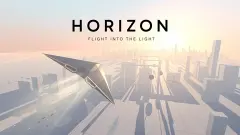
If it was the balloon that brought you here, Save the Balloon is the same idea from the opposite side: you play the defender who clears the way instead of the thing being defended. Sling Chicken puts the same bird on the same upward trip and lets you fling it yourself, peg by peg. Chubby Duck Jump narrows the whole thing to one button and a charge meter in an endless sky, and Fit in the Wall keeps the instant ending but gives you a single correct answer to find each time. For dodging at speed rather than drifting upward, Horizon: Flight Into the Light weaves a glider between white towers. The rest are in arcade games.
Screenshots
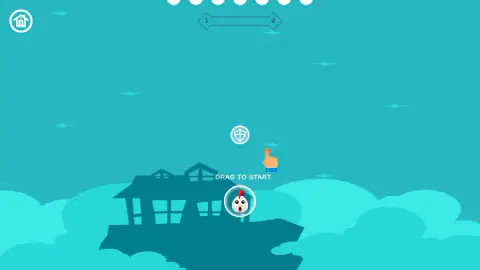
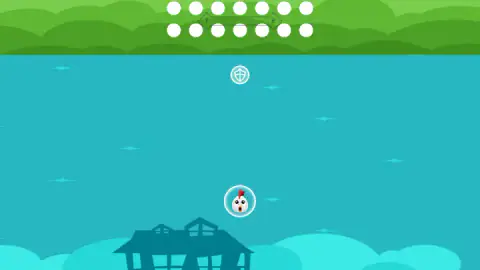
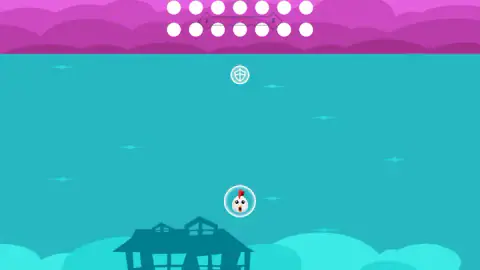
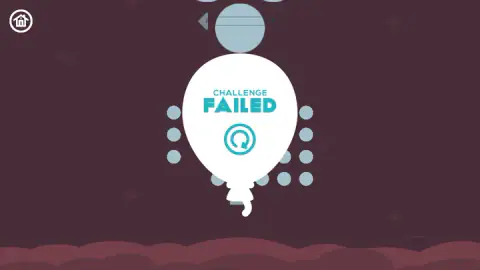
Taken by opening the game ourselves and letting it run — not supplied by the publisher, and not the same picture every other site shows.
How to play Go Up
- Drag. The hand and the words DRAG TO START sit between the bubble and the shield, and a short drag upward sets the attempt running.
- Keep dragging the shield. It is the piece that answers a pointer, and it slides around the bubble rather than away from it.
- Put it on the side the trouble is coming from, which on every screen we saw was above.
- When CHALLENGE FAILED comes up, take the circular arrow in the middle of the balloon. It is the only button on the card and it restarts immediately.
- If a black strip reading "Click to keep playing" appears over the top of the game, the page has simply lost focus. One click anywhere inside and it picks up again.
What our attempts taught us:
- The bubble is not yours. The instinct is to drag the chicken, because that is the thing you want to move. It is the one thing on the screen that a drag does not seem to do anything for.
- Clicking the discs at the top is a dead end. We spent a good half of our attempts doing exactly that, working left to right along the rows, and every single one of those attempts ended the same way as the others.
- Nothing on the keyboard helped. The arrow keys and a letter key gave us nothing. If you are used to holding a key to climb in this kind of game, there is no key to hold.
- Restarting costs nothing. There is no result screen to sit through and no reward to collect, so one click puts you straight back at DRAG TO START. That is why we got through so many attempts so fast.
- Level 1 is not a tutorial level. It behaves like a real one. We did not clear it.
Controls
| Drag (mouse or finger) | Starts the attempt, and then moves the shield disc around the bubble |
|---|---|
| Click or tap | Takes the restart arrow on the CHALLENGE FAILED balloon and the Continue playing button when the game pauses itself |
| House icon, top left | The only other control on screen during an attempt |
| No keyboard control we could find | We tried the arrow keys and a letter key and nothing we could see or hear responded |
Features
- A chicken rides upward inside a white bubble, and there is no control anywhere for steering it
- A second disc marked with a shield floats just above the bubble and is the only piece a drag moves
- A field of white discs, two rows of seven, sits across the top of every screen
- One touch ends the attempt: a card shaped like a balloon reads CHALLENGE FAILED and offers a single restart arrow
- No score, no timer, no lives counter and no shop anywhere on screen
- Backdrops change from attempt to attempt while the chicken, the shield and the discs stay identical
- Available since October 2025
Game details
- Developer
- Drivix Games
- Release date
- October 2025
- Last updated
- October 17, 2026
- Added here
- August 2025
- Technology
- HTML5 (2D)
- Platforms
- Browser (desktop), Browser (mobile & tablet, touch)
- Saved progress
- Saving, when available, is managed by this game. Mava cannot confirm your level.
FAQ
How do you play Go Up?
Every attempt opens with a pointing hand and the words DRAG TO START, and a drag sets the climb going. From there you drag the small disc with the shield on it, keeping it between the bubble and whatever the balloon is about to meet. The attempt ends the instant the bubble is touched.
What do you actually control in Go Up?
The shield, and nothing else. The chicken's bubble goes up and there is no throttle, no steering and no brake for it anywhere on the screen. The house icon in the top left corner is the only other thing you can press while an attempt is running.
Why does a run end so fast in Go Up?
Because the bubble has no health. There is no damage bar and no second chance in the middle of an attempt, so a single contact is the whole ending. That is also why the restart is one arrow and nothing else, with no card to read first.
Does Go Up keep a score?
Not that we could find. In our session the screen carried the bubble, the shield, the field of discs, a slim track between markers labelled 1 and 2, and a house icon, with no points, no clock, no lives and no coins. The failure card does not tally anything either.
Who made Go Up?
It is credited to Drivix Games. The game has been available since October 2025.
How many levels does Go Up have?
We cannot say. The track at the top of the screen runs between a marker reading 1 and one reading 2, and in four minutes of attempts ours never moved off the first. Every attempt we made ended on the same failure card, so what level 2 looks like is not something we can report.
Can you play Go Up on a phone?
It is listed for PC, Android and iOS in portrait, and the controls point the same way, since a drag is the only input the game asked for. We played it in a desktop browser with a mouse, in a landscape window, with nothing cut off the edges.
Does Go Up make you watch video ads?
It did not make us. Three times during our session a dark overlay came up reading "We skipped the ad this time - enjoy the game!" with a Continue playing button, and one click put us back in the game. We never sat through a video in roughly four minutes of attempts.