



About Sky Blocks Falling
A counter in the top-right corner of Sky Blocks Falling reads 228. It is not a clock, and working out what it actually counts is the most useful ten minutes you can spend on this game.
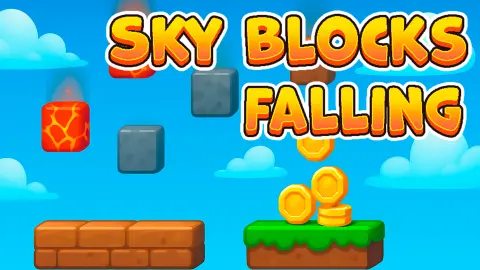
The screen is a flat blue sky with pixel clouds on it and a single slab of stone near the bottom, which you slide left and right with the mouse. Small cubes of earth drop out of nowhere, one at a time. Catch one and a stripe of grass-topped soil appears at the left end of the slab. Catch five and the slab pays you and goes back to bare stone. Above that sits a row of upgrade cards, and that row is the real game. The first costs two coins. The rest are grey, locked, and do not even show you a price.
The game is credited to a developer called Neko_puf and has been available since December 2025. Most of that developer's games are idle games, which tells you where the designer's interest lies.
We have now played it twice. The first time we never managed to buy anything. The second time we did, and one purchase explained most of what the first session could not.
The counter is not a clock. It is 250 full bars
The brown gauge only ever goes down, which makes it look like a timer. It is not. We watched it sit on the same number for half a minute while we missed block after block. Time does not touch it.
What does touch it is the bar. Every time the slab filled and paid, the number dropped by exactly one. Before we spent any coins, the gauge and the coin counter added up to the same total in every screen we looked at: 250. Catch five blocks, gain a coin, lose one from the counter.
Then we bought something, and that settled it. Our coins fell by the price. The gauge did not move at all. It is counting bars, not money — and because it started at 250, the game is asking you for 250 full bars from beginning to end.
We filled fifteen of them in just under ten minutes. At that rate the rest is about two and a half hours of sliding a slab around with a mouse. That is not an accident of difficulty. It is the number the upgrade shop exists to shrink.
The bar takes five blocks, and we have still never seen a sixth
Watch the slab rather than the sky and the design gives itself away. Empty, it is plain grey stone. Catch a block and the leftmost fifth turns to earth with grass on top. Catch another and the next fifth goes the same way. We have now checked this across every usable screen of two sessions, and the fill only ever sits at one of five positions: empty, one fifth, two fifths, three fifths, four fifths.
Not once have we caught it holding five — which is exactly what you would expect if the bar cashes itself out the moment the last slot fills. The coin counter agrees: it climbs one step at a time, never two.
So the unit of progress here is not the block. It is the bar. Five catches, one payout, one off the counter. Everything in the shop is priced against that exchange rate.
Two coins, and the price went up fifteen per cent
Here is the number that explains the genre, and this time we have it first-hand.
The first card asked two coins all session. We finally had them, pressed it, and three things happened at once. The payout under the slab went from 1 to 1.2. Our coin total started carrying a decimal. And the card's own price changed from 2 to 2.3.
That is a rise of exactly fifteen per cent, and it is not a one-off. Flip the bulk toggle so the card sells five at a time and it asks 13.5 rather than the ten you would get by multiplying — which is what five purchases come to when each one is fifteen per cent dearer than the last.
That 15% is not an arbitrary choice by this developer. It is close to an industry constant, and it has a birthday. Cookie Clicker went online in August 2013, written in a single evening by Julien "Orteil" Thiennot, and the price of every building in it is its base cost multiplied by 1.15 for each one you already own. Its community reference sums that up as a rule of thumb: the price roughly doubles every five purchases.
Why fifteen and not ten or fifty? Because it is the rate at which your income and your costs stay just out of step. Each upgrade adds a fixed amount to what you earn, while prices multiply. Early on your earnings win and everything feels cheap. A few minutes later the multiplication catches up, and the next card is always a little further away than the last one was. That is not a flaw in the design — it is the design, and it is why a loop you can learn in four seconds can hold you for an hour.
You can watch the gap open in real time. One purchase lifted our payout by a fifth and the price by about a seventh, so we were still ahead. The second card had just turned green at ten coins, five times what the first one cost. Its picture is a short slab becoming a long one, which is as much as we can honestly tell you, because we never pressed it.
Forty-seven achievements, none of them ours
We should be plain about what ten minutes buys here.
A panel headed ACHIEVEMENTS opened once while we were playing. It filled the screen with darkened tiles — cubes in ones and twos, upward arrows, swatches of brick and gravel — above a line reading "Progress 0/47", with "Bonus 0%" beneath it. Count the grid and it comes to forty-seven exactly. We closed it with nothing unlocked and nothing added to our income.
The rest of the interface stayed shut. Down the left edge sit a gold coin stamped with a P, a gold star over three smaller ones, a pink badge with a C and a clipboard that grew a gold exclamation mark partway through. A blue button marked x2 Bonus sits at the top. None was pressed, and the card row runs off the right-hand edge, so we cannot even promise you there are only nine.
Nothing made us watch an advert, nothing asked us to sign in, and the game never paused while we fumbled. For something whose own tutorial we failed the first time round, it is patient about being learned slowly.
More idle games to lose an afternoon to
Neko_puf has three other games in our catalogue, all built on the same engine of small gains and rising prices. Planet Destroy Idle chips a world apart with pickaxes whose price climbs a tenth each level, Gun Bounce Idle drops weapons into an arena and lets the ricochets do the earning, and Pickaxe Crusher Idle sends a bouncing pick deeper into a mine. If the slab is the part you want, BreakBlock is the straight brick-breaker with none of the shopping, and Idle Pong sits between the two. The rest are in arcade games.
Screenshots
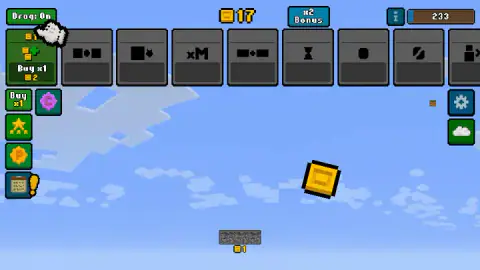
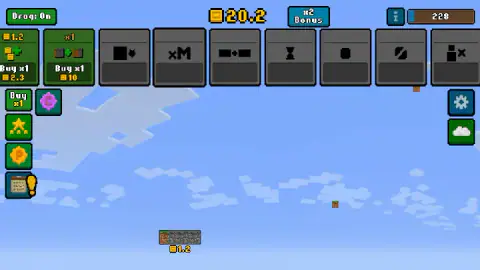
Taken by opening the game ourselves and letting it run — not supplied by the publisher, and not the same picture every other site shows.
How to play Sky Blocks Falling
- Press and hold on the slab, then move the mouse. The game's own sign spells it out: "Press and hold the SkyBar to move it and catch falling blocks". The bar follows your pointer only while the button is down.
- Put it under a falling cube. Blocks come one at a time and take a couple of seconds to reach the bottom, so you have time. They are tiny — about as wide as one slot of the bar — and easy to lose against a cloud.
- Fill the bar and spend what it pays. The number printed under the slab is what one full bar is worth. It starts at one coin, and the first card costs two.
- Buy that first card early. It is the only one that will explain itself: hover it and a brown sign says it "increases income received when filling the SkyBar". Everything after it is a guess until you can afford it.
What ten minutes with it taught us:
- The sky is a painting. The clouds do not drift. Two screens nine minutes apart are identical except for the cube that happened to be falling.
- The "Drag: On" button in the corner is a control setting, not an upgrade. Switched on, as it is by default, you must hold the button to move the bar. It took us a session to stop treating it as something to collect.
- The small green "Buy x1" in the left column is a bulk toggle. Press it and every price along the top row changes at once. If a card suddenly costs nearly seven times what it did, that is why.
- The arrow keys do nothing. We tried all four and the game did not answer.
- Large gold blocks tumble past too, spinning as they fall. One is about as wide as the entire bar. We never caught one, so what it pays we cannot tell you.
Controls
| Hold the left mouse button on the bar | Drags the SkyBar along the bottom of the screen. The game's own sign puts it as "Press and hold the SkyBar to move it and catch falling blocks" |
|---|---|
| "Drag: On" button, top left | Switches that holding off, so the bar is meant to follow the pointer with no button held. We left it on both times we played |
| The cards along the top | The upgrades. An open card shows what it is worth now, a Buy button and a price. A locked one shows a black symbol and an empty price panel |
| "Buy x1" button, left column | The bulk toggle. One press turns it into Buy x5 and every card's price changes with it |
| Arrow keys | Nothing we could see or hear. This is a game for a pointer, not a keyboard |
| Star, P coin, pink badge and clipboard, left column | Four panels. Only one of them opened while we played, and it was the achievements list |
Features
- A SkyBar with five slots that fills from the left, pays out and goes back to bare stone
- A counter in the corner that drops by one for every full bar and ignores everything else, including time and spending
- Nine upgrade cards along the top, the ninth cut off by the right-hand edge of the window
- A first upgrade that costs two coins, lifts the payout from 1 to 1.2, and raises its own next price to 2.3
- A second card that opens at ten coins and whose picture is a short slab turning into a long one
- Forty-seven achievements with a coin bonus attached, reading 0% and 0 of 47 when we stopped
- The sky never moves, because the pixel clouds are painted on rather than drifting
- It has been available since December 2025
Game details
- Developer
- Neko_puf
- Release date
- December 2025
- Last updated
- August 10, 2026
- Added here
- October 2025
- Technology
- HTML5 (2D)
- Platforms
- Browser (desktop), Browser (mobile & tablet, touch)
- Classification
- Arcade
- Saved progress
- Saving, when available, is managed by this game. Mava cannot confirm your level.
FAQ
How do you play Sky Blocks Falling?
You hold the left mouse button on the bar at the bottom of the screen and slide it under the cubes dropping out of the sky. Each one you catch fills a slot, and the bar pays you when all five are full. Those coins buy the upgrade cards along the top, which is where the game actually goes.
What does the brown counter in the corner of Sky Blocks Falling mean?
It counts the full bars you still owe, and it starts at 250. We can be confident about that because it never moved while we were missing blocks, it did not budge when we spent coins on an upgrade, and before we bought anything it and the coin counter always added up to 250. It drops by exactly one each time the bar pays out, whatever the payout is worth.
How long does Sky Blocks Falling take to finish?
We filled fifteen bars in just under ten minutes, which is roughly one every forty seconds. At that pace the 228 still on the counter would take about two and a half hours of catching cubes by hand. That gap is the argument the game makes for buying upgrades instead.
What is the SkyBar in Sky Blocks Falling?
It is the slab you move along the bottom of the screen, and the game names it on its own tutorial sign. It is bare grey stone when empty and fills with grass-topped earth from the left as blocks land on it. Across two sessions we only ever measured it at nought, one, two, three or four fifths full and never at five, which is what you would expect of a bar that cashes out the instant it fills.
Why does the first upgrade in Sky Blocks Falling cost more after you buy it?
Because every copy is fifteen per cent dearer than the one before. The first card asks two coins; buy it once and the same card asks 2.3. Flip the bulk button to five at a time and it asks 13.5 rather than ten, which is the same fifteen per cent compounded five times. It is the standard price curve of the idle genre.
Does Sky Blocks Falling have achievements?
Yes, forty-seven of them. A panel headed ACHIEVEMENTS opened once while we were playing and showed a grid of darkened tiles above the line "Progress 0/47", with "Bonus 0%" under it, so completing them pays a percentage on top of what you earn. We finished our session with none of them unlocked.
Who made Sky Blocks Falling?
It is credited to a developer called Neko_puf. No studio name appears anywhere on screen while you play. The game has been available since December 2025 and was last updated in August 2026.
Can you play Sky Blocks Falling on a phone?
It is listed for desktop, mobile and tablet, and the whole game is pointer-driven, so there is nothing a finger could not do that a mouse can. We played on a desktop both times, so we can describe the buttons but not how the bar answers to a thumb.