

About Mine Mining Islands 2: Skyblock City!
The word skyblock is a promise about scarcity. The format it names strands you on a scrap of land floating in empty sky with a counted handful of materials and no way to fetch more, and everything you ever build has to come out of that handful. Mine Mining Islands 2: Skyblock City! takes the name, puts a city in the title, and then opens by handing you five tools and 500 gold before you have taken a step.
What it actually is, once the loading clears, is a walking game. A blocky character stands on a floating island under a pale, almost white sky, the camera high and behind. There are no waypoints, no minimap and no quest log. There are red arrows, painted flat on the grass and on the stone, each one roughly the size of the character, and the game expects you to follow them the way you would follow paint on a road.
C4S.WAG made it, the same studio behind the first Mine Mining Islands. It was published in May 2026, updated that August, rated suitable from ten and up.
We played it for four minutes and never got out of the tutorial. That is not a complaint so much as the most useful thing we can tell you, because the tutorial is where this game decides whether you stay.
Skyblock is a format, and a trademark board has now said so out loud
This is worth knowing before you judge the title, because the word in it is doing real work.
Skyblock started as one person's map. A player known as Noobcrew published it in September 2011: a small L-shaped island of grass hanging in an otherwise empty sky, one tree, one chest, and a short list of materials inside it. There was no boss and no ending. The whole design was a constraint — you cannot go and get more, so the only way forward is to turn what you have into more of what you have. It spread further than almost any other piece of player-made content from that era, first through videos, then through servers that ran it as a permanent mode, and eventually into separate games that borrowed the shape.
By then the name had stopped belonging to anybody, and in May 2026 that became official. The creator's company had applied, back in 2019, to register Skyblock as a trademark in the United States. The application was opposed, the case went to the Trademark Trial and Appeal Board, and the board refused it, finding the word merely descriptive of virtual worlds made of block islands in the sky. Descriptive is the legal way of saying everybody's.
So a browser game is free to call itself Skyblock City, and the question becomes whether it means it. On the evidence of the tutorial: half. The islands are real skyblock islands. Walk to any edge and the ground simply stops — you can see the underside of the next island hanging in the air, and the gaps between them are crossed on narrow plank bridges held up by log posts.
The scarcity, though, is gone. A skyblock map gives you one chest. This game gives you a full set of five tools and a purse before the first objective. It has kept the geography and thrown away the rule that made the geography matter, which is a fair trade for a game that wants eight-year-olds to get somewhere in the first minute, and a disappointment if the word in the title is what drew you in.
What the corner panel is actually telling you
At the top, your character's face, and beside it the tool in hand: a pickaxe, drawn large, with four smaller ones squeezed into a square next to it — a hammer, an axe, a fork and a sword. Each of the five sits over its own slim green bar with a number written across it, too small to read at normal size. Our reading is that this is wear, and that tools here have a working life; we never saw one of those numbers move, so treat it as a reading rather than a fact. Below them, a wooden plank with 500 on it and a gold coin, and under that the objective sign, headed TRAINING in yellow on brown.
The fourth piece hides until you want it. A strip pulls up along the bottom of the screen with ten slots in two rows, each one paired with a plus button. Nine of them hold a different ore, told apart only by colour: black, deep red, blue, yellow, green, pale blue, cream. One sits in a bright gold frame with a question mark in it, which reads as something not yet found. That strip is the clearest statement of intent in the whole interface. Nine kinds of rock, and a game that wants you to go and fill all of them.
What four minutes of training did and did not show
The game gave three objectives in a row. Reach the mine, following the arrows. Mine three cobblestone, tapping the pickaxe button. Then reach the dump, following the arrows again. We finished the first two and were walking to the third when our time ran out. The route went from grass and sand across two plank bridges over open sky, past a pool of water set into the ground, and down onto grey stone flecked with moss, where the first ore shows up as red specks on the floor. Two other block figures stood on one island beside a yellow block; they did not approach us and we did not approach them.
Here is the honest part. The studio promises a good deal more: becoming mayor, upgrading buildings, trading with villagers, selling what you dig, unlocking further islands, raising your speed, strength and luck, defending the city against monster raids, and fighting in an arena. We saw none of it. Not one monster, not one building, not one trade, and not one coin moving in either direction. That does not make the promises false. It means the game puts them a long way behind a tutorial.
How it differs from the first Mine Mining Islands
The two games are closer than most sequels, and the difference is almost entirely the camera. The first one, Mine Mining Islands: Skyblock Village, is played from inside the character's head, with a small white crosshair in the middle of the screen and a tool held up at the right edge: you aim at the block you want. The sequel pulls the camera out and up, so you watch a small figure walk rather than being them. For a game whose main hazard is a cliff edge over nothing, that is the better choice — you can see the drop coming.
The starting purse doubled too, from 250 to 500. And the pickaxe moved out of your hands and into that corner button, which is the change a returning player will notice first and like least.
More games by C4S.WAG
The studio works almost exclusively in cubes. Mine Miner 3D: Mayor of Dream Island is the closest relative, a first-person mining game that also opens on a TRAINING sign telling you to reach the mine, with the same 500 coins in the corner. Mine Block Party: World of Minigames swaps the digging for elimination rounds against a lobby.
For the format rather than the studio, Skyblock 3D: Survival plays the premise straighter and Voxel Terraform lets you reshape the ground instead of mining it for sale. The rest are under strategy games.
Screenshots
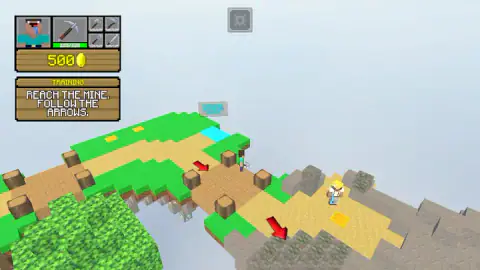
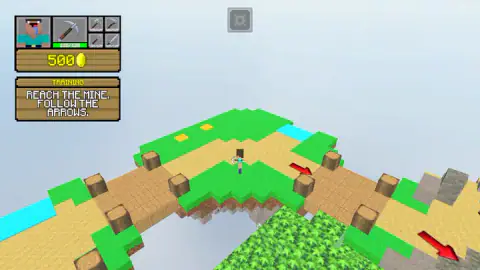
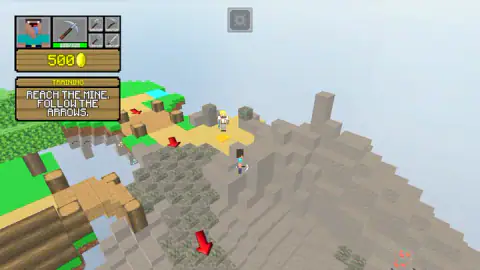
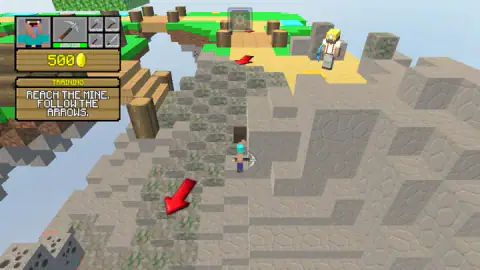
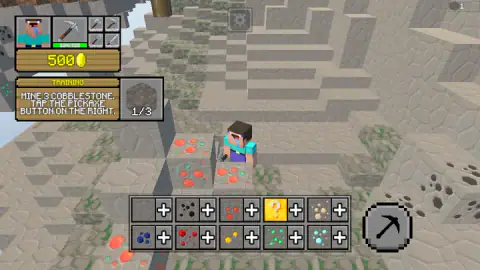
Taken by opening the game ourselves and letting it run — not supplied by the publisher, and not the same picture every other site shows.
How to play Mine Mining Islands 2: Skyblock City!
- Walk with W, A, S and D. The studio lists the arrow keys as an alternative; the letters are what moved us.
- Read the wooden sign in the top-left corner. It carries one objective at a time, and it is the only place the game tells you anything.
- Follow the red arrows on the ground. They are the route, and they turn corners and point down staircases.
- To dig, stand next to the stone and press the round pickaxe button in the bottom-right corner. You do not swing at a block yourself.
- Pull up the resource strip along the bottom to see what you are carrying.
Things that are easier once somebody tells you:
- The pickaxe is a button, not a swing. This is the single thing most likely to stall a new player, and the game knows it: the second objective is literally worded as an instruction to tap that button. If you came in expecting to aim at a block and click it, you will stand in front of the stone doing nothing.
- The counter does not tick on every press. Our three-block task showed 1 of 3 and 2 of 3 across the attempt, and it took considerably more than three presses to clear. Keep tapping; the objective does change.
- The game pauses the moment you click away. A grey bubble reading "Click to keep playing" drops over the scene. One click anywhere inside the frame brings it back.
- The arrows are objects, not an overlay. They lie on the ground in perspective, so an arrow on a lower ledge can hide behind the ledge above it. If the trail seems to stop, walk to the edge and look down.
- Nothing in training costs money. The 500 in the corner is scenery for now.
Controls
| W, A, S, D | Walk. This is what we used, and the view moved every time we held a key down |
|---|---|
| The arrow keys | Listed by the studio as the same thing as W, A, S and D. We walked with the letters, so we cannot confirm the arrows |
| The round pickaxe button, bottom right | Mine. The tutorial names this button directly, and this is how the three-block task was finished |
| The tool panel, top left | Shows the tool in hand with four more beside it, each over its own green bar |
| The gear button, top centre | Settings. It sits above the play area in every frame |
| A grey bubble reading "Click to keep playing" | Click back inside the frame. It appeared twice for us, both times after the pointer had wandered out |
| Touch, on a phone or tablet | A joystick on the left to walk and the same button on the right to mine or attack, according to the studio. Not tested by us |
Features
- A tutorial level called TRAINING that gives you one instruction at a time on a wooden sign in the corner, and nothing else
- Big red arrows painted flat on the ground and on stone walls: they are the only route marker in the game
- A third-person camera fixed high and behind the character, so you always see the island edge coming
- Five tools in the corner panel, a pickaxe in hand plus a hammer, an axe, a fork and a sword, each over its own green bar
- A purse of 500 gold from the first second, which the tutorial never asks you to spend
- A resource strip that pulls up from the bottom with ten slots, nine ores in different colours and one gold slot marked with a question mark
- Floating islands of grass, sand and grey stone joined by plank bridges, every one of them ending over open sky
- It was published in May 2026 and last updated that August
Game details
- Developer
- C4S.WAG
- Release date
- May 2026
- Last updated
- October 23, 2026
- Added here
- March 2026
- Technology
- HTML5 (3D)
- Platforms
- Browser (desktop), Browser (mobile & tablet, touch)
- Saved progress
- Saving, when available, is managed by this game. Mava cannot confirm your level.
FAQ
How do you play Mine Mining Islands 2: Skyblock City?
You walk a blocky character across floating islands with W, A, S and D, following large red arrows painted on the ground. A wooden sign in the top-left corner gives one objective at a time, starting with reaching the mine. To dig, you press the round pickaxe button in the bottom-right corner rather than swinging at a block yourself.
How do you mine in Mine Mining Islands 2: Skyblock City?
Stand next to the stone you want and press the round pickaxe button in the bottom-right corner of the screen. The game's own tutorial spells this out: the sign reads MINE 3 COBBLESTONE, TAP THE PICKAXE BUTTON ON THE RIGHT. The counter on that sign does not move on every press, so expect to tap it more than three times to clear a three-block task.
What are the controls for Mine Mining Islands 2: Skyblock City?
On a computer, W, A, S and D walk, and the studio lists the arrow keys as the same thing. Mining and attacking are done with the button on the right of the screen, not with a key. On phones and tablets the studio describes a joystick on the left and the same button on the right, which we did not test.
What is skyblock?
Skyblock is a survival format, not a single game. It was created as a user-made map published in September 2011 by a player known as Noobcrew, and its premise is that you begin on a tiny island floating in empty sky with a counted set of materials and nothing around you. The idea spread so widely that in May 2026 a United States trademark board refused to register the word, finding it merely descriptive of block islands in the sky.
Is Mine Mining Islands 2: Skyblock City free to play in a browser?
Yes. It runs in the browser with no download and no account, and it is listed for computers, Android and iOS in landscape, with English and Russian text and an E10+ age rating. It opens straight into the TRAINING level after a couple of clicks.
What do you start with in Mine Mining Islands 2: Skyblock City?
Five tools and 500 gold. The corner panel shows a pickaxe in hand with a hammer, an axe, a fork and a sword beside it, each sitting over its own green bar, and a wooden plank below them reading 500 next to a gold coin. Across our whole session that number never changed.
Is Mine Mining Islands 2: Skyblock City the same as the first Mine Mining Islands?
No, and the difference is the camera. The first game, Mine Mining Islands: Skyblock Village, is played from inside the character's own head with a crosshair in the middle of the screen. This sequel pulls back to a fixed third-person view, so you watch your own character walk and you can see the edge of the island before you reach it. The starting purse also doubled, from 250 to 500.
Who made Mine Mining Islands 2: Skyblock City?
The game is credited to C4S.WAG, the studio behind the first Mine Mining Islands and a run of other block-styled browser games. Beyond the portals the studio leaves almost no trace, so the name is the listing's attribution rather than something we could confirm on a studio site. The game was published in May 2026 and updated that August.