



About Mine Block Party: World of Minigames
The mode window in Mine Block Party: World of Minigames opens with Block Party already picked, the game the title promises. Right next to it, a card called Duel of Life sits above a red banner that reads NEW MODE! One click on that banner, and your next match is no longer the one on the box.
That is what happened to us, and it turned out to be the clearest lesson of the session. This is not one minigame. It is a lobby game with a menu of eight, and the small picture beside the SELECT MODE button is the only thing that tells you which one you are about to play.
Every mode works the same way around the edges. You press PLAY, choose a camera, wait while a counter fills to 15 players, and then try to be the last blocky figure standing. A placement costs or wins trophies, every round pays coins, and the coins go into four upgrades on the main screen.
The game is credited to C4S.WAG. It has been available since April 2026. The look is the familiar blocky voxel style, but it is not an official product of any other game.
Our session ran a little over four minutes, mouse and keyboard on a desktop. We played three rounds of Duel of Life and lost all three, the worst of them in 15th out of 15. Read this as a close look at the menus and one mode, not a guide to all eight.
Eight minigames on one wooden menu
The SELECT GAME MODE window is a wooden board with eight picture cards, four on top and four below. Seven names are readable: Block Party, Rainbow Road, Car Attack, Duel of Life, Rainbow Party, Memory Road and Wall Battle. The eighth card shows a colour floor and a character in a teal shirt, and its name is hidden under the red NEW MODE! banner that belongs to Duel of Life above it.
The pictures hint at what each one is. Block Party and Rainbow Party show floors made of coloured squares. Rainbow Road and Memory Road show narrow paths of blocks leading to a trophy, one coloured and one plain white. Car Attack is a grey road with a pedestrian crossing and a car heading for it, and Wall Battle has tall green and yellow walls.
We only played Duel of Life, so the rest is what the cards show and nothing more. The listing still talks about three modes, which tells you the menu has grown since it was written.
Duel of Life: a board of colours and a few seconds to aim
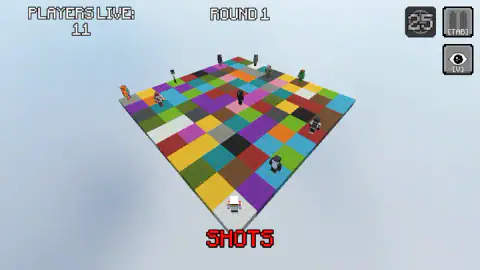
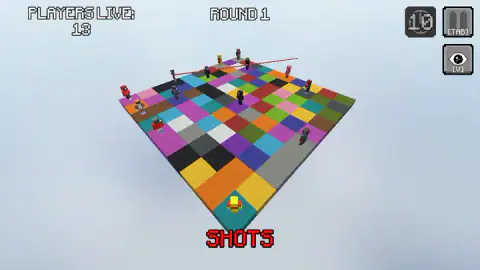
A round of Duel of Life takes place on a square board of coloured tiles floating in a pale sky. The figures stand scattered across it, each on its own tile, and a counter at the top left reads PLAYERS LIVE.
Before anything happens, the screen asks you to choose a position and a shot direction. The countdown starts at five, which is not long to read the board. Then the word SHOTS appears in red at the bottom, and in one of our captures two thin red lines cut across the far half of the board.
The counter falls quickly. In one round it went from 15 to 11 in about twenty seconds, and each match we played was over in well under a minute. A number in a round badge at the top right kept changing between captures, and we never worked out whether it was a clock or something else.
What we can say is that standing still at the front of the board did not work. Three rounds, three defeats.
Trophies, coins and the four upgrades
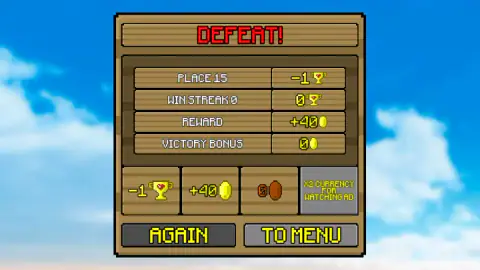
The result screen spells out the economy. Our last-place finish read PLACE 15 with one trophy taken away, a win streak of zero and no victory bonus. The game still paid a reward of 40 coins, so even a bad round moves you towards something.
Under that sits a grey button offering to double the coins if you watch an ad. That is the game's own offer, separate from the ad breaks the portal can show between rounds.
The coins go into four upgrade tiles on the main screen, each with its level shown above it:
| Upgrade | Levels | First level costs |
|---|---|---|
| Speed | 10 | 100 coins |
| Jump | 10 | 100 coins |
| Number of Players | 6 | 250 coins |
| Victory Bonus | 11 | 50 coins |
Speed and Jump are what the listing means by making your character faster and more agile. Victory Bonus is the cheapest and fits the result screen, which has a line for it. We did not buy anything, so we cannot tell you what Number of Players changes.
Beside the coins there is a green gem counter, at zero, with a plus button. The main screen also has buttons for SKINS, a PREMIUM SHOP, PROMO CODES and SETTINGS. The listing says the skins include characters from cartoons and well-known video makers. We did not open that screen.
Are the other 14 players people?
The lobby says SEARCHING FOR PLAYERS, and our counter went from zero to a full 15 in about ten seconds. For a game of this size, that is quick.
Nothing on screen tells you whether the other figures are people online or computer-controlled bots. No names appear over their heads, and there is no chat. We would not promise a child that they are playing against real friends.
Who it is for
Players who like short elimination rounds and a blocky look. A match takes less time than the wait for a bus, losing still pays, and the upgrade tiles give a clear reason to come back.
It is less clear to a newcomer than it looks. There are no instructions beyond a line on the main screen telling you to choose a mode and press PLAY, and in Duel of Life we lost three times without learning how to aim. The result screen's ad offer and the portal's ad breaks are part of the rhythm, so expect them.
More last-one-standing games
For the same idea with obstacles instead of shots, try Run Royale Knockout. Ragdoll Battle Royale! Throw Down the Enemy! also ends when one figure is left on the platform, and Summer Punch Party swaps the board for tropical islands and a pair of gloves. The rest are under action games.
Screenshots
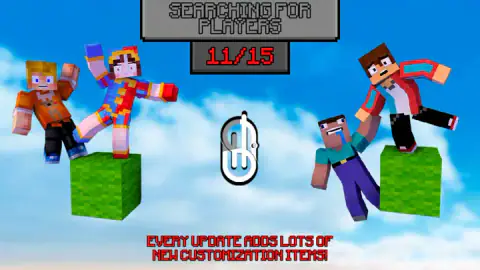
Taken by opening the game ourselves and letting it run — not supplied by the publisher, and not the same picture every other site shows.
How to play Mine Block Party: World of Minigames
- On the main screen, press SELECT MODE at the bottom left. Click a card until it says SELECTED, then close the window with the X.
- Press PLAY. A window asks for a camera: Static, Free or First person. Pick one.
- Wait on the SEARCHING FOR PLAYERS screen while the red counter climbs to 15/15. There is nothing to press.
- In Duel of Life, a red prompt tells you to choose position and shot direction while a countdown runs from five. Then the round plays out.
- When you are out, the result screen shows your place, trophies and coins. AGAIN starts a new lobby; TO MENU goes back to the upgrades.
What three lost rounds taught us:
- Look at the thumbnail before you press PLAY. It changed from the colour floor of Block Party to the Duel of Life board after our click on the banner, and nothing else on the main screen tells you.
- Spend the starting coins first. You begin with 500 coins and the first level of Speed or Jump costs 100. Two upgrades fit before your first match.
- Pick your tile on purpose. In every round we saw, our figure stood on the front corner tile nearest the camera, and we went out every time. Our reading is that we never chose a position and the game left us where it put us.
- Tab pauses and V changes the view. Both have buttons in the top right corner, with the key printed underneath.
- The movement keys are for other modes. The developer lists W, A, S, D or the arrows to move and Space to jump. In Duel of Life none of them made a sound we could hear.
Controls
| SELECT MODE button (bottom left of the main screen) | Opens the window with the eight minigames; the one you click is marked SELECTED |
|---|---|
| PLAY button | Asks for a camera (Static, Free or First person), then sends you to the lobby |
| Mouse on the board | In Duel of Life, the game asks you to choose a position and a shot direction while a short countdown runs |
| Tab | Pause, shown as a button in the top right corner during a round |
| V | Changes the view, shown as an eye button under the pause button |
| W, A, S, D or arrows, Space, mouse | Listed by the developer for moving, jumping and turning the camera; in Duel of Life we heard no response to any of them |
| AGAIN / TO MENU | On the result screen, a new lobby straight away or back to the upgrades |
Features
- Eight minigames on one menu, from Block Party and Rainbow Road to Car Attack and Wall Battle
- Lobbies of 15 players, with a PLAYERS LIVE counter that drops as people go out
- A Duel of Life mode where you pick a spot on a floating board of coloured tiles and a direction to shoot
- Three camera choices before every match, including a first-person view
- Trophies won or lost on placement, and coins paid out even after a defeat
- Four upgrades on the main screen, from Speed and Jump to a Victory Bonus with eleven levels
Game details
- Developer
- C4S.WAG
- Release date
- April 2026
- Added here
- February 2026
- Technology
- HTML5 (3D)
- Platforms
- Browser (desktop)
- Saved progress
- Saving, when available, is managed by this game. Mava cannot confirm your level.
FAQ
How do you play Mine Block Party World of Minigames?
Press SELECT MODE, click one of the eight minigame cards and close the window. Press PLAY, choose a camera and wait while the lobby fills to 15 players. Each mode is a last-one-standing round, and the result screen then pays coins and adds or takes away trophies.
What modes are in Mine Block Party World of Minigames?
The mode window shows eight cards. Seven names are readable, Block Party, Rainbow Road, Car Attack, Duel of Life, Rainbow Party, Memory Road and Wall Battle, and the eighth is covered by a NEW MODE banner. We played Duel of Life only.
How does Duel of Life work in Mine Block Party?
Every player stands on a floating board of coloured tiles. Before the round, a red prompt asks you to choose a position and a shot direction while a countdown runs from five, and then the shots fly. The PLAYERS LIVE counter drops as figures go out, and the last ones left win.
Are the other players in Mine Block Party real people?
We cannot say. The lobby screen reads SEARCHING FOR PLAYERS and filled to 15 in a few seconds, which is fast for a small game. Nothing on screen tells you whether the others are people online or computer-controlled bots.
What do coins do in Mine Block Party World of Minigames?
They pay for four upgrades on the main screen, Speed, Jump, Number of Players and Victory Bonus, and for skins. You start with 500 coins. Speed and Jump cost 100 each at their first level, so two upgrades fit in the starting purse.
Do you lose anything when you lose a round?
A trophy, in our case. Finishing 15th of 15 took one trophy off our total, but the game still paid 40 coins. After a defeat there is a button that doubles the coins if you watch an ad.
Who made Mine Block Party World of Minigames?
The game is credited to C4S.WAG. It has been available since April 2026. It has no connection to any other block game or its studio.