





About +1 Pickaxe: Break Blocks 3D
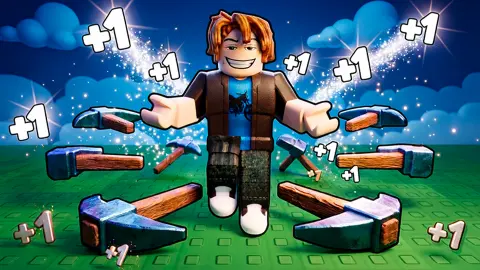
Most mining games are about how fast you can click. This one never asks for a click on a block. In +1 Pickaxe: Break Blocks 3D the pickaxe swings by itself, circling a blocky character at waist height, and it hits whatever happens to be next to it. The only decision left to you is where to stand.
That sounds like nothing to do, and for the first seconds it is exactly that. The game opens in a corridor between two tall brown walls, with the character standing on grass and no start button anywhere. Nothing happens until you walk up to a block. Then a small bar appears over the block, a "+1" pops out of it, and the level bar at the bottom starts to fill.
The title is the reward. Above that bar a line reads "Total pickaxes: 1", and next to it, "Next pickaxe: Level 5". Levels are how you earn pickaxes.
The game is credited to NewPlace and has been available since 27 August 2026.
We should say how far we got. We played two short sessions. In the first the character never moved, for a reason explained below. In the second we went from level 1 to level 6 in about four minutes, worked on the grass blocks and then started on the stone. We bought nothing, and this page covers only that stretch.
The level bar is the real game
The blocks are the scenery. The thing you are actually working on is the bar.
Early levels go by quickly. Level 2 asked us for 30 points and level 4 for 50, and the grass blocks gave them up in about a minute each.
At level 5 the promised pickaxe arrived. The line above the bar changed to "Total pickaxes: 2", and the next one moved out to level 10.
Then the bar changed scale. Level 6 asks for 375. We were 31 points into it when we stopped, so we cannot say how long it takes, but the jump is plain: more than seven times what level 4 wanted. This is the point where the game stops being a quick walk and becomes a matter of standing still for a while, or of wanting the buttons underneath.
Two zones, and what the HP on the sign means
A sign floats over each area with its name and a number: Grass zone, 5 HP, and Stone zone, 20 HP. The number is the health of one block in that zone, so a stone block takes four times the work of a grass one with the same pickaxe.
That is the reason more pickaxes matter. More of them circling means more hits on each turn, and the walls get thicker as you go. We saw the stone wall from the grass, a grey line across the far end of the corridor, and reached it at level 4. We did not see what comes after it.
What everything costs, in G
Nearly every button on the screen has a price. Three buttons under the level bar sell experience in packs, the smallest marked +50K XP. On the right, x2 Wins is marked 149 G and x2 POWER 3 G.
The pop-ups spell out what G stands for. Press the smallest pack and the card reads: "Get +50K XP and spend Gems? 25 G".
Our balance, shown in the top right corner, read 0 G from the first second to the last. Mining did not add to it. When we pressed x2 POWER anyway, we landed in the Shop, short of the three gems it wanted. We closed it without buying, so we cannot tell you how gems are obtained or what they cost.
It is worth knowing how big those XP packs are next to the bar. Level 6 asks for 375 points, and the smallest pack is labelled fifty thousand. If the label means what it says, one purchase skips a great many levels, and with them most of the walking.
Four more buttons sit on the left: Shop, Rebirth, Auras and Trails. Two multipliers above the level bar, "Trails: x1.00" and "Rebirth: x1.00", suggest that those two menus raise your gains. A red mark appeared on Rebirth when we reached level 6. We did not open it. A trophy counter under the settings gear stayed at 0, and we did not see what earns a trophy.
Who it suits
It suits someone who likes to watch numbers climb with very little effort: you park the character, the pickaxe works, and the bar fills. It also suits short visits, because the first five levels fit in a few minutes.
It suits less a player who wants to dig freely or build. We saw no way to place blocks and nothing to craft, and the corridor leads from one wall to the next. And if purchase cards annoy you, expect to see them often: the XP buttons are large and sit just where the eye goes.
More digging and breaking games
Deep Drill is the same idea with even less to do: the drill goes down by itself and you spend what it brings up. Mystery Digger keeps the digging and adds treasure, and Dig out of Prison turns it into an escape. For breaking things with a blocky character, there is Break a Tower: Obby. The rest are under clicker games.
Screenshots
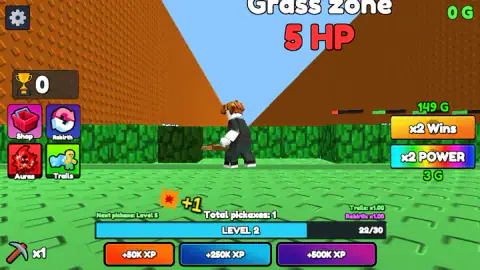
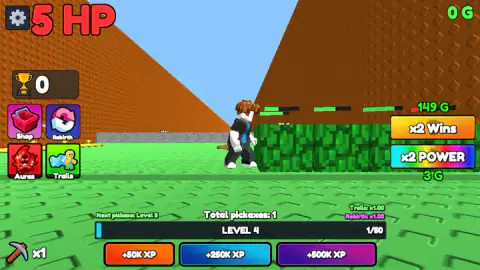
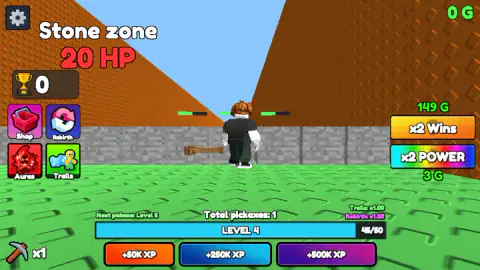
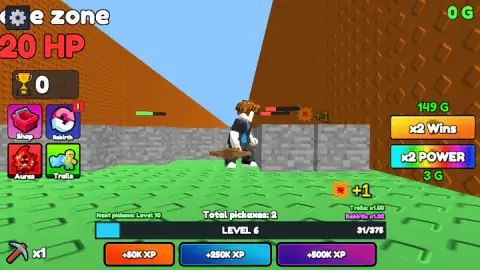
Taken by opening the game ourselves and letting it run — not supplied by the publisher, and not the same picture every other site shows.
How to play +1 Pickaxe: Break Blocks 3D
- Click once on the game, then hold W. The character walks down the corridor towards a row of green blocks.
- Stop against a block. The pickaxe keeps turning around the character and chips at the block each time it comes round. A red and green bar over the block shows what is left of it.
- Watch the level bar. It sits at the bottom centre with the level number and a count such as 22/30. When it fills, the level goes up and the count starts again.
- Move on when the blocks are gone. Behind the grass is a grey wall, the Stone zone, and its blocks take longer.
- Answer No to the cards you do not want. The buttons around the screen open purchase cards with a green Buy and a red No.
What we picked up while playing:
- The arrow keys did not move our character. We spent a whole first session on them and stayed on level 1 with the bar at zero. With W, A, S and D the same corridor took seconds.
- Try standing between blocks. The pickaxe goes all the way round, and we saw several blocks showing damage bars at once, so a spot with blocks on two sides should waste less of each turn.
- Mind the purple pad. Past the grass there is a purple strip on the floor with trophy shapes on it. Walking onto it opens a "Double wins?" card that asks for 79 G.
Controls
| W / A / S / D | Walk the character forward, left, back and right; hold a key to keep walking |
|---|---|
| Mouse click | Presses the on-screen buttons (XP packs, x2 Wins, x2 POWER, Shop, Rebirth, Auras, Trails) and answers the Buy / No cards |
| No attack key | The pickaxe circles the character and hits whatever block it reaches |
Features
- A pickaxe that mines by itself: your only job is where the character stands
- Zones named on a floating sign with the health of their blocks: Grass zone at 5 HP, Stone zone at 20 HP
- A level bar that also counts pickaxes: the second one arrived at level 5, and the next is promised at level 10
- Level 2 asks for 30 points, level 4 for 50 and level 6 for 375
- Gem prices on most buttons: 3 G for x2 POWER, 25 G for the smallest XP pack, 149 G for x2 Wins
- Four side menus: Shop, Rebirth, Auras and Trails
- Made by NewPlace and listed since August 2026
Game details
- Developer
- NewPlace
- Release date
- August 2026
- Last updated
- August 28, 2026
- Added here
- August 2026
- Technology
- HTML5
- Platforms
- Browser (desktop, keyboard & mouse), Browser (mobile & tablet, touch)
- Saved progress
- Saving, when available, is managed by this game. Mava cannot confirm your level.
FAQ
How do you play +1 Pickaxe: Break Blocks 3D?
Walk the character with W, A, S and D until it stands against a block. The pickaxe circles the character by itself and hits anything in reach, so there is no attack key. Each hit fills the level bar at the bottom of the screen, and gaining levels is what brings extra pickaxes.
How do you move in +1 Pickaxe: Break Blocks 3D?
With the W, A, S and D keys on a keyboard. On our first try we used only the arrow keys and the character stayed where it was for the whole session. Holding W for a couple of seconds was enough to reach the first row of blocks.
How do you get more pickaxes in +1 Pickaxe: Break Blocks 3D?
By levelling up. A small line above the level bar says when the next one comes: it read Next pickaxe: Level 5 at the start, and after we passed level 5 the total went from 1 to 2 and the line changed to Level 10.
What does G mean in +1 Pickaxe: Break Blocks 3D?
The game's own pop-ups call it Gems. Prices are written in G: 25 G for the smallest XP pack, 79 G to double the wins on one pad, 3 G for x2 POWER. Our balance stayed at 0 G for the whole session, so we could not buy anything, and we did not find out how gems are obtained.
Do you have to pay to play +1 Pickaxe: Break Blocks 3D?
Not for what we played. We went from level 1 to level 6 in about four minutes with no gems at all, answering No to every offer. The offers are frequent, though: the XP buttons sit right under the level bar and each one opens a Buy / No card.
What are the zones in +1 Pickaxe: Break Blocks 3D?
Each zone is a wall of blocks across a corridor, and a floating sign gives its name and the health of its blocks. We saw two: the Grass zone, with green blocks at 5 HP, and the Stone zone behind it, with grey blocks at 20 HP. We did not get past the stone.
Who made +1 Pickaxe: Break Blocks 3D?
It is credited to a developer named NewPlace. It was published on 27 August 2026 and is listed for PC, Android and iOS, in landscape format, in English and Russian.