

About TerraBlox
Most 2D sandbox games drop you in a forest and leave you to work out that wood comes first. TerraBlox writes it across the top of the screen in capitals and refuses to go on until you do it. The goal is ten planks. In our session it stayed at zero for ten minutes, and that is the most useful thing we can tell you about the start.
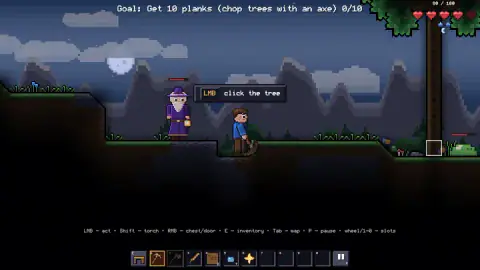
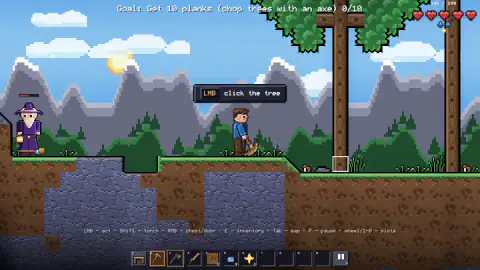
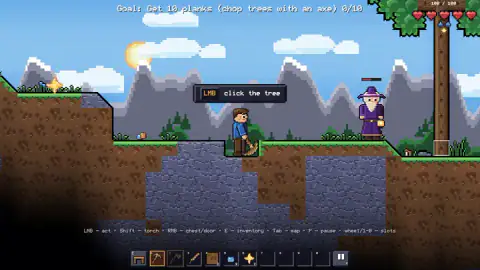
You play a small figure in a blue shirt on a strip of grass, dirt and grey stone, seen from the side. A tree stands a few tiles to the right. A wizard in a purple robe, holding a lantern, waits nearby with his own health bar over his head. Above everyone a line reads "Goal: Get 10 planks (chop trees with an axe) 0/10", and a bubble adds "LMB click the tree".
Under the scene the game prints its controls in one line, and it never hides them: left button to act, Shift for a torch, right button for chests and doors, E for the inventory, Tab for the map, P to pause, and the wheel or the number keys for the hotbar. Below that sits the hotbar, already holding a pickaxe, an axe, a stick and two blocks of dirt.
The game is by stHashirama and was published on 26 October 2026, two days before we played it.
A tutorial that waits for you
TerraBlox does not teach with a list of pages. It sets one goal, points at the tree, and waits. That is a sound idea for a sandbox, where the first minutes are the ones most players leave in. It is also unforgiving: nothing else is offered until the counter moves, so if you miss the tool or the distance, the game simply keeps pointing.
We know this because we missed both. For our whole session the tutorial bubble stayed in place, the wizard stood by, and the goal still read 0/10 when we stopped. If you get stuck at the same spot, the two fixes in the tips above are where we would start.
Night, rain and the things that come with them
The sky runs through a full cycle while you stand still. We started under a moon, saw a bright sun climb over the mountains, and went back into the dark. Rain arrived on its own more than once, falling in thin blue lines over the whole scene.
The dark is not only for looks. A green slime with its own health bar hopped along the hills, and the one time we died it was at night, in the rain, with a slime a few tiles away. The screen dimmed, read "You died" and "respawning…", and offered a deal: "Revive where you fell – watch an ad?" We did not take the ad, and a moment later we were back at the start.
The inventory shows how big the game is
Pressing E opens the screen that tells you what TerraBlox is planning. The crafting panel reads "0 of 311 available", spread over ten pages, with seven tabs whose icons show a pickaxe, a sword, a helmet, a potion and a chest. Every recipe was greyed out for us. The count of what is available seems to follow what you carry, which would explain why nothing can be made before the first planks.
On the right are three armor slots and five accessory slots. Below sits a backpack of four rows of ten, with Sort and Close buttons and a bin for throwing things away.
In the top-left corner there is a small panel titled The End, with a counter: "Lord fragments: 0 of 8". It is the clearest sign of a goal beyond the tutorial. Eight fragments lead to a finale. We did not earn one, so we cannot tell you who drops them.
The wizard, and what fills your hotbar
The wizard is there from the first second. He moves around you, sometimes on your left and sometimes by the tree, and carries a lantern and his own health bar. In our session he never got in the way.
One thing changed without us understanding why. A stack of small blue items on the hotbar grew from 7 to 11 over the session, the star-shaped item next to it gained one, and a pair of blue boots turned up in the following slot. We never chopped, dug or picked anything up by hand. Something in the world was adding to our pockets, and the game did not say what.
What we played, and what we did not
We played one session of about ten minutes on a computer, all of it on the spot where the game starts. We never got a plank, never mined, placed a block, crafted, opened the map or went underground. We saw no boss and no biome other than the grassy surface. The game's listing promises a much larger world below, with bosses and a finale, and the Lord fragments counter backs that up, but none of it is something we saw.
TerraBlox is also listed for phones and tablets. Our session was on a mouse and keyboard only, so we cannot say how the touch controls handle the tutorial.
Who it is for
TerraBlox suits players who like slow, side-on survival games where the fun is in deciding what to make next, and who do not mind working out the first step on their own. If you want a game that holds your hand through every click, the plank goal will feel like a wall. If you get past it, there are 311 recipes on the other side.
For more digging and building, Mine Mining Islands: Skyblock Village is about mining island by island, and Desolate Isle: Survival has you gathering, crafting tools and building a base to escape. Toybox: Pixel World Sandbox is a 2D pixel sandbox without the survival pressure. There are more in our adventure games.
Screenshots
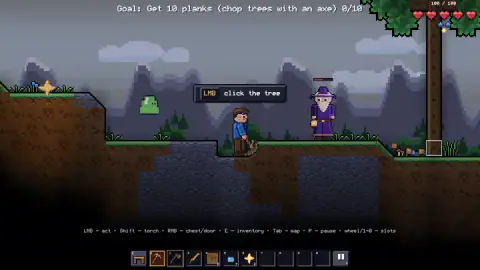
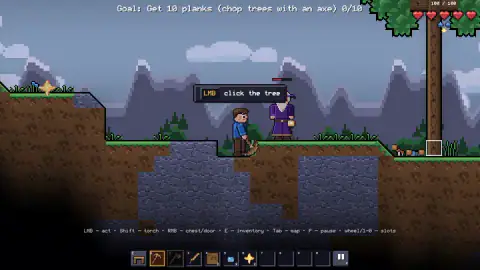
Taken by opening the game ourselves and letting it run — not supplied by the publisher, and not the same picture every other site shows.
How to play TerraBlox
- Start a game from the opening screens. You spawn next to the wizard with the first goal already showing.
- Pick a tool with the wheel or the number keys. The pickaxe is in slot 1, the axe in slot 2.
- Walk to a tree and hold the left button on it to chop. Planks are what the first goal counts.
- Press E to open the inventory. The crafting panel lists every recipe and how many you can make.
- Press Shift to place a torch when it gets dark, and right-click chests and doors to open them.
Tips from our session
- The pickaxe is in your hand when you start, not the axe. The orange frame sat on slot 1 the whole time we played. Press 2 before you swing at a trunk.
- Get close. We clicked the tree from where we spawned, several tiles away, and nothing was chopped. A small white square shows which tile your cursor is on; put it on the trunk, next to you.
- Watch the hearts at night. Five hearts make 100 health. Ours fell to 80 early on with a slime close by, and later to zero.
- Say No to the revive offer if you do not want an ad. You come back anyway, only not where you fell.
Controls
| Left mouse button | Acts with the item in your hand (the on-screen line calls it "act") |
|---|---|
| Right mouse button | Opens chests and doors |
| Shift | Places a torch |
| E | Opens the inventory, crafting, armor and accessory slots |
| Tab | Opens the map |
| P | Pauses the game |
| Mouse wheel / 1-0 | Picks a slot on the hotbar |
Features
- A side-on pixel world with a full day and night cycle, and rain that rolls in on its own
- The first goal is 10 planks, and nothing else in the tutorial moves until you get them
- A crafting panel that counts 311 recipes across 10 pages, all locked at the start
- Three armor slots and five accessory slots next to a 40-slot backpack
- A purple-robed wizard with a lantern who stays near you from the first second
- A panel called The End that counts Lord fragments, 0 of 8 when you begin
- Death drops your health to zero and offers to revive you on the spot in exchange for an ad
Game details
- Developer
- stHashirama
- Release date
- October 2026
- Last updated
- October 27, 2026
- Added here
- October 2026
- Technology
- HTML5 (2D pixel art)
- Platforms
- Browser (desktop, mouse and keyboard), Browser (mobile & tablet, touch)
- Saved progress
- Saving, when available, is managed by this game. Mava cannot confirm your level.
FAQ
How do you play TerraBlox?
TerraBlox is a side-on pixel sandbox played with the mouse and a few keys. The left button uses whatever is in your hand, the right button opens chests and doors, E opens the inventory and crafting, and Tab shows the map. The game starts you next to a tree with a pickaxe and an axe, and asks for 10 planks.
How do you get planks in TerraBlox?
The first goal reads Get 10 planks (chop trees with an axe), and a bubble tells you to click the tree with the left button. In our session we clicked the trunk from a few tiles away with the pickaxe selected, and the counter stayed at 0 of 10 for ten minutes. Our advice is to select the axe in slot 2 and walk up to the trunk before clicking.
Why is my TerraBlox tutorial stuck at 0/10 planks?
Ours was, for a whole session. The tutorial does not move on until the plank counter fills, so the usual cause is the wrong tool or the wrong distance. The pickaxe sits in slot 1 and is selected at the start; the axe is in slot 2, and the tree is not right next to where you spawn.
What happens when you die in TerraBlox?
The screen reads You died and respawning, and a box asks Revive where you fell, watch an ad, with Yes and No buttons. We did not take the ad and came back at the start anyway. We died once at night in the rain, with a green slime nearby.
What are Lord fragments in TerraBlox?
The inventory screen has a small panel titled The End with a counter that reads Lord fragments: 0 of 8. It points to eight fragments needed for the finale. We did not earn any, so we cannot say where they drop.
How many crafting recipes does TerraBlox have?
The crafting panel reads 0 of 311 available at the start and spreads the list over 10 pages. None were available in our session, which had not yet produced a single plank.
Who made TerraBlox and when did it come out?
TerraBlox is by stHashirama. It was published on 26 October 2026 and was updated the next day, so it was two days old when we played it.