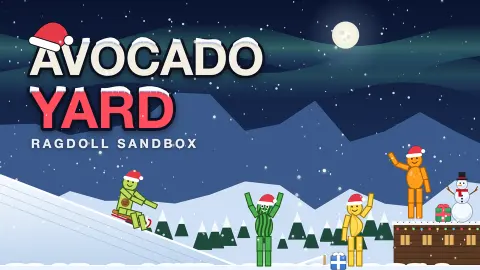









About Avocado Yard: Ragdoll Sandbox
Most ragdoll games give you a stick figure and a reason to hurt it: a level to finish, a target to hit, a cannon to aim. Avocado Yard: Ragdoll Sandbox gives you the stick figure, a shelf full of tools and no reason at all. The avocado is the toy. What you do with it is the game.
That sounds thin until you see what the shelf holds. On the left of the screen there are tools that change what a click means: Blast, Pistol, Freeze, Nail, Rope, Zap, Minigun, Moves and Delete. Below them, under ITEMS, sit the things you can put in the yard: an avocado, a crate, a rock, a plank, a bomb and a barrel. Each avocado is a little green figure with a face and a brown pit for a belly, and when it is hit, its arms and legs flop the way a real body would.
The game is by DK Entertainment and was published on 24 September 2026, with an update on 29 October. We played it with a mouse, from the first tutorial card to the end of a Rampage round.
The three steps that teach the whole game
The tutorial is short, and each step is one of the game's three verbs.
Step one is place. A hand points at the Avocado card with the words "Every toy lives on this shelf", and then at a gold circle in the middle of the field: tap here to drop it. That is the whole building system. Choose on the left, click on the right.
Step two is throw. A dotted arc curls up from the avocado's head and the card says "Grab it and fling it up! Swipe fast and let go". When we did it properly, a gold banner said "Nice throw!" and the avocado tumbled through the air with its limbs spread.
Step three is destroy. The hand moves to the Bomb card, then to the ground next to the avocado: "Drop it next to the avocado. It goes off in a second." After that, a card reading TUTORIAL COMPLETE says you are ready, and promises 40+ toys, 6 maps and 38 challenges.
Hold on to that last line, because the game had already outgrown it. The star counter at the top of the screen read 0/46 on the same visit. The October update added content faster than the welcome card was rewritten, so trust the counter.
What "ragdoll" means here, and why throws feel different every time
A ragdoll in a game is a body made of separate parts, a head, a chest, two arms, two legs, joined loosely at the joints. Nobody animates the fall in advance. The computer works out, in that very instant, where each part goes when something pushes it. That is why the same throw never lands the same way twice.
In Avocado Yard you feel it in the throw. A slow drag drags the avocado around like a puppet on a string. A fast swipe released mid-movement sends it spinning, and the arms and legs trail behind, because each one is carrying its own momentum. Hit it with a bomb and it folds over a crate rather than bouncing off like a ball.
This is also why the tools are worth trying one by one. Freeze, Nail and Rope are, by their names, ways to hold things still or tie them together, and a ragdoll that is partly fixed and partly loose swings in ways a solid ball never could. We only used the throw and the bomb, so try the rest yourself.
Rampage: sixty seconds against a leaderboard
The sandbox has no score, but Rampage does. Its card explains the rule: deal as much damage to avocados as you can in 60 seconds. Avocados keep dropping in, and every tool and unlocked item counts. Your best run goes to the leaderboard.
The board shows the top ten. When we looked, first place was "Excessive Swordfish" with 227,056 damage, and tenth place had 82,559. The names are playful animal handles, not real people.
Our run began with five avocados standing in a row. A challenge bar at the top read "Drop 3 avocados · 1/3", and the corner said SLOW ×0.2: slow motion was on, and we had not noticed. The minute ran out before we did any real damage. The final card read "Time is up! Damage dealt: 0", with two buttons, Back to sandbox and Play again.
We are telling you this because it is the most useful thing we learned. Before you press Start, check that slow motion is off, pick a tool that hits several avocados at once, and already know where you will use it. Sixty seconds is not long enough to explore the shelf.
What is free, and what asks for an ad
The starter shelf is open from the beginning: all the tools we listed apart from the Minigun, and all six items. The Minigun card has a small red AD badge, which means watching an ad is how you get it. We did not unlock it.
The challenge bar also hints at how the rest of the game opens up: challenges give stars, and stars are what the counter at the top tracks. We did not complete one in our session, so we cannot say what each star unlocks.
Who it is for, and what we did not see
It suits anyone who likes to poke at physics: kids who want to throw a funny green figure across the screen, and older players who want to build a contraption of planks, rope and barrels and watch it fall apart. It is not a puzzle game, whatever its listing says. There is no right answer and nothing to lose.
We did not see the other maps, the missions, the Moves menu, skins or the daily gift. We did not get a real Rampage score, and we played with a mouse, not on a touch screen.
More ragdoll and sandbox games
If you want more bodies to throw, try Ragdoll Crash-Test: Throw and Break. For a sandbox with bigger explosions, TNT Sandbox and Car Crash Sandbox are in our catalogue too. More in our casual games section.
Screenshots
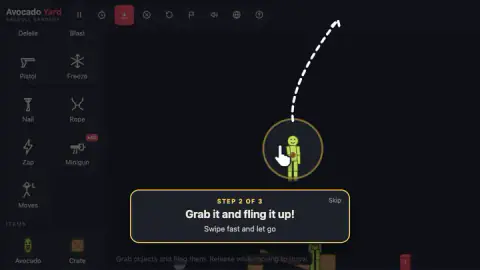
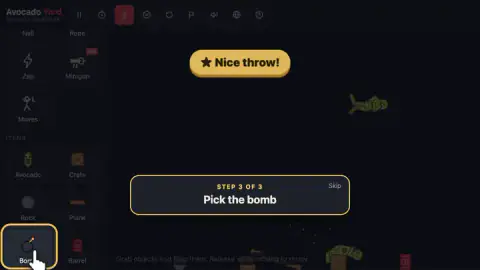
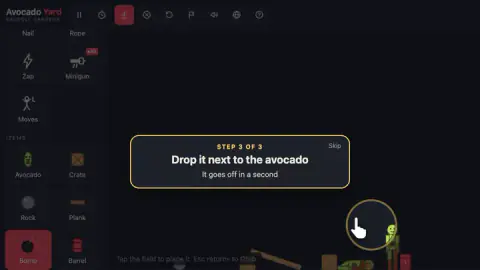
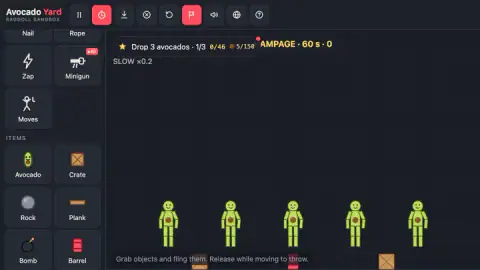
Taken by opening the game ourselves and letting it run — not supplied by the publisher, and not the same picture every other site shows.
How to play Avocado Yard: Ragdoll Sandbox
- Pick a toy on the shelf. Click Avocado (or any item) on the left. The game's own hint at the bottom says it plainly: tap the field to place it.
- Drop it in the yard. Click anywhere on the dark field and the toy falls into place, landing on the ground or on whatever is already there.
- Grab and fling. Press on an object, swipe fast and let go while you are still moving. That last part matters: the throw comes from your speed at the moment of release.
- Switch tools for bigger effects. Pick Bomb and drop it next to an avocado; it goes off about a second later. Pick Freeze, Nail or Rope and your clicks start building instead of throwing.
- Press Esc to get your hand back. Whatever tool you have selected, Esc returns you to Grab, the plain throwing hand.
Tips from our session
- If you are in a hurry, every tutorial card has a Skip link in the corner. The tutorial is only three steps, though, and step two teaches the throw better than any text can.
- The shelf scrolls. Delete, Blast, Pistol and Freeze sit at the top and slide out of sight when you scroll down to the items.
- After a bomb, the avocado lands in a heap. Grab it from wherever it ended up; it is still a toy.
- Keep an eye on the label under the challenge bar. If it says SLOW ×0.2, slow motion is on and everything, including your throws, moves at a fraction of normal speed.
Controls
| Click a toy on the shelf, then click the field | Places that toy (avocado, crate, rock, plank, bomb, barrel and more) where you clicked |
|---|---|
| Press on an object, drag fast and let go | Grabs it and throws it; releasing while the pointer is still moving is what makes it fly |
| Click a tool on the shelf (Blast, Pistol, Freeze, Nail, Rope, Zap, Delete...) | Switches what your click does on the field |
| Esc | Returns to Grab, the default throwing hand |
| Top bar (nine buttons) | Pause, slow motion, modes, sound, language, help and scene controls |
Features
- A three-step tutorial that you can skip: place an avocado, throw it, then drop a bomb next to it
- Tools on the shelf: Delete, Blast, Pistol, Freeze, Nail, Rope, Zap, Minigun and Moves
- Six starter items under ITEMS: Avocado, Crate, Rock, Plank, Bomb and Barrel
- Rampage: 60 seconds to deal as much damage as you can to avocados that keep dropping in, with a top-10 leaderboard
- A star counter at the top tracks challenges; ours read 0/46 on our first visit
- The Minigun carries an AD badge on the shelf
Game details
- Developer
- DK Entertainment
- Release date
- September 2026
- Last updated
- October 29, 2026
- Added here
- September 2026
- Technology
- HTML5 (2D physics)
- Platforms
- Browser (desktop), Browser (mobile & tablet, touch)
- Classification
- Casual
- Saved progress
- Saving, when available, is managed by this game. Mava cannot confirm your level.
FAQ
How do you play Avocado Yard: Ragdoll Sandbox?
Pick a toy on the shelf on the left and click or tap the field to place it. Then press on any object, drag quickly and let go to throw it. Tools on the same shelf change what your click does: blow things up, freeze them, nail them or tie them with rope. There is no level to beat in the sandbox; you play with the physics.
How do you throw the avocado in Avocado Yard?
Press on the avocado, swipe fast and let go while your pointer is still moving. The speed of the swipe at the moment you release is what launches it. A slow drag that stops before you let go just moves it. When the tutorial throw works, the game shows a banner that says "Nice throw!"
What is Rampage mode in Avocado Yard: Ragdoll Sandbox?
Rampage is a 60-second score attack. Avocados keep dropping into the yard and you deal as much damage to them as you can, with every tool and unlocked item allowed. Your best run goes to a top-10 leaderboard. When time runs out the game shows your damage and offers Back to sandbox or Play again.
What is a good Rampage score in Avocado Yard?
On the leaderboard we saw, first place had 227,056 damage and tenth place had 82,559. So a six-figure run puts you near the top ten. Our own first run scored 0, so start the clock only when you have a plan for the first seconds.
Can you skip the tutorial in Avocado Yard: Ragdoll Sandbox?
Yes. Every tutorial card has a Skip link in its top right corner. The tutorial is only three steps (place an avocado, throw it, drop a bomb next to it), so it takes well under a minute if you follow it.
How many toys, maps and challenges does Avocado Yard have?
When we finished the tutorial, the game promised 40+ toys, 6 maps and 38 challenges. The star counter at the top of the screen, though, already read 0/46. The game was updated in late October 2026, so the counter is the better guide to how many challenges there are now.
Why is everything moving in slow motion in Avocado Yard?
Slow motion is switched on. In our session a SLOW ×0.2 label sat under the challenge bar, and the stopwatch button in the top bar was lit red at the same time. The game's instructions list that stopwatch as the slow-motion button and the S key as its shortcut, so press one of them to return to normal speed.
Is Avocado Yard: Ragdoll Sandbox free?
Yes, it is free to play in the browser with no download. Some toys are marked with an AD badge on the shelf, such as the Minigun, which means watching an ad is how you get them. Everything in the tutorial and the starter shelf is available from the start.