




About SandLab
Most sandbox games hand you building blocks and leave the physics alone. SandLab hands you substances and leaves the physics to them. There are no bricks to stack and no level to finish. You choose a material, pour it onto the field with the mouse, and the game decides what happens grain by grain.
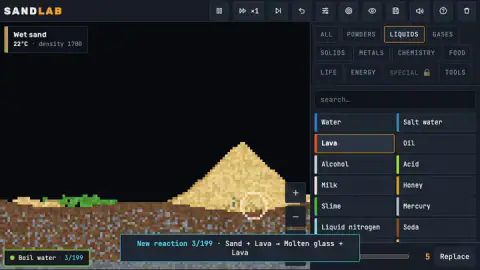
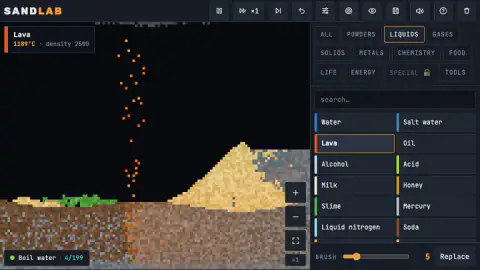
The first reaction we found did not come from a plan. We poured lava at the foot of a sand pile, and a notice slid up from the bottom of the screen: New reaction 3/199 · Sand + Lava → Molten glass + Lava. That line is the whole game in miniature. You mix things, the game works out the result, and the count of what you have discovered goes up by one.
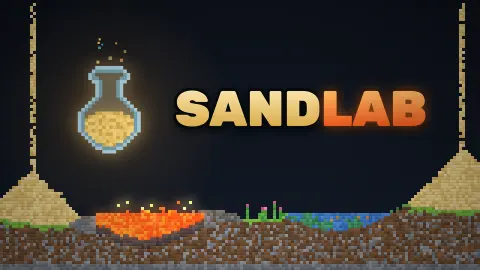
It belongs to a type of game called falling sand, where every grain on the screen is simulated on its own instead of being drawn as a solid shape. That is why a pile here slumps into a slope, why lava falls as separate drops, and why nothing looks the same twice. SandLab reached our catalogue in October 2026. The studio is not named anywhere we could see, so we cannot credit it.
The number beside the goal is not what it looks like
At the bottom left the game shows a short goal with a number next to it, Boil water and 2/199. It is natural to read that as two out of 199 bits of water boiled. It is not. That number counts the reactions you have discovered, and the goal is a separate thing.
We know because the two moved together: the counter went up by one at the same instant the sand and lava notice appeared, and the notice carried the same 3/199. The goal never changed, because we never boiled anything. By the end of our session the counter had gone up once more, though the notice for that fourth reaction came and went without us catching it.
So there are two kinds of progress. The goals, which the game's listing says number 20, teach you one idea at a time: boil water, grow a plant, make glass, light a lamp, bake bread and forge bronze. The reaction count is the long one. The counter already read 2/199 before we had poured anything, so the starting scene counts a couple of reactions for you.
Reading the Inspect box
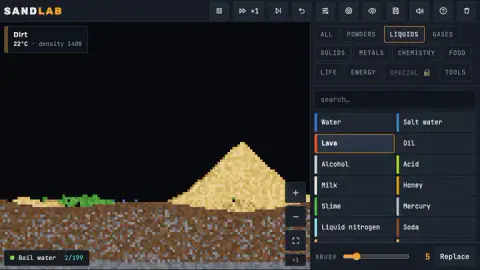
The Inspect box is the most useful thing on the screen, and it is easy to ignore. Point at the field and it tells you exactly what is there. On our starting scene it read Dirt, 22°C, then Sand, 22°C, then Wet sand where a little water had soaked into the bottom of the pile.
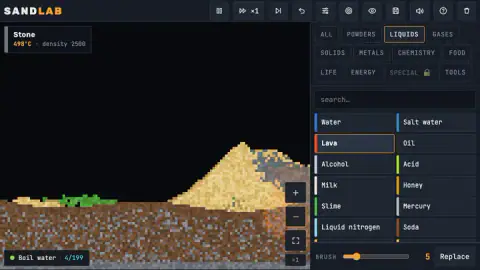
The densities look like real-world figures in kilograms per cubic metre. Sand showed 1600 and wet sand 1700, which is about right: water fills the gaps between grains, so a bucket of wet sand is heavier than a bucket of dry. And where lava had settled, the box read Stone, still glowing at 498°C long after the drops stopped.
That matters because temperature is what drives most reactions. If something is not changing, point at it. A material sitting at room temperature next to one at several hundred degrees will not stay that way for long.
Ten minutes in the lab: what we did and what we did not
We played SandLab for about ten minutes with a mouse. We stayed almost entirely in the LIQUIDS tab and used three materials: water, lava and sand.
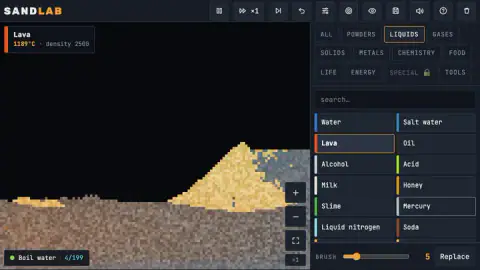
The lava did most of the work. Drawn high on the screen, it fell as a thin stream of orange drops and sank into the soil. Drawn against the sand pile, it produced the molten glass reaction, and the right side of the pile turned to grey stone with a glowing seam. By the end the strip of grass on the left had disappeared and the soil around it had turned a paler grey-brown.
What we did not manage matters as much. We never completed Boil water and never saw steam. We did not open POWDERS, GASES, SOLIDS, METALS, CHEMISTRY, FOOD, LIFE, ENERGY or TOOLS. The SPECIAL tab carried a padlock and we left it shut. We did not try the search box, the brush slider, the Replace button, room settings, the views, saving, undo or the speed controls. The keyboard shortcuts in this page come from the game's listing, not from our hands.
Why lava turns sand into glass, and why real glassmakers cheat
The reaction we found is close to real chemistry, with one shortcut. Ordinary sand is mostly quartz, and glass is mostly melted quartz that cooled before its atoms could line up into crystals. Nature does this on its own: obsidian is volcanic glass from lava that cooled too fast to crystallise, and fulgurites are glassy tubes left where lightning strikes sand.
The shortcut is the temperature. Pure quartz sand does not melt until around 1,700 °C. The lava in SandLab sits at 1189°C, which is in the range of real basaltic lava, the runny kind that pours out of volcanoes in Hawaii. In the real world that lava would scorch the sand but not turn it to glass.
Glassmakers get around this by cheating. They add soda, which lowers the melting point by several hundred degrees, and lime, which keeps the finished glass from dissolving in water. That mix, called soda-lime glass, is what windows and bottles are made of.
What the material list holds
The panel on the right has twelve tabs: ALL, POWDERS, LIQUIDS, GASES, SOLIDS, METALS, CHEMISTRY, FOOD, LIFE, ENERGY, SPECIAL and TOOLS. The LIQUIDS tab alone held water, salt water, lava, oil, alcohol, acid, milk, honey, slime, mercury, liquid nitrogen and soda, and the list kept going below the fold. There is a search box above it, which will matter once the list gets long.
The game's listing claims more than 270 materials, room settings for temperature, gravity and wind with presets such as Moon and Inferno, heat and flammability views, slow motion and three save slots. We saw buttons along the top bar for pause, speed, single steps, undo, settings, views, saving, sound and help, but we did not test them, so treat the rest of that list as the studio's word.
Who it is for
SandLab suits anyone who likes to poke at things and see what happens. There is no timer, no score and nothing to lose, so a child can play it as a paint box and an adult can play it as a chemistry set. Curious players will get the most out of it: the game rewards the question "what if I pour this on that", and the Inspect box answers the follow-up.
It is less suited to players who want a goal pulling them along. The goals are short hints, not levels, and in ten minutes we finished none of them.
If you like sand that behaves like sand, Sand Fall turns falling blocks into flowing grains, and Dig & Flow - Save Water has you dig channels to guide liquids. For mixing elements with a goal in mind, Alchemy: Elixir of Life builds everything up from four basic ones. For a pixel sandbox with characters instead of chemicals, try Toybox: Pixel World Sandbox. More relaxed games are in casual games.
Screenshots
How to play SandLab
- Press the button marked "Let's Play!" on the title card and wait for the Warming Up bar to fill. The field opens with a pile of sand on brown soil and a strip of grass.
- Click a tab in the right-hand panel, such as LIQUIDS, then click a material name. The chosen one gets an orange outline.
- Drag across the black field to draw it. A circle shows the size of the brush.
- Point at anything on the field and read the Inspect box in the top left corner: it names the material under the pointer, with its temperature and density.
- Check the goal at the bottom left. It suggests one experiment at a time; ours was Boil water.
Tips from our session:
- Tab first, then material. The list only changes when you switch tabs, and a click on the field with the wrong material selected simply pours the wrong thing.
- Drop materials from high up if you want to watch them. Our lava, drawn in mid-air, fell as a column of single drops and soaked into the soil where it landed.
- Aim properly for the goal. The starting field has only a few blue pixels of water near the grass, and our lava kept landing on soil instead.
- The ALL tab starts with tools rather than materials: Eraser, Heat +, Cool −, Pick, Mix and Shake come before Sand.
- If the field stops responding, reloading brings back the same starting scene. We had to do that twice.
Controls
| Click a tab, then a material | Chooses what the brush draws. The tabs run from ALL and POWDERS to TOOLS; the chosen material gets an orange outline |
|---|---|
| Left click and drag on the field | Draws the chosen material. A circle shows the size of the brush |
| Point at the field | The Inspect box at the top left names whatever is under the pointer, with its temperature and density |
| Right drag or Shift + drag | Moves the camera (per the listing) |
| Mouse wheel or pinch | Zooms; there are also + and − buttons and a reset button beside the field (per the listing) |
| [ and ] | Smaller or bigger brush; there is also a BRUSH slider under the list (per the listing) |
| Space | Pause and play (per the listing) |
| Ctrl + Z | Undo (per the listing) |
| V / R / G | Switch view, open room settings, open goals and reactions (per the listing) |
Features
- A falling-sand field where every grain is its own pixel: sand piles into slopes, liquids run and lava drops through the air
- Twelve material tabs: ALL, POWDERS, LIQUIDS, GASES, SOLIDS, METALS, CHEMISTRY, FOOD, LIFE, ENERGY, SPECIAL and TOOLS
- An Inspect box that reads the material under your pointer with its temperature and density, such as lava at 1189°C
- A reaction notebook out of 199: each new mix pops up a notice, like Sand + Lava → Molten glass + Lava
- A short goal at the bottom left to point you at an experiment; ours was Boil water
- The LIQUIDS tab alone holds water, salt water, lava, oil, alcohol, acid, milk, honey, slime, mercury, liquid nitrogen and soda
- No timer, no score and no way to lose: the only progress is what you discover
Game details
- Developer
- Partner studio
- Release date
- October 2026
- Last updated
- October 26, 2026
- Added here
- October 2026
- Technology
- HTML5 (2D pixel simulation)
- Platforms
- Browser (desktop), Browser (mobile & tablet, touch)
- Saved progress
- Saving, when available, is managed by this game. Mava cannot confirm your level.
FAQ
What is SandLab?
SandLab is a free falling-sand sandbox that runs in the browser. You pick a material from a list on the right, such as sand, water or lava, and draw it onto the field with the mouse. Each grain then moves and reacts on its own, so sand piles up, liquids spread and hot materials change what they touch.
How do you play SandLab?
Click a tab in the right-hand panel, such as LIQUIDS, then click a material name, then drag across the black field to pour it. The game does the rest. A short goal at the bottom left, like Boil water, suggests an experiment, but there is no timer and no way to lose.
What does the number next to the goal in SandLab mean?
It counts the reactions you have discovered, out of 199, not your progress on the goal. In our session it read 2/199 at the start and jumped to 3/199 at the same moment a notice announced Sand + Lava → Molten glass + Lava. The goal name stays the same until you complete it.
How do you make glass in SandLab?
Pour lava onto sand. When we did, the game announced the reaction Sand + Lava → Molten glass + Lava. In the real world it is harder, because quartz sand needs around 1,700 °C to melt, which is why glassmakers mix in soda to lower that temperature.
How do you boil water in SandLab?
The idea is to bring something hot to the water, and lava is the obvious choice from the LIQUIDS tab. Honestly, we did not manage it in our ten minutes. Our lava landed on soil and sand instead of the small pools of water, and the goal stayed open. Aim the brush right over the blue pixels.
How many materials are there in SandLab?
The game's own listing says more than 270, sorted into tabs such as POWDERS, LIQUIDS, GASES, METALS, FOOD and LIFE. We saw the first dozen or so in the ALL and LIQUIDS tabs. The SPECIAL tab showed a padlock in our session, so not everything is open from the start.
Can you play SandLab on a phone?
The game's listing says it works with touch, with tap and drag to draw and a pinch to zoom. We played it with a mouse on a computer, so we have not checked how the long material list feels on a small screen.
Who made SandLab?
The studio is not named in the information we have, so we cannot credit it. SandLab reached our catalogue in October 2026, and its title card calls it a simulation.