


About Toybox: Pixel World Sandbox
Most building games open on an empty field and a toolbar. Toybox: Pixel World Sandbox opens on a finished house, dark riveted walls, glass windows, a stepped roof of earth and grass, and then asks you for something no builder asks first. It wants an opponent.
That request is the game in one line. This is a sandbox, with blocks and furniture in its menus, but the first thing it teaches is how to start a fight. You drop a character into the world, you drop a second one from the other team next to it, and the game says the battle can begin.
It is credited to Erow Games. It was published in late September 2026, which is too few to mean much yet.
Here is the honest part. Our session lasted about four minutes, and most of it went on the tutorial. We placed rabbits and grey cats, saw the two teams announced and watched the characters gather on the grass beside the house. We did not see how a fight ends, and we never opened the weapons, blocks or crafting menus. This page covers the first five minutes well and the rest only by the developer's word, and it says which is which.
Two copies of every character, and the dot that picks a side
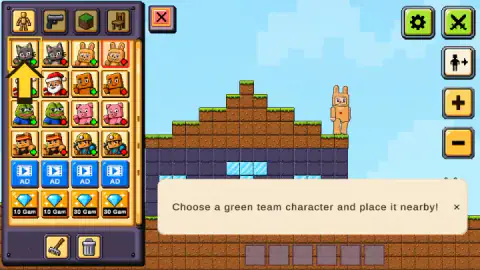
The character tab is a grid four tiles wide. On its first screen we counted eight characters: a grey cat, a figure in a rabbit suit, a Father Christmas, a wooden block figure, a frog, a pink pig, a fighter with a headband and a miner with a lamp on his helmet. Each one sits beside its twin. The left copy has a green dot, the right copy a red one.
That layout tells you how the game thinks. There are no heroes and villains here, and no character is stronger on paper than another, as far as we could see. A team is whatever you decide to paint green. You can stage cats against rabbits, or cats against cats.
Below the characters the grid changes. One row of tiles shows a film strip and the word AD. Under it, a row of tiles shows a diamond and a price of 10 or 30. We did not click either row, so we cannot tell you what they unlock; they look like extra items you get for watching a video or spending the game's own currency. A scroll bar on the panel's edge says the list goes on below.
The other three tabs show a pistol, a grass block and a chair. By the developer's description they hold weapons, building blocks and objects. We did not open them.
What we saw when the two teams met
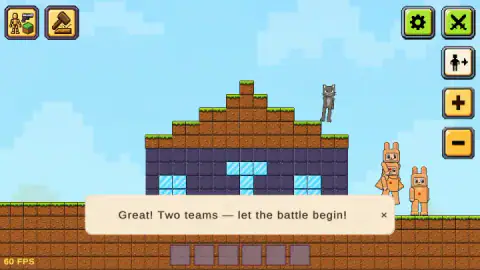
The tutorial is three lines long, and all three appeared in English. The first step asks for a character. The second reads "Place the opponent near your first character!". The third asks for a green team character nearby, and it kept us longest. When the game was finally satisfied, a new banner came up: "Great! Two teams — let the battle begin!".
By then we had made a small crowd. A grey cat stood on the roof, and three rabbits were on the grass to the right of the house. The characters do not stay where you put them. The rabbits we had dropped on the roof were on the ground a few seconds later, leaning into each other the way loose-limbed dolls do.
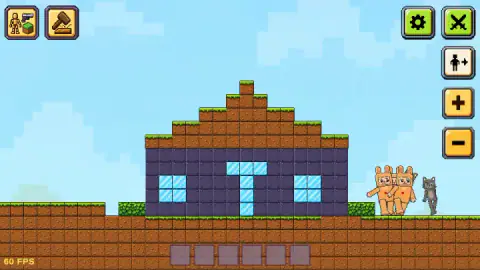
A moment after the banner closed, the cat was down on the grass too and the rabbits were pressed up against it. That is as far as we can describe the fight. We did not see a hit land or anyone fall, and we cannot tell you who won.
Then we tried the buttons on the right edge. The minus button pulled the view back a step. The crossed-swords button brought up a strip across the screen reading "Bots attack". When we looked at the house again, nobody was in view: the lawn was empty. We do not know whether they had walked off or the fight had finished without us.
The buttons we did not reach
A fair amount of this game sits behind buttons we never opened.
The hammer button in the top left is, by the developer's instructions, a crafting menu: you gather wood and crystals and turn them into equipment. A row of six empty slots along the bottom of the screen stayed empty for our whole session.
The button with a figure and an arrow is for taking control of a character yourself. The developer's instructions give the keys: A and D or the arrow keys to walk, W to jump, Space or the right mouse button to attack, G to drop what you are holding. We pressed the button late, when no character was in view, and it turned yellow. We did not manage to steer anyone.
Under the panel there are two more buttons, a rake and a bin. They look like tools for clearing the scene. We did not press them.
A toy before it is a game: the idea goes back to 1989
Toybox has no levels, no score and no ending that we saw, and its developer says so plainly. That puts it in a family with a long history. When SimCity came out in 1989, its creator Will Wright called it a software toy rather than a game, according to Wikipedia's article on non-games, because its main mode had no final objective. You were handed a set of pieces and left alone with them.
The version of that idea with floppy bodies in it arrived fifteen years later. Garry's Mod, made by Garry Newman, first appeared in December 2004 as a modification of another game and went on sale on its own in 2006. Wikipedia describes it as a physics sandbox with no set objectives, where players spawn characters, ragdolls and props and then play with them.
Toybox does the same thing on a flat pixel screen, with one shortcut. In the older sandboxes you have to invent the conflict yourself. Here the conflict is built into the tile: the green dot and the red dot mean the dolls already know whose side they are on.
Who it is for
It suits people who like to set a scene and watch it play out, and children who would rather make their own rules than follow a level list. The first battle takes two clicks per character.
It will disappoint anyone who wants goals. Nothing on screen told us what to do after the tutorial ended. The pistol tab and the battles also make it a fighting toy, even if the fighters are pigs and rabbits, so parents of small children may want to look first.
More games to play with rather than beat
Solar Smash is the same kind of toy at a larger scale: a planet, a set of weapons and no objective. My Town Home: Family Playhouse is a sandbox without the fighting, a house full of characters to move around. If it was the floppy fighters you liked and you would rather have rules and a score, Ragdoll Arena 2 Player gives them rounds to win. The rest are under casual games.
Screenshots
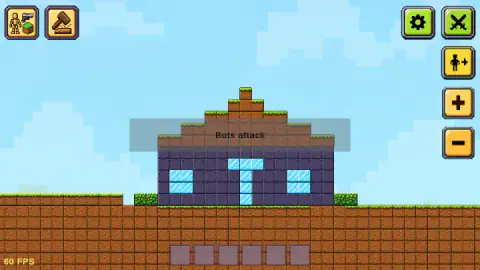
Taken by opening the game ourselves and letting it run — not supplied by the publisher, and not the same picture every other site shows.
How to play Toybox: Pixel World Sandbox
- Open the panel. The button in the top left corner, the one showing a figure, a pistol and a block, opens a panel with four tabs. The first tab is characters.
- Click a character tile. A red frame marks the one you picked.
- Click an empty spot in the world. The character drops where you clicked. Ours landed on the roof of the house because that is where we pointed.
- Place one from the other team. Every character is in the grid twice, with a green dot or a red dot. One of each colour is enough.
- Close the panel and watch. The red X shuts it, and the whole world comes into view.
What our session taught us:
- Click twice, do not drag. Click the tile, then click the world. That pair of clicks is what put our characters down.
- The dot matters more than the picture. The two grey cats in the top row look identical. Only the small dot in the corner of the tile tells you which side each one is on.
- If the tutorial sticks, change tile. Ours sat on "Choose a green team character and place it nearby!" while we added rabbit after rabbit from the same tile. It moved on when we picked a grey cat instead. We cannot say exactly which click satisfied it, so check the dot on the tile inside the red frame.
- Follow the yellow arrow. It points at the tile the tutorial wants, or at the spot in the world where it wants the character.
Controls
| Click a tile, then click the world | Drops the chosen character at the spot you clicked |
|---|---|
| Crossed-swords button | Switches the team battles; after we pressed it a strip reading "Bots attack" appeared |
| Plus and minus buttons | Zoom; one press on minus pulled our view back a step |
| Figure-with-arrow button | Character control, by the developer's instructions; it turned yellow when we pressed it |
| A / D or arrow keys, W, Space, G | Move, jump, attack and drop the held item while controlling a character, by the developer's instructions; we did not get to try them |
Features
- A pixel world that opens with a finished house already standing on the grass
- Eight characters on the first screen of the panel, each offered twice, once with a green dot and once with a red one
- Team battles that need nothing more than one character of each colour
- Four panel tabs, for characters, weapons, blocks and furniture
- A three-line tutorial in English that ends with "Great! Two teams — let the battle begin!"
- Made by Erow Games
Game details
- Developer
- Erow Games
- Release date
- September 2026
- Last updated
- September 22, 2026
- Added here
- September 2026
- Technology
- HTML5 (2D physics)
- Platforms
- Browser (desktop, mouse and keyboard), Browser (mobile & tablet)
- Classification
- Action , Adventure , Arcade , Simulation
- Saved progress
- Saving, when available, is managed by this game. Mava cannot confirm your level.
FAQ
How do you play Toybox: Pixel World Sandbox?
Open the panel on the left, click a character tile and then click an empty spot in the world. The character drops there. Place one with a green dot and one with a red dot and the game announces two teams and a battle. The developer's instructions add blocks, weapons, crafting and direct control of a character, which we did not reach.
What do the green and red dots mean in Toybox: Pixel World Sandbox?
They are the two teams. Every character in the panel appears twice, side by side, once with a green dot and once with a red one. The picture is the same; the dot decides which side that copy fights for.
Why is the Toybox: Pixel World Sandbox tutorial stuck?
Ours stayed on the line about choosing a green team character while we added rabbit after rabbit from the same tile. It moved on when we picked a different tile, a grey cat, and placed that. Check the dot on the tile you have selected, marked by a red frame, and try the other copy of the character.
Is there a way to win Toybox: Pixel World Sandbox?
The developer says there are no fixed missions and no single way to win, and we saw no score, timer or level number on screen. It is a sandbox: you set up a scene and watch what happens. Our session was short, so we cannot say how a battle ends.
What does the crossed-swords button do in Toybox: Pixel World Sandbox?
The developer's instructions say it switches the battles between computer-controlled characters on or off. When we pressed it, a strip reading "Bots attack" appeared across the middle of the screen.
Is Toybox: Pixel World Sandbox in English?
Every line we saw was in English, including the whole tutorial. Russian is listed as the game's language and the developer's own note says the in-game text is Russian, so what you get may depend on your browser or region.
Who made Toybox: Pixel World Sandbox?
It is credited to Erow Games. It was published on 21 September 2026 and updated the next day.
Can you play Toybox: Pixel World Sandbox on a phone?
It is listed for PC, Android and iOS, and the developer's instructions describe on-screen buttons for moving, jumping and attacking on mobile. We played on a desktop with a mouse and did not test a phone or tablet.