




About Pixel Feast
Most colour-matching puzzles let you put a colour anywhere it fits. Pixel Feast does not. Its pictures are eaten, and the eaters start at the edge. A crate whose colour is buried inside the picture just sits in its slot, taking up room, until everything around that colour has gone.
That one rule is the whole puzzle. You do not paint, drag or rotate anything. You choose which crate to open next, from three short columns, and you have five places to park the crates while their characters eat. Open the wrong colours too early and the parking fills up with crates that cannot reach their food.
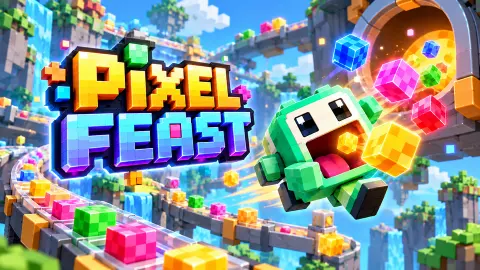
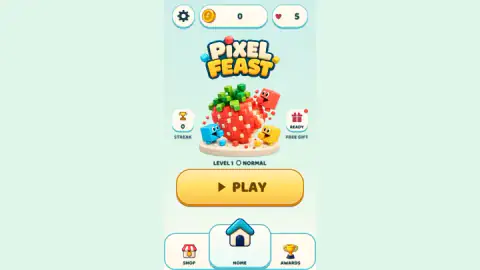
The game reached our catalogue in October 2026. No studio is named on it. It opens on a short loading line, A little bite. A big delight., and a home screen with a voxel strawberry being bitten by three cube characters.
The picture is eaten from the outside in
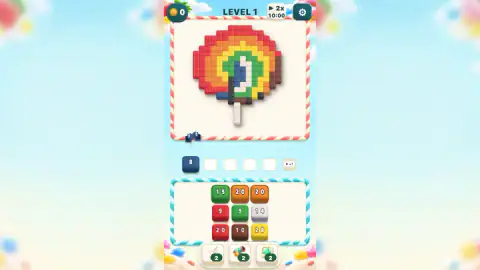
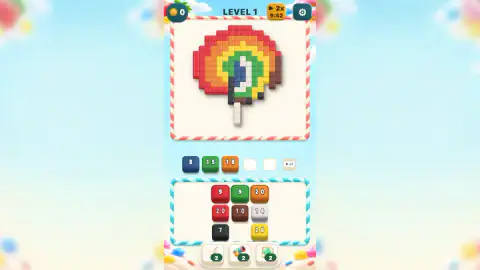
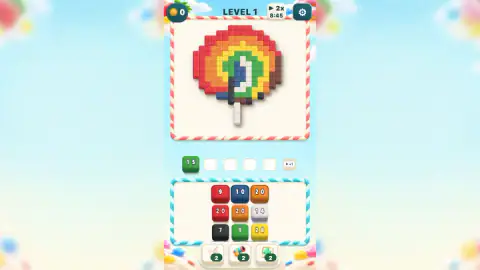
The first level is a rainbow lollipop. A red ring runs round the outside, then orange, yellow and green, with a blue and white swirl in the middle, a brown patch on the right, dark pixels at the bottom and a white stick below.
Our first three taps were blue, green and orange, the three crates the board offers at the start. Blue went from 10 to 8: its characters took the two blue pixels that poke out at the bottom left, the only blue on the edge. Orange went from 20 to 18, eating the two orange pixels exposed on the right beside the brown patch.
Green ate nothing at all. Its crate kept the same number for the rest of that attempt, because every green pixel is wrapped inside yellow, orange and red.
So the order is set by the picture, not by the crates. On the lollipop you need red first, and the red crates were not at the front when we started: one sat second in the left column, and we had to send the green crate away to bring it forward. That is the real decision in each move. You sometimes have to open a colour you cannot use yet, just to reach the one you need, and every such crate costs a slot.
We never filled all five slots, so we cannot tell you exactly what happens when the row is full. The game's own listing tells you to keep slots available, and a sixth slot marked +1 with a play icon is offered for watching a video.
What our ten minutes on level 1 looked like
We played for about ten minutes and did not finish the first level. The honest account is short.
On our first attempt we loaded blue, green and orange, the characters ate four pixels between them, and then we spent the rest of the attempt trying to drag crates onto the picture, which does nothing. We restarted twice. On both restarts the crates and the picture were exactly the same, and we got no further than sending one green crate into a slot.
Our hearts stayed at five and our coins at zero, and we never saw a results screen. We did not use any booster, the extra slot, the shop, the awards page or the free gift. Everything on this page about those comes from what the screen shows or from the game's listing, and we say which.
What else is on the board
Three booster buttons sit under the crates, each marked 2 at the start. The game's listing calls them Hand, which lets you pick a crate deeper in a column, Rainbow Cannon, which clears pixels matching the crates already in your slots, and Extra Slot. Hand is the one that answers the lollipop problem directly: it would let you reach a buried red crate without spending a slot on green.
At the top there is a 2x badge with a play icon and a clock. It read 10:00 when we started, turned gold and counted down while we played, and stopped at 8:45 after a restart. It is not a time limit on the level; nothing ended when it ran. We do not know what it doubles.
The home screen also has a coin counter, five hearts, a streak counter, a free gift and tabs for a shop and awards. The listing says there are 134 levels with new obstacles, and that videos are optional rewards. We saw one level.
Pixels, voxels and why each bite is one
The word pixel is short for picture element: "pix", from pictures, plus "el", for element. It was first published in 1965 by Frederic Billingsley of NASA's Jet Propulsion Laboratory, describing the dots of images scanned from space probes. A pixel is the smallest piece of a picture that can have its own colour.
That is exactly the unit Pixel Feast counts in. A crate of 10 means ten bites, and each bite removes one picture element, no more. When a pixel goes, the one behind it becomes the new edge. The pixels here are drawn as little cubes, which is closer to a voxel, a volume element, the 3D word built the same way. You can see it on the home screen strawberry.
The idea also explains why the order matters. A picture made of whole elements can only lose them one at a time, from wherever an eater can stand, so the outline of the picture decides what is available on every turn.
Who it is for
Pixel Feast suits players who like a calm puzzle with one clear rule and no level timer that we could find. It is easy to start with a single tap, but the first level already asks you to plan around a buried colour and a crate stuck behind another. Younger players will follow it from the pictures; the tutorial line Tap a block at the front of a chain to load a free slot is the only tutorial line we saw.
If you like the parking-row idea, Bus Color Jam uses the same kind of limited waiting area with passengers and buses. If the pixel pictures are the draw, Nonogram and Grid Odyssey: Nonograms have you reveal pixel art with number clues instead. The rest are in puzzle games.
Screenshots
How to play Pixel Feast
- Press PLAY on the home screen, then Play on the Level 1 card. The card states the goal: Clear every colour pixel.
- Look at the picture at the top and find the colours on its outer edge. Those are the only ones that can be eaten right now.
- Tap the front crate of a column that holds one of those edge colours. It moves into the first free waiting slot.
- Watch its characters walk round the frame and eat matching pixels. The number on the crate drops by one for each pixel.
- Keep choosing crates, outside colours first, until the picture is empty.
Tips from our session
- Before you tap, ask one question: can this colour be reached from outside the picture? If not, leave it in the column.
- A tap is all it takes. Dragging a crate does nothing; we tried it many times.
- Columns move up. When a front crate leaves, the next one behind it becomes tappable, and sometimes a new crate appears at the back. Look one crate deep before you choose.
- The level starts with the same crates every time. If it goes badly, a restart is a chance to plan the order you already know.
Controls
| Tap or click a crate in the front row | Sends that crate to the first free waiting slot; its characters walk round the frame and eat matching pixels they can reach |
|---|---|
| Tap or click a booster button | Uses one of three limited helpers at the bottom of the board (each started with 2 uses in our game) |
| Gear button | Opens the settings and pause menu |
Features
- Every level is a pixel picture; you win it by clearing every coloured pixel, which the level card says in so many words
- Crates stand in three columns, and only the front crate of each column can be tapped; the next one moves up when it leaves
- The number on a crate is how many pixels its characters will eat, and it counts down one bite at a time
- Five waiting slots sit between the picture and the crates, with a sixth one offered for a video
- Characters only eat pixels they can reach from outside, so the picture is cleared ring by ring from the edge in
- The first picture is a rainbow lollipop with a red outer ring, a white stick and a brown patch on one side
- Three limited boosters, which the game's listing calls Hand, Rainbow Cannon and Extra Slot
Game details
- Developer
- Partner studio
- Release date
- October 2026
- Last updated
- October 26, 2026
- Added here
- October 2026
- Technology
- HTML5 (3D)
- Platforms
- Browser (desktop), Browser (mobile & tablet, touch)
- Saved progress
- Saving, when available, is managed by this game. Mava cannot confirm your level.
FAQ
How do you play Pixel Feast?
Tap a crate at the front of one of the three columns. It moves into one of five waiting slots, and the small cube characters inside walk round the picture's frame and eat pixels of their own colour. When every coloured pixel in the picture is gone, the level is cleared.
Why does a crate in Pixel Feast sit in its slot without eating anything?
Its characters can only eat pixels they can reach from the outside of the picture. In the first level a green crate of 15 sat in its slot untouched because the green ring of the lollipop is wrapped inside yellow, orange and red rings. Clear the outer colours first and the inner ones open up.
What do the numbers on the crates mean in Pixel Feast?
The number is how many pixels that crate's characters will eat. It counts down as they eat; a blue crate of 10 dropped to 8 after its characters took two blue pixels from the bottom edge of the picture.
How many waiting slots are there in Pixel Feast?
Five, with a sixth slot marked +1 and a play icon, which is offered for watching a video. Each crate you tap takes one slot until its characters have finished eating, so loading colours that cannot eat yet fills the row.
Do you have to drag the pieces in Pixel Feast?
No. Everything is done with a single tap or click on the front crate of a column. We spent part of our session dragging crates at the picture, and nothing happened at all.
How many levels does Pixel Feast have?
The game's own listing says 134 levels with new obstacles along the way. We only played the first one, a rainbow lollipop on Normal, and did not finish it, so we cannot confirm the count.
What are the boosters in Pixel Feast?
There are three buttons at the bottom of the board, each showing 2 uses at the start. The game's listing names them Hand, which picks a crate deeper in a column, Rainbow Cannon, which clears matching pixels for crates already in the slots, and Extra Slot. We did not use them.
Is Pixel Feast free and does it work on a phone?
It is free to play in the browser. The listing says it works with touch or a mouse; we played with a mouse. Videos are optional and give extra slots, boosters or coins.