







About My Town Home: Family Playhouse
Most house games in a browser give you a job. Clean the kitchen, decorate the bedroom, beat the timer. My Town Home: Family Playhouse gives you a family, a house and nothing to do. There is no score, no level to clear and no way to lose. What happens next is whatever you make happen.
That is the idea behind a digital dollhouse, and My Town Games has been making them for a long time. The studio, based in Israel, first put My Town Home on the App Store in July 2015. Google Play now lists it at more than 50 million downloads.
The browser version has been available since December 2024. It is the same house and the same family, played with a mouse or a finger instead of an app.
We played it for four minutes in a desktop browser. That was enough to see how it works, and not enough to see all of it: we reached the front of the house and the living room, and this page says clearly where the rest comes from.
A dollhouse with no rules
The reason My Town Home works for young children is the same reason a real dollhouse does. Nothing is wrong. If a child wants the whole family on the stairs or the baby beside the fish tank, that is where they go, and the game never says no.
That also means the game will not tell anyone what to do. There are no quests on screen and no voice explaining the next step. Children who like to make up stories take to it at once. Children who want to win something may wander off after a few minutes, and the mini-games and the daily calendar are there partly to keep them.
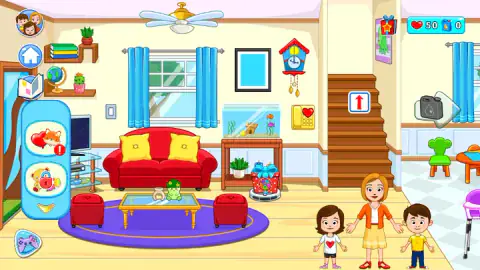
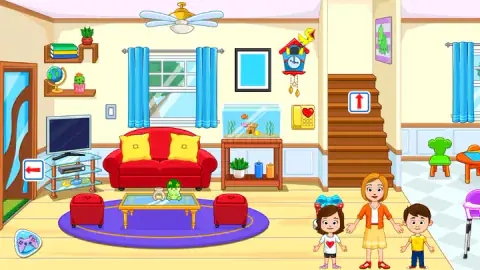
The house itself is drawn like a picture book. The living room we saw had a red sofa with yellow cushions, a fish tank, a cuckoo clock and a toy dinosaur on the coffee table. Through the doorway on the right you can see the corner of the kitchen, with a child's green chair and a high chair.
What is in the house
The app stores and the game's description agree on six rooms over two floors. The game's description fills in the list: the living room, a kitchen with a big table and a smaller one for the children, a backyard with a sandbox and a trampoline, children's rooms, a parents' room and a bathroom.
The stores also promise a mom, a dad and six children, plus pets, and more than 100 items you can pick up and move.
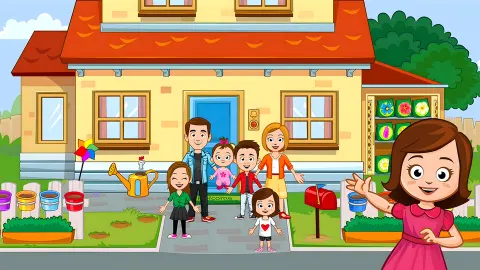
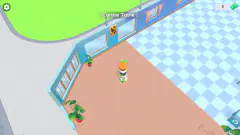
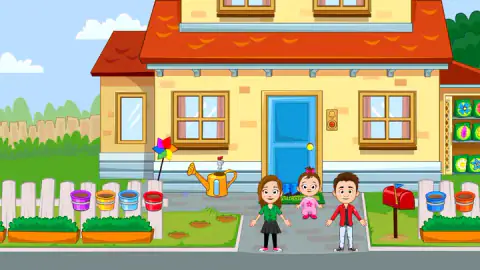
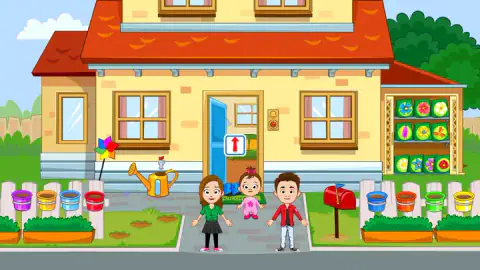
What we saw ourselves was smaller. Outside there is a yellow house with a red roof and a blue door with a welcome mat. Along the fence stand coloured pots, beside them a watering can and a pinwheel, and a shelf of seed packets by the wall. The flower beds have small dug holes in them, which fits the description's promise that you can plant flowers and tend them.
The family on the path outside was not the family inside. On the porch we saw a girl in green, a baby and a boy in a red jacket. In the living room it was a mother in orange with a girl and a boy. That matches the stores' point that you choose which characters to play with.
Hearts, the calendar and the robot vacuum
There are two counters in the top right. The red one, with a heart, is the currency. The blue one stayed at 0 for our whole session, and we could not find out what fills it.
Hearts come from the daily calendar, a row of seven days with a gift on each, and from the mini-games. According to the game's description, the robot vacuum has a wheel of fortune on it, and you can catch it and spin for a prize. We saw the robot and the wheel on its gift box, but we did not spin it.
The book button on the left opens a family album. The description says you collect cards to fill its pages. It loaded behind a picture of an open photo album, with a garden party on one page and a family picnic on the other.
The mini-games and the ads
A gamepad button in the bottom left corner opens a side panel with round bubbles. Two sat in it when we looked: a fox surrounded by hearts, marked with a red exclamation point, and a teddy bear. The store page names the first two mini-games as popping balloons and washing a teddy bear, and says you collect rewards after. On Google Play they are listed under a Buddy Pass feature. In the browser, the description says both are there from the start.
When we pressed the fox bubble, the game went to an ad break rather than a mini-game. So we cannot say yet how they play or how many hearts they pay.
Parents should know that ads are part of the browser version, and the mobile app lists both ads and in-app purchases. On the App Store, extra characters are sold one by one and there is a monthly or yearly subscription for everything. We did not see anything for sale in our session.
Who it is for
Google Play recommends My Town Home for children from 4 to 12 and rates it Everyone, and the App Store rates it 4+. In practice it suits the younger end best: what we saw is driven by pictures and arrow signs rather than text. Older children who want goals will find more to do in a game with levels.
It is also a good pick for two children sharing one screen and one story. There is no turn to wait for and no one to beat.
What we saw, and what we did not
We played about four minutes on a desktop. We saw the daily calendar, the living room, the front of the house, the album's loading screen and the robot vacuum. We did not reach the kitchen, the bedrooms, the bathroom or the backyard, and we did not play a mini-game, change an outfit or spin the wheel. Everything about those comes from the distributor's description and the app store pages.
More games like My Town Home
Kiki World: Kawaii Doll Decor is another dollhouse where you arrange rooms your own way. Tidy Up the Dollhouse gives the house a job to do, and Home Design: Decorate House is about choosing the furniture. Pregnant Mom Simulator Family Life keeps the family theme. Other games made for small children sit in the kids section.
Screenshots
How to play My Town Home: Family Playhouse
- Collect the daily reward. The game opened straight into the living room with a seven-day calendar on top. Press COLLECT to close it.
- Look around. Everything in the scene is a toy: the sofa, the clock, the phone shaped like a heart, the plant on the shelf.
- Drag things and people. According to the game's description, you move items and characters with the mouse or a finger and put them wherever your story needs them.
- Follow the red arrow signs. A sign on the front door takes you inside, one by the living room door takes you back out, and one on the stairs leads up.
- Spend hearts. The heart counter in the top right is the game's money, which the description says you use to buy things.
Tips from our session:
- The calendar is forgiving. Its own line says "If you miss a day, you'll still keep your progress", so a child who skips a day does not lose the streak. Our heart counter went from 30 to 50 when we collected.
- Watch the floor. The robot vacuum does not wait for you. It carries a gift box printed with a spinning wheel, and it was in a different spot in each of our shots of the living room.
- Some rooms take a moment. When we clicked the sign on the stairs, the game showed a "Loading..." screen with a cuckoo clock in the corner before the next floor.
- The arrow keys do nothing here. We tried them and the space bar. This is a mouse or touch game.
Controls
| Click or tap | Use an object, press a button or follow an arrow sign to another room |
|---|---|
| Drag (mouse or finger) | Pick up an item or a character and put it somewhere else |
| Red arrow signs | Move between scenes, such as through the front door or up the stairs |
Features
- A dollhouse with no score and no goal, where you move the family and the furniture around and make up the story
- Red arrow signs on doors and stairs take you from scene to scene
- A seven-day reward calendar that keeps your progress if you miss a day
- A robot vacuum that wanders the living room with a gift box on its back
- Hearts as the in-game currency, earned from the daily calendar and, per the description, from mini-games
- A browser version of a mobile app that has been on the App Store since 2015
Game details
- Developer
- My Town Games Ltd
- Release date
- December 2024
- Last updated
- June 30, 2026
- Added here
- March 2025
- Technology
- HTML5
- Platforms
- Browser (desktop, mouse), Browser (mobile & tablet, touch)
- Classification
- Fashion & Beauty , Kids
- Saved progress
- Saving, when available, is managed by this game. Mava cannot confirm your level.
FAQ
What is My Town Home Family Playhouse?
It is a digital dollhouse made by My Town Games, an Israeli studio that makes open-ended pretend-play games for children. You get a family and a two-storey house and there is no goal or score. You move the characters and objects around and make up the story yourself.
Is My Town Home Family Playhouse free?
The browser version is free to play and shows ads. The mobile app is also free to download, with ads and in-app purchases; on the App Store, extra characters and a subscription are sold separately.
How do you play My Town Home in the browser?
Click or tap to use things and drag to move items and characters. Red arrow signs on the doors and stairs take you to the next scene. Daily rewards and mini-games pay out hearts, which the game uses as currency.
How many rooms are in My Town Home?
The app stores and the game's listing both describe six rooms, including a living room, a kitchen and a garden or backyard, spread over two floors. In our session in the browser we only reached the front of the house and the living room.
What age is My Town Home for?
Google Play recommends it for children aged 4 to 12 and rates it Everyone, and the App Store rates it 4+. There is no score and nothing to lose. A parent should know that it shows ads.
Who made My Town Home Family Playhouse?
My Town Games Ltd, a studio based in Israel. The app first came out on the App Store in July 2015 and Google Play lists it at more than 50 million downloads. The browser version has been available since December 2024.
What are the mini-games in My Town Home?
The store page and the game's description name two, popping balloons and washing a teddy bear, and say more unlock as you play. We tried to open one in the browser and got an ad break instead, so we have not seen them yet.
Is the browser version the same as the My Town Home app?
It is the same house and the same family, made by the same studio. We cannot confirm that every room and character from the app is included in the browser version, since we only reached two scenes.