








About Single Mom Baby Care Prank Game
Most mom simulators start you in the kitchen with a crying baby. Single Mom Baby Care Prank Game starts you in a bedroom with clean hands and a card that says "Go and wash your hands." We found no sink in that bedroom. The first thing the game teaches you, without saying so, is that the house is bigger than the room you can see.
Before you get there it walks you through four screens. A wardrobe, where every outfit but the one you are wearing carries a padlock and a price in coins. A Mode Selection screen with three cards. A grid of ten levels. Then a loading bar under the game's logo. None of it is long, but the wardrobe and the level grid each have a button marked AD, and it helps to know which ones you need. In level 1, the answer is none of them.
The game comes from CodesXpirit, the studio that also made Single Dad Simulator Family Life and a row of Mother Simulator titles, and it was published on 4 November 2026. We played it on a computer with a keyboard two days later, three times, always Career Mode and always level 1. We never found the sink. We say that first, because the rest of this page is about what we did find on the way.
Three modes on the card, two you can play
The Mode Selection screen is the game's honest moment. Career Mode, "Build a better future", is the green card. Prank Mode, "Every move can be a prank", is the yellow one. Family Mode, the purple card on the right, reads Coming Soon.
That matters because the publisher's description sells Family Mode as one of the two ways to play, with cooking, shopping, gardening, driving and a pet dog. When we played, that card was shut. What you actually choose between is Career and Prank, and we only went into Career.
Career Mode is a grid of ten numbered levels. Level 1 is the only one with a Select button. Level 2 shows a Skip Level button with a red AD label, and levels 3 to 10 are padlocks. So the levels run in order, and the only way past the first one without finishing it is to watch an ad, if the ad loads. In our runs, it did not.
The soap is free, and the big button is the trap
Every level starts with two cards. The first is the objective; for level 1 it is "Go and wash your hands." The second is Items Required, and for level 1 it shows one thing, a bar of soap, with two buttons under it.
The small green button carries a coin icon and a 0. The large yellow one reads Get All Free with the AD label. They look like the cheap option and the generous one. They are not. The green 0 is the price of the soap, and the price is nothing: press it once, the soap gets a green tick, and the yellow button turns into a plain OK that takes you into the house.
The yellow button is a video ad, and the Items Required card has no X. In our first session we pressed Get All Free three times, got "Video Not Available, please try again later" three times, and never left the card. Clicking around it did not close it either. The whole session ended on that screen. The second time, one press of the green 0 had us in the bedroom in about half a minute.
The same pattern shows up on the other AD buttons. The wardrobe has Get Free $500, the level grid has Skip Level, and inside the level a blue Skip Level button sits at the top right with the N key on it. Inside the level the same card, "Video not available, please try again later", came up once for us, before we had touched that button. Treat the AD buttons as optional, because in practice they were.
The bedroom is the start, not the task
You begin standing behind the mom in a bedroom: a bed with grey sheets and a padded headboard, a bedside lamp, a television on a wooden shelf, a wall with a raised geometric pattern. The coin counter at the top left reads $0. Underneath it sits a round pad, the on-screen joystick that the publisher says is for touch screens; on a keyboard you never need it. At the top right, five small buttons carry their keys in brackets: I for the controls chart, Ctrl for settings, P for pause, Q for the wardrobe, N for Skip Level.
The objective is to wash your hands, and we found nothing in this room that does. What the room does have is a brown door. Through it we saw a staircase, and beyond the door a smaller room with pink walls and a blue bed. No baby appeared anywhere during our ten minutes. The sink is somewhere past that, and we did not reach it.
So the first level is really a navigation lesson. The camera sits close behind the mom, which means a wall fills the screen as soon as you walk into one, and we spent a good part of a session looking at beige paint. The fix is the mouse: the first tutorial card says "Use Mouse to look Around" for a reason. Turn, find the door, then walk.
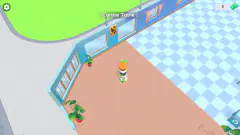
Along the way you will meet orange speech-bubble tags. One reads Decorate Aquarium here, hanging over a colourful fish that floats in mid-air beside a plant in an orange pot; another version of it reads "Decorate [H] quality [E] here". This is a separate system from the level tasks: spots in the house you can furnish, with H named on them, and E in one of the tags we read. We did not press either. It is worth knowing that the big orange sign in the middle of the screen is not telling you where to go.
Who it is for, and what we did not see
This is a slow, roomy house game rather than a baby-care puzzle. If you like walking a character through a 3D home, reading objective cards and ticking off chores, the opening is comfortable and the tutorials explain every key. Younger players will manage the menus without help. Anyone hoping for a baby to feed in the first minute will be waiting a while.
We saw one level of one mode, on a keyboard. The publisher promises cooking, cleaning, grocery shopping, driving, a dog, a park, birthdays and a 3D city, plus a Prank Mode of unexpected situations around the house. None of that reached level 1's bedroom in our runs, and we did not test touch controls, Shift to sprint, or the T key for cutscenes, since no cutscene appeared.
More games by CodesXpirit
The same studio made Single Dad Simulator Family Life, where the chores come with a clock, and Rich Mom Family Simulator Luxury Life, where the house is a mansion. Mother Simulator Beach Party Games takes the family outdoors. More of this kind are in our girls games section.
Screenshots
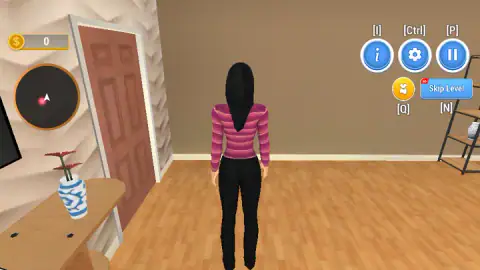
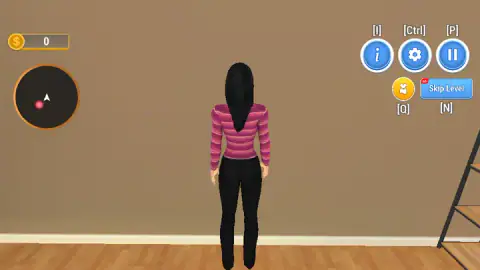
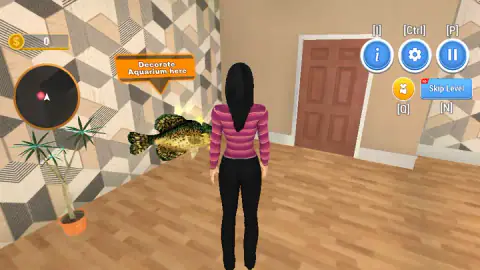
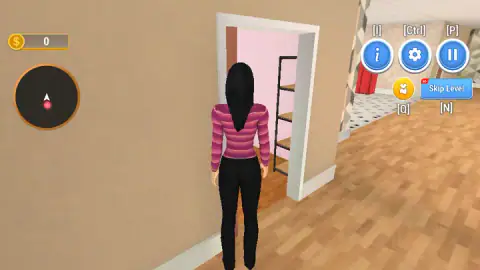
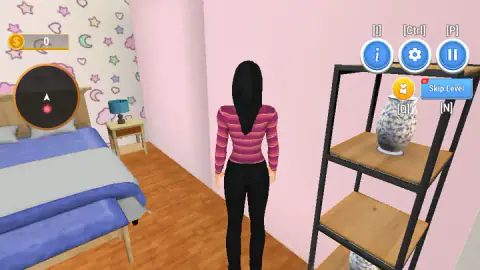
Taken by opening the game ourselves and letting it run — not supplied by the publisher, and not the same picture every other site shows.
How to play Single Mom Baby Care Prank Game
- On the Customization screen, press the green Play button at the bottom right. The clothes with padlocks cost coins you do not have yet.
- Pick a mode. Career Mode is the green card; Prank Mode is the yellow one. The purple Family card says Coming Soon and cannot be chosen.
- On the level grid, press Select on level 1. The other nine are padlocked, and level 2's yellow Skip Level button is a video ad.
- Read the Level Objective card and press OK. Then, on the Items Required card, press the green button with the coin and the 0 under the soap. A green tick appears and the button turns into OK.
- Walk with W, A, S, D, turn the camera with the mouse, and press F when you are next to something you can use.
Tips from our runs
- The soap is free. The big yellow Get All Free button under it is an ad, and the card has no close button, so if that ad fails to load you are stuck on the card. Press the small green 0 instead.
- Three tutorial cards come up once you are in the room: mouse look, WASD and a full keyboard chart. Tap to Continue is written at the bottom right of the last two.
- Turn before you walk. Holding W into a wall shows you the wall. A tap of A or D first brought the brown door into view for us.
- The orange Decorate tags are not the objective. The fish floating next to the plant is a decoration spot, not a bathroom.
Controls
| W, A, S, D | Walk forward, left, back and right (shown on the MOVE AROUND card; we used W, A and D) |
|---|---|
| Mouse | Look around, per the first tutorial card |
| F | Action (on the illustrated keyboard; we never had anything to use it on) |
| Shift | Sprint, per the keyboard card and the publisher |
| H (and E on one tag we read) | Decorate a spot, per the orange "Decorate … here" tags in the bedroom (not pressed) |
| Q | Customization, the shirt button at the top right |
| N | Skip Level, the blue button marked AD (a video ad) |
| I / Ctrl / P | Controls card, settings and pause, the three small buttons at the top right |
| T | Skip cutscene, per the publisher (we saw no cutscene) |
| Touch | Round joystick pad at the bottom left, per the publisher (not tested) |
Features
- Three mode cards at the start: Career, Prank, and Family marked Coming Soon
- Ten levels in Career Mode, with only level 1 open and a Skip Level button on level 2 that asks for a video ad
- A level objective card before each task: level 1 reads Go and wash your hands
- An Items Required card that lists what the task needs; level 1's soap costs 0 coins on the green button
- A 3D house explored from behind the mom, with a bedroom, a staircase and a pink room behind a brown door
- Orange Decorate here tags on spots like an aquarium, labelled with the H key
- A Customization wardrobe with coin prices, padlocks and a coin counter that started at 0 for us
Game details
- Developer
- CodesXpirit
- Release date
- November 2026
- Last updated
- November 6, 2026
- Added here
- November 2026
- Technology
- HTML5 (3D)
- Platforms
- Browser (desktop, keyboard and mouse), Browser (mobile & tablet, touch)
- Classification
- 3D , Casual , Fashion & Beauty
- Saved progress
- Saving, when available, is managed by this game. Mava cannot confirm your level.
FAQ
How do you play Single Mom Baby Care Prank Game?
Press Play on the wardrobe screen, choose Career Mode or Prank Mode, and select level 1. A card tells you the level objective, and a second card lists the items you need. Then you walk the mom through the house with W, A, S and D, turn the camera with the mouse and press F to act. Level 1 asks you to go and wash your hands.
How do you get the soap in level 1 of Single Mom Baby Care Prank Game?
Press the green button with the coin and the 0 under the word Soap on the Items Required card. The soap costs nothing, a green tick appears on it and the button turns into OK. The yellow Get All Free button is a video ad, and in our runs it only brought up a Video not available message.
Where do you wash your hands in Single Mom Baby Care Prank Game?
Not in the bedroom where the level starts, as far as we could see. We walked that room for about ten minutes, found a brown door, a staircase and a pink room with a blue bed behind the door, and never reached a sink. Expect to leave the bedroom and explore the rest of the house before the objective can be done.
Is Family Mode available in Single Mom Baby Care Prank Game?
Not when we played. The Mode Selection screen offers three cards, Career Mode, Prank Mode and Family Mode, and the Family card is marked Coming Soon. Only Career and Prank can be chosen.
How many levels does Single Mom Baby Care Prank Game have?
The Career Mode grid shows ten levels. Level 1 is open with a Select button, level 2 shows a Skip Level button marked AD, and levels 3 to 10 are padlocked. We only played level 1.
What are the Decorate here signs in Single Mom Baby Care Prank Game?
Orange tags that float over spots in the house, such as Decorate Aquarium here next to a floating fish in the bedroom, with the H and E keys named on them. They are a decoration system separate from the level objective; following them does not wash your hands.
Does Skip Level work in Single Mom Baby Care Prank Game?
It asks for a video ad. Every button with the red AD label, Skip Level, Get All Free and Get Free $500, offers a shortcut in exchange for a video ad, and Get All Free, the one we pressed repeatedly, was answered every time with Video not available, please try again later. Do not count on it to move past level 1.
Who made Single Mom Baby Care Prank Game?
The game is credited to CodesXpirit, the studio behind Single Dad Simulator Family Life and several Mother Simulator games, and was published on 4 November 2026. We found no other page about the game.