

About My Dogy Virtual Pet
A virtual pet is usually one screen and a row of buttons: feed, wash, play, sleep, repeat until the novelty goes. This one keeps that screen and hides an arcade behind it.
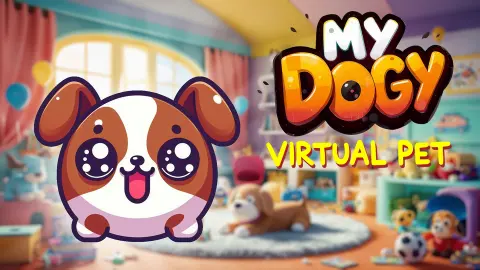
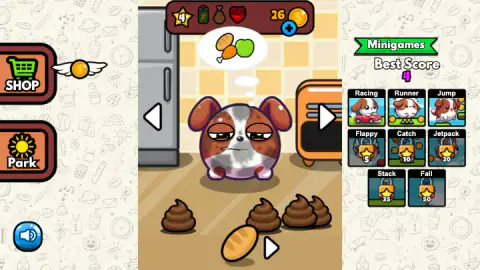
The puppy lives in a small flat you page through with white arrows: a kitchen with a fridge and a heater, a bathroom, a bedroom with a pink rug and a lamp. Along the top sits a star with your level in it and, beside it, three small pictures that are really gauges: a green battery, a brown food sack and a red heart, all of them losing their colour as you go. No menu tells you what is wrong. A thought bubble appears over the dog with bread, a chicken leg and a green apple in it, and you work out the rest. On the floor there is usually something to pick up, and some of it is poop.
Down the right-hand side sits the other game: a panel headed Minigames with eight tiles in it. Racing, Runner and Jump are open from the start. Flappy, Catch, Jetpack, Stack and Fall each wear a padlock with a number stamped on it, and those numbers are the whole progression system, printed where you can read them in the first minute.
The game is credited to Renato Duchini, who publishes as Onduck Games, and was published in October 2025. Our session took the dog from level four to level five and finished on twenty-nine coins. What follows is what that bought us, and the list of what it did not.
The star in the corner is the price list, and the padlocks print it
Most games that gate their content make you guess. This one does not: every locked tile carries a star with a number on it, and that number is the level you need. Flappy asks for five. Catch ten, Jetpack twenty, Stack thirty-five, Fall fifty.
That ladder turns a care loop into a plan. Looking after a cartoon dog has no fail state that we found, which normally means no reason to come back tomorrow. Here there is one: the gap between your star and the fifty on the Fall tile is on screen the whole time.
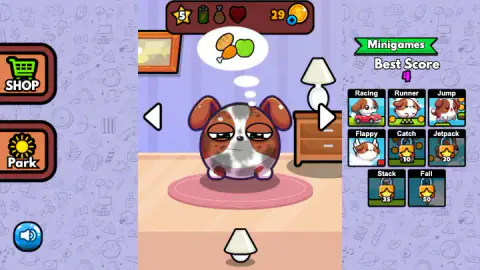
And the rule works rather than merely being printed. Early on, the bar read four and Flappy was a padlock over a star with a five on it. Later the bar read five and Flappy had become a drawing of the puppy with wings, no padlock in sight. The other four stayed shut.
What we cannot tell you is what feeds the star. It went up once while we were feeding the dog, cleaning the floor and driving a small red car, and nothing announced why. Our score and our coins both moved without the star following, which points at the care loop rather than the arcade — but that is us joining two dots, not being told.
Virtual pets have been a real-time chore since 1996
The idea the whole genre rests on arrived with the Tamagotchi, which Bandai put on sale in Japan in late 1996: an egg on a keyring, three buttons, a screen of a few hundred pixels. What made it a phenomenon was not what it did while you were holding it. It was what it did while you were not.
A Tamagotchi ran on a clock. Its hunger drained in real hours whether the device was in your hand, in a drawer or in a desk at school, and that one decision turned a toy into an obligation. Schools banned them for exactly that reason: children were not playing with them in lessons, they were being summoned by them. Every pet game since has been a variation on the same question — can software make you feel responsible for something that does not exist.
This game keeps the chore and softens the consequences, which is the right trade for an audience of children. The dog asks in pictures. Its needs are small gauges rather than numbers to interpret. The mess piles up where you cannot miss it, so cleaning is visible work with a visible result — the strongest teaching moment the genre has. And nothing we did or failed to do produced a punishment.
To anyone hoping this teaches what owning a dog is like: it does not. What it teaches is that care is maintenance rather than a single kind act — the bubble comes back, the floor gets dirty again, and yesterday's feeding does not count for today. That is where the resemblance stops. We also never found out whether the gauges keep draining once the tab is shut, which is the one thing that would make the chore real, so we will not claim they do.
What to check before handing this to a child
Three things, from what we saw.
There is advertising. Part-way through our session a panel appeared over the game, labelled as an advert by the platform, with a cross in the corner. It closed on the first click.
There is a shop, and we did not open it. A large SHOP button sits on the left edge of the room, and a small blue plus is stuck to the coin counter above. Neither is proof that real money is involved, and neither is proof that it is not. The honest answer is to look for yourself first.
There is poop. Cartoon poop, drawn as brown swirls, and picking it up is a normal part of play rather than a gag. Children tend to find this the best part.
Beyond that, what we played had no chat, no box to type a name into and no sign-in. The words on screen are short English labels, and the dog asks in pictures, so a child who cannot read yet can still follow it.
How far we got
Level five, best score four, twenty-nine coins, and a dog still thinking about food when we stopped. Most of this game is ahead of us.
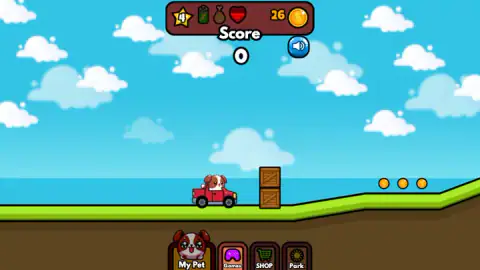
We never opened the shop or the park, so we cannot describe either. We played one of the eight minigames, and only three are open anyway. We never saw the bath used, never put the dog to bed, and never found out what the battery and the sack need in order to fill. We do not know what one point on the track is awarded for — a coin, a crate, a stretch of ground — because our score rose while we were doing all three at once.
What we can say is that the first ten minutes are unusually legible. The needs are on screen, the price of every locked thing is on screen, and the only buttons we cannot explain are the ones we chose not to press.
More from Onduck, and more pets
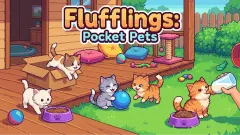
Neko's Adventure is the same studio with the same cartoon animal and none of the caretaking: a cat, a forest and a long drop. Fruit Fusion is Onduck in puzzle mode, pairing fruit upward in a wooden box, and it suits the same age and the same short sitting. On the pet side, Flufflings: Pocket Pets runs the opposite loop — cats wander into your yard on their own and you choose which to keep — and Funny Pet Haircut takes grooming seriously enough to make you drag the brush rather than tap at it. The rest are in kids games.
Screenshots
How to play My Dogy Virtual Pet
- Read the bubble, not the bar. The gauges tell you something is wrong; the thought bubble over the dog's head tells you what. Ours showed food, so food was the job.
- Click what is lying on the floor. The kitchen had a baguette on the boards and three piles of poop around it. Picking things up is the whole care loop — nothing to drag, nothing to aim.
- Use the arrows beside the dog to change room. The bathroom's soap is no use to a hungry dog in the kitchen.
- Open the Minigames panel when the dog is settled. Tap a tile with no padlock. The track loads in the same window, with the four main buttons still along the bottom.
- Play the minigame for the star, not the coins. The level number in the corner unlocks the rest of the panel, and the padlocks say how far away each one is.
What the session taught us:
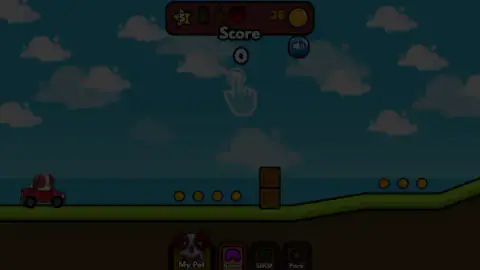
- The track does not start by itself. Twice we sat looking at a dimmed screen with a large pointing hand floating in the middle of it. If the car is not moving, the game is not stuck; it is asking.
- Collecting coins on the track does not move the coin counter. Ours stayed on twenty-six for the entire run, even over a line of them, and only read higher back in the flat.
- The score climbs one at a time. Nought, one, two, three in a run that involved shoving a wooden crate along the ground. Our best stuck at four, and the panel remembers it.
- The heart is the gauge to watch. Half red while we drove, nearly all dark by the time we reached the bedroom — the clearest signal in the interface, once you know it is a fill level and not a logo.
- The keyboard is not involved. We tried the arrows and the space bar on the track and nothing answered.
Controls
| Click or tap | The only input the game answered to. It picks things up off the floor, it opens the buttons around the edge, and on the track it is what keeps the car going |
|---|---|
| White arrow beside the dog | Pages to the next room. The kitchen, a bathroom and a bedroom all came round this way, each with its own mess |
| Minigames panel, right | Starts a minigame. Three tiles are open from the start, five carry a padlock with a star number on it |
| SHOP and Park, left edge | Two large buttons in the room view. We did not explore either, so we cannot tell you what is behind them |
| My Pet, Games, SHOP, Park | The same four places as a strip of buttons along the bottom, which stays on screen underneath the minigames |
| Speaker, top right | Mutes the game. It sits just under the score while a minigame is running |
| Arrow keys and space | We pressed all of them on the track and nothing we could see or hear responded. Treat it as a game you play entirely with a pointer or a finger |
Features
- Four needs drawn as gauges along the top — a green battery, a brown food sack and a red heart, beside a star carrying your level — that lose their colour as you play
- A thought bubble over the dog instead of a menu: ours asked for bread, a chicken leg and a green apple rather than naming anything
- Rooms you page through with arrows, each with its own job: a kitchen with food on the floor, a bathroom, a bedroom
- Cartoon poop that piles up on the floor and has to be picked up, three piles at once in our kitchen
- Eight arcade minigames in a side panel — Racing, Runner, Jump, Flappy, Catch, Jetpack, Stack and Fall — of which three are open from the start
- Padlocks that name their own price: the locked tiles read 5, 10, 20, 35 and 50, and Flappy opened in front of us the moment our star went from four to five
- A coin counter that moves slowly: twenty-six for most of our session, twenty-nine by the end of it
Game details
- Developer
- Renato Duchini (Onduck Games)
- Release date
- October 2025
- Last updated
- August 10, 2026
- Added here
- August 2025
- Technology
- HTML5 (2D)
- Platforms
- Browser (desktop), Browser (mobile & tablet, touch)
- Classification
- Casual , Simulation
- Saved progress
- Saving, when available, is managed by this game. Mava cannot confirm your level.
FAQ
What is My Dogy Virtual Pet?
It is a free browser game about looking after a cartoon puppy. The dog lives in a flat of two or three rooms, four small gauges along the top show how it is doing, and a thought bubble over its head shows what it wants next. Tucked down the right-hand side is a panel of eight arcade minigames, which is the other half of the game. It needs no download and plays in one tab.
How do you play My Dogy Virtual Pet?
With a mouse on a computer or a finger on a phone, and with nothing else. You click the food, the mess and the objects lying around the room, you use the white arrows beside the dog to move to the next room, and you pick a minigame from the panel on the right when you want a break. We tried the arrow keys and the space bar on the racing track and got no response at all, so the keyboard is not part of it.
What do the icons at the top of the screen mean?
Five things sit in that bar. A yellow star with a number in it, which is your level and which decides what you can unlock. Then a green battery, a brown food sack and a red heart, which are gauges rather than labels — they lose their colour as the dog goes without. On the right is how many coins you have, with a small blue plus button attached to the coin.
How do you unlock the other minigames?
Each locked tile shows a star with a number on it, and that number is a level. Flappy asks for five, Catch for ten, Jetpack for twenty, Stack for thirty-five and Fall for fifty. We watched Flappy open the moment the star in the top bar went from four to five, which is as clear a confirmation of the rule as you could ask for. What raises the star in the first place we never worked out.
Is My Dogy Virtual Pet suitable for young children?
Mostly, with two things worth knowing first. Nothing we played was violent or frightening, the on-screen words are short English labels, and the dog asks for things in pictures, so a child who cannot read yet can still follow the care loop. The two caveats are that cleaning up cartoon dog poop is a real part of the game, and that an advertising panel appeared over the screen part-way through our session.
Does My Dogy Virtual Pet have ads or things to buy?
It has advertising: one panel came up over the game during our session, labelled as an ad by the platform, and it closed on a cross in its corner. On buying, we can only tell you what we saw. There is a SHOP button down the left edge of the room and a small blue plus beside the coin counter, and we did not open either one, so we cannot promise you that nothing in there costs real money. Check it yourself before handing a phone over.
How do you earn coins in My Dogy Virtual Pet?
Through the minigames, as far as we could tell, though not in the way you might expect. There are coins to collect along the racing track, but our coin counter sat on twenty-six for the whole run and only read higher afterwards. The points you score on the track are counted separately, under the word Score, and your best is kept on the Minigames panel.
Who made My Dogy Virtual Pet and when?
It is credited to Renato Duchini, who publishes as Onduck Games and has a long list of browser titles. The game was published in October 2025 with an update in August 2026. Those are the platform's own records for the game's page, which is the most reliable source we have for it.