












About Cat on a Vacuum: Home Cleaning Simulator
Most cleaning games are about the satisfying swipe: a finger rubs away grime and the picture underneath appears. Cat on a Vacuum does not let you wipe anything. You are the robot vacuum, a white disc with one light on top, and the floor only gets clean where you actually drive. That turns a cozy chore into something closer to a small driving and planning game.
The home is a 3D apartment seen from just behind the robot. The floor starts dark and dusty, scattered with crumpled paper, yellow crumbs and grey bits. Every path you roll over turns to light wood. An orange cat wanders between the furniture, and a man sits on the sofa or at the dining table while you work around his feet.
What makes it a game is the pair of numbers in the top-right corner. One is your battery, which starts at 100% and drains as the clock runs. The other is your bin, which holds only 40 pieces of litter. Neither lasts long, and the whole job is about juggling the two.
It is by Petrenko Semen. Cat on a Vacuum was published on 28 October 2026, so it is brand new.
Three bars, one apartment: why the bin matters most
At first glance the Cleaning bar looks like the goal and the other two look like decoration. They are not. In our run the bin was already full when the Cleaning bar read 2%. Put simply, a whole bin of litter covers only a sliver of the apartment.
That means a full job is many round trips: clean a patch, drive to the station, come back. The game is really about route planning. Every trip to the wall costs battery, and battery costs a trip to the pad. Upgrading the bin is the change that should cut the most driving, though we did not reach the wrench station to see what it costs.
The battery kept falling even while we were stuck. It went from full to 18% in under four minutes and to zero in about five and a half. The countdown does not wait for you to be useful, so the best habit is to set off for the station before the bin is full, while the battery still has room for the trip back.
Running out is not the end: reserve drive
Most games of this kind would show a fail screen when the battery hits zero. This one does not. At 0% a new message replaces the old one: "Reserve drive • reach the charger manually". The job stays open, your progress stays on the bar, and the game simply asks you to limp home.
That makes Cat on a Vacuum forgiving in a way that suits younger players. You cannot lose the job by forgetting the battery; you only lose time. We ended our session in reserve drive, still wedged under a table, so we cannot say how slow the reserve is or whether it runs out too.
Under the furniture, the camera follows you down
Real robot vacuums are built flat for one reason: to get under beds and sofas, where dust collects and brooms do not reach. The game copies that. The robot fits under the tables and the bed, and when it does, the camera drops to floor level and peers out between the legs. A note on screen explains that "Normal view returns when you leave the furniture."
It looks good, and it is also the hardest part of the game. From down there you see table legs, a sliver of room and very little of where the stations are. The Camera button in the bottom-right corner shows which mode you are in: Normal view, or Low with "auto" or "manual" beside it. If you get turned around under a table, drive straight back out the way you came in before you try to turn.
The cat, the family and what we did not see
The real-world joke behind the title is an old internet favourite: cats riding robot vacuums around the living room. The game's description promises exactly that, a cat hopping on for a ride. In our session the orange cat walked the floor on its own, sometimes right beside the robot, but never climbed on. It may happen later in a job.
We also did not hear the conversations between a dad and his daughter that the description mentions, or see the kitchen it lists alongside the living room and bedroom. We did not empty the bin, reach the charger, earn a coin or open the upgrade station, so prices, rewards and the other vacuums are unknown to us. All of our ten minutes were on a computer; the game says phones and tablets get an on-screen joystick, which we did not try.
Who it is for
It suits anyone who likes a calm job with a little planning in it: there is no enemy and no fail screen, and you can see your progress on the floor itself. Children will get the idea at once, though the low camera under furniture may need a hand. If you want quick rounds and instant rewards, the 40-piece bin will feel slow at the start.
For another game where you drive a machine around and keep an eye on a draining bar, try City Cleaner 3D Tractor Simulator, where the fuel gauge plays the battery's part. Sponge Strike: Clean & Smash is cleaning of the swipe-and-fling kind, and cat lovers can bounce falling kittens to safety in Save the Kitten. There are more slow-paced games in our casual games.
Screenshots
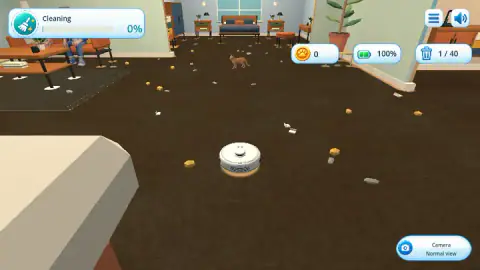
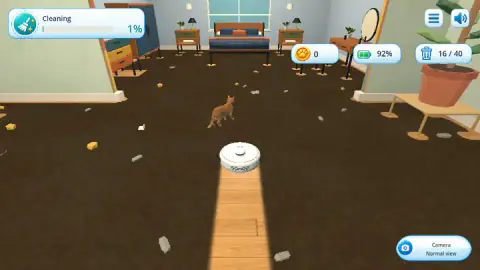
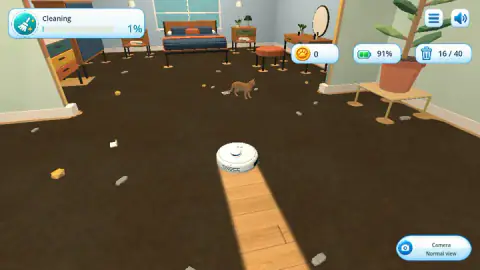
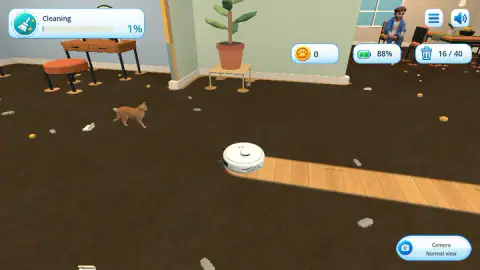
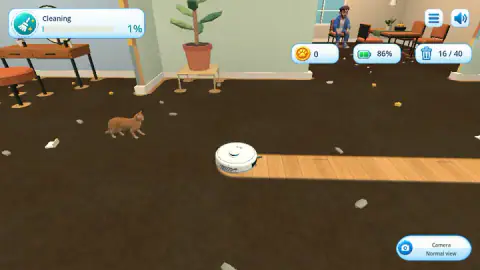
Taken by opening the game ourselves and letting it run — not supplied by the publisher, and not the same picture every other site shows.
How to play Cat on a Vacuum: Home Cleaning Simulator
- Drive with the arrow keys. Up and Down move the robot forwards and backwards, Left and Right turn it. There is nothing to press to clean: the robot does it as it rolls.
- Watch the Cleaning bar. It sits in the top-left corner and counts how much of the floor is clean. The job ends at 100%.
- Empty the bin before it stalls you. When the counter reaches 40 of 40, the message "Bin full • go to the right station" appears and a white arrow on the floor points to the emptying station.
- Recharge before you run dry. At 18% the game warns "Low battery — return to the charging pad". The pad is a white disc on the floor.
- Spend coins at the wrench station. The game says coins from finished jobs buy speed, battery and a bigger bin there.
Tips from our session. The bin, not the battery, is the first wall you hit. Ours filled in under a minute and a half, while the battery still showed 63%, and from that moment the Cleaning figure froze at 2% for the rest of the session. So the moment you see "Bin full", stop cleaning and follow the floor arrow; extra driving with a full bin does nothing. Stay out from under tables while you are heading for a station. Ours slipped under one, the camera dropped to floor level, and between the legs we lost our way and the battery ran down to zero.
Controls
| Up and Down arrows | Drive the robot vacuum forwards and backwards; it cleans whatever it rolls over |
|---|---|
| Left and Right arrows | Turn the robot on the spot |
| Camera button (bottom right) | Switches between Normal view and a low camera, which also kicks in on its own under furniture |
| On-screen joystick (phones and tablets) | Steers the robot on touch screens, according to the game's instructions; we did not try it |
Features
- You drive the robot vacuum yourself: the dark, dusty floor turns to clean light wood wherever it has rolled
- Three bars run the job: a Cleaning percentage, a battery that drains from 100%, and a bin that holds 40 pieces
- When the bin is full the Cleaning figure stops rising, and a white arrow on the floor points to the emptying station
- Emptying and upgrade stations stand side by side on one wall, with a separate charging pad on the floor
- Below 18% battery the game warns you to head for the pad; at zero it switches to a slow reserve drive
- Driving under a table drops the camera to floor level until you come back out
- An orange cat wanders the rooms on its own while you work
Game details
- Developer
- Petrenko Semen
- Release date
- October 2026
- Last updated
- October 29, 2026
- Added here
- October 2026
- Technology
- HTML5 (WebGL 3D)
- Platforms
- Browser (desktop, keyboard), Browser (mobile & tablet, touch)
- Saved progress
- Saving, when available, is managed by this game. Mava cannot confirm your level.
FAQ
How do you play Cat on a Vacuum: Home Cleaning Simulator?
You steer a robot vacuum around a messy 3D home with the arrow keys: up and down move it, left and right turn it. It sucks up any litter it rolls over and leaves a clean trail on the floor. The job is done when the Cleaning bar in the top-left corner reaches 100% and the bin has been emptied.
What do you do when the bin is full in Cat on a Vacuum?
The bin holds 40 pieces at the start, and once it reads 40 of 40 the message Bin full appears and a white arrow on the floor points the way. Drive to the emptying station, the orange box with a tray icon on the wall. Until you do, the Cleaning percentage does not move, however much floor you cover.
What happens when the battery runs out in Cat on a Vacuum?
At 18% the game tells you to return to the charging pad. At 0% the job does not end: the robot switches to reserve drive and the game asks you to reach the charger manually. In our session the battery lasted about five and a half minutes from full.
How do you upgrade the vacuum in Cat on a Vacuum?
Next to the emptying station there is a second station marked with a wrench. According to the game, that is where you spend coins on speed, battery and bin capacity, and where new vacuums are unlocked. Coins come from finishing cleaning jobs; we did not finish one, so we did not see the prices.
Does the cat ride the vacuum in Cat on a Vacuum?
The game's description says a cat hops onto your vacuum for a ride. In our session the orange cat walked around the rooms on its own, near the robot but never on top of it. It may climb on later in a job; we did not see it.
Why did the camera change in Cat on a Vacuum?
When the robot drives under a table or a bed, the camera drops to floor level so you can still see it between the legs. A note says Normal view returns when you leave the furniture. The Camera button in the bottom-right corner also lets you switch views yourself.
Who made Cat on a Vacuum: Home Cleaning Simulator?
It is by Petrenko Semen. It was published on 28 October 2026, in English and Russian, for computers, Android and iOS.