











About My Clearn Robot
Most robot games make the robot big. My Clearn Robot does the opposite. Its hero is a small robot with an orange head, a white face, a red body and blue feet, and the camera sits down at its height. From there a sofa cushion is a wall, the sofa is a cliff, and an orange cabinet at the side of the room blocks half the view.
The game puts its rules in one place: a blue card across the top of the screen. J punches with the hand, K kicks, and you break cubes with your hand to get new parts. Those cubes are yellow and marked with a question mark, the kind of block that says "hit me" in almost any game. The idea is that the robot grows by what it breaks out of them.
The title has a small mystery of its own. The game's description calls it My Clean Robot, so "Clearn" looks like a typing slip that stuck. Nothing we saw involved cleaning, though. The description also talks about fighting viruses in an apartment, and that matches the punch and kick far better than any mop would.
My Clearn Robot is by Ramoki, the developer listed for it. It was published in February 2025. Our own session stayed in the first room, and this page is honest about where it stopped.
What is on the screen
The room is a living room built for a much larger owner. A blue sofa fills the back, with a row of yellow cushions along the floor in front of it. The floor is a black-and-white chequerboard. A bookshelf hangs on the wall in the top right, and an orange cabinet with an open door stands at the right side.
As you walk right, the camera follows and the sofa slides away to the left, so the room plays like a side-scroller drawn in 3D. You can also walk deeper into the room: at one point our robot stood behind the cabinet, small in the distance.
There is another character in the room. A small yellow figure in a dark pointed hat wanders among the cubes. The description's viruses may be what it is, but it never touched us. Our health bar stayed at five out of five for the whole session.
Tiny robots in giant rooms are an old idea
Putting a small hero in a full-size house is a trick games have used for decades, because it turns ordinary furniture into a level. The best-known case with a robot is Chibi-Robo, a GameCube game made by Skip Ltd. and published by Nintendo in 2005. Its title character is a household robot about 10 centimetres tall who tidies up after a family and recharges from the wall sockets, and the house around him is the whole adventure.
Real cleaning robots live at the same height. iRobot's Roomba vacuum went on sale in 2002, and it sees a living room much as this game shows it: sofas as walls, gaps under furniture as tunnels, the floor as the whole world.
My Clearn Robot borrows the view and swaps the job. Instead of cleaning the room, your robot fights in it, and the yellow cubes stand in for the upgrades a real robot never gets. That is also why the low camera matters: it makes a row of cushions feel like a wall and a cube feel like a prize.
What we did not see
We are clear about the limits here. In our session we did not clearly break a cube, so we cannot tell you what a new part looks like or where it goes on the robot. The coin counter stayed at zero. We saw no fight with the hatted figure and took no damage, so we cannot say how health is lost or what happens at zero. We did not reach the end of the room, a second level, a shop or a customisation screen. We played only on a computer, not with the touch joystick.
Who it is for
My Clearn Robot suits younger players and anyone who likes toy-like 3D worlds. The controls are movement plus two attack keys, and the rules fit on one card. It is less suited to players who want to be guided: the game explains almost nothing beyond that card, and in our session it gave no sign of what to do once the cubes were in front of us.
If the giant-room idea is what draws you, Tiny Delivery has you drive food across kitchen counters without spilling it. For robots that are all about parts, Robot Scrapyard Arena builds its whole game around bolting salvage onto your machine, and Ragdoll Robots: Sandbox is a physics playground for knocking robots about. There are more easy-going games in casual games.
Screenshots
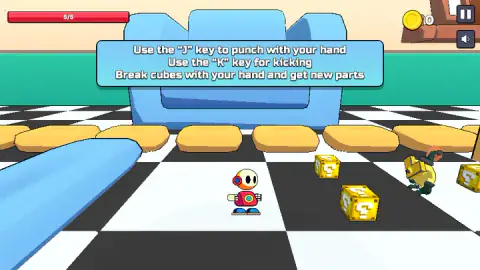
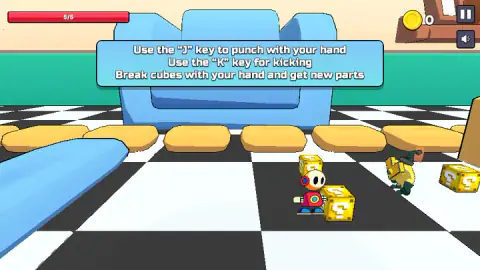
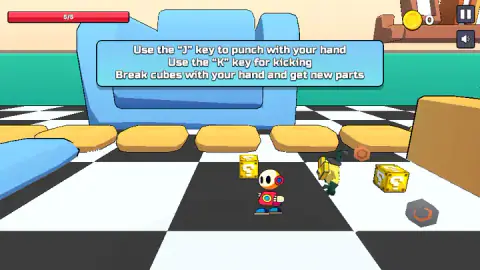
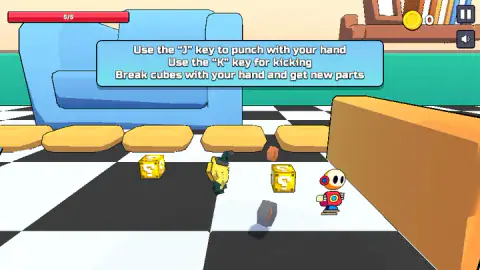
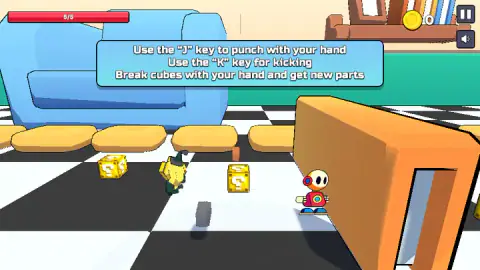
Taken by opening the game ourselves and letting it run — not supplied by the publisher, and not the same picture every other site shows.
How to play My Clearn Robot
- Click inside the game window once so it listens to the keyboard.
- Walk with D to move right along the room. W, A and S move and turn the robot the other ways.
- Get close to a yellow ? cube and press J to punch it. The card says cubes are broken by hand, so lead with J.
- Use K to kick. The card lists it as a second attack, separate from the cube breaking.
- Keep an eye on the red bar in the top left. It reads 5/5 at full health.
Tips from our session
- The blue card is not a menu. It sits over the top of the screen for as long as you play. We clicked it, punched and kicked, and it never went away. The game runs underneath it, so ignore it.
- Watch the floor, not just the cubes. Grey and copper hexagons, shaped like nuts, turned up on the floor during our run. We could not tell whether a blow of ours had knocked them loose, and none of them added to the coin counter.
- Use the pause button. The two square buttons in the top right are pause and sound, next to the coin counter.
Controls
| W, A, S, D | Walk and turn the robot; D walks it to the right along the room |
|---|---|
| J | Punch with the hand; the help card says cubes are broken by hand |
| K | Kick |
| Joystick (touch) | Walk and turn on a phone or tablet, according to the game's listing |
| Hand and Leg buttons (touch) | Punch and kick on a touch screen, according to the game's listing |
Features
- A living room seen from the height of a toy: a blue sofa the size of a wall and a black-and-white checked floor
- Yellow cubes marked with a question mark, which the help card says give new robot parts when broken by hand
- Two attacks only: a punch on J and a kick on K
- A red health bar of five points in the top left corner
- A coin counter in the top right, next to pause and sound buttons
- A blue help card with the three rules that stays on screen while you play
Game details
- Developer
- Ramoki
- Release date
- February 2025
- Last updated
- August 10, 2026
- Added here
- April 2025
- Technology
- HTML5 (3D)
- Platforms
- Browser (desktop, keyboard), Browser (mobile & tablet, touch)
- Saved progress
- Saving, when available, is managed by this game. Mava cannot confirm your level.
FAQ
How do you play My Clearn Robot?
Walk the robot with W, A, S and D, punch with J and kick with K. The help card at the top of the screen sets the task: break the yellow question cubes with your hand to get new parts. On a phone, the game's listing gives a joystick and hand and leg buttons instead.
Is it My Clean Robot or My Clearn Robot?
The game is listed as My Clearn Robot, but its own description calls it My Clean Robot, so the extra r looks like a typing slip in the title. Both names point to the same game, a small robot fighting and breaking cubes in a giant living room.
How do you close the blue sign in My Clearn Robot?
In our session it never closed. Clicking it, punching and kicking all left it in place. It is a help card rather than a menu, and the game carries on underneath it, so you can ignore it and keep playing.
Should you punch or kick the cubes in My Clearn Robot?
Punch them. The help card says to break cubes with your hand, which is J on a keyboard. K is the kick, which the card lists as a separate attack.
How do you get coins in My Clearn Robot?
There is a coin counter in the top right corner, but it stayed at 0 for our whole session, so we cannot say what pays out. The help card only promises new parts from the cubes, not coins.
Who made My Clearn Robot?
My Clearn Robot is by Ramoki, the developer listed for it. It was published on 16 February 2025 and was last updated in August 2026.
Is My Clearn Robot good for young kids?
The look is soft and toy-like, the controls are two attack keys plus movement, and nothing on screen is gory. The catch is that it explains very little beyond its one help card, so a young player may need an adult to point at the yellow cubes and the J key.