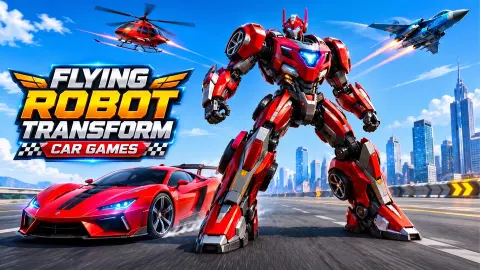




About Flying Robot Transform Car Games
A game called Flying Robot Transform Car Games sounds like a driving game with a gimmick. The first thing it asks you to do has nothing to do with driving. It puts a red robot on a city street, on foot, and tells you to destroy three other robots before they destroy you.
The car and the wings are there, as buttons in the corner of the screen. But the first mission is a hunt: a counter in the top left reads 0/3, a radar shows where the enemies are, and a health bar tells you how long you have left. We watched that bar drop below half within seconds of the fight starting.
The game is by CodesXpirit. It has been available since July 2026. Our own session was short, about four minutes and two attempts at the first level, and we lost both. What follows is what those four minutes showed us, and where our knowledge stops.
A portal opens on the road, and three robots walk out
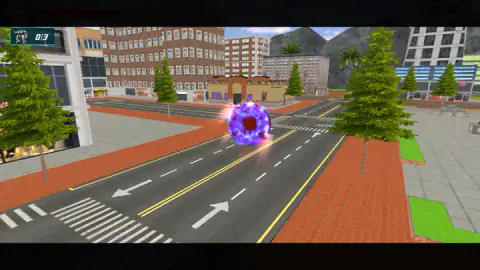
Level one starts with a short scene, shown with black bars above and below like a film. A purple ball of light hangs over an empty road between shops and apartment blocks. Then it opens into a ring, and white-and-blue robots carrying guns step through onto the tarmac.
That scene is the whole story, and the mission card that follows puts it in one line: kill three enemy robots that have just arrived from another dimension. The mission card spells it DIMENSTION. It is a small thing, but it tells you what kind of production this is: quick, direct, and not worried about polish.
What matters for play is the number. Three enemies, counted in the top left corner next to a small robot icon. The counter stayed at 0/3 for our entire session.
Fourteen buttons on the screen, and the keyboard only moves you
When the scene ends, the screen fills up. This is the part that is not obvious at first, so here is how the buttons are grouped.
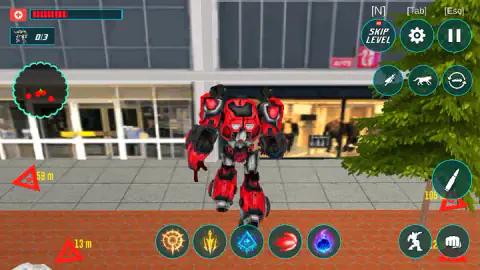
Top left is your status: the health bar, the 0/3 counter and a round radar. On the radar, red dots are enemies and a green arrow is you.
Top right are three system buttons, each labelled with its key: Skip Level on N, settings on Tab and pause on Esc. Under them sit three round form buttons. One shows a flying robot, one a four-legged animal and one a car with turning arrows around it. These are the transformations the title promises.
Bottom right is the fighting: a bullet button for shooting, and a kick and a punch below it. Along the bottom centre runs a row of five skill icons.
The game's instructions give the keyboard one job, moving with W, A, S and D. The mouse does the rest. On a computer that means fighting is a matter of steering with one hand and clicking round buttons with the other, which feels like a phone game played on a desk. It works, but it takes a minute to stop looking for a fire key.
Around the edges of the screen, red triangles point at targets, each with a distance beside it. At one moment ours read 59, 13 and 12 metres. An enemy that is in view gets a green ring at its feet and its own distance label.
The Skip Level key sits next to your movement keys
On a keyboard, N is a short reach from W, A, S and D. In this game it is the shortcut for Skip Level, and the button has a small ad tag on it: watch an ad, skip the mission.
We pressed N during our first attempt. The fight stopped, and a notice came up saying no ad was available. After we closed it, the level carried on unskipped, still at 0/3. So we cannot tell you whether a skipped level counts as cleared. We can tell you that the key interrupts the fight with a notice you then have to close.
Fighting Mode on the menu, Mission Mode in the description
The menu offers two cards, Fighting Mode and Free Mode, with a coin counter above them. The game's description calls the first one Mission Mode. It is the same thing, but if you go looking for a button with that name you will not find it.
The description also says missions pay coins that buy upgrades, and that the robot can become a wolf, a car, a bike, a helicopter, a jet and a tank. Our coin counter read 0 when we started, and we never finished a mission to see it move. Of the forms, we saw three buttons and did not confirm any change ourselves.
Free Mode, by the description, is the city without a mission: walk, drive and fly where you like. We did not open it.
Two attempts at level one, both lost
This is the honest size of our session. We chose Fighting Mode, started the first level twice and saw the Level Failed card twice. That card has two buttons, Home and Retry, and Retry sends you back through the mission card to the same street.
We did not destroy a single enemy. We cannot say how many levels there are, what the later missions ask for, or how the bosses the description mentions behave. We also did not try the game on a phone.
What we can say is that the first level is not a tutorial. It hands you fourteen buttons and three armed enemies at once, and it expects you to work out the rest.
Who it is for
It suits players who like big robots, a simple target and a city to cross, and who do not mind rough edges. Younger players will understand the mission at once, since it is one sentence long, though the number of buttons may take a few tries.
It is not a racing game, whatever the name suggests. There is no track and no lap time in what we played. If you came to drive, start with Free Mode or pick one of the games below.
More robots, and more cars that fly
Ultimate Robo Duel 3D is robot fighting without the city: one arena, one opponent. Ultimate Flying Car gives you the other half of this game's title, a car that takes off over city streets. Shape Transform turns changing form into a race, where picking the right vehicle for each stretch decides who wins. The rest are in our action games.
Screenshots
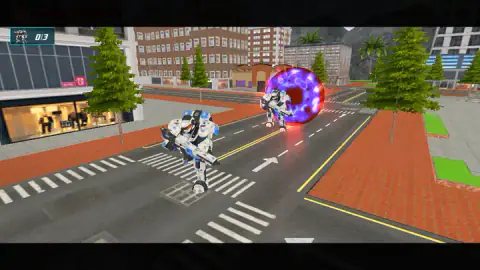
Taken by opening the game ourselves and letting it run — not supplied by the publisher, and not the same picture every other site shows.
How to play Flying Robot Transform Car Games
- Press Start, then choose a mode. Fighting Mode is the one with missions; Free Mode is the open city.
- Pick the first level and wait for the loading bar.
- Watch the opening scene, read the mission card and press OK.
- Move with W, A, S and D. Use the mouse on the round buttons to shoot, punch, kick or fire a skill.
- Destroy three enemy robots before your health bar empties. If it empties, press Retry.
Tips from our session
- The mission card types its text one letter at a time. Pressing where the OK button should be before it has appeared does nothing. Wait for the green button.
- Keep your finger away from N. It is the Skip Level key and it calls an ad, right in the middle of a fight.
- Read the red arrows before you walk. Each one carries a distance in metres, so you can pick the nearest enemy instead of the first one you see.
- Do not stand still at the start. The enemies carry guns, and in our second attempt the health bar was under half before we had reached any of them.
- The keyboard only moves you. Every attack is a button on the screen, so keep the mouse over the right-hand side.
Controls
| W A S D | Move the robot, according to the game's own instructions |
|---|---|
| Mouse on the round buttons | Shoot, punch, kick, use the five skills and change form |
| N | Skip Level, tied to an ad: in our session an ad notice came up and the level was not skipped |
| Tab | Opens the settings |
| Esc | Pauses the game |
Features
- Two modes on the menu, Fighting Mode with missions and Free Mode for roaming the city
- A first mission with a clear target: three enemy robots, counted from 0/3 in the top left corner
- A short opening scene in which a purple portal opens on the road and the enemies walk out of it
- A round radar and red arrows that give the distance to each enemy in metres
- Three form buttons on screen, a flying robot, a four-legged animal and a car
- Separate buttons for shooting, punching and kicking, plus a row of five skills
- Made by CodesXpirit
Game details
- Developer
- CodesXpirit
- Release date
- June 2026
- Last updated
- August 31, 2026
- Added here
- May 2026
- Technology
- HTML5 (WebGL, 3D)
- Platforms
- Browser (desktop, keyboard and mouse), Browser (mobile & tablet, touch)
- Download size
- 47.2 MB
- Ad requests
- 2 (few)
- Has a save
- Yes
- Saved progress
- Saving, when available, is managed by this game. Mava cannot confirm your level.
Measured by opening the game ourselves on 2026-09-11, not taken from the feed. Twelve seconds on a phone-sized screen, with ad requests counted and blocked rather than loaded.
FAQ
How do you play Flying Robot Transform Car Games?
Press Start, choose Fighting Mode or Free Mode, and in Fighting Mode pick a level. The first mission asks you to destroy three enemy robots in a city. You move with W, A, S and D and use the mouse on the round on-screen buttons to shoot, punch, kick and change form.
What is the goal of the first level in Flying Robot Transform Car Games?
To destroy three enemy robots that arrive through a portal. A counter in the top left corner starts at 0/3, and a radar and red arrows show how far away each enemy is. If your health bar runs out first, the level ends on a Level Failed card with Home and Retry buttons.
What is the difference between Fighting Mode and Free Mode?
Fighting Mode is the mission mode, with levels and a target for each one. The game's description says Free Mode lets you explore the city at your own pace, changing form and flying around without a mission. We only played Fighting Mode, so we cannot describe Free Mode first hand.
What does the N key do in Flying Robot Transform Car Games?
N is the Skip Level shortcut, and the button carries a small ad tag. When we pressed it, a notice said no ad was available and the level carried on without being skipped. It sits close to the movement keys, so it is easy to hit by accident.
What can the robot transform into?
The screen shows three form buttons, a flying robot, a four-legged animal and a car. The game's description lists a wolf robot, car, bike, helicopter, jet and tank. We did not confirm any of the changes ourselves in our short session.
Who made Flying Robot Transform Car Games?
It was made by CodesXpirit and has been available since July 2026 with its last update in August 2026.
Can you play Flying Robot Transform Car Games on a phone?
It is listed for PC, Android and iOS, and the game's instructions mention an on-screen joystick for mobile. It plays in landscape. We played it on a computer with keyboard and mouse and did not try the touch controls.