


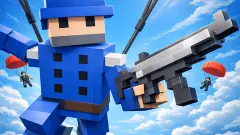


About RoboStrike 3D
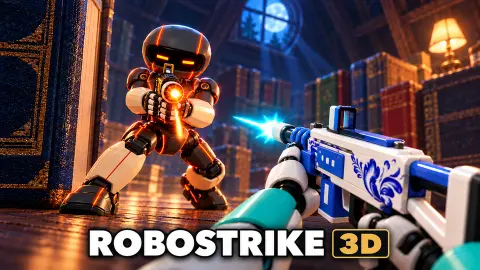
Most browser shooters put you in a soldier's boots and a warehouse. RoboStrike 3D puts you in a robot about the height of a coffee mug, and the warehouse is a kitchen. The maps on the menu are an attic, a kitchen, a greenhouse and a scrapyard, and in the greenhouse the cover is a flowerpot, a crate of oranges and a watering can the size of a house.
The other thing that sets it apart is that two of its three modes are not about kills. In Batteries, five robots per side carry batteries to a cannon at their base, and the cannon is what brings the enemy tower down. In Mega Robot, the game says, you charge a giant robot and use it to destroy the enemy core. Only Deathmatch scores eliminations.
We should be honest about how much of it we saw. Our ten-minute session got us into two matches and through almost none of either. The game opened straight into a match at the wheel of a large mech, we pressed Esc, and we spent most of the session on the pause screen. Later we went back to the menu, skipped the tutorial, picked a class and a gun, and reached the first seconds of a Batteries match in the greenhouse. So this page is strong on the menus, loadouts and modes, and says so when a rule comes only from the game's own text.
It is made by SG Studio. It was published in October 2026. It plays in English and Russian, and it is listed for computers only.
Squall or Nailer: what the numbers on the cards mean
Every match starts on the same screen, and the two guns come with their figures printed on them. The Squall is an automatic rifle. The Nailer is a minigun with a SPIN-UP label, which means it takes a moment to reach full speed.
| Squall | Nailer | |
|---|---|---|
| Damage per shot | 26 | 16 |
| Shots per minute | 429 | up to 706 |
| Range | 65 m | 38 m |
Multiply damage by fire rate and something useful falls out: on paper the two guns hit almost equally hard per second. The Squall does about 186 a second, the Nailer about 188 once it is spinning. So the choice is not about raw power. It is about distance and patience. The Squall reaches nearly twice as far and works from the first trigger pull. The Nailer only matches it close up and after its warm-up.
Against a robot with 100 health, that also tells you how many hits a fight takes. Four Squall shots are enough, about half a second of fire. The Nailer needs seven. In rooms where cover is a flowerpot and a crate, most fights happen at short range, which is where the minigun is meant to live.
Slot 3 is not a gun. On the default loadout it is the Dash, with three charges that each come back after eight seconds, and the class tool tip says to use it from slot 3 in battle.
The three classes and the three modes
Each class gives one bonus and nothing else that we could see. Raider runs 15 percent faster, Bastion has 30 extra armour, and Sharpshooter reloads 20 percent faster. That is a small difference on paper, but it lines up with the modes. Batteries is a carrying game, so speed decides who reaches a dropped battery first. A Bastion has more reason to stand by the cannon. A Sharpshooter with a Nailer spends less time reloading a gun that empties quickly.
The modes, as the game describes them:
- Batteries (5 × 5). Collect batteries, deliver them to your base, charge the cannon and fire it at the enemy tower. Both towers start at 2,000, and three empty battery icons sit under the minimap.
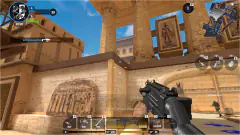
- Mega Robot. Charge your team's giant robot and use it to destroy the enemy core. Our very first match looked like this: a core bar for each side, an Our mech panel, and three mech abilities on screen, Stomp on Space, Charge on Shift and Rockets on the right button, with a laser on the left one. The order on screen was Destroy the enemy core, follow the core marker, get close and fire.
- Deathmatch. The most eliminations wins.
There is also a Daily Mode switch labelled Turbo, a Rooms button and a Practice tab. We did not open any of them.
Ranks, seasons and the garage
RoboStrike 3D tracks you in two ways. XP raises your level and rank, and a new player starts at Blank I with 0 of 500. The game says XP is earned in online matches, and that level rewards are claimed in the Ranks tab of the garage. Rating is separate, with a Placement box that starts at 0 of 5. Next to it, a Season box counts tiers from 0 to 20.
Parts, shown with a gear icon, are the currency. The garage is where, the game says, you customise your robot and equipment; we did not open it. A yellow panel in the corner offered 15 minutes of Premium, worth 50 percent more XP and parts, in exchange for watching an ad, up to three times.
You play as a guest with a generated name, so there is no sign-up wall before the first match.
Who it suits, and what is not obvious
It suits players who like team shooters with a job to do rather than pure kill counts, and anyone who wants a first-person shooter that runs in a browser tab without a download. The setting is friendly and the robots are cartoonish, so there is no gore.
What is not obvious at first: the game takes your mouse only after a click inside it, Esc gives it back, and the first match the game dropped us into was not the mode the menu had selected. It is a computer game first. The game's listing gives no phone version, and every control we saw assumes a mouse and keyboard.
More team shooters to try
If you want another first-person team shooter in the browser, Hazmob FPS: Online Shooter and Special Ops: GO are both built around short timed matches with guns and throwables. SWAT Cats keeps the team score but moves the camera behind your character, and Color Brawls is a smaller arena with a toy gun. The rest are in our shooting games.
Screenshots
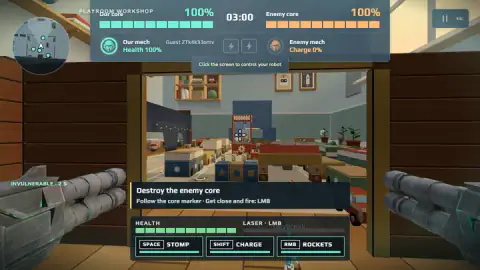
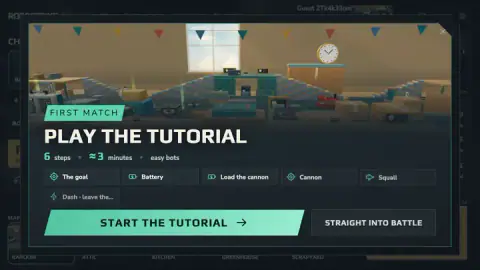
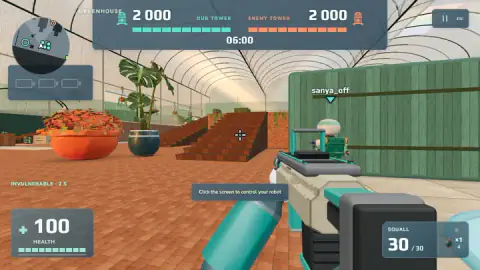
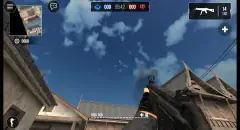
Taken by opening the game ourselves and letting it run — not supplied by the publisher, and not the same picture every other site shows.
How to play RoboStrike 3D
- Pick a mode and a map. The BATTLE tab lists Batteries, Mega Robot and Deathmatch, and a row of maps along the bottom: Random, Attic, Kitchen, Greenhouse and Scrapyard. Press PLAY.
- Decide on the tutorial. Your first match offers a six-step tutorial of about three minutes against easy bots, covering the goal, batteries, loading the cannon, the cannon itself, the Squall rifle and the Dash. You can take it or go STRAIGHT INTO BATTLE.
- Choose a class and a gun before the countdown ends. A timer in the corner counts down to the start, and if it runs out you go in with whatever is ticked, which by default is Raider and the Squall.
- Click inside the game to take control. A small note at the top reads Click the screen to control your robot. Until you do, the mouse does not turn your view.
- Play the objective. In Batteries, charge your cannon and bring the enemy tower from 2,000 to zero before the six-minute clock runs out. You spawn with full health and a short spell of invulnerability, marked on screen.
Tips from our run:
- Read the pause screen. Esc opens a PAUSED panel that shows the reward still waiting: +500 XP and +50 parts at the end of a three-minute match. It also has a Controls list folded away at the bottom, the quickest place to check the keys.
- Back to the match did not always bring us back. The pause panel kept us there for several minutes even though the big yellow button looked like the way out. If that happens, a click inside the game view is what the game itself asks for.
- Check the bots switch. The Against Bots toggle was on by default, with difficulty on Easy. Switch it off if you would rather look for human players.
- The tasks pay the first parts. Your first match is worth 100 parts and a first win 35. A counter showed 130 parts left to earn that day, so there is a daily ceiling.
- One tip worth remembering from the loading screen: a robot carrying a battery drops it when knocked out, so the fight often moves to wherever a carrier went down.
Controls
| Click inside the game | Takes control of your robot; the game asks for it with the note Click the screen to control your robot |
|---|---|
| Mouse / left mouse button | Look around and shoot |
| Right mouse button | Aim, according to the game's control list; at the wheel of the giant mech it fires Rockets |
| W A S D | Move, according to the game's control list |
| Space / Shift / C while sprinting | Jump, sprint and slide, as the game lists them; in the mech, Space is Stomp and Shift is Charge |
| 1, 2, 3 and 4 | Switch weapons; slot 3 holds your class tool (Dash on the default loadout) and 4 readies a grenade |
| R / E / Tab | Reload, interact and show the scoreboard, according to the game's control list |
| Esc | Opens the PAUSED menu, which shows the reward waiting at the end of the match |
Features
- Three modes on the main menu: Batteries and Mega Robot, where a team pushes an objective, and Deathmatch, where kills are the score
- Batteries is five against five: carry batteries to your base cannon and use it to bring down an enemy tower that starts at 2,000
- Five map choices on the menu, Random, Attic, Kitchen, Greenhouse and Scrapyard, all ordinary rooms seen from a small robot's height
- Three classes, each with one bonus: Raider runs 15 percent faster, Bastion carries 30 extra armour, Sharpshooter reloads 20 percent faster
- Two starting guns with their numbers on the card: the Squall rifle hits harder and reaches further, the Nailer minigun fires faster once it spins up
- A bots toggle and a difficulty menu set to Easy, so you can play against computer robots instead of waiting for people
- A six-step tutorial of about three minutes, offered before your first match and skippable
Game details
- Developer
- SG Studio
- Release date
- October 2026
- Last updated
- October 1, 2026
- Added here
- October 2026
- Technology
- HTML5 (WebGL, 3D)
- Platforms
- Browser (desktop, keyboard and mouse)
- Saved progress
- Saving, when available, is managed by this game. Mava cannot confirm your level.
FAQ
How do you play RoboStrike 3D?
Pick a mode on the main menu (Batteries, Mega Robot or Deathmatch), a map, and press PLAY. Before each match you choose a class and a gun, then click inside the game to take control. You move with WASD, look and shoot with the mouse, and press Esc for the pause menu.
What is Batteries mode in RoboStrike 3D?
Batteries is a five-against-five team mode. Each team has a base cannon and a tower, and the towers start at 2,000. You charge your cannon with batteries and use it to bring the enemy tower down, and a robot carrying a battery drops it when it is knocked out, so anyone can grab it.
Which class should I pick in RoboStrike 3D?
There are three: Raider (+15 percent run speed), Bastion (+30 armour) and Sharpshooter (+20 percent reload speed). Raider is the default. In Batteries, where the job is carrying things across the map, the speed bonus is the one that matches the mode; Bastion suits players who stay near the cannon and fight.
Squall or Nailer: which gun is better in RoboStrike 3D?
The Squall rifle hits harder per shot (26 against 16) and reaches further (65 m against 38 m). The Nailer minigun fires faster once it has spun up. Multiply damage by fire rate and the two guns hit almost equally hard per second, so the real choice is range and instant fire against close-up spray.
Can you play RoboStrike 3D against bots or offline?
There is an Against Bots switch, on by default, and a Bots difficulty menu that starts on Easy, plus a Practice tab. The game says XP for your rank is earned in online matches, so bot games may not count towards climbing; they are a good way to learn the maps.
Can you play RoboStrike 3D on a phone?
It is listed for PC only, and everything we saw expects a mouse and keyboard: the mouse aims, WASD moves, and the mech abilities sit on Space, Shift and the right mouse button. We played it on a computer.
Who made RoboStrike 3D?
RoboStrike 3D is by SG Studio. It came out in October 2026. It plays in English and Russian.
What do XP and parts do in RoboStrike 3D?
XP raises your level and rank; a new player starts at Blank I with 0 of 500 XP. Parts, shown with a gear icon, are the game's currency; you earn them from tasks such as First match and from match rewards. The pause menu shows the match reward in advance, +500 XP and +50 parts for a three-minute match.