

About Red & Blue: Online. Build! Destroy! Fight!
Most browser shooters open by showing you a keyboard. Red & Blue opens by shouting at you. The screen goes black, a walkie-talkie slides in from the left, and a voice says "WAKE UP, SOLDIER!" — and the only thing on the screen you can press is a button marked "UNDERSTOOD, ROGER THAT". There is no second option. You are not being asked anything.
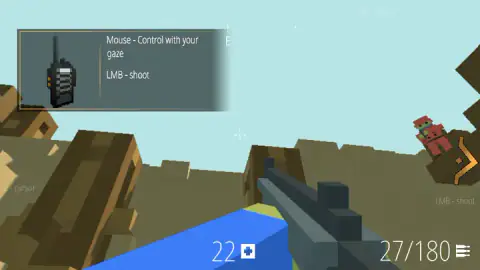
What is behind the radio is a world made of cubes: a brown ridge of blocks under a pale blue sky, a rifle filling the bottom of the frame, and a small figure in red standing on a ledge with a thick orange arrow pointing straight at him. A card pinned to the top-left corner explains the controls in two lines, Mouse - Control with your gaze and LMB - shoot, and that really is the whole of it to begin with. Look, and fire.
The part that takes a minute to notice is that the ground is listening too. Blocks come loose where your shots land, the ridge in front of you stops being a ridge, and nothing puts the dirt back.
The game is credited to DeadHead. It was published in April 2026 and last updated that August.
Here is what this page is built on. We played for about four minutes on a desktop, with a mouse and a keyboard. We got through the opening briefings and into the training ground, fired a handful of shots and watched the landscape change shape. We never reached the end of the training, never opened the menu, never placed a single block, and never saw another player's name on the screen. Everything below either happened in front of us or is marked as something the game itself says.
"Understood, roger that": a button that cannot say no
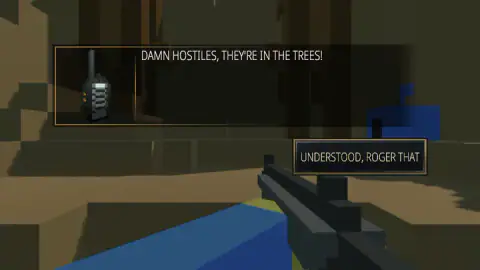
Three things came over the radio while we played, and all three were answered by the same button. First the wake-up call. Then "DAMN HOSTILES, THEY'RE IN THE TREES!". Then an instruction, "SHOOT THE TREE TRUNKS!". Under each one, in the bottom-right corner, the same rectangle: UNDERSTOOD, ROGER THAT.
That phrase is older than it sounds, and it does not mean what most people think. Before 1956, soldiers and pilots spelling words over a crackling radio used an alphabet in which the letter R was Roger. R stood for received, so saying "roger" meant one specific thing: your words arrived. Not that you agreed with them. Not even that you had understood them. In 1956 the alphabet changed and R became Romeo, but the habit stuck, and it is still what a pilot says to a control tower today.
If you actually meant you were going to do the thing, there was a different word for that: wilco, short for will comply. The two were kept apart on purpose, because on a bad line the difference between "I heard you" and "I am doing it" can matter a great deal. Strictly speaking, "roger wilco" is a waste of breath, since wilco already contains the receipt.
Now look at the button again. It says understood and roger that — comprehension and receipt bolted together — and there is nothing beside it. No "negative", no "say again", no second choice. Which is an honest piece of design, because a tutorial is not a conversation. The briefing is not waiting for your decision; it is waiting for your click. Knowing that saves you hunting for an option that was never there, and it says something about the game: in a world where every surface can be shot to pieces, the one thing you cannot change is what the radio says to you.
Thirteen shots, and the hill is a different shape
Our ammunition started at 29 and finished at 16, which is thirteen shots. The number beside it never budged from 180 the entire time: a magazine in the gun, and the rounds still in your pockets, and no reload in four minutes.
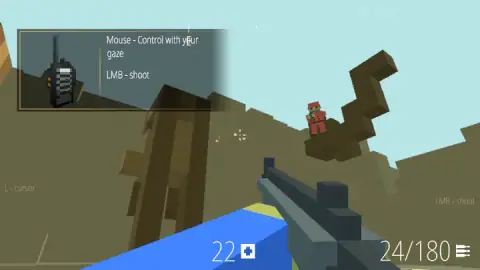
Thirteen shots is nothing, and yet in the pictures we came away with, the landscape is visibly not the same landscape. Early on, the ridge running across the middle of the view is one long unbroken brown slope. By the end it is a staircase of loose blocks with daylight showing between them, and the little plateau the figure in red was standing on is hanging clear of the hillside behind it, a bite taken out from underneath.
That is the thing worth carrying into your first game. A shot that misses is not wasted in the way it is in most browser shooters — it has gone somewhere and taken something with it. The floor under an enemy is a target. So is the wall he is hiding behind. The large reserve of rounds suddenly looks less like generosity and more like a budget for digging.
The word "online" is in the title, and we cannot vouch for it
The game calls itself Online, is listed as a multiplayer one, and we are not going to tell you it is, because we did not see it. Our four minutes were a training ground. A voice talked at us, an arrow pointed, a figure in red stood where the training needed him to stand. We never reached a list of rooms, never saw a scoreboard, never saw a name floating over anybody. Whether another person was connected at the same time we genuinely do not know, and the figures we shot at may have been the game's own.
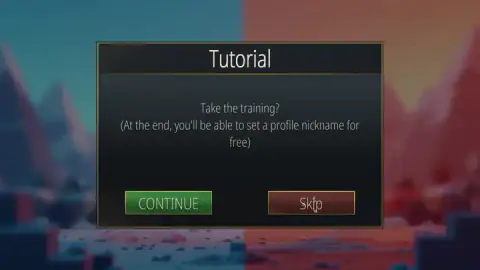
What we can say is that the game clearly expects you to have an identity. That first card dangles a free profile nickname at the end of the training, which is the sort of reward a game only bothers with when your name is going to show up somewhere other people can read it. And the menu sitting behind that card is split down the middle, blurred blue on the left and blurred red on the right — the exact shape of a lobby with two teams in it.
The team half of this game is the half we have not tested, and this page will stay honest about that until we have.
More shooters we have played through
Masked Forces is the one to try if the lobby is what you came for: we got into named rooms with other people in them, chat and all. Winter Clash 3D is a team shooter that puts both sides in Santa suits and runs its rounds on a four-minute clock. Warfare Area goes the other way entirely — no teams, one rifle, and a base full of hand-placed enemies to clear out before the clock beats you. And Ninja Clash Heroes swaps the blocks for a Japanese garden and six fighters a side. The rest are in shooting games.
Screenshots
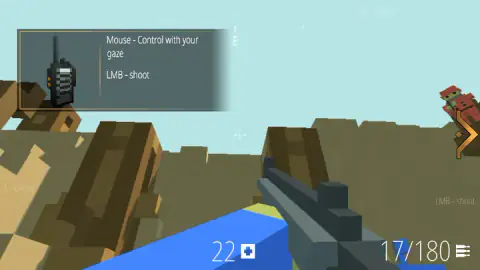
How to play Red & Blue: Online. Build! Destroy! Fight!
- Answer the first card. It asks Take the training? and offers CONTINUE in green and Skip in brown. A line underneath promises that at the end of the training you can set a profile nickname for free. We took the training.
- Answer the radio. Each briefing arrives with a walkie-talkie beside it and one button to press. Pressing it is the only way forward.
- Aim by moving the mouse, fire with the left button. The crosshair sits in the middle of the screen and never leaves it; you turn your whole view to put it on something.
- Follow the orange arrow. When the training wants you looking somewhere, a thick orange arrow appears at the edge of the picture and points at it. On our run it was always pointing at a figure in red.
- Keep half an eye on the two numbers along the bottom. On the left, a count beside a small white medical cross. On the right, your ammunition.
What the run taught us:
- The rest of the controls are printed round the edges of the screen, in grey so faint it reads as part of the sky. Tab - menu sits along the top, L - cursor down the left side, LMB - shoot on the right. Nobody tells you they are there; they are just there, the whole time.
- The help card does not close. We clicked its corners, its text and the picture of the radio, clicked the empty sky beside it, and pressed Enter. It stayed put for the rest of our session. The good news is that it sits over sky rather than over anything you need, so the sane move is to stop fighting it.
- Nothing hit us. The number beside the medical cross read 22 at our first look and 22 at our last. Whatever the training is for, it is not for teaching you to take cover.
- Your shots are also a shovel. Several of ours went into the slope rather than into anyone, and the slope kept the damage.
- Pressing other keys got us nowhere we could hear. We tried the arrow keys, the letters a shooter usually uses and the space bar, and nothing audible happened. That is not the same as those keys doing nothing, and we are not going to pretend it is.
Controls
| Mouse | Looks and aims. The game's own help card calls it "Control with your gaze" |
|---|---|
| Left mouse button | Shoots |
| UNDERSTOOD, ROGER THAT | The only reply to the radio. Every briefing is answered with this one button |
| Tab | Menu, according to the label printed along the top of the screen. We did not open it |
| L | Cursor, according to the label printed down the left edge. We did not use it |
| Arrow keys, WASD, Space | Nothing we could hear during the training. We pressed all of them, repeatedly |
Features
- A first-person shooter in a world made of cubes: brown block ridges, a pale sky and figures in red to shoot at
- The training is delivered by a walkie-talkie, and every message is answered by one button marked UNDERSTOOD, ROGER THAT
- An orange arrow at the edge of the screen points at whatever the training wants you looking at
- Shots land on the landscape as well as on people: the ridge in front of us came apart while the ammunition count fell
- Thirteen shots took the magazine from 29 down to 16 while the reserve stayed at 180 — no reload in four minutes
- Health sat at 22 from our first reading to our last: nothing in the training ever hit us back
- Made by DeadHead
Game details
- Developer
- DeadHead
- Release date
- April 2026
- Last updated
- August 10, 2026
- Added here
- February 2026
- Technology
- HTML5 (WebGL)
- Platforms
- Browser (desktop, mouse and keyboard), Browser (mobile & tablet, touch)
- Classification
- Action , Fighting , Multiplayer , Shooting , 2 Player
- Saved progress
- Saving, when available, is managed by this game. Mava cannot confirm your level.
FAQ
How do you play Red & Blue: Online. Build! Destroy! Fight!?
You move the mouse to look and press the left button to shoot. That is what the game's own help card teaches, in those two lines and no others. The training walks you through it: a voice on a radio tells you what is happening, an orange arrow points at the thing you are meant to be looking at, and you fire at it. The ground in front of you comes apart as you shoot, which is as much a part of the game as the figures are.
What are the controls in Red & Blue: Online?
Four of them are written on the screen. The help card pinned to the top left says mouse to look and left button to shoot. Round the edges of the picture, in faint grey, the game prints Tab for the menu and L for the cursor. We did not open either of those two, so the sheet stops where our hands did.
Do you need an account to play Red & Blue: Online?
We never signed in to anything and we still reached the training ground. The training does dangle something account-shaped, though: the card that offers it says that at the end you will be able to set a profile nickname for free. We did not reach the end, so what the nickname is for is a gap in this page rather than an answer.
Can you really play Red & Blue: Online with other people?
Online is in the title and the game is listed as a multiplayer one, but we cannot confirm it from our own play. Our four minutes were a training ground with a radio talking at us. We never reached a list of rooms, never saw a scoreboard, and never saw a name over anyone's head, so we do not know whether a single other person was connected while we played. We would rather say that than repeat a claim we have not tested.
Can you destroy the ground in Red & Blue: Online?
Yes, and it does not grow back. Comparing two moments of our own run, the far ridge starts as one long brown slope and ends as a staircase of loose blocks with sky showing between them. At one point the lump of ground the red figure was standing on was left hanging clear of the slope behind it. The landscape keeps whatever shape your shooting leaves it in.
Is Red & Blue: Online like Minecraft?
It borrows the look: everything is a cube, the palette is brown earth under a pale blue sky, and the figures are blocky people in team colours. The feel is not the same. You are looking down the barrel of a rifle, the camera is locked to your eyes, and nothing in our four minutes handed us a block to place. What the two share is a world you can take apart.
How much ammunition do you get in Red & Blue: Online?
We watched the counter fall from 29 to 16 over thirteen shots while the number beside it stayed at 180. That is a magazine in the gun and a reserve in reserve, and we never had to reload in four minutes of training. Since shots go into the scenery as well as into people, the generous reserve has a job to do.
Who made Red & Blue: Online. Build! Destroy! Fight!?
The game is credited to DeadHead. It went up in April 2026, was last updated in August 2026. We found no studio site to check that against, so treat the name as a single source. A separate Windows title called Blocked Out: Red V Blue, by another studio, is not this game.