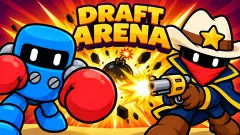


About Clankmates
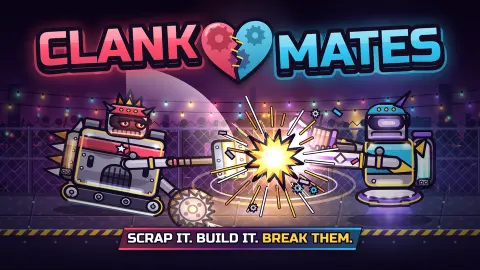
Clankmates gives you no buttons during the fight. Your robot drives in, swings, gets flipped or knocked into a wall, and the round ends without one input from you. Every decision happens in the minute before, in the parts shop. That makes it a strange kind of fighting game: what you win or lose is decided by what you bought.
In our first match we dealt more damage than the CPU, 1317 to 1097, landed more crits and had the biggest hit, and still lost five rounds to two. Damage spread across seven rounds is worth nothing; only rounds count. The rest of this page is about winning rounds, which in Clankmates means shopping well.
The limits of what we saw: one session of about ten minutes on a computer, two matches against the CPU in the LOCAL menu, using the mouse. We did not play ranked, online rooms, two players on one device, or with touch. In both matches we bought very little, and we lost both, which is the clearest lesson we can pass on.
The game is credited to Codai and has been available from November 2026.
The icon next to the score tells you the next arena
Every round is in a different arena, and each one has a rule written under its name when the fight starts. The six we saw:
| Arena | What the game says | Shop icon |
|---|---|---|
| Sawmill | A floor saw pops up in the middle | Saw blade |
| Crane Yard | The crane magnet lifts the heavier bot | Magnet |
| Press Hall | Hydraulic crushers slam down when the lights flash | Press |
| Frozen Lake | Ice everywhere: slow starts, long slides. Treads grip best | Snowflake |
| Recycling Plant | The belt carries bots away. Treads grip best | Conveyor belt |
| Midnight Junkyard | Plain old scrap. No tricks | Faded junkyard |
The arena name only appears once the fight begins, after you have shopped. But the small icon next to the score in the shop matched the next arena in every round we played, across both matches. A snowflake in round 6 meant Frozen Lake; a magnet in round 4 meant Crane Yard.
That turns the arena from luck into information. Two of the six favour treads over wheels, and both our robots rolled on wheels. On the Recycling Plant we watched the belt change direction mid-round, dragging both robots one way and then the other. If the icon shows a snowflake or a belt and treads are in the shop, that is the moment to think about them.
Part cards read the rival's build
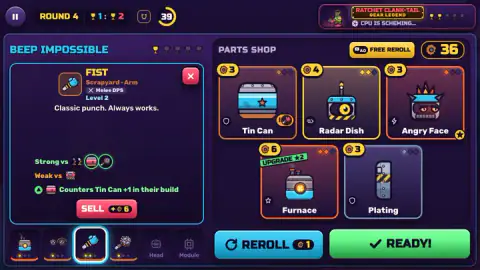
Open a card and it does more than describe the part. Under the stats it lists what the part is strong and weak against, and then it checks the rival's robot. In round 4 of our first match, the Fist card read Counters Tin Can +1 in their build. The Tin Can card, in the same shop, warned Weak vs Fist +1 in their build. The rival's robot had a fist.
So the same part is a good buy against one opponent and a poor one against another, and the game tells you which. The shop cards also carry a small badge in one corner: in round 4 the Tin Can's showed a fist in orange, and a round later the Fist's showed green. We would not trust the badge alone without opening the card.
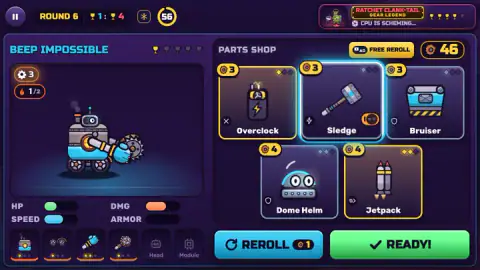
Each part also has a role tag, such as Tank, Melee DPS or Burst, and a brand: Scrapyard, Inferno, Ironclad and Turbo all appeared. Your robot's own panel shows HP, DMG, SPEED and ARMOR as bars.
Slots, upgrades and set bonuses
The robot has six slots along the bottom of the shop: body, wheels, two arms, head and module. A new part for a full slot replaces the old one, and the card tells you what you get back. The Tin Can, a body, read Replaces Furnace, +3 scrap back.
Buying a part you already own upgrades it instead. Those cards wear a green UPGRADE label and cost more: a third level of Fist cost 7 and added 12 damage, about twice what most fresh parts cost.
Selling is on the card too. Our level 2 Fist would have sold for 6, so an upgraded part you no longer want is not a total loss.
The shop hint reads: Same brand = SET BONUS. Tap the badge. Our first robot showed a small flame with 1/2 next to it: one Inferno part out of the two the set needs.
The Angry Face head, also Inferno, promised the bonus on its card: burns last 40% longer and hurt 20% more. It cost 3 and we did not buy it. With hindsight, finishing a set was the cheapest upgrade on the screen.
Losing pays more, but hoarding does not win
After each round a small label shows the scrap each side earns. In all four rounds where we could read both, the loser got 3 more than the winner, labelled comeback bonus, for example 14 against 11. A losing streak hands you a bigger budget.
What you do with it is the point. In our second match we played Gizmo Duck with its starting parts, a body, wheels and a fist, and bought nothing. The scrap piled up to 44 by the fourth shop, and the robot lost the first three rounds. On Frozen Lake it fell to Lord Voltemort's spiked cart after taking off less than a quarter of the rival's health. Nothing we saved fought for us.
What happens in a fight
You only watch, but the callouts tell you what is working. CLASH means both robots hit at once. FLIPPED and WALL BOUNCE are knockbacks, JUGGLE x3 is a robot kept in the air, STUN freezes the target. Special moves arrive with a banner and the word OVERDRIVE: SAW TOSS from the buzzsaw arm, HAYMAKER from the fist, PILEDRIVER from the rival's drill. A hit at the right moment shows INTERRUPTED and cancels them.
Fights start with a 36 on the clock, and ours all ended with a K.O. long before it ran out, usually around 15 to 20 seconds in. We never saw what happens at zero.
Who it is for, and more to play
It suits two people on one sofa who like the shopping half of a strategy game, and anyone who enjoys building something and watching it go. If you want to steer a robot yourself, it is the wrong game.
For two players and robots you do control, try Ultimate Robo Duel 3D. Bobr turbo: craft cars is also about building a machine from parts and watching it fight. Jurassic Merge: Dino Evolution keeps the auto-battle with dinosaurs, and 12 MiniBattles is another quick duel for two on one keyboard.
More in our strategy games.
Screenshots
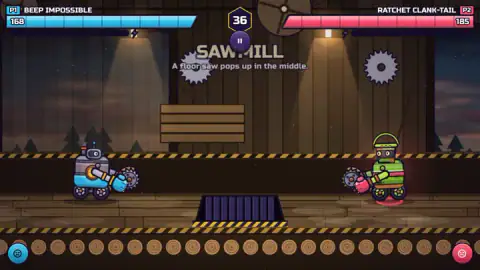
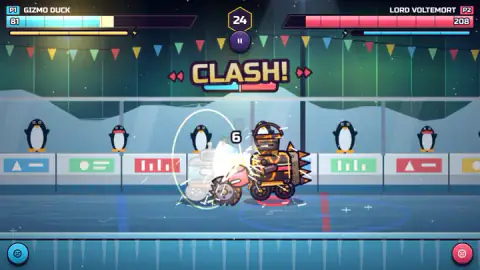
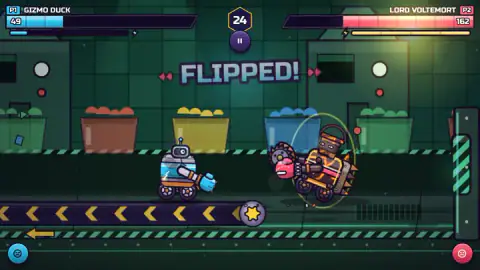
Taken by opening the game ourselves and letting it run — not supplied by the publisher, and not the same picture every other site shows.
How to play Clankmates
- From the main menu, choose LOCAL. You get VS CPU or 1V1, two players on one device. RANKED and ONLINE are the internet modes.
- In the PARTS SHOP, tap a card to open it, then BUY or UPGRADE it with your scrap. REROLL replaces the offer for 1 scrap.
- Press READY. The button changes to WAIT, NOT YET until the other side is ready too.
- Watch the fight. A round ends with a K.O., the loser's robot falling apart, and a card with each part's contribution.
- Back to the shop. The first side to win five rounds, shown as trophies next to each name, wins the match.
Tips from our matches:
- Check the arena icon first. It sits next to the round score, and it tells you where the next fight is.
- Open every card before buying. The card compares the part with the rival's robot, which the shop cards alone do not spell out.
- Spend your scrap. It carries over, but it does nothing while it sits there.
- The shop timer starts at 60 and counts down. The CPU uses the same time; its badge reads CPU IS SCHEMING.
Controls
| Mouse click (or tap) | Open a part card in the shop, buy or upgrade it, reroll, press READY |
|---|---|
| W, A, S, D / Space / R / E | Player 1 in local 2-player, per the game's provider - move around the shop, buy, reroll, ready (not tested) |
| Arrow keys / Enter / P / O | Player 2 in local 2-player, per the game's provider - move, buy, reroll, ready (not tested) |
| Pause button, top left (Esc, according to the game's listing) | Pause; the menu offers RESUME, SETTINGS and QUIT TO MENU |
Features
- A one-minute parts shop before every round, then a fight you only watch: first to five round wins takes the match
- A small icon next to the score in the shop shows the next arena before you buy
- Six arenas we saw with their own rule, from a floor saw and a crane magnet to ice and a conveyor belt
- Part cards that check the rival's build: Counters Tin Can +1 in their build, Weak vs Fist +1 in their build
- Six slots on the robot; a new part replaces the old one in its slot and hands back some scrap
- Buying a part you own upgrades it, and parts of the same brand add up to a set bonus
- The loser of a round gets 3 more scrap than the winner, labelled comeback bonus
Game details
- Developer
- Codai
- Release date
- November 2026
- Added here
- November 2026
- Technology
- HTML5 (2D)
- Platforms
- Browser (desktop), Browser (mobile & tablet, touch)
- Saved progress
- Saving, when available, is managed by this game. Mava cannot confirm your level.
FAQ
How do you play Clankmates?
Each round has two halves. First you get about a minute in the PARTS SHOP to spend scrap on robot parts, reroll the offer or upgrade what you own, then you press READY. Then your robot fights the rival's on its own, with no controls, until one is knocked out. The first side to win five rounds wins the match.
Can you control your robot during the fight in Clankmates?
No. Once both sides are ready, the fight plays itself out: CLASH, CRIT, FLIPPED and the named special moves happen without input. Everything you decide is in the shop, which parts to buy, which to upgrade and which to replace. The arena is the one thing you cannot choose, but the shop shows you which one is next.
How do you know which arena is next in Clankmates?
Look at the small icon next to the round score at the top of the shop. In our matches it always matched the next fight: a saw blade for Sawmill, a magnet for Crane Yard, a snowflake for Frozen Lake and a belt for Recycling Plant. Frozen Lake and Recycling Plant both say treads grip best, so the icon tells you when wheels are a risk.
What does 'Counters +1 in their build' mean in Clankmates?
When you open a part card, it compares that part with the rival's current robot. The Fist card read Counters Tin Can +1 in their build, and the Tin Can card warned Weak vs Fist +1 in their build. Open the card before you buy: it tells you whether the part beats or loses to what the other robot already carries.
Is it worth saving scrap in Clankmates?
Not in our experience. In one match we bought nothing with the starting robot and lost the first three rounds while holding 44 unspent scrap. Scrap does carry over between rounds, but it does not fight. Spend it on parts and upgrades, then use what is left for rerolls.
Can two players play Clankmates on one computer?
Yes. The LOCAL menu has a 1v1 mode for two players on one device, next to VS CPU. The game's provider gives Player 1 W, A, S, D, Space to buy, R to reroll and E for ready, and Player 2 the arrow keys, Enter, P and O. We played only against the CPU, with the mouse.
Who made Clankmates?
The game is credited to the developer Codai and has been available from November 2026, so it is brand new. We found no other page or guide about it.