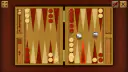









About Backgammon
Backgammon is the classic dice game for two players, and this version by Code This Lab has one big helper. When you click one of your checkers, the point it can reach lights up, so you never count spaces in your head. You click the checker, then you click the lit point.
You play the light checkers. Your opponent is the computer, called AI on the screen, and it plays the red ones. Each side has 15 checkers, and the board has 24 long triangles called points.
We played two sessions of about six minutes each, on a computer with a mouse. We did not finish a game in either one. This page teaches the start and the middle of a game, because that is the part we saw. When we did not see something, we say so.
Your dice are white; the red dice on the left are the AI's
The board can show red dice even when it is your turn. Those red dice belong to the AI. They land on the left half of the board and stay there after its turn ends, so red dice on the left are the AI's last roll, not yours.
Two signs tell you it is your turn. The PLAYER 1 plate glows, and the dice box appears on the right. When the AI plays, its own plate glows instead.
Look at the lit point before you click it
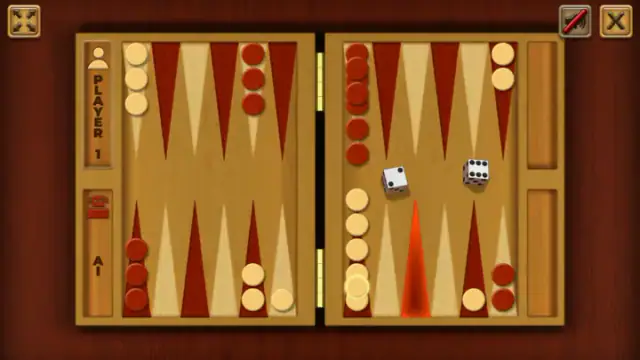
In this picture, we rolled a 2 and a 6. We clicked the checker on point 6. It got a glowing ring, and point 4 lit up in red. That is the 2. In another move, the lit point glowed light instead of red, so look for the glow, not for a color.
The game shows you where a checker can go. It does not tell you if that move is safe. Before you click the lit point, ask yourself one question: will my checker be alone there? A checker alone on a point can be hit. The next sections show what happens then.
A double gives you four moves, so plan all four
When both dice show the same number, a banner appears at the bottom of the board. It says "GOT A DOUBLE, DICES REDOUBLED". The word "DICES" is spelled that way in the game. The banner goes away by itself, so you do not need to click it.
A double means you play the number four times, not two. We rolled two 6s, and this is what we did with them:
- We moved two checkers from point 13 to point 7.
- We moved one checker from 24 to 18.
- For the fourth move, we picked the last checker on 13, and point 7 lit up again.
By then, three of our checkers were together on point 7. This is our advice from that game, not a fixed method: use doubles to bring checkers to the same point. Then you do not leave single checkers lying around.
The banner is about the dice only. It is not the "doubling cube" that some backgammon games use. We never saw a cube.
A lone checker near the red home can end up on the bar
The red home is the top-right quarter of the board, points 19 to 24. The red checkers are heading there. In our first session, we opened with a 2 and a 6 and moved a checker from 24 to 22. That left one light checker alone on point 24, right inside the red home.
The AI landed a red checker on it. Our checker went to the bar, the strip down the middle of the board, and two red checkers then sat on point 24.
A checker on the bar must come back in through the red home. Here is how:
- Click the checker on the bar. It glows.
- Look at the top-right quarter. A point there lights up.
- Click the lit point.
A point with two or more red checkers is closed to you. In one of our games, point 19 had a pile of red checkers, and it did not light up. We rolled a 1 and a 6. Only the 1 could bring our checker in, because the 6 would have landed on the blocked point 19.
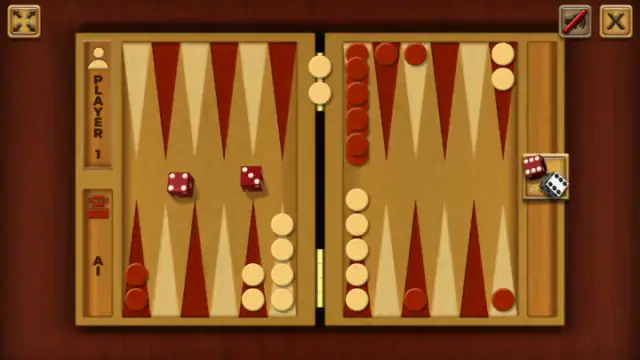
The AI hit us once in the first session and twice in the second. The picture above shows how the second session ended: two of our checkers were on the bar, and the AI was ahead.
Two lessons from this:
- Do not leave a checker alone in the top-right quarter.
- If you get hit, look at the red home before you roll. Count the open points. Any point with two or more red checkers will not light up.
How the board starts: 15 checkers each
You do not set up the board yourself. When a game starts, all 30 checkers sit in the tray on the right, and then they slide to their places. Your 15 light checkers start like this:
| Point | Where on the screen | Light checkers |
|---|---|---|
| 24 | Top right | 2 |
| 13 | Top left | 5 |
| 8 | Bottom left | 3 |
| 6 | Bottom right | 5 |
The red checkers start in a mirror image of yours. Your checkers travel along the top toward the left. Then they come down and move right, toward your home at the bottom right, where they finish.
The game shows no rules, so here are the ones we saw
This version has no rules screen and no tutorial. The "i" button on the menu only shows the studio credits. These are the rules we saw in play:
- You roll two dice and make one move for each die.
- A double gives you four moves.
- If you land on a red checker that is alone, it goes to the bar. The AI can do the same to you.
- A checker on the bar comes back in through the red home.
- A point with two or more rival checkers is blocked.
To win, you need to take all your checkers off the board before the AI does. That comes from the game's description, because we did not get that far. We never saw checkers being taken off, the end screen or any scoring.
What we tested, and what we did not
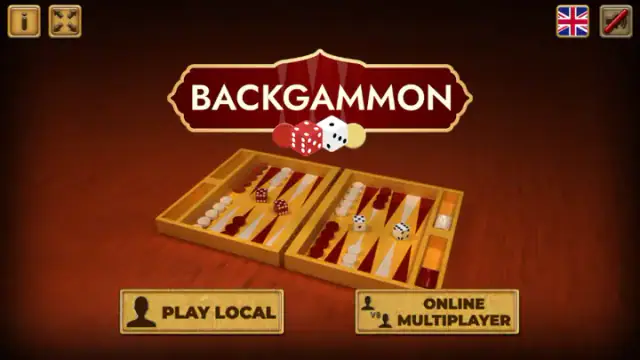
We tested PLAY LOCAL against the AI, with a mouse, on a computer. All the screen text we saw was in English.
We did not test these:
- the ONLINE MULTIPLAYER button;
- the two-person card on SELECT MODE;
- touch screens or dragging checkers;
- the lightning button that appears while the checkers set up;
- the sound, which was off the whole time.
We found no difficulty setting for the AI. Each session started at the main menu, so do not count on a saved game.
More classic games on Mava
If you like quiet games of thinking, try Solitaire or Sudoku. You can find more in our strategy games section.
Screenshots

How to play Backgammon
- On the menu, click PLAY LOCAL. If the screen does not change, wait a moment before you click again.
- On the SELECT MODE screen, click the left card. It shows a person, "VS" and a screen that says AI. This starts a game against the computer.
- Watch the checkers slide from the tray on the right onto the board. When they stop, look at the left side. The PLAYER 1 plate has a glowing edge, which means it is your turn.
- Click the box on the right with one red die and one white die. The box disappears, and your two white dice land on the right half of the board.
- Click one of your light checkers. It gets a glowing ring, and a point lights up. Click that point, and the checker moves there. Then do the same with your other die.
Tips from our games
- In these tips, point 1 is at your bottom-right corner, and point 24 is at the top-right corner.
- Always roll first. Before we rolled, clicking checkers did nothing. We tried three times in a row, and the board did not change.
- Wait until your white dice stop. Then read them.
- Each die is one move. With a 2 and a 6, we moved one checker from point 8 to point 2 and another from 24 to 22.
- The arrow keys did nothing. Use the mouse.
Controls
| Mouse click on the dice box | Rolls your two white dice. The box only appears on your turn, on the right side of the board. |
|---|---|
| Mouse click on a light checker | Selects it. The checker gets a glowing ring, and the point it can reach lights up. |
| Mouse click on the lit point | Moves the selected checker there. |
| Mouse click on a checker on the bar | Selects it and lights up a point where it can come back in, in the top-right quarter. |
| Arrow keys | Did nothing when we tried them. Play with the mouse. |
| Touch and dragging | Not tested. We played only on a computer with a mouse. |
Features
- Classic backgammon for two, with 15 checkers each on 24 points. You play the light checkers, and the AI plays the red ones.
- Click a checker and the game lights up the point where it can go, so you do not have to count spaces.
- Your dice are white and land on the right. The AI's dice are red and stay on the left after its turn.
- Doubles show the banner "GOT A DOUBLE, DICES REDOUBLED" and give you four moves.
- Hit checkers wait on the bar in the middle. To bring one back, click it, then click a lit point in the red home.
- The menu has PLAY LOCAL (you against the AI, or two people on one device) and ONLINE MULTIPLAYER. We tested only the AI mode.
- The game has no rules screen. The "i" button shows only the studio credits.
Game details
- Developer
- Code This Lab
- Release date
- May 2025
- Added here
- May 2025
- Technology
- HTML5
- Platforms
- Browser (desktop)
- Classification
- Strategy
- Saved progress
- Saving, when available, is managed by this game. Mava cannot confirm your level.
FAQ
Does this Backgammon have a doubling cube?
No doubling cube appeared in our two sessions against the AI. The banner "GOT A DOUBLE, DICES REDOUBLED" is about the dice. It shows up when you roll doubles, which gives you four moves. We also saw no gammon or point scoring.
Can I play Backgammon online against other people here?
The menu has an ONLINE MULTIPLAYER button, but we did not test it. We cannot say who it matches you with or how it works. We played against the AI through PLAY LOCAL.
Can two people play Backgammon on the same computer?
After PLAY LOCAL, the SELECT MODE screen shows a card with a person against a person, next to the AI card. We did not try that mode, so we cannot say how turns are passed.
Can I change how hard the Backgammon AI is?
We found no way to do it. The SELECT MODE screen has only two cards, against the AI or against a person. It has no difficulty setting.
Does Backgammon work on a phone or tablet?
The game's description says you can play it on your device, but we only tested a computer with a mouse. We did not try touch or dragging checkers. The game is laid out sideways, like a wide screen.
Does Backgammon save a game you did not finish?
Not that we saw. Both of our sessions started from the main menu, with no game to continue. If you need to stop, expect to start a new game next time.
Is this Backgammon free, and do I need to download it?
It is free, according to the game's description. It opens in your browser on mavagames.com, with nothing to download. An ad for another game can appear, and you close it with its Close button.
How do you win this version of Backgammon?
According to the game's description, the winner is the first player to take all of their checkers off the board. We did not reach that part in our sessions, so we cannot show how this version handles it.
What games are similar to Backgammon?
If you like Backgammon, try [Yatzy](/game/yatzy), [Ludo World](/game/ludo-world) and [Domino Legend](/game/domino-legend) on mavagames.com: they are the closest games to it in our catalogue.