







About Domino Battle
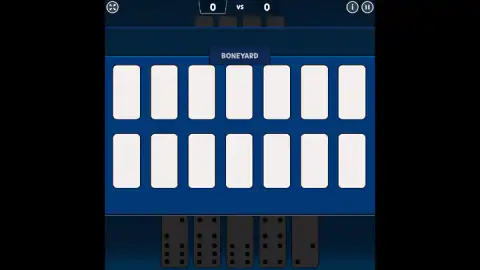
Getting stuck is usually the dullest moment in a game of dominoes. A button says "draw", a tile slides into your hand, and the game moves on before you notice what happened. Domino Battle stops the table instead. When nothing in your hand fits, the line of tiles disappears and the boneyard takes the whole screen: two rows of seven face-down tiles, and you choose which one becomes yours.
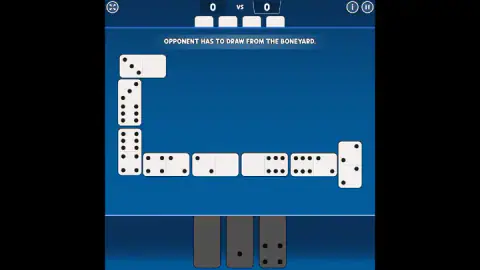
That choice is blind. Every tile looks the same from the back. What it does is make the cost of being stuck visible in a way a single button never does, and the game spends that drama only on you. When the computer is the one with nothing to play, all you get is a line of text across the top of the table: "OPPONENT HAS TO DRAW FROM THE BONEYARD." A whole screen for your bad luck, one sentence for its own.
We came back for a much longer sitting than our first, and this time got far enough to win a round, watch the scoreboard move and see what the game does with the tiles you are left holding. It is by Inlogic Software, a studio from Slovakia that makes browser versions of classic board and card games. We still have not won a match. Below is how far we got, and where we stopped.
The screen we had missed
The first time we played this, the game dealt us a hand the moment it loaded, and we wrote that we had never seen where the Draw and Block rules are chosen. That was our fault, not the game's. Start it cleanly and the Inlogic logo comes up, asks for a click, and hands you a proper menu: the Domino Battle sign, two buttons side by side, and a tutorial and an instructions button under them.
The red Draw button carried a second line in small type, "Continue Round 1, Score 0 : 0", because the choice of rules and the saved game are the same button. We learned how literal that is by accident. We got ourselves wedged on the boneyard screen, reloaded the page, and the game came back offering to continue the previous game: same round, same score, same tiles waiting. For a browser game you play in a tab you might close by mistake, that matters more than it sounds.
There is a coin counter at the top of that menu. Ours sat at zero throughout, and we never found out what the coins are for.
How a round ends: their tiles become your points
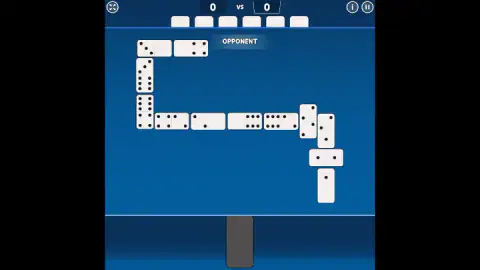
We won the first round with the line a dozen tiles long, folded around three corners of the table, and with the computer still holding six when we laid our last one.
What happens next is the part worth staying for. A panel slides up headed "ROUND 1", with a bar for the opponent and a bar for you, each marked out of a hundred. Behind it the computer's hand is turned face up, and its tiles send their own value into your bar one at a time. We caught the panel mid-count with our bar still on five, and a "+12" lifting off a double six. Under the bars it said "PERFECT", and under that, in small print beside a gold coin, that winning a match without conceding a point pays a thousand of them.
Then the next round deals, and the scoreboard at the top of the table, which had sat on nothing for the whole first round, reads 42. That is what the computer's remaining tiles were worth: nearly half of the 100 that win a match, from one round. We played on into the second round and ran out of session before it ended, so a finished match is still something we have not seen.
Why it is called the boneyard
Dominoes were traditionally made from bone or ivory, often with ebony backs, which is why players still call the tiles bones. The pile left over after the deal became, naturally, the boneyard.
The arithmetic is worth knowing. A double-six set has 28 tiles, one for every pair of numbers from blank to six. Deal seven to each of two players and exactly half the set is left over, which is why the screen that opens when you are stuck holds 14 of them.
In Draw dominoes those tiles are a lifeline: you take from them until you can play. In Block dominoes they are dead, and a stuck player simply passes. Domino Battle offers both, and it explains the harder one on a card the first time it matters, in its own words: a player in this mode who cannot move picks tiles from the boneyard until a suitable one turns up. We have played Draw on both visits and still cannot tell you how Block feels here.
The table, and the few things on it
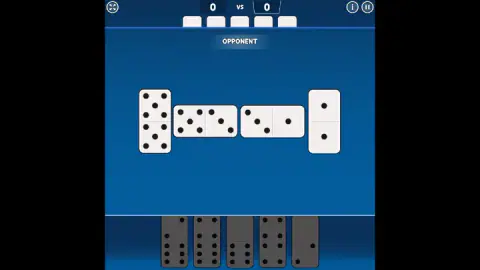
The table is a single blue field with very little on it, and nearly everything there earns its place. The score sits top centre. The row of backs under it is the computer's hand. The "YOU" tag marks yours. Fullscreen is the button in the top left corner; an information button and a pause button are in the top right, and pausing gives you continue, restart and menu, with separate switches for music and sound.
The line itself is the surprise. It does not stay in a tidy row. Doubles are laid crosswise, across the line rather than along it, as they are on a real table, and when the chain reaches the edge of the screen it turns a right angle and carries on. By the end of a long round ours was running down one side and along the bottom in a hook. On a table shaped like a phone screen, that folding is the only way a full round fits.
The game also teaches as it goes. A card states the goal before the first tile is laid, in capitals, which is to get rid of all your dominoes sooner than the opponent. Another explains the boneyard the first time you need it. Twice in our session the table went dark for an ad break and came back with a card saying the ad had been skipped.
Who it is for
If you grew up playing dominoes at the kitchen table and want a round while the kettle boils, this is that, with the computer across from you. It is also a kind way to learn, because the lighting does the rule-checking and a newcomer can spend their attention on choices rather than on mistakes. It is a game against the computer only: there is no opponent from the other side of the world, and nothing we saw suggests one.
More dominoes and board games
Inlogic's other dominoes game in our catalogue is Domino Legend, which we played in Block on a red table, so between the two sheets both sets of rules are covered. Domino Online Multiplayer puts a real person on the other side of the table, and Dominoes Classic Duel is another two-player take on the tiles. From the same studio, Ludo World moves the turn-by-turn thinking to dice. The rest of our slow, think-first games are in strategy.
Screenshots

Taken by opening the game ourselves and letting it run — not supplied by the publisher, and not the same picture every other site shows.
How to play Domino Battle
- The opening screen asks which rules you want: Block in yellow, Draw in red. Underneath, the game offers to carry on with a previous game or start a new one.
- You get seven tiles along the bottom, under a "YOU" tag. The computer's sit in a row at the top, face down, and you can always count them.
- Look at the two open ends of the line in the middle. Tiles in your hand that match one of them stay bright; the rest are dimmed to a flat grey.
- Click a bright tile to lay it. If every tile is dimmed, the boneyard opens and you take face-down tiles until one fits.
- Play your last tile before the computer does. The round ends there, and the tiles still in the loser's hand are counted into the winner's score.
Tips from our rounds
- Click, do not drag. We tried sliding a tile across to the open end and the table ignored it. A single click is the whole input, and the keyboard is dead: arrows, Enter and the space bar left the table exactly as it was.
- Trust the lighting. Every bright tile we checked matched an open end and no dimmed one did, so there is no such thing as an illegal move here. At some turns the game goes further and tints the two open ends and the tile in your hand that fits in the same yellow.
- Count the ends before you play. When both ends show the same number, only tiles carrying that number will do, and a hand without one goes straight to the boneyard.
- Watch the row of backs. That is the computer's hand, and it is the only honest clock in the game. Six backs against your last tile is a round you are about to win by a wide margin.
Controls
| Click or tap a lit tile in your hand | Lays it on the open end it matches |
|---|---|
| Click or tap a face-down tile in the boneyard | Takes it into your hand when nothing you hold can be played |
| Pause button (top right) | Opens continue, restart and menu, plus music and sound switches |
| Corner button (top left) | Switches fullscreen on and off |
Features
- Two sets of rules on the opening screen, Block in yellow and Draw in red, with a tutorial beside them
- Lit hand: the tiles you are allowed to play stay bright, everything else is dimmed to grey
- Doubles are laid crosswise, and the line turns a right angle when it reaches the edge of the table
- When you are stuck the table gives way to a boneyard of 14 face-down tiles; when the computer is stuck you get one line of text
- At the end of a round the loser's hand is turned face up and each tile's pips are counted into the winner's score, out of 100
- The round and the score survive a reload, because the menu offers to continue your previous game
- Made by Inlogic Software
Game details
- Developer
- Inlogic Software
- Release date
- October 2025
- Added here
- August 2025
- Technology
- HTML5 (2D)
- Platforms
- Browser (desktop, mouse), Browser (mobile & tablet, touch)
- Classification
- Action , Cards & Board
- Saved progress
- Saving, when available, is managed by this game. Mava cannot confirm your level.
FAQ
How do you play Domino Battle?
You and the computer each start with seven tiles. On your turn you lay a tile whose number matches one of the two open ends of the line. The tiles you can legally play stay bright in your hand and the rest are dimmed, and a single click on a bright tile plays it. Dragging does nothing.
What happens in Domino Battle when you cannot play?
The table is replaced by the boneyard, two rows of seven face-down tiles. You tap one to take it into your hand and keep taking until something fits. When it is the computer that cannot move, you do not get that screen: a line of text across the top says the opponent has to draw from the boneyard.
What is the boneyard in dominoes?
It is the pile of tiles nobody was dealt. In a two-player game with a double-six set, seven tiles each leaves 14 in the boneyard. In Draw dominoes, a player who cannot move takes tiles from it; in Block dominoes, the boneyard stays untouched and a stuck player simply passes.
Does Domino Battle have Block and Draw modes?
Yes. The game opens on a screen with two buttons, Block in yellow and Draw in red, plus a tutorial and an instructions button underneath. We have played Draw on both of our visits, so we can describe that one first-hand and not the other.
How is a round scored in Domino Battle?
Whoever plays their last tile wins the round, and the tiles the loser is still holding are counted into the winner's score, pip by pip. We won a round with the computer holding six tiles and it was worth 42 points. Both bars on the round screen are marked out of 100, and the first player to reach 100 wins the match.
How do you win Domino Battle?
You win a round by emptying your hand first and a match by reaching 100 points before the computer. We won the first round of our session and then ran out of time in the second, so we have seen a round won but never a whole match.
Does Domino Battle save your game?
It does. We reloaded the page in the middle of a round and the menu came back with a button offering to continue the previous game, with the round number and the score printed on it. The round was exactly where we had left it.
Who made Domino Battle?
Domino Battle is by Inlogic Software, a Slovak studio that makes browser versions of classic board and card games. It is published. The same studio also makes Domino Legend.
Can you play Domino Battle on a phone?
It is listed for PC, Android and iOS, and the table is laid out in portrait, the shape of a phone screen. Everything is done by tapping tiles, so it should suit touch, but we played with a mouse and did not test a phone.