

About BorderClash
Most war games in a browser count what you destroy. BorderClash counts what you keep. Across the top of every battle runs a single bar, blue on the left and red on the right, and the number at each end is the share of the island that army holds. Tanks, flags and soldiers are all on screen, but that bar is the score.
The island sits in bright blue water, cut into zones with thick black borders. Your base is the blue zone at the bottom, with a flag and a small armoured building labelled LEVEL 1. The red side holds the top. Between them is a pale strip of no man's land, half red grid and half blue, with START BATTLE written over it and a cartoon hand pointing at it so you cannot miss where to begin.
Once the battle starts, the game turns into a tug of war over ground. Each zone is a grid of small tiles, and tiles change colour one at a time as an army pushes into them. You can watch a front line crawl across a zone, row by row, which makes it easy to see who is winning without reading a single number.
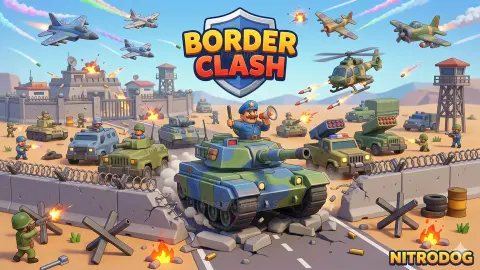
BorderClash is made by NitrodogStudio. It was published in July 2026.
How our battle on LEVEL 1 was lost
We played one battle, and we lost it. The share bar tells the story better than we can. When the clock started, blue held 29 per cent of the island and red 27, and the rest was neutral.
Red moved first. Half a minute in, its share had reached 41, and soon after it passed half the island. Blue did not move at all in that stretch: every point red gained came from the neutral zone in the middle, which turned solid red and got a red building of its own.
Then red came for our zone. With just under two minutes left, red tiles were appearing inside our blue grid along the border, and the bar read 23 against 77. Red never stopped.
In overtime, at 0:53, the bar read 5 against 95, and only a scatter of blue tiles was left around our base. The loss screen came shortly after, with time still on the clock by our count.
The lesson is simple and the game makes it clear. Ground nobody owns is the cheapest ground there is, and the side that sends troops into it first starts the battle ahead.
Losing still pays
BorderClash does not send you away empty-handed. Our LOSE screen came with a line in red, DONT FORGET UPGRADES, and a REWARD box holding two soldier cards, one card of a worker carrying a wrench and one wooden log. A green CLAIM button takes the reward, and a pink DOUBLE REWARD button offers twice as much for watching an ad.
Back on the map, the coin counter in the top right corner had gone from 0 to 80. The worker and the log look like building material, which fits the upgrades tab in the bar at the bottom of the map, the only tab open besides the battle itself. The other three tabs are padlocked. The message on the loss screen is the game telling you how it expects you to progress: lose, collect, upgrade, try again.
Why the bar counts ground, not kills
Scoring by territory is older than any computer. In the board game Go, the winner is the player who surrounds more of the board, not the one who captures more stones, and plenty of captured stones can still mean a lost game. BorderClash follows the same idea in a much faster form. What the bar measures is tiles, so the useful question for every soldier you send is how much ground he turns blue.
That changes how you should play. Chasing the enemy across the island is less useful than holding a border and pushing it forward a row at a time. The share bar rewards the army that is everywhere a little over the army that is somewhere in force.
What we did not reach
We played one battle of LEVEL 1, lost it, claimed the reward and returned to the map. We never won a battle, never opened the upgrades tab and never saw a second level. The game's description talks about units with unique abilities, and we only ever had the soldier card to use, so we cannot tell you what the other units do or how many there are.
The camera also shows more land in the distance, larger coastlines in other colours to the north-east of the island. We never got there, and we do not know if they are later levels or just scenery. We also cannot say whether the red army is controlled by another player or by the computer; the game did not tell us.
Who it is for
BorderClash suits players who like short real-time battles with one clear number to watch. A battle lasts about three minutes, the controls are a handful of taps, and the share bar makes the state of the fight obvious even to a child who has never played a strategy game.
It is not a deep strategy game in its opening minutes. In our battle there was one unit card and one decision, where to send it. Anyone looking for research trees and diplomacy should look elsewhere, starting with the Steam game of almost the same name mentioned in the questions below.
More games by NitrodogStudio
My Army Base is the same developer's military game about training soldiers and taking enemy territory, with a base to build. Machine Eater is NitrodogStudio's other strategy title, built around a growing ship and enemies picked off a radar. For another fight over a map, Line Control has you drawing routes from your bases to capture enemy points, and Clash of Armour is a real-time battle where you deploy armoured units against an opponent's defences. More war and building games are in the strategy category.
Screenshots
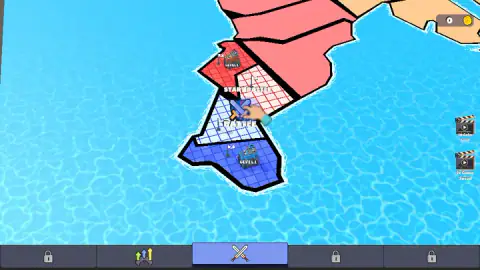
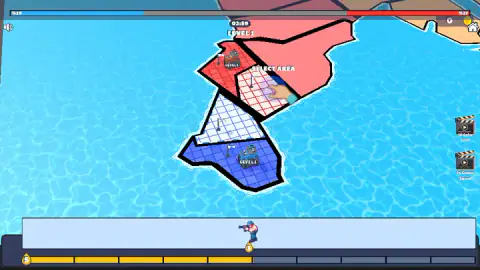
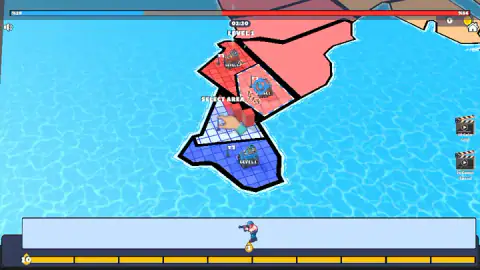
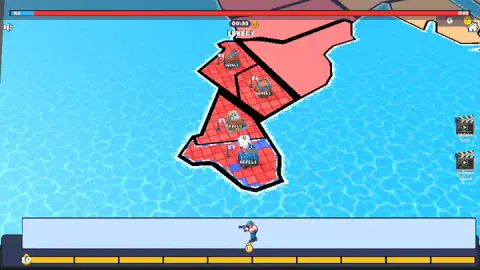
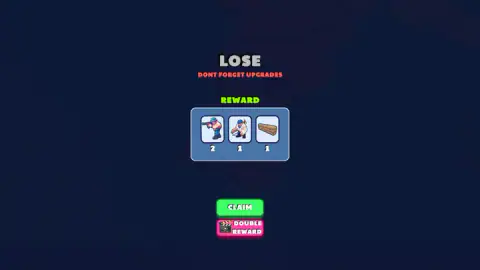
Taken by opening the game ourselves and letting it run — not supplied by the publisher, and not the same picture every other site shows.
How to play BorderClash
- On the map, press START BATTLE on the pale zone in the middle of the island.
- When SELECT AREA appears, tap the zone you want your troops to fight for. The tutorial hand points at the contested ground first.
- Tap a unit card at the bottom of the screen to send that unit. The first soldier card costs 3 energy.
- Watch the energy bar under the cards. It has ten segments and refills on its own, so you can never send more than a handful of units at once.
- Keep an eye on the share bar at the top and on the clock. The battle is fought over territory, and the clock decides when it ends.
Tips from our run:
- The neutral ground goes first. At the start of our battle blue held 29 per cent of the island and red 27; the rest was nobody's. Red took that empty ground within the first minute, before we had done much at all.
- Do not sit on a full energy bar. Ours reached ten segments early and stayed full for long stretches. Full energy is wasted energy, because the bar cannot grow past ten.
- Save something for overtime. With a minute left, an OVERTIME banner announces double energy, and an x2 badge sits beside the clock until the end.
- The two clapperboard buttons on the right are ads. One offers 10 coins and the other double game speed. When we tapped them, the game answered that no ads were available and let us carry on.
- The house icon at the top right leaves the battle, and the speaker at the top left turns the sound off.
Controls
| Click or tap a zone | Starts a battle from the map (START BATTLE) and, during a battle, picks the area your troops go for (SELECT AREA) |
|---|---|
| Click or tap a unit card | Spends energy to send that unit; the first soldier card costs 3 |
| Clapperboard buttons (right edge) | Offer 10 coins or double game speed in exchange for watching an ad |
| Bottom tab bar | Switches between the battle map and the upgrades screen; the other three tabs start locked |
| Speaker and house icons | Turn the sound off and leave the battle for the map |
Features
- An island split into coloured zones, with your blue base at the bottom and the red side's bases at the top
- A share bar across the top of the screen that shows how much of the island each army holds, in per cent
- Ground changes hands one tile at a time, so you can watch a front line creep through a zone
- Battles run against a clock of about three minutes, and the last minute is OVERTIME with double energy
- An energy bar of ten segments that refills on its own and pays for every unit you send
- Losing still pays out a reward of unit cards, materials and coins, with a reminder not to forget upgrades
- Made by NitrodogStudio, the developer of My Army Base and Machine Eater
Game details
- Developer
- NitrodogStudio
- Release date
- July 2026
- Last updated
- July 23, 2026
- Added here
- June 2026
- Technology
- HTML5 (3D)
- Platforms
- Browser (desktop, mouse), Browser (mobile & tablet, touch)
- Saved progress
- Saving, when available, is managed by this game. Mava cannot confirm your level.
FAQ
How do you play BorderClash?
You start on a map of an island split between a blue army, yours, and a red one. Press START BATTLE, then pick the area you want to fight for and tap unit cards to send troops there, paying with energy that refills on its own. A bar at the top shows what share of the island each side holds.
How do you win a battle in BorderClash?
The bar at the top of the battle screen measures territory, not kills. Each side starts with a share of the island and the neutral ground in between is up for grabs. We lost our battle when the red side had taken 95 per cent of the island, so holding and spreading your colour is what counts.
What is overtime in BorderClash?
With one minute left on the clock an OVERTIME banner appears and your energy gain is doubled, shown by an x2 badge next to the timer. It is the moment to spend everything you have saved, because units come back twice as fast.
What happens when you lose in BorderClash?
You still get a reward. After our lost battle the game handed us two soldier cards, a worker card and a log, and our coin counter went from zero to 80. The screen also reminds you not to forget upgrades, and offers to double the reward in exchange for watching an ad.
Who made BorderClash?
BorderClash is made by NitrodogStudio. It was published in July 2026.
Is BorderClash the same as Border Clash on Steam?
No. Border Clash on Steam is a separate, turn-based strategy game for two to six players on computers. BorderClash, written as one word, is a free browser game by NitrodogStudio where battles run in real time against a clock.
Can you play BorderClash on a phone?
Yes. The game is played entirely by tapping, and it is listed for phones and tablets in both landscape and portrait. It needs no download or sign-in.