

About Medieval Battle 2P
Every battle game asks you to fight. This one asks you to go shopping, and then takes the mouse away from you.
Medieval Battle 2P gives each player a purse of 2,000 coins and three soldiers to spend it on, priced by the head: a heavy infantryman at 70, an archer at 80, a spearman at 90. You buy them, you stand them on a stone square somewhere in a walled town, and you press START. From that second on there is no order to give, no unit to select, no retreat to sound. Your only remaining input is a speed dial that goes up to 2.0X, and it exists because you will want it.
That makes it a strategy game in the strictest sense: the whole game happens before it begins. The game's listing files it under Action, and that label is wrong — the big browser-game portals shelve it under strategy, and so do we. Nothing you can do with your hands after START affects the result. Everything you did with your money before it does.
The three price tags are the whole balance sheet, and they are strange. The banner for each unit prints its damage and its health, so the arithmetic is public. The heavy does 6 damage and carries 60 health. The archer does 4 and carries 30, and costs more than the heavy. The spearman does 8, carries 80, and costs the most. Notice what is missing: a drawback. The dearest soldier is better in both columns, and the sums do not rescue the cheap one — a full purse buys 28 heavies or 22 spearmen, and the 22 spearmen come out ahead on total health and total damage. The archer's entire argument is that he shoots from where he stands.
It was built in Unity by RHM Interactive OÜ, a Tallinn company that also runs its own games site, and it went up on that site on or before 10 February 2022 — four days before it was published elsewhere. It has since collected 8.8 out of 10 from 838 voters on another big games site and 4.4 out of 5 from 906 on the publisher's own site.
The shield wall was the weapon, and this game will not let you build one
The spear was the ordinary weapon of the medieval foot soldier, and the reason was money. A serviceable spear cost pence; a sword cost the equivalent of months of pay, needed metalwork a village smith could not do, and functioned as much as a status object as a weapon. Armies were equipped with spears because armies could be afforded with spears. Medieval Battle 2P gets that right, probably by accident, when it makes the spearman the best thing on the field.
What it cannot reproduce is the reason the spear worked. Its power was collective. At Hastings, on 14 October 1066, the English formed a shield wall on a ridge — infantry and dismounted cavalry packed tight, shields overlapping, five to seven ranks deep — and held it from morning until dusk against repeated Norman cavalry charges. William of Poitiers, watching, described one army with all the movement and another "rooted to the soil". A shield wall that kept its shape was very nearly unbreakable, and this one did not break because it was beaten. It broke when it stopped being a wall: some of the English chased a feigned Norman retreat, the ranks opened to let them out, and the horsemen wheeled round and cut them off.
Now look at what this game hands you. The placement grid gives every soldier a tile of his own, and the tiles are wide: push a second man up against the first and the marker under him turns red. And the moment START is pressed, each soldier chooses a target for himself and walks across the square alone. There is no facing, no flank, no rank, no bonus for standing beside a friend, and nothing that rewards holding a line.
So the one formation that decided medieval battles is the one formation this game cannot draw. Every fight in it begins where Hastings ended — the wall already broken, the field already a scatter of private duels. It is a battle simulator that has simulated everything except the part that mattered.
Two armies, one mouse, and a second turn that is not fair
The two-player mode is not simultaneous, and that changes it completely. A banner reads TURN PLAYER 1, the first player spends 2,000 coins and presses READY, and the camera swings across the square to the opposite side. TURN PLAYER 2 comes up, a fresh 2,000 coins appears in the corner, and the second player builds an army while looking at the first one, in full, with nothing concealed.
There is no hidden-placement screen and no way to ask for one, so the second turn is a counter-punch and the first is a guess. Alternate who goes first: the corner scoreboard counts across matches, so a series is the intended way to play.
| Player 1 (blue) | Player 2 (red) | |
|---|---|---|
| Turn | First | Second, after READY |
| Purse | 2,000 coins | A fresh 2,000 coins |
| Sees the other army | Nothing to see | All of it |
| Confirms with | READY | START |
| Mouse and keyboard | Shared | Shared |
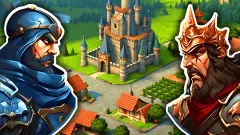
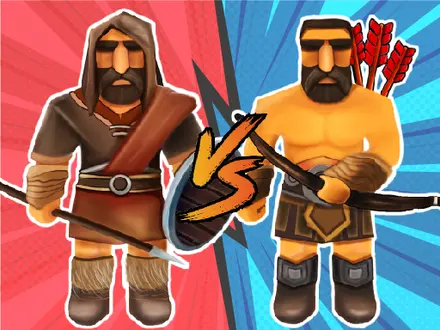
The two armies are worth a second look as well. Blue fields mailed soldiers with kite shields, red fields bare-chested figures from what looks like a different game, and the banners print identical numbers on both. There is no faction to choose, only a colour.
Playing Medieval Battle 2P unblocked at school
Two people on one mouse is exactly the shape of game that ends up on library and classroom machines, and this one needs no installer, no plugin and no login — a browser and a screen, Chromebook included. Be honest about the other half of it, though. This is a 56-megabyte Unity download, most of it a single data file that arrives without compression, so on a shared school connection there is a real wait before the first soldier lands. It is desktop only, too: no touch controls, and its own listing is flagged not mobile-ready.
The thing a filter blocks is an address, not a game. Every "unblocked" copy on the web is this same game on a different domain, and none behaves differently once the page opens. Whether it opens on your school network is a decision your school made about its allow list. If it does not, ask a teacher whether the site can be added, or play at home.
More games from RHM Interactive
The pause screen advertises two stablemates, which is as close to a recommendation from the developer as you get: Janissary Tower, which we have not written up yet, and Castel Wars: Middle Ages, a two-player artillery duel over the same period with a far shorter loading bar. Castel Wars is where that series starts, and Ragdoll Arena 2 Player is the same studio being sillier. For a medieval fight where you do hold the controls, Stick Duel: Medieval Wars is the opposite design. And for another game decided before it starts, Kingdom Tower Defense sits beside this one in strategy games.
How to play Medieval Battle 2P
- Choose a mode. CAMPAIGN is one player against a fixed army; TWO PLAYER needs someone sitting next to you. Give the loading screen time — this is a heavy download and the wooden gate can sit shut for a while.
- Pick a soldier from the banners at the top. Three banners, three prices, damage and health printed on each. There is no fourth unit and no upgrade to unlock.
- Click the ground to place him. The tile under the cursor turns blue where he fits and red where he does not, and the cost flies off your purse in red. DELETE removes one soldier and CLEAR wipes the field.
- Press READY when you are done. In two-player mode the camera swings to the far side of the square and hands the second player a fresh 2,000 coins.
- Press START and stop touching things. The soldiers cross the square on their own. A strength bar appears at the top, a score board in the corner, and the speed dial in the other corner.
Things worth knowing before your second match:
- Buy spearmen. There is no reason not to, which is the dullest true sentence anyone can write about this game.
- Do not spread out. Soldiers pick their own targets and walk to them alone, so an army parked in the far corners spends its first minute simply arriving.
- Small armies produce very long battles. Our first match was three heavies against two spearmen, and at 2.0X the two sides were still swinging at each other a quarter of an hour later with nobody down. Spend the purse.
- Going second is an advantage. Player two places an army while looking at player one's, fully deployed, with nothing hidden. If you play more than one round, swap who goes first.
- If the gate stays shut, reload. Loading a battle failed for us more than once, reopening on the menu without starting anything. Pressing the button again worked.
Controls
| Left click a unit banner | Pick which soldier you are buying. The three banners across the top show damage, health and price, and they never change during a match |
|---|---|
| Left click the ground | Place that soldier on the tile under the cursor. The tile shows blue where he fits and red where he does not, and the price flies off your purse |
| X | Erase mode, as published by the developer — switches the left button from placing soldiers to removing them |
| Ctrl | The snap key, as published by the developer — lines a soldier up on the tile instead of dropping him where the cursor happens to be |
| Right mouse button, held | Swing the camera around the square. Useful before you commit, useless afterwards |
| W A S D | Slide the camera across the battlefield without turning it |
| READY / START | READY ends player one's turn and hands the mouse over. START begins the battle, and from that moment neither player can touch anything |
| 0.5X / 1.0X / 1.5X / 2.0X | Battle speed, in the top-left corner. It only appears once the fighting has started |
Features
- Two players take turns on one mouse — player one builds an army, presses READY, and the camera swings to the other end of the square for player two
- 2,000 coins each, spent before the battle and never during it
- Three units and three price tags — Heavy at 70, Archer at 80, Spearman at 90 — with damage and health printed on the banner
- The spearman is the best unit in both columns, 8 damage and 80 health, so the most expensive soldier has no drawback at all
- The red and blue armies look completely different and are numerically identical, so there is no faction to pick
- A campaign of 24 levels across two worlds, Forest and Desert, all but the first locked at the start
- Scores carry across rounds — the board in the corner reads PLAYER 1 and PLAYER 2 and keeps counting
Game details
- Developer
- RHM Interactive
- Release date
- February 2022
- Last updated
- September 7, 2026
- Added here
- November 2022
- Technology
- HTML5 (Unity 2020.3.28f1 WebGL, 800×450 landscape)
- Platforms
- Browser (desktop), Chromebook
- Classification
- 3D , Multiplayer , Strategy
- Download size
- 48.1 MB
- Ad requests
- 2 (few)
- Has a save
- Yes
- Saved progress
- Saving, when available, is managed by this game. Mava cannot confirm your level.
Measured by opening the game ourselves on 2026-09-10, not taken from the feed. Twelve seconds on a phone-sized screen, with ad requests counted and blocked rather than loaded.
FAQ
Is Medieval Battle 2P a strategy game or an action game?
It is a strategy game, whatever the tag on a portal says. You buy and position an army, press START, and then you cannot touch anything until it is over. Several big games sites file it under strategy; the game's listing calls it action, which is the one classification the game itself contradicts.
How do you play Medieval Battle 2P with two players?
You take turns on the same mouse. Player one gets 2,000 coins and places an army, then presses READY; the camera swings to the far end of the square, player two gets a fresh 2,000 coins, and pressing START runs the battle. Nobody controls a soldier during the fight.
Which unit is best in Medieval Battle 2P?
The spearman, and it is not close. He does 8 damage and carries 80 health against the heavy infantryman's 6 and 60, and he costs only 20 coins more. Spend the whole purse and 22 spearmen still beat 28 heavies on total health and total damage, so the price buys you no drawback.
Can you play Medieval Battle 2P against the computer?
Only in the campaign, and there is no opponent thinking in it. Each of the 24 levels holds a fixed enemy army that the designer placed by hand, so the same level always presents the same problem. The two-player mode needs a second human next to you.
How many levels does Medieval Battle 2P have?
Twenty-four, split into two worlds of twelve — Forest and Desert. Only level one is unlocked when you arrive; the other twenty-three carry a padlock and open in order as you win.
Who made Medieval Battle 2P?
RHM Interactive OÜ, a company registered in Tallinn, Estonia in September 2018, which also runs its own games site. The credit holds up under checking — the title screen prints "RHM INTERACTIVE © 2022" in the corner. That is worth saying because the portal's own page markup claims authorship of several games it demonstrably did not make.
Why does Medieval Battle 2P take so long to load?
Because the first visit pulls about 56 megabytes, most of it one data file that arrives uncompressed. On a fast connection the title screen took us between fifty and ninety seconds. Loading a battle is slower still, and it is not always reliable — more than once the wooden gate closed and reopened on the menu without loading anything, and pressing the button again fixed it.
Can you play Medieval Battle 2P unblocked at school?
There is nothing to install and no account to make, so any browser that reaches this page can run it, Chromebooks included. Whether it reaches this page is a question about your network's allow list, not about the game. If the address is refused, ask a teacher whether it can be added, or play it at home.