

About Blade & Bedlam
In most sword games the sword is a button. You press it, an animation plays, and something in front of you loses health. Blade & Bedlam takes the button away. The weapon hangs in the air beside your knight, and it only does anything when you move it with the mouse.
That makes a small game hard in an unusual way. You stand in a round arena seen from above. Enemies walk in from the edge. Nothing aims for you and nothing swings for you, so the first minute is spent learning how a blade the length of your knight behaves when you pull it around him.
The game is credited to David Polk. It was published in May 2025.
You should know how far we got, because it was not far. We played for about four minutes on a desktop, three runs in all, each with the Broadsword. We lost the first two on wave 1 and were still on wave 1 in the third when we stopped. So this page is about the opening of the game: the weapon screen, the first wave, and the two panels that tell you how you did. Everything past that we can only pass on from the developer.
Six weapons, and the choice comes before you have swung one
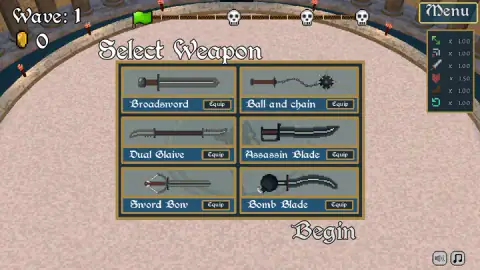
The game asks for your weapon before it has shown you a single enemy. The six are Broadsword, Ball and chain, Dual Glaive, Assassin Blade, Sword Bow and Bomb Blade. The screen gives each a picture and a name, and nothing else: no damage figure, no reach, no description.
The pictures do say something. The Broadsword is a plain straight blade. The Ball and chain is a spiked ball on a length of chain. The Dual Glaive has a blade at both ends of one shaft. The Sword Bow looks like a crossbow with a blade for a stock, and the Bomb Blade is a curved sword with a round black bomb where the pommel should be.
We took the Broadsword three times, so the other five are untested here. What we can say is what the choice costs: nothing. All six were open from the first visit, with no price on any of them.
What the first wave looks like
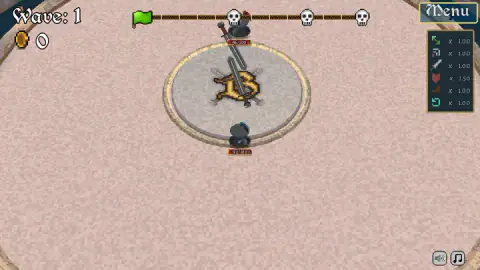
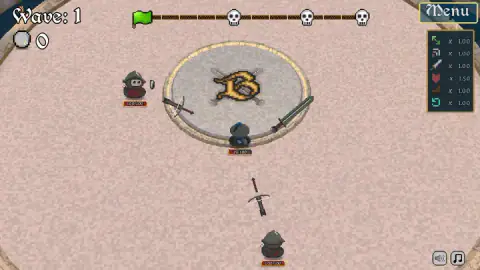
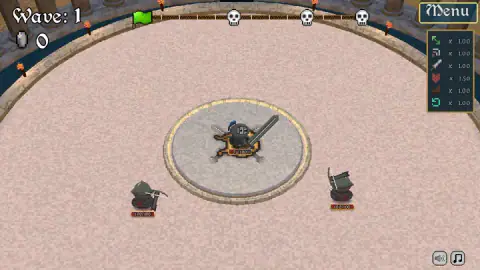
The arena is a wide circle of sand with a stone disc in the middle, and your knight starts on that disc. He is a small figure in a dark helmet with a blue plume. The sword lies next to him, not in his hand, and in each of our pictures it sits at a different angle around him.
The top of the screen carries three things. On the left, the wave number and a coin counter. In the middle, a bar that runs from a green flag past three skulls. On the right, the Menu button, and under it a small panel of six icons, each with a multiplier beside it. Five of them read 1.00 and one reads 1.50. We do not know what the skulls mark or what the six multipliers stand for, because nothing on screen names them and we never got far enough to see them change.
Two kinds of enemy turned up. One carried a sword and came up onto the central disc. The others wore dark hoods, carried crossbows and stayed off the central disc. Every figure has its health written under it, and all of them start at 100, the same as you.
That last detail explains the difficulty. You are not a hero mowing down weak soldiers. On wave 1 one enemy is worth exactly as much health as you are, and we faced two of them at a time. In one run the knight went from full health to 73 with two crossbowmen still untouched.
The Defeated panel is the best map of the game
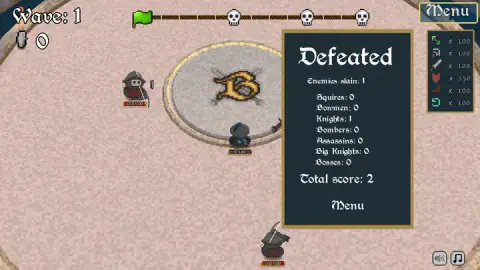
Lose, and a dark panel appears with a count of what you killed. It is the most informative screen we saw, because it lists every class of enemy whether you met it or not: Squires, Bowmen, Knights, Bombers, Assassins, Big Knights and Bosses.
So there are seven lines to fill, and the last one tells you the waves lead somewhere. The developer's instructions say the same: the final challenge is to beat all the bosses.
Our own panel was modest. Our best run ended with one Knight slain and a total score of 2. The run before it ended with nothing slain at all. Back on the title screen, by our notes, the best score had moved from 0 to 2. We cannot tell you whether every enemy is worth two points or only that class.
The pause scroll counts what you took and what you gave
Press Menu in the middle of a fight and a parchment scroll covers the arena. On the left is Thine Wares, the things you own. Ours was empty. On the right is Thine Stats, with a block for the current run.
In our third run that block read 60 damage taken and 200 dealt to enemies. It is a useful pair of numbers. The health labels only tell you how the fight stands now; the scroll tells you how the whole run has gone, and whether you are trading well. Three buttons run along the bottom: main menu, options and resume.
What we did not see
The developer's instructions describe a shop between rounds where you buy items for the knight, special items to look for, and blocking arrows and bolts with your own weapon. None of that reached our screen. Our coin counter read 0 from start to finish, and we never cleared the wave that would have opened the shop.
We did not open Testing Arena, the second button on the title screen, so we cannot say what it offers. We did not open the options. And we did not try the game on a phone: it is listed for Android, but a game built around a mouse swing and a right click is one we would want to test by hand before saying anything about touch.
Who it is for
It suits players who like a game where the skill is in the hand. There is no levelling screen to hide behind in the first wave, only a blade and how well you move it. Runs are short, and a best score on the title screen gives each one a target.
It suits less anyone looking for a gentle start. The first enemies are as tough as you are, and the game explains very little. One line about the dodge roll is all the teaching you get.
More games to try next
For another sword fight, Epic Sword Battle! Fight in the Ragdoll Arena! moves the duel into 3D with ragdoll fighters, and Stick Duel: Medieval Wars turns it into a one-on-one for one or two players. If the waves are what you came for, Tiny Arena sends you through rooms of monsters with an upgrade at every door. The rest are under action games.
Screenshots
Taken by opening the game ourselves and letting it run — not supplied by the publisher, and not the same picture every other site shows.
How to play Blade & Bedlam
- Press Begin on the title screen. Your best score sits in the bottom left corner.
- Equip a weapon. The Select Weapon screen shows six, each with its own Equip button. Then press the second Begin underneath.
- Swing with the mouse. The weapon hangs beside the knight. Per the developer's instructions the mouse swings it, and W A S D moves the knight.
- Roll out of trouble. A line on the arena floor says it at the start of each run: right click to dodge roll.
- Stay alive. The label under the knight starts at 100/100. At 0 the run is over and the Defeated panel adds up your kills.
What three short runs taught us:
- Clicking on an enemy is not an attack. We clicked on enemies several times and it got us nowhere. By the instructions there is nothing to trigger: the blade has to be swung into the target.
- Wave 1 is not a warm-up. Our first two runs each ended in under a minute.
- The enemies do not all come to you. The hooded ones carry crossbows and stood well away from the knight in every picture we have of them.
- The Menu button is the pause. It sits in the top right corner and stops the fight while you read your numbers.
Controls
| Mouse | Swings the weapon, which hangs beside the knight instead of sitting in his hand (developer's instructions; in our runs the sword changed side as we worked the mouse) |
|---|---|
| Right click | Dodge roll, as the hint on the arena floor says at the start of a run; the developer's instructions add Shift as a second key for it |
| W A S D | Move the knight, according to the developer's instructions |
| Click Menu (top right) | Pauses the run and opens a scroll with your items and your statistics |
Features
- Six starting weapons on one screen: Broadsword, Ball and chain, Dual Glaive, Assassin Blade, Sword Bow and Bomb Blade
- A round arena seen from above, with one knight, a health label of 100 and no second life
- A weapon that hangs beside the knight and is swung with the mouse, not fired with a button
- A defeat panel that counts what you killed in seven classes, from Squires to Bosses
- A pause scroll with run statistics: time, damage taken and damage dealt
- A best score kept on the title screen, and a separate Testing Arena button
- Made by David Polk
Game details
- Developer
- David Polk
- Release date
- May 2025
- Last updated
- August 10, 2026
- Added here
- May 2025
- Technology
- HTML5 (Godot)
- Platforms
- Browser (desktop, mouse and keyboard), Browser (Android, as listed)
- Classification
- Action
- Download size
- 36.1 MB
- Ad requests
- 2 (few)
- Has a save
- Yes
- Saved progress
- Saving, when available, is managed by this game. Mava cannot confirm your level.
Measured by opening the game ourselves on 2026-09-11, not taken from the feed. Twelve seconds on a phone-sized screen, with ad requests counted and blocked rather than loaded.
FAQ
How do you play Blade & Bedlam?
You press Begin, equip one of six weapons and start on wave 1 in a round arena seen from above. Enemies walk in and you swing your weapon at them with the mouse, while a right click makes the knight roll out of the way. The developer's instructions give W A S D for moving. The run ends when the knight's health reaches zero.
What weapons are there in Blade & Bedlam?
The Select Weapon screen shows six: Broadsword, Ball and chain, Dual Glaive, Assassin Blade, Sword Bow and Bomb Blade. Each has its own Equip button and you choose before the first wave. We played all three of our runs with the Broadsword, so we cannot compare how the other five handle.
What enemies are in Blade & Bedlam?
The Defeated panel lists seven classes: Squires, Bowmen, Knights, Bombers, Assassins, Big Knights and Bosses. On wave 1 we met a sword-carrying enemy and hooded ones with crossbows who kept their distance. We did not reach the other classes.
How is the score counted in Blade & Bedlam?
When the knight falls, a panel shows how many enemies you killed in each class and a total score. Our best run ended with one Knight slain and a total score of 2. The title screen keeps your best score, and we cannot say what the other enemy classes are worth.
How do you dodge in Blade & Bedlam?
With a right click. The game says so itself at the start of a run, with a line over the knight that reads Right click to dodge roll. The developer's instructions add the Shift key as a second way to roll.
Is there a shop in Blade & Bedlam?
The developer's instructions say you buy items between rounds, and the screen has a coin counter and a pause section called Thine Wares for what you own. We never cleared wave 1, so our counter stayed at 0 and that section stayed empty. We cannot describe the shop or its prices.
Is Blade & Bedlam a multiplayer game?
Not from what we saw. Every run was one knight against enemies controlled by the game, and there was no lobby, name or second player on any screen. It is filed under action and player-versus-environment.
Who made Blade & Bedlam?
It is credited to David Polk. It was published in May 2025. It is listed for PC and Android as a landscape game; we played it on a desktop computer with mouse and keyboard.