





About Build And Run
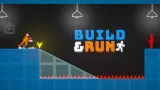
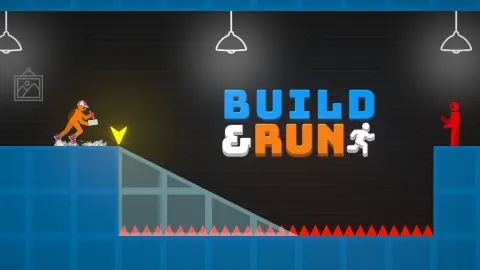
Most runners give you a jump button and let you blame your thumbs. Build And Run puts none on the screen. An orange figure sprints to the right by himself, the floor has holes full of red spikes, and all you own is a row of keys that lay new floor in front of him.
First, the limits of this page. We played for about ten minutes on a computer, in two stretches split by a page reload. We got past the tutorial holes, reached the first checkpoint, laid one ramp, and then spent most of the session falling into one pit just beyond that checkpoint. We never saw the end of the first level. We saw no weapons, no enemies and no shop, so anything here about those comes from the listing, and we say so where it does.
What we can give you is the part that stopped us. Sixteen falls in the same pit teach you how the building really works, and most of it is on no card.
The glass ramp is not part of the level
After our first death we came back to the checkpoint and found a pale glass ramp over the next hole. It looks like scenery. Then we reloaded, and with Q selected the same hole showed a flat strip of pale squares instead. That shape is the ghost, a preview of whichever piece is green.
It holds no weight. We watched the runner drop straight through a strip that filled the pit from bank to bank. Only the wooden piece carries him.
The trap is your selection. We had switched to W for a ramp further on, died there, and returned with W still green, facing a hole we had crossed earlier with flat platforms. So after a death, look at the buttons before the road. We cannot say whether a ramp would cross that hole, because we never got one down there in time.
The ghost slides with you, and the holes are one piece wide
The ghost rides just ahead of the runner's feet, four squares long, with the arrow at its near end. Every hole we met was also four squares wide. That means a single piece fits only at one moment, when the arrow sits right on the edge.
Press a square too early and the piece stops a square short of the far side. It happened to our one ramp, and moments later the runner was back at the checkpoint. We did not see the fall itself, so the cause is our reading.
Being early is not wasted, though. A second press lays the next piece from the end of the first. Repeated presses of Q left us a run of at least nine wooden squares across one hole and the solid ground on both sides, and no counter on the screen ran out.
So on a flat hole, two quick presses ask less of your timing than one perfect one. The arrow sometimes turned red while we were on a fresh piece, and we never worked out why.
A fall costs no coins, and a reload costs them all
The heart at the top left has an infinity symbol beside it, and it never changed. Our coins held at 26 through thirteen falls. Collected coins do not come back either, so you cannot farm a stretch by dying on it.
What a fall removes is your work. The platforms we had laid past the checkpoint were gone when we came back.
The expensive move is the one that feels like a fix. When we reloaded the page to get unstuck, the coins went to zero and the tutorial started again from the first hole. If you are stuck, keep falling.
The third hole is the first one without a card
The first two holes come with a card and a pointing hand. The cards stop the game, and we sat on one for over half a minute with nothing moving. Only the piece under the hand releases it: clicks on the E button and on the card did nothing, and Q did. Both cards also stop at the moment the ghost fits the hole exactly, which is a free lesson in where to press.
Then you pass the checkpoint lamp. The third hole arrives about two seconds later with no card to stop the clock, and every one of our sixteen falls was here, before the reload and after it. The ramp cards come only on the far side.
The restart has its own quirk. We pressed Enter more than thirty times on the dark screen without result, and W or Q laid nothing there. A click anywhere started the run, even on a build button, and that click laid no piece. We never tried the space bar the screen asks for.
Across all those tries we did not get one piece down in time. So this is what the falls taught us, not a route we finished: check the green box, start, and press as the arrow reaches the edge, about a second and a half later. With W still green, Q first selects, so it takes one more press.
What the listing promises, and what we saw
| Listing says | What we saw |
|---|---|
| Weapons on the R key | Never reached. A fourth box beside Q, W and E stayed empty, with no letter |
| Enemies to defeat | None. Only holes and red spikes in the stretch we played |
| Gear for your character | No shop or gear screen |
| Two modes | No menu at all: the game opened straight on a level |
| On-screen buttons on mobile | A mouse click on the Q button laid a piece under a card; clicks on E did nothing. No phone tried |
None of that means the listing is wrong. It may all begin after the point where we stopped.
Who it is for, and more to play
It suits someone who enjoys failing fast: restarts take a click and a fall costs no coins. The cards are short, but after them you get about two seconds from the lamp to the next hole, and we cannot speak for how hard it gets later.
If you would rather have one decision and no building, Stickman Jump also runs you at spikes, with a single button for the moment you jump. Build the Bridge keeps the idea of making ground appear under someone who walks on his own, as a keyboard puzzle. For coins and dodging down a city street, try Parkour Runner 3D.
More in our arcade games.
Screenshots
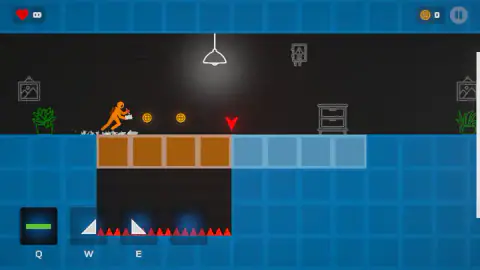
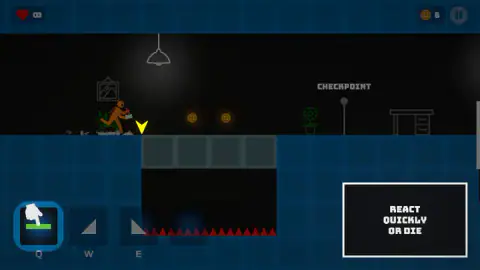
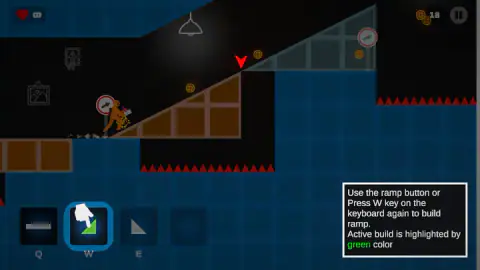
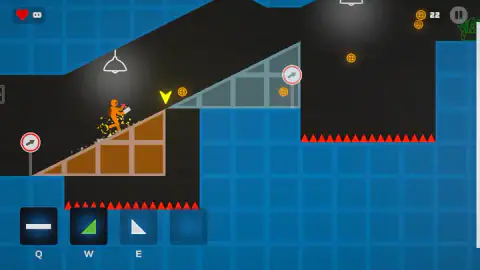
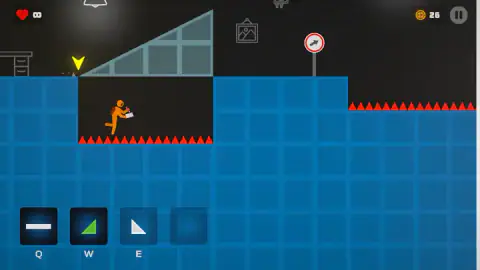
Taken by opening the game ourselves and letting it run — not supplied by the publisher, and not the same picture every other site shows.
How to play Build And Run
- Start the run. The dark screen says to press Space. We clicked with the mouse, and that worked every time.
- Watch the pale blocks ahead of the runner. They show the selected piece and where it would land.
- Press the selected piece's key as the yellow arrow reaches the edge of a hole. Q lays a flat platform and W a ramp. E is marked as a slope, which we never got down.
- To change piece, press its key twice. The first press selects it, and it turns green. The second lays it.
- Pick up coins and pass checkpoints. A lamp lights as you go by, and a fall brings you back to it.
Tips from our run:
- Check the green box before you start. Your last piece stays selected after a fall.
- When in doubt on a flat hole, press twice. The second platform starts where the first one ends.
- Time it from the start. Keys do nothing on the dark screen, so nothing can be ready in advance. The arrow then reaches the edge in about a second and a half: press at that point, or press twice to cover more.
- Treat the road sign as a warning. Before our only ramp, a red-ringed sign with a rising arrow stood on the bank. That is one case, so it is our reading and not a rule.
- Read the cards slowly. The game stands still while they are up, whatever REACT QUICKLY OR DIE suggests.
Controls
| Q | Selects the flat platform, and lays one when it is already selected |
|---|---|
| W | Selects the ramp, and lays one when it is already selected |
| E | Selects the slope, according to the listing's instructions; we never saw one laid |
| Mouse click | Starts the run from the PRESS SPACE TO START screen; a click on the Q button also laid a piece under a tutorial card |
| Space | Starts the run, according to the game's own screen; we did not press it |
| R | Uses weapons, according to the listing's instructions; we never reached one |
Features
- A runner that moves by himself, with no jump button on the screen
- Three build keys, with the selected piece shown in green
- A pale preview of the selected piece that slides along just ahead of the runner
- Pieces four squares long, the same width as every hole we met
- Lives marked with an infinity symbol, which did not drop in any of our falls
- Coins that stay in your total when you fall, and went back to zero on our one page reload
- Tutorial cards that stop the game until you use the piece they point at
Game details
- Developer
- Partner studio
- Release date
- September 2024
- Added here
- March 2025
- Technology
- HTML5 (WebGL/Unity)
- Platforms
- Browser (desktop), Browser (mobile & tablet, touch)
- Classification
- Arcade
- Saved progress
- Saving, when available, is managed by this game. Mava cannot confirm your level.
FAQ
How do you play Build And Run?
The runner sprints right by himself, and you lay floor in front of him. Q lays a flat platform and W a ramp, and the pale shape ahead of him shows what will land and where. Press when the yellow arrow reaches the edge of the hole. We did not reach the end of the first level, so we cannot describe how a level finishes.
What is the glass ramp in Build And Run?
It is not part of the level. It is a pale preview of the piece you have selected, so it turns into a flat strip when Q is selected. It holds no weight, and we watched the runner fall straight through one. Only the solid wooden piece you lay will carry him.
How do you get past the PRESS SPACE TO START screen in Build And Run?
We pressed Enter more than thirty times on that screen and nothing happened, and the build keys did nothing there either. A mouse click anywhere started the run every time. We never tried the space bar itself, so we can only pass on what the screen says about it.
Why do I keep falling at the checkpoint in Build And Run?
From the checkpoint lamp to the hole takes about two seconds, and it is the first hole with no card to stop the game. The game also keeps your last piece selected after a fall, so you may come back with the ramp in green. Check the buttons and start the run. The arrow reaches the edge in about a second and a half: press then, or press twice to cover more. We fell here sixteen times and did not get a piece down in time, so this is our reading and not a route we finished.
Do you lose coins when you die in Build And Run?
No. Our total stayed at 26 through thirteen falls, and the coins we had picked up did not come back to be collected twice. Pieces you laid after the checkpoint do disappear. Reloading the page is what cost us: the total went to zero and the tutorial cards started over.
How do you change pieces in Build And Run?
Press a piece's key once to select it, and it turns green. Press it again to lay it. The game's cards say this about the ramp on the W key. That second press takes time you may not have, so change pieces before you get close to the hole.
Does Build And Run have weapons and enemies?
The game's listing says so, with weapons on the R key, along with gear for your character and two modes. We saw none of it in our session. There were only holes and red spikes, and the fourth box beside the build buttons stayed empty with no letter under it.
Who made Build And Run?
The portal listings we read do not agree on who made it, or on the release date beyond the year 2024. We leave the credit blank here instead of picking one. The loading screen shows it was made with Unity.